When RustDesk Meets Incus
Why RustDesk?
We could use XRDP. Two reasons we don’t:
- XRDP is a delivery tool, not a platform. It ships one X session over RDP. It has no notion of a container desktop cloud — no per-user containers, no lifecycle, no orchestration. All of that is yours to build on top.
- XRDP development has largely stalled, especially for Wayland. Delivering a Wayland session over XRDP is still an open problem, not a configuration detail.
You might ask: RustDesk runs anywhere, so why run it inside Incus?
Because for tailoring infrastructure to run a specific application, nothing comes close to Incus.
How to make it happens
Network
Start with the default bridge:
$ incus network list managed=true -cntm4s
┌──────────┬─────────┬─────────┬────────────────┬─────────┐
│   NAME   │  TYPE   │ MANAGED │      IPV4      │  STATE  │
├──────────┼─────────┼─────────┼────────────────┼─────────┤
│ incusbr0 │ bridge  │ YES     │ 10.253.31.1/24 │ CREATED │
└──────────┴─────────┴─────────┴────────────────┴─────────┘
rustdesk-server needs a flat network, so add a macvlan interface on the host NIC:
incus network create macvlan0 --type=macvlan parent=enp2s0
$ incus network list managed=true -cntm4s
┌──────────┬─────────┬─────────┬────────────────┬─────────┐
│   NAME   │  TYPE   │ MANAGED │      IPV4      │  STATE  │
├──────────┼─────────┼─────────┼────────────────┼─────────┤
│ incusbr0 │ bridge  │ YES     │ 10.253.31.1/24 │ CREATED │
├──────────┼─────────┼─────────┼────────────────┼─────────┤
│ macvlan0 │ macvlan │ YES     │                │ CREATED │
└──────────┴─────────┴─────────┴────────────────┴─────────┘
A macvlan parent and its children are isolated by the kernel. If the host itself needs to reach the containers, add a macvlan sub-interface on the host:
ip link add mv0 link enp2s0 type macvlan mode bridge
ip addr add 192.168.3.250/24 dev mv0
ip link set mv0 up
Images
We contributed a cachyos image to lxc-ci. It should show up on images:, but has not appeared yet. Until it does, we publish our own images with incus-simplestreams on a local simplestreams server, builder-images:.
$ incus image list builder-images: cachyos -clfdt
┌────────────────────────┬──────────────┬────────────────────────────────────┬─────────────────┐
│         ALIAS          │ FINGERPRINT  │            DESCRIPTION             │      TYPE       │
├────────────────────────┼──────────────┼────────────────────────────────────┼─────────────────┤
│ cachyos/cloud (1 more) │ 2d3bdce348fc │ cachyos  x86_64 (cloud) (20261103) │ VIRTUAL-MACHINE │
│                        ├──────────────┼────────────────────────────────────┼─────────────────┤
│                        │ d58ab6f92ac2 │ cachyos  x86_64 (cloud) (20261103) │ CONTAINER       │
└────────────────────────┴──────────────┴────────────────────────────────────┴─────────────────┘
rustdesk-server
rustdesk-server needs two NICs, so put the configuration in a profile:
incus profile copy default rustdesk-server
incus profile device add rustdesk-server \
      eth1 nic network=macvlan0
Launch rustdesk-server with that profile:
incus launch images:cachyos/cloud \
      rustdesk-server \
      --profile rustdesk-server
Here I assume image cachyos/cloud has been created in images:, if it’s not true, you can build it by yourself.
Then install rustdesk-server inside it (the name is confusing, the install is not):
incus shell rustdesk-server
yay -S rustdesk-server-bin
Enable both services:
systemctl enable rustdesk-server-hbbr.service
systemctl enable rustdesk-server-hbbs.service
The public key clients need is under /var/lib/rustdesk-server:
ls /var/lib/rustdesk-server/*.pub
# /var/lib/rustdesk-server/id_ed25519.pub
These steps can go into the profile’s cloud-init.user-data:
incus profile set rustdesk-server \
      cloud-init.user-data=- \
      < rustdesk-server-cloud-init.yaml
That makes rustdesk-server creation fully automatic. In practice you do not need it: one Incus host needs one rustdesk-server.
rustdesk
The rustdesk container desktop only needs incusbr0, but it does need an input device. Give it a profile too:
incus profile copy default rustdesk
incus profile device add rustdesk \
      uinput unix-char \
      path=/dev/uinput \
      source=/dev/uinput
Launch the container desktop with the rustdesk profile:
incus launch cachyos/cloud \
      rustdesk01 --profile rustdesk
Install the desktop stack:
yay -S ghostty xfce4-session \
    xfce4-panel xfce4-settings \
    xfce4-appfinder xfce4-terminal \
    xfce4-notifyd xfce4-power-manager \
    xfwm4 xfdesktop thunar exo garcon \
    mousepad noto-fonts-cjk fcitx5 \
    fcitx5-configtool fcitx5-qt \
    fcitx5-gtk fcitx5-chinese-addons \
    xorg-server-xvfb xorg-xdpyinfo \
    xorg-xset xorg-xauth xorg-xrandr \
    pipewire-pulse dbus mesa \
    rustdesk-bin
Now a few small pieces of configuration.
xvfb.service:
incus file push - rustdesk01/etc/systemd/system/xvfb.service <<'UNIT'
[Unit]
Description=Virtual X server (Xvfb)
After=network.target

[Service]
Type=simple
ExecStart=/usr/sbin/Xvfb :0 -screen 0 3840x2160x24 -dpi 192 -nolisten tcp
Restart=always
RestartSec=2

[Install]
WantedBy=multi-user.target
UNIT
wait-x11-ready:
incus file push - rustdesk01/usr/bin/wait-x11-ready <<'SH'
#!/bin/bash
for i in $(seq 1 30); do
    [ -S /tmp/.X11-unix/X0 ] && exit 0
    sleep 1
done
exit 1
SH
incus exec rustdesk01 -- chmod +x /usr/bin/wait-x11-ready
xfce.service:
incus file push - rustdesk01/home/arch/.config/systemd/user/xfce.service <<'UNIT'
[Unit]
Description=XFCE session on Xvfb

[Service]
Type=simple
Environment=DISPLAY=:0
Environment=XDG_RUNTIME_DIR=/run/user/1000
Environment=XDG_SESSION_TYPE=x11
Environment=LIBGL_ALWAYS_SOFTWARE=1
ExecStartPre=/usr/bin/wait-x11-ready
ExecStart=/usr/bin/startxfce4
Restart=on-failure
RestartSec=5

[Install]
WantedBy=default.target
UNIT
Audio: a persistent null sink, /home/arch/.config/pipewire/pipewire.conf.d/20-rd-sink.conf:
incus file push - rustdesk01/home/arch/.config/pipewire/pipewire.conf.d/20-rd-sink.conf <<'CONF'
context.objects = [
    { factory = adapter
        args = {
            factory.name     = support.null-audio-sink
            node.name        = "rd-sink"
            node.description = "Remote Desktop Audio"
            media.class      = "Audio/Sink"
            object.linger    = true
            audio.position   = [ FL FR ]
        }
    }
]
CONF
RustDesk config, /home/arch/.config/rustdesk/RustDesk2.toml. Note 10.253.31.8 is the internal IP of rustdesk-server, and <id_ed25519.pub> is its public key:
incus exec rustdesk01 -- mkdir -p /home/arch/.config/rustdesk
incus file push - rustdesk01/home/arch/.config/rustdesk/RustDesk2.toml <<'TOML'
rendezvous_server = '10.253.31.8:21116'
nat_type = 1
serial = 0
unlock_pin = ''

[options]
av1-test = 'N'
custom-rendezvous-server = '10.253.31.8'
key = '<id_ed25519.pub>'
direct-server = 'Y'
access-mode = 'full'
TOML
/home/arch/set-default-sink.sh:
incus file push - rustdesk01/home/arch/set-default-sink.sh <<'SH'
export XDG_RUNTIME_DIR=/run/user/1000
export DISPLAY=:0
systemctl --user daemon-reload
systemctl --user enable --now xfce
systemctl --user enable --now pipewire pipewire-pulse wireplumber
if command -v xfconf-query >/dev/null; then
   xfconf-query -c xsettings -p /Xft/DPI -s 192
   xfconf-query -c xsettings -p /Gdk/WindowScalingFactor -s 2
   systemctl --user restart xfce
fi
for i in $(seq 1 30); do
    if ( pactl list short sinks 2>/dev/null |
             grep -q rd-sink) &&
           (pactl list short sources 2>/dev/null |
                grep -q rd-sink.monitor); then
        pactl set-default-sink rd-sink &&
            pactl set-default-source rd-sink.monitor &&
            break
    fi
done
SH
/root/setup-rustdesk.sh:
incus file push - rustdesk01/root/setup-rustdesk.sh <<'SH'
#!/bin/bash
chown -R arch:arch /home/arch
loginctl enable-linger arch
systemctl daemon-reload
systemctl enable --now xvfb
sleep 3
su - arch -c '/home/arch/set-default-sink.sh'
systemctl enable --now rustdesk
SH
incus exec rustdesk01 -- chmod +x /root/setup-rustdesk.sh
incus exec rustdesk01 -- /root/setup-rustdesk.sh
rustdesk ends up with about 4 GiB of applications. Publish it as an image so the next one is cheap:
incus stop rustdesk01
incus publish rustdesk01 --alias rustdesk/cloud
All of the above can go into the rustdesk profile as cloud-init.user-data:
incus profile set rustdesk \
      cloud-init.user-data=- < rustdesk-cloud-init.yaml
A second container desktop is then one command:
incus launch rustdesk/cloud rustdesk02 --profile rustdesk
The reader may find container desktops cumbersome to set up. Once the image and the profile exist, they are not. Still, containers are the hard case. Virtual machines are easier because incus console --type=vga gives you a graphical console. incus console on a container has no VGA output, so you work in the dark until the desktop is up.
incus-ui
Create an incus-ui profile by copying rustdesk:
incus profile copy rustdesk incus-ui
incus profile device add incus-ui \
      incus-socket proxy \
      bind=container \
      connect=unix:/var/lib/incus/unix.socket \
      listen=unix:/var/lib/incus/unix.socket \
      gid=0 uid=0 \
      mode=0666 security.gid=0 security.uid=0
Launch an incus-ui container:
incus launch rustdesk/cloud incus-ui --profile incus-ui
Install the necessary software:
incus shell incus-ui
yay -S nginx incus incus-ui
WebSocket upgrade is needed, otherwise the Incus UI terminal and console do not work. /etc/nginx/conf.d/00-websocket-upgrade.conf:
incus file push - incus-ui/etc/nginx/conf.d/00-websocket-upgrade.conf <<'CONF'
map $http_upgrade $connection_upgrade {
    default upgrade;
    ''      close;
}
CONF
Forward Incus UI HTTP traffic to the Unix domain socket, /etc/nginx/conf.d/incus-ui.conf:
incus file push - incus-ui/etc/nginx/conf.d/incus-ui.conf <<'CONF'
server {
    listen 127.0.0.1:443 ssl;
    server_name localhost;

    ssl_certificate     /etc/nginx/tls/incus-ui.crt;
    ssl_certificate_key /etc/nginx/tls/incus-ui.key;

    location /1.0 {
        proxy_pass http://unix:/var/lib/incus/unix.socket;
        proxy_http_version 1.1;
        proxy_set_header Host $host;
        proxy_set_header Upgrade $http_upgrade;
        proxy_set_header Connection $connection_upgrade;
        proxy_read_timeout 3600s;
        proxy_send_timeout 3600s;
    }

    location /ui/ {
        alias /usr/share/incus-ui/;
        try_files $uri $uri/ /ui/index.html;
    }

    location = / {
        return 302 /ui/;
    }
}
CONF
Certificate generation and nginx setup, /root/setup-incus-ui.sh:
incus file push - incus-ui/root/setup-incus-ui.sh <<'SH'
#!/bin/bash
# Self-signed certificate, localhost only.
mkdir -p /etc/nginx/tls
openssl req -x509 -newkey rsa:2048 -nodes -days 3650 \
  -keyout /etc/nginx/tls/incus-ui.key \
  -out /etc/nginx/tls/incus-ui.crt \
  -subj "/CN=localhost"

# Arch nginx does not include conf.d. Add the line once.
grep -q "include /etc/nginx/conf.d/\*.conf;" /etc/nginx/nginx.conf || \
  sed -i "/include       mime.types;/a\\    include       /etc/nginx/conf.d/*.conf;" /etc/nginx/nginx.conf

# Keep the default server off every interface; the only reachable
# listener is 127.0.0.1:443 from incus-ui.conf.
sed -i "s/^        listen       80;/        listen       127.0.0.1:80;/" /etc/nginx/nginx.conf

nginx -t
systemctl enable --now nginx
SH
incus exec incus-ui -- chmod +x /root/setup-incus-ui.sh
incus exec incus-ui -- /root/setup-incus-ui.sh
Trust the certificate in Firefox, /root/setup-local-ca.sh:
incus file push - incus-ui/root/setup-local-ca.sh <<'SH'
#!/bin/bash
# Trust the per-container localhost certificate for
# the system and Firefox.
set -uo pipefail
echo "=== local CA trust $(date) ==="

CRT=/usr/local/share/ca-certificates/incus-ui-localhost.crt
SRC=/etc/nginx/tls/incus-ui.crt
if [ ! -f "$SRC" ]; then
    echo "no $SRC; skip"
    exit 0
fi

install -Dm644 "$SRC" "$CRT"
# Arch has no update-ca-certificates;
# p11-kit's trust is the equivalent.
trust anchor --store "$CRT" || true

# Arch's Firefox keeps profiles under XDG_CONFIG_HOME.
FFCFG=/home/arch/.config/mozilla/firefox
if ! find "$FFCFG" -maxdepth 2 -name cert9.db \
   2>/dev/null | grep -q .; then
    runuser -u arch -- \
    env HOME=/home/arch XDG_CONFIG_HOME=/home/arch/.config \
    MOZ_HEADLESS=1 timeout 15 /usr/lib/firefox/firefox \
    --headless about:blank \
        >/dev/null 2>&1 || true
fi

for P in "$FFCFG"/*/; do
    [ -f "${P}cert9.db" ] || continue
    D="sql:${P%/}"
    runuser -u arch -- env HOME=/home/arch certutil \
        -D -n incus-ui-localhost \
        -d "$D" >/dev/null 2>&1 || true
    runuser -u arch -- env HOME=/home/arch certutil -A \
        -n incus-ui-localhost \
        -t "C,," -i "$CRT" -d "$D" || \
        echo "certutil failed for ${P%/}"
done

echo "=== local CA trust done $(date) ==="
SH
incus exec incus-ui -- chmod +x /root/setup-local-ca.sh
incus exec incus-ui -- /root/setup-local-ca.sh
All of the above can go into the profile:
incus profile set incus-ui \
      cloud-init.user-data=- < incus-ui-cloud-init.yaml
If you run your own image server, set it on incus-ui directly: incus-ui does not see the command-line remote configuration.
incus config set user.ui.image_servers=- <<'JSON'
[{"name":"builder-images",
  "url":"https://192.168.3.117",
  "protocol":"simplestreams"}]
JSON
Enterprise users care about their images: they carry company-specific applications and configuration. An image needs a home of its own.
So what we get
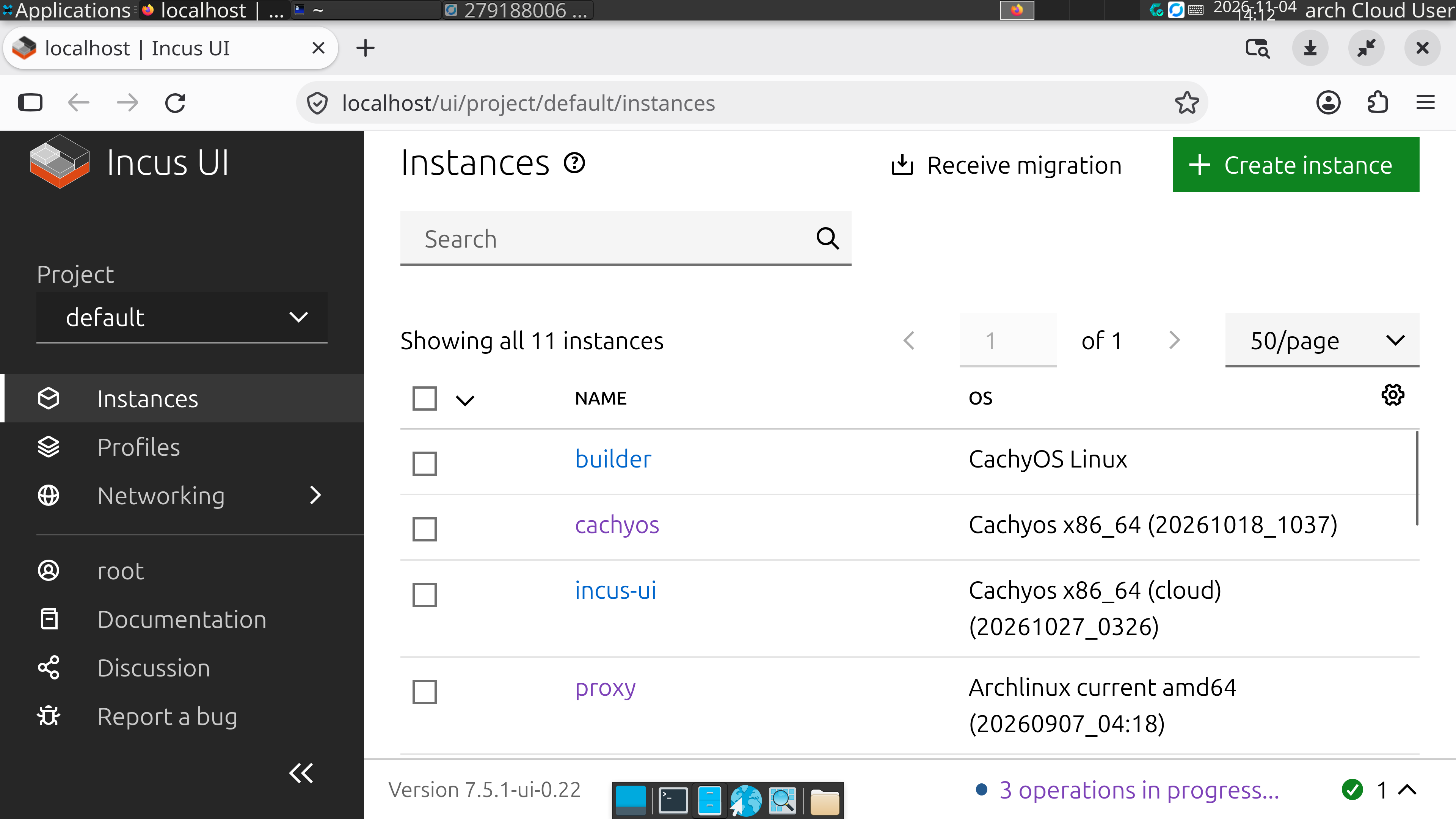
Look at what all this work produced. We can reach incus-ui over RustDesk:
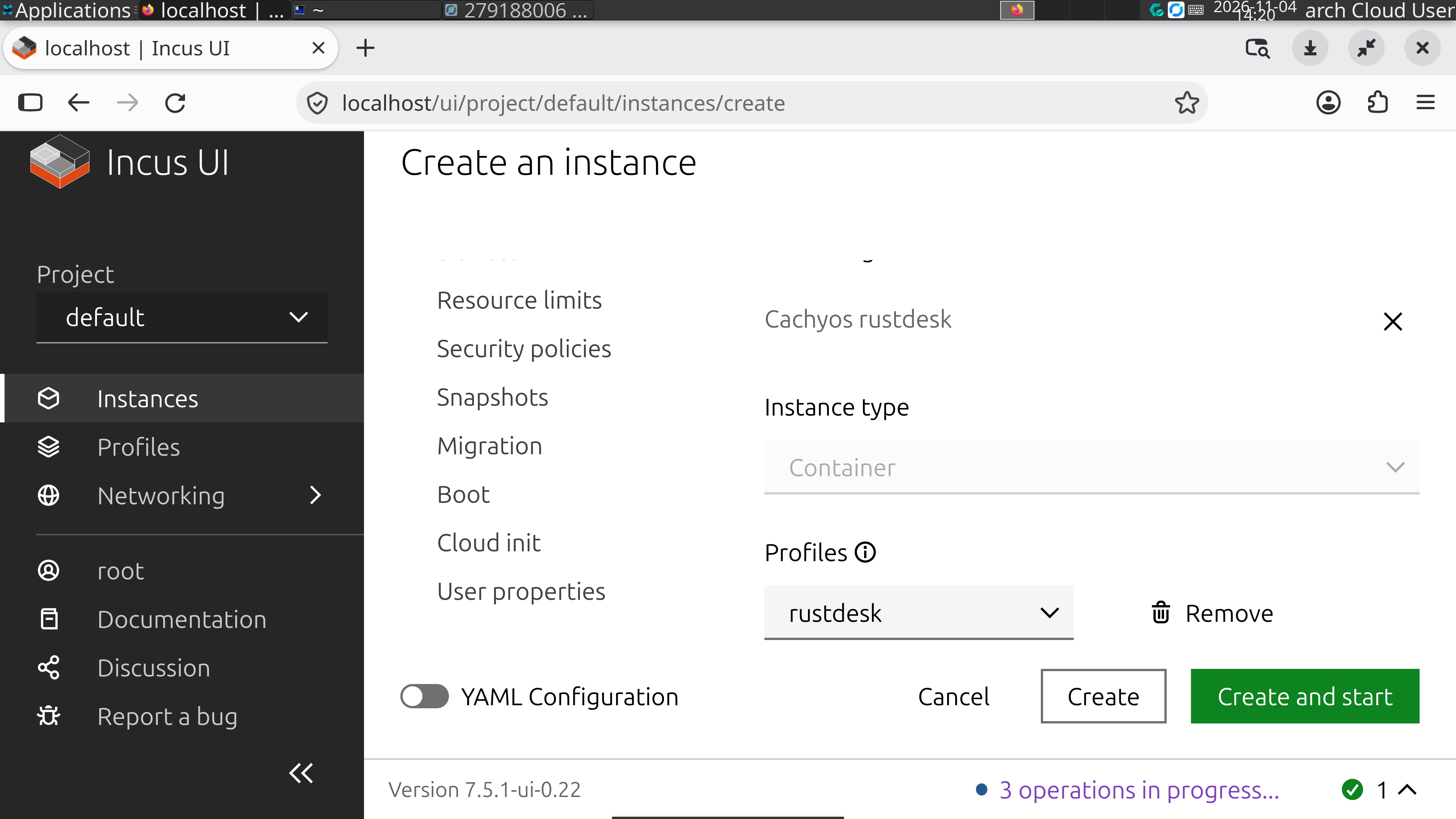
We can use incus-ui to hand out new container desktops:
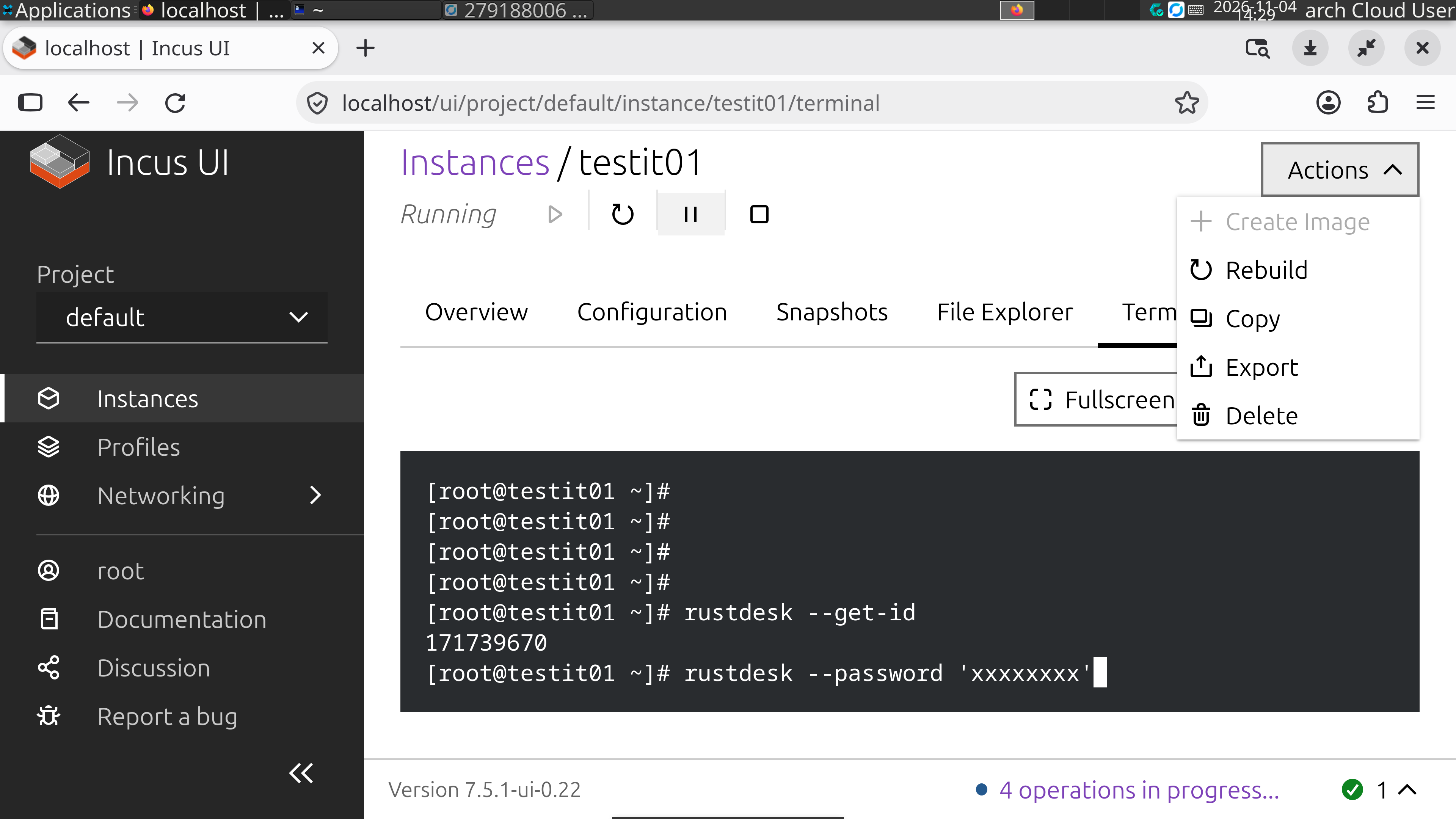
In the incus-ui terminal, get the ID of the new container desktop and set a permanent password:
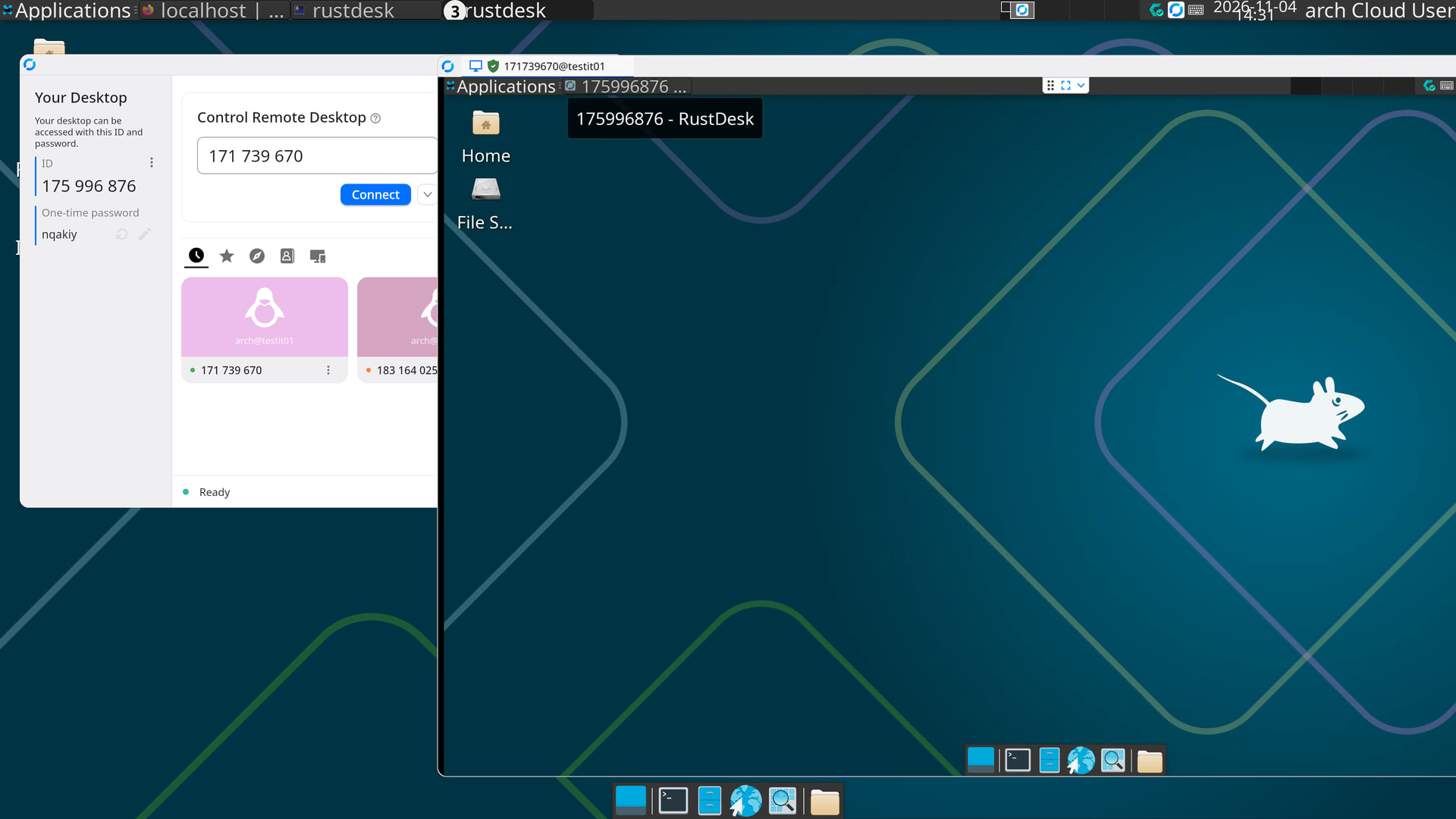
And we can connect to it from Incus UI itself:
As the administrator of a container desktop, once everything looks right, it is time to hand it to a colleague.