_sasl_plugin_load failed on sasl_server_plug_init for plugin: gssapiv2
 gssapiv2_client_plug_init() failed in sasl_server_add_plugin(): generic failure
 Could not find keytab file: /etc/qemu/krb5.tab: Unknown error 1737441660
 _sasl_plugin_load failed on sasl_server_plug_init for plugin: gssapiv2
 gssapiv2_client_plug_init() failed in sasl_server_add_plugin(): generic failure
 Could not find keytab file: /etc/qemu/krb5.tab: Unknown error 1737441660
 *HARK*  log.c:  97: core_log_lib_info: compiled with libndctl 63+
 *HARK*  log.c:  94: core_log_lib_info: compiled with support for shutdown state
 *HARK*  log.c:  92: core_log_lib_info: src version: 2.1.0
Whether that has anything to do with the issue or not I have no idea. I don’t think I’ve used Kerberos in more that 20 years.
Thanks, I removed the last occurrence of path=/dev/tpm0.
Regarding secureboot, do you remember why we were not enabling it before?
Is there something relevant to Windows that should be also mentioned in the post?
It is required for Windows of course but the default is “true” I guess…
security.secureboot
Whether UEFI secure boot is enforced with the default Microsoft keys

Key:	security.secureboot
Type:	bool
Default:	true
Live update:	no
Condition:	virtual machine
I had it forced to false in my “default” profile because up to now I’ve only been creating Linux VMs. When I created the first attempt of this VM, the installer complained about it not being set. Looking back, I probably inherited it from the default profile.
I guess it’s OK to leave it out since “true” is the default.
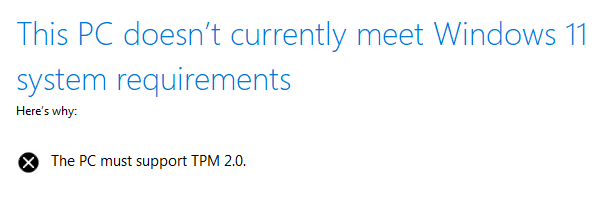
Well, I give up. I’ve tried every suggestion I can find but the windows installer still doesn’t recognize the tpm. I did add the tpm to a Ubuntu 24 VM and it does show up in the VM and I can access it so I have no idea what’s going on. Ah well.
I tested this on a clean Fedora 43 instance with the Fedora builds of Incus and got the same issue.
The swtpm process is running but for some reason not detected by Windows.
[root@fedora ~]# incus version
Client version: 6.19.1
Server version: 6.19.1

[root@fedora ~]# qemu-system-x86_64 --version
QEMU emulator version 10.1.4 (qemu-10.1.4-1.fc43)
Copyright (c) 2003-2025 Fabrice Bellard and the QEMU Project developers

[root@fedora ~]# swtpm --version
TPM emulator version 0.10.1, Copyright (c) 2014-2022 IBM Corp. and others
I tried setting -machine pc-q35-8.0 to match what I have on Debian but it’s still not working.
Another piece of the puzzle though would be EDK2. Windows may be reliant on the firmware having performed some measurements, not just the mere presence of a TPM on the I2C bus.
A build of EDK2 that lacks TPM support could be an issue and may match what you’re seeing where the module is present and visible on Linux but is treated as missing on Windows.
If edk2 didn’t support it, wouldn’t a Linux VM not see it either? I thought if I booted the edk2 UefiShell.iso I might be able to tell what’s going on but although I can get to the shell, I have no idea what I’m looking for. I don’t see “tpm” in the device list but I’m not sure if I’m supposed to.
Nope, I think both Linux and Windows technically see a TPM device on the I2C bus.
But I expect that Microsoft considers any TPM without any populated PCRs as being broken and so filters it out immediately, leading to what you’re seeing.
Linux on the other hand doesn’t care about that, so it will happily show you a TPM device even if all its PCR are set to the 0 value as would be the case if the firmware didn’t perform any of the boot time measurements (populating PCRS 0-7).
On Fedora, qemu.conf shows /usr/share/edk2/ovmf/OVMF_CODE.secboot.fd as the path to the firmware. It’s a 2mb file and is provided by the edk2-ovmf package. On Ubuntu, there aren’t any edk2 packages but there is an ovmf package. Installing that gave me /usr/share/OVMF/OVMF_CODE_4M.secboot.fd which is a 3.6mb file. Obviously the Fedora file is much smaller than the Ubuntu counterpart which leads me to believe that it’s not compiled with everything needed. The edk2-ovmf package installs more files than the Ubuntu version however…
.rw-r--r--@  24k root root  2 Mar 18:00 DBXUpdate-20251016.x64.bin
.rw-r--r--@  24k root root  2 Mar 18:00 EnrollDefaultKeys.efi
.rw-r--r--@ 4.2M root root  2 Mar 18:00 MICROVM.fd
.rw-r--r--@ 4.2M root root  2 Mar 18:00 OVMF.amdsev.fd
.rw-r--r--@ 2.2M root root  2 Mar 18:00 OVMF.igvm
.rw-r--r--@ 4.2M root root  2 Mar 18:00 OVMF.inteltdx.fd
.rw-r--r--@ 4.2M root root  2 Mar 18:00 OVMF.inteltdx.secboot.fd
.rw-r--r--@ 4.2M root root  2 Mar 18:00 OVMF.qemuvars.fd
.rw-r--r--@ 4.2M root root  2 Mar 18:00 OVMF.stateless.fd
.rw-r--r--@ 4.2M root root  2 Mar 18:00 OVMF.stateless.secboot.fd
.rw-r--r--@  70k root root  2 Mar 18:00 OVMF.stateless.secboot.pcrlock
lrwxrwxrwx@    - root root  2 Mar 18:00 OVMF_CODE.cc.fd -> OVMF_CODE.fd
.rw-r--r--@ 2.0M root root  2 Mar 18:00 OVMF_CODE.fd
.rw-r--r--@ 2.0M root root  2 Mar 18:00 OVMF_CODE.secboot.fd
.rw-r--r--@ 2.1k root root  2 Mar 18:00 OVMF_CODE.secboot.pcrlock
.rw-r--r--@ 3.7M root root  2 Mar 18:00 OVMF_CODE_4M.qcow2
.rw-r--r--@ 2.0M root root  2 Mar 18:00 OVMF_CODE_4M.secboot.fd
.rw-r--r--@ 2.1k root root  2 Mar 18:00 OVMF_CODE_4M.secboot.pcrlock
.rw-r--r--@ 3.7M root root  2 Mar 18:00 OVMF_CODE_4M.secboot.qcow2
.rw-r--r--@ 131k root root  2 Mar 18:00 OVMF_VARS.fd
.rw-r--r--@ 131k root root  2 Mar 18:00 OVMF_VARS.secboot.fd
.rw-r--r--@ 561k root root  2 Mar 18:00 OVMF_VARS_4M.qcow2
.rw-r--r--@ 561k root root  2 Mar 18:00 OVMF_VARS_4M.secboot.qcow2
.rw-r--r--@ 1.2M root root  2 Mar 18:00 Shell.efi
.rw-r--r--@ 2.9M root root  2 Mar 18:00 UefiShell.iso
Moving OVMF_CODE.secboot.fd out of the way and symlinking OVMF.stateless.secboot.fd → OVMF_CODE.secboot.fd did the trick.
So now, should Incus be using OVMF.stateless.secboot.fd in the qemu.conf file or should the Fedora edk2-ovmf package be changed to use the “stateless” versions for the base version? I’m thinking the latter would break things that expected the base version to NOT be stateless so I’m thinking I should open a Fedora bugzilla issue to have the incus package use the stateless version.
I may have spoken too soon. I was able to successfully install and run Windows 11 but after a few minutes, it shuts down with a “GUEST_PANIC” error. No other info. Not even a good old BSOD.
Update: I switched to using libvirt and virt-manager and I was able to create a Windows 11 VM and it’s been stable for 2 days. The difference I think is…