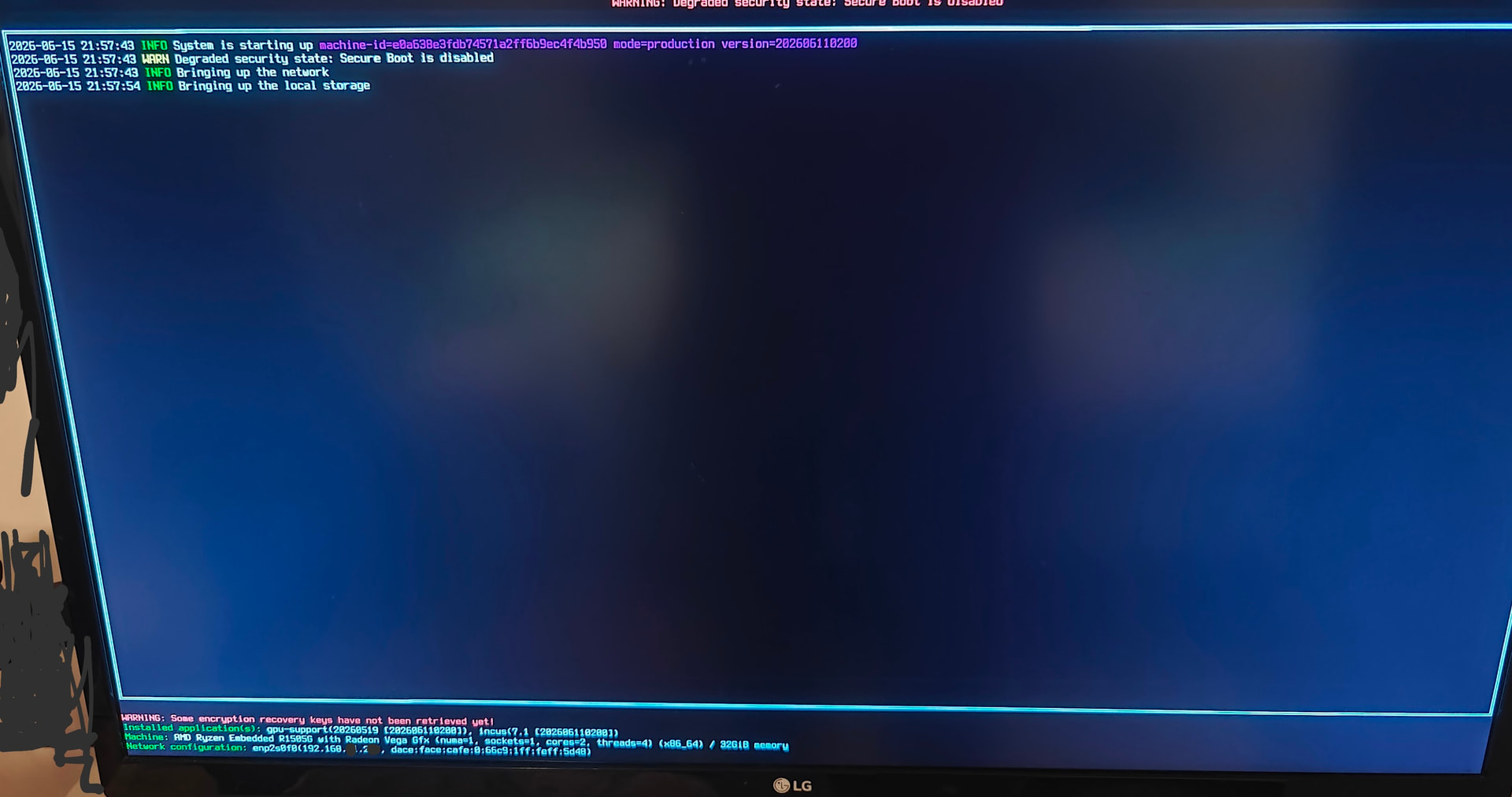
Hello,
Looks like I need help with installing gpu-support for AMD (HP t640 device AMD Ryzen Embedded R1505G\Vega GPU).
IncusOS 7 is installed successfully, then hangs on loading gpu-support extension.
Last msg on display is “Bringing up the local storage”, and then display goes off.
Cannot be connected with incus-cli, but can ping IP
incus admin os application add -d ‘{“name”:“gpu-support”}’ incus admin os system reboot
Hmm, gpu-support comes with a GPU driver reload on startup.
So the fact that the system never starts Incus suggests either a failure at that stage or a system hang.
Assuming you’re up for some debugging, what I’d try to do (will need a reinstall) is to configure the system for syslog logging to a separate system, confirm that you’re getting the events and then install gpu-support and reboot.
Since you’ve reported network as being functional and application startup happens after networking, that “should” get you the full kernel log and everything onto the separate system, allowing us to debug what’s going on here.
amdgpu 0000:04:00.0: [drm] Optional firmware “amdgpu/raven2_gpu_info.bin” was not found
amdgpu 0000:04:00.0: Failed to get gpu_info firmware “raven2_gpu_info.bin”
amdgpu 0000:04:00.0: Fatal error during GPU init
@stgraber
I’m not sure why there is no raven2_gpu_info.bin
Is it done for purpose? Or there is chance firmware can be added to the sysext image.
HP t640 is quite limited, but can run some useful LLMs locally via Vulkan, or used to render simple games to be streamed.
@stgraber thanks, I see.
So we know a little about what is happening now. From the log
INFO Reloading application name=gpu-support version=202606110200
INFO System is shutting down version=202606110200
INFO Stopping application name=gpu-support version=20260519 [202606110200]
INFO Stopping application name=incus-lts-7.0 version=7.0.0 [202606110200]
and the next thing is system is dead after the reboot.
I wonder how to get logs form that failed boot. My naive attempt will be setting nomodeset and looking for logs on booted system. Is it possible to somehow set kernel boot params?
Nope. Unfortunately the kernel boot options are part of the signed kernel image.
I’m pretty surprised that the remote syslog logging trick didn’t work though.
Network comes online before any of the applications and so does the logging service. So you should really have been able to get remote syslog logging working and get output prior to the system getting stuck.
you’re right,
please find logs from Incus (first boot after gpu-support intallation) attached.
looks like it is my specific hardware problem with 6.12 kernel,
my best idea is to recreate issue on Debian (Trixie) [upd: debian-live-13.5.0-amd64-xfce.iso boots without a problem],
and maybe try to add dpm=0 aspm=0 runpm=0 kernel params. to check ACPI buggy stuff, what is the best way to do it?