Incus bridge - routes and addresses IPv4 and IPv6 on containers

Hi,

To introduce myself, I’ve only been using “incus” for the first time for a few days, or rather a few hours.

I’ve been doing network administration for about twenty years as a hobby, using LXC and QEMU for VMs. I work primarily as a web developer.

I followed Stéphane Robert’s :france: documentation on installing incus.

I’m trying to create a very simple bridge :

root@hst-fr:~ # cat /etc/os-release
PRETTY_NAME="Debian GNU/Linux 13 (trixie)"
NAME="Debian GNU/Linux"
VERSION_ID="13"
VERSION="13 (trixie)"
VERSION_CODENAME=trixie
DEBIAN_VERSION_FULL=13.1
ID=debian
HOME_URL="https://www.debian.org/"
SUPPORT_URL="https://www.debian.org/support"
BUG_REPORT_URL="https://bugs.debian.org/"
root@hst-fr:~ # incus --version
6.18
root@hst-fr:~ # ifconfig
eth0: flags=4163<UP,BROADCAST,RUNNING,MULTICAST>  mtu 1500
        inet 147.79.115.130  netmask 255.255.255.0  broadcast 147.79.115.255
        inet6 fec5::1  prefixlen 120  scopeid 0x40<site>
        inet6 fe80::a6e8:d4ff:feb5:9455  prefixlen 64  scopeid 0x20<link>
        inet6 2a02:4780:28:5295::1  prefixlen 48  scopeid 0x0<global>
        ether a4:e8:d4:b5:94:55  txqueuelen 1000  (Ethernet)
        RX packets 4493781  bytes 1120255785 (1.0 GiB)
        RX errors 0  dropped 0  overruns 0  frame 0
        TX packets 6975455  bytes 1205368093 (1.1 GiB)
        TX errors 0  dropped 0 overruns 0  carrier 0  collisions 0

incusbr0: flags=4163<UP,BROADCAST,RUNNING,MULTICAST>  mtu 1500
        inet 10.175.0.254  netmask 255.255.255.0  broadcast 10.175.0.255
        inet6 fc00:4780:28:5295::fd  prefixlen 112  scopeid 0x0<global>
        inet6 fe80::1266:6aff:fe56:2685  prefixlen 64  scopeid 0x20<link>
        ether 10:66:6a:56:26:85  txqueuelen 1000  (Ethernet)
        RX packets 10247  bytes 626020 (611.3 KiB)
        RX errors 0  dropped 0  overruns 0  frame 0
        TX packets 6241  bytes 35618616 (33.9 MiB)
        TX errors 0  dropped 11 overruns 0  carrier 0  collisions 0

lo: flags=73<UP,LOOPBACK,RUNNING>  mtu 65536
        inet 127.0.0.1  netmask 255.0.0.0
        inet6 ::1  prefixlen 128  scopeid 0x10<host>
        loop  txqueuelen 1000  (Local Loopback)
        RX packets 743  bytes 284007 (277.3 KiB)
        RX errors 0  dropped 0  overruns 0  frame 0
        TX packets 743  bytes 284007 (277.3 KiB)
        TX errors 0  dropped 0 overruns 0  carrier 0  collisions 0

My configuration :

root@hst-fr:~ # incus profile list
+---------+-----------------------+---------+
|  NAME   |      DESCRIPTION      | USED BY |
+---------+-----------------------+---------+
| default | Default Incus profile | 2       |
+---------+-----------------------+---------+
root@hst-fr:~ # incus profile show default
config: {}
description: Default Incus profile
devices:
  eth0:
    name: eth0
    network: incusbr0
    type: nic
  root:
    path: /
    pool: default
    type: disk
name: default
used_by:
- /1.0/instances/bdc
- /1.0/instances/web
project: default

View my network via “incus” :

root@hst-fr:~ # incus network list
+----------+----------+---------+-----------------+---------------------------+-------------+---------+---------+
|   NAME   |   TYPE   | MANAGED |      IPV4       |           IPV6            | DESCRIPTION | USED BY |  STATE  |
+----------+----------+---------+-----------------+---------------------------+-------------+---------+---------+
| eth0     | physical | NO      |                 |                           |             | 0       |         |
+----------+----------+---------+-----------------+---------------------------+-------------+---------+---------+
| incusbr0 | bridge   | YES     | 10.175.0.254/24 | fc00:4780:28:5295::fd/112 |             | 3       | CREATED |
+----------+----------+---------+-----------------+---------------------------+-------------+---------+---------+
| lo       | loopback | NO      |                 |                           |             | 0       |         |
+----------+----------+---------+-----------------+---------------------------+-------------+---------+---------+

After configuring the Bridge’s IPv4 and IPv6 addresses with the following CLI command :

root@hst-fr:~ # incus network set incusbr0 ipv4.address=10.175.0.254/24 ipv6.address=fc00:4780:28:5295::fd/112

I found out how to change the “ipv4.dhcp.ranges” of the DNSMasq.

CLI command incus :

root@hst-fr:~ # incus network set incusbr0 ipv4.dhcp.ranges="10.175.0.100-10.175.0.110"

I notice that the above command does not modify the configuration file ; this must be intentional.

Therefore, in the network incus configuration file :

root@hst-fr:~ # incus network edit incusbr0
### This is a YAML representation of the network.
### Any line starting with a '# will be ignored.
###
### A network consists of a set of configuration items.
###
### An example would look like:
### name: mybr0
### config:
###   ipv4.address: 10.62.42.1/24
###   ipv4.nat: true
###   ipv6.address: fd00:56ad:9f7a:9800::1/64
###   ipv6.nat: true
### managed: true
### type: bridge
###
### Note that only the configuration can be changed.

config:
  dns.nameservers: 2606:4700:4700::1111, 1.1.1.1, 2001:4860:4860::8888, 8.8.8.8
  ipv4.address: 10.175.0.254/24
  ipv4.dhcp: "true"
  ipv4.dhcp.gateway: 10.175.0.254
  ipv4.dhcp.ranges: 10.175.0.111-10.175.0.115
  ipv4.dhcp.routes: 0.0.0.0/0,10.175.0.254
  ipv4.firewall: "false"
  ipv4.nat: "true"
  ipv4.routing: "true"
  ipv6.address: fc00:4780:28:5295::fd/112
  ipv6.dhcp: "false"
  ipv6.firewall: "false"
  ipv6.nat: "true"
  ipv6.routing: "true"
description: ""
name: incusbr0
type: bridge
used_by:
- /1.0/profiles/default
- /1.0/instances/web
- /1.0/instances/bdc
managed: true
status: Created
locations:
- none
project: default

I have 2 containers:

root@hst-fr:~ # incus list
+------+---------+---------------------+------+-----------+-----------+
| NAME |  STATE  |        IPV4         | IPV6 |   TYPE    | SNAPSHOTS |
+------+---------+---------------------+------+-----------+-----------+
| bdc  | RUNNING | 10.175.0.114 (eth0) |      | CONTAINER | 0         |
+------+---------+---------------------+------+-----------+-----------+
| web  | RUNNING | 10.175.0.115 (eth0) |      | CONTAINER | 0         |
+------+---------+---------------------+------+-----------+-----------+

Otherwise, in the following command ;

root@hst-fr:~ # incus network list-leases incusbr0
+-------------+-------------------+---------------------------------------+---------+
|  HOSTNAME   |    MAC ADDRESS    |              IP ADDRESS               |  TYPE   |
+-------------+-------------------+---------------------------------------+---------+
| bdc         | 10:66:6a:b1:0a:21 | 10.175.0.114                          | DYNAMIC |
+-------------+-------------------+---------------------------------------+---------+
| bdc         | 10:66:6a:b1:0a:21 | fc00:4780:28:5295:1266:6aff:feb1:a21  | DYNAMIC |
+-------------+-------------------+---------------------------------------+---------+
| incusbr0.gw |                   | 10.175.0.254                          | GATEWAY |
+-------------+-------------------+---------------------------------------+---------+
| incusbr0.gw |                   | fc00:4780:28:5295::fd                 | GATEWAY |
+-------------+-------------------+---------------------------------------+---------+
| web         | 10:66:6a:80:dd:71 | 10.175.0.115                          | DYNAMIC |
+-------------+-------------------+---------------------------------------+---------+
| web         | 10:66:6a:80:dd:71 | fc00:4780:28:5295:1266:6aff:fe80:dd71 | DYNAMIC |
+-------------+-------------------+---------------------------------------+---------+
  1. On IPv6 (dynamic type; which I did not request); I see that incus has taken the IPv6 address of my bridge (the IPv6::/64 block) to create EUI-64 type addresses (linked to the MAC address); which is done on LLUs (Link-Local Unicast; the fe80::).
  2. In the containers; I can neither ping the bridge (IPv4 address: 10.175.0.254); nor 1.1.1.1; and yet I see the link in state UP.
  3. In the containers; I do not see the IPv6 Addresses - I do see the LLUs normally - fe80:: and the EUI-64.
  4. In containers; By manually configuring an IPv6 ULA; I am able to ping the Gateway address “fc00:4780:28:5295::fd” and on the Internet.
  5. In containers; on IPv4 routes I wonder why I see CloudFlare and Google DNS in the routes - imagine; if I had to declare the IP addresses of all the websites in the world one by one.

Example :

root@hst-fr:~ # incus exec bdc -- bash
root@hst-fr.bdc:~ # ip -4 address show
1: lo: <LOOPBACK,UP,LOWER_UP> mtu 65536 qdisc noqueue state UNKNOWN group default qlen 1000
    inet 127.0.0.1/8 scope host lo
       valid_lft forever preferred_lft forever
30: eth0@if31: <BROADCAST,MULTICAST,UP,LOWER_UP> mtu 1500 qdisc noqueue state UP group default qlen 1000 link-netnsid 0
    inet 10.175.0.114/24 metric 1024 brd 10.175.0.255 scope global dynamic eth0
       valid_lft 2612sec preferred_lft 2612sec
root@hst-fr.bdc:~ # root@hst-fr.bdc:~ # ip -4 route show
default via 10.175.0.254 dev eth0 proto dhcp src 10.175.0.114 metric 1024
1.1.1.1 via 10.175.0.254 dev eth0 proto dhcp src 10.175.0.114 metric 1024
8.8.8.8 via 10.175.0.254 dev eth0 proto dhcp src 10.175.0.114 metric 1024
10.175.0.0/24 dev eth0 proto kernel scope link src 10.175.0.114 metric 1024
10.175.0.254 dev eth0 proto dhcp scope link src 10.175.0.114 metric 1024
root@hst-fr.bdc:~ # ping -c2 10.175.0.254
PING 10.175.0.254 (10.175.0.254) 56(84) bytes of data.
From 10.175.0.114 icmp_seq=1 Destination Host Unreachable
From 10.175.0.114 icmp_seq=2 Destination Host Unreachable

--- 10.175.0.254 ping statistics ---
2 packets transmitted, 0 received, +2 errors, 100% packet loss, time 1015ms
root@hst-fr.bdc:~ # ping 1.1.1.1 -c2
PING 1.1.1.1 (1.1.1.1) 56(84) bytes of data.
From 10.175.0.114 icmp_seq=1 Destination Host Unreachable
From 10.175.0.114 icmp_seq=2 Destination Host Unreachable

--- 1.1.1.1 ping statistics ---
2 packets transmitted, 0 received, +2 errors, 100% packet loss, time 1026ms

Connectivity IPv4 - KO :confused:

root@hst-fr.bdc:~ # ip -6 address show
1: lo: <LOOPBACK,UP,LOWER_UP> mtu 65536 state UNKNOWN qlen 1000
    inet6 ::1/128 scope host proto kernel_lo
       valid_lft forever preferred_lft forever
35: eth0@if36: <BROADCAST,MULTICAST,UP,LOWER_UP> mtu 1500 state UP qlen 1000
    inet6 fe80::1266:6aff:feb1:a21/64 scope link proto kernel_ll
       valid_lft forever preferred_lft forever
root@hst-fr.bdc:~ # ip -6 route show
fe80::/64 dev eth0 proto kernel metric 256 pref medium

I add an IPv6 address and the route - OK :

root@hst-fr.bdc:~ # ip -6 address add fc00:4780:28:5295::bdc/112 dev eth0

root@hst-fr.bdc:~ # ip -6 route add default via fc00:4780:28:5295::fd

root@hst-fr.bdc:~ # ip -6 route show
fc00:4780:28:5295::/112 dev eth0 proto kernel metric 256 pref medium
fe80::/64 dev eth0 proto kernel metric 256 pref medium
default via fc00:4780:28:5295::fd dev eth0 metric 1024 pref medium

root@hst-fr.bdc:~ # ping -6 -c2 2606:4700:4700::1111
PING 2606:4700:4700::1111 (2606:4700:4700::1111) 56 data bytes
64 bytes from 2606:4700:4700::1111: icmp_seq=1 ttl=53 time=1.89 ms
64 bytes from 2606:4700:4700::1111: icmp_seq=2 ttl=53 time=2.78 ms

--- 2606:4700:4700::1111 ping statistics ---
2 packets transmitted, 2 received, 0% packet loss, time 1002ms
rtt min/avg/max/mdev = 1.893/2.338/2.783/0.445 ms

Otherwise ; I am asking for your help to know how to configure a static IPv4 address for your containers from the DHCP included in incus.

I want to configure an IPv4 address and an IPv6 address; I am looking for the solution.

I tried these 2 commands to assign an IPv4 address; but they return an error.

root@hst-fr:~ # incus config device set bdc eth0 ipv4.address=10.175.0.2/24
Error: Device from profile(s) cannot be modified for individual instance. Override device or modify profile instead
root@hst-fr:~ # incus config device override bdc eth0 ipv4.address=10.175.0.2/24
Error: Invalid devices: Device validation failed for "eth0": Device IP address "10.175.0.2/24" not within network "incusbr0" subnet

For my own learning ; I wanted to familiarize myself with new network commands and tools such as “systemd-networkd.service” and “systemd-resolved.service”:

root@hst-fr.bdc:~ # networkctl status
● Interfaces: 1, 35
         State: routable
  Online state: online
       Address: 10.175.0.114 on eth0
                fe80::1266:6aff:feb1:a21 on eth0
       Gateway: 10.175.0.254 on eth0
           DNS: 1.1.1.1
                8.8.8.8
Search Domains: incus

Nov 12 21:41:56 bdc systemd-networkd[134]: Failed to increase receive buffer size for general netlink socket, ignoring: Operation not permitted
Nov 12 21:41:56 bdc systemd-networkd[134]: lo: Link UP
Nov 12 21:41:56 bdc systemd-networkd[134]: lo: Gained carrier
Nov 12 21:41:56 bdc systemd-networkd[134]: eth0: Link UP
Nov 12 21:41:56 bdc systemd-networkd[134]: eth0: Gained carrier
Nov 12 21:41:56 bdc systemd-networkd[134]: Unable to load sysctl monitor BPF program, ignoring: Operation not permitted
Nov 12 21:41:56 bdc systemd-networkd[134]: eth0: Configuring with /etc/systemd/network/eth0.network.
Nov 12 21:41:56 bdc systemd[1]: Started systemd-networkd.service - Network Configuration.
Nov 12 21:41:56 bdc systemd-networkd[134]: eth0: DHCPv4 address 10.175.0.114/24, gateway 10.175.0.254 acquired from 10.175.0.254
Nov 12 21:41:57 bdc systemd-networkd[134]: eth0: Gained IPv6LL
root@hst-fr.bdc:~ # systemctl status systemd-networkd.service
● systemd-networkd.service - Network Configuration
     Loaded: loaded (/usr/lib/systemd/system/systemd-networkd.service; enabled; preset: enabled)
    Drop-In: /run/systemd/system/systemd-networkd.service.d
             └─zzz-lxc-ropath.conf
             /run/systemd/system/service.d
             └─zzz-lxc-service.conf
     Active: active (running) since Wed 2025-11-12 21:41:56 UTC; 8min ago
 Invocation: 02d5605b75c74c76a3d35bb894045677
TriggeredBy: ● systemd-networkd.socket
             ● systemd-networkd-varlink.socket
       Docs: man:systemd-networkd.service(8)
             man:org.freedesktop.network1(5)
   Main PID: 134 (systemd-network)
     Status: "Processing requests..."
      Tasks: 1 (limit: 38490)
   FD Store: 0 (limit: 512)
     Memory: 1.8M (peak: 2.4M)
        CPU: 45ms
     CGroup: /system.slice/systemd-networkd.service
             └─134 /usr/lib/systemd/systemd-networkd

Nov 12 21:41:56 bdc systemd-networkd[134]: Failed to increase receive buffer size for general netlink socket, ignoring: Operation not permitted
Nov 12 21:41:56 bdc systemd-networkd[134]: lo: Link UP
Nov 12 21:41:56 bdc systemd-networkd[134]: lo: Gained carrier
Nov 12 21:41:56 bdc systemd-networkd[134]: eth0: Link UP
Nov 12 21:41:56 bdc systemd-networkd[134]: eth0: Gained carrier
Nov 12 21:41:56 bdc systemd-networkd[134]: Unable to load sysctl monitor BPF program, ignoring: Operation not permitted
Nov 12 21:41:56 bdc systemd-networkd[134]: eth0: Configuring with /etc/systemd/network/eth0.network.
Nov 12 21:41:56 bdc systemd[1]: Started systemd-networkd.service - Network Configuration.
Nov 12 21:41:56 bdc systemd-networkd[134]: eth0: DHCPv4 address 10.175.0.114/24, gateway 10.175.0.254 acquired from 10.175.0.254
Nov 12 21:41:57 bdc systemd-networkd[134]: eth0: Gained IPv6LL

And “systemd-resolved.service” :

root@hst-fr.bdc:~ # systemctl status systemd-resolved.service
● systemd-resolved.service - Network Name Resolution
     Loaded: loaded (/usr/lib/systemd/system/systemd-resolved.service; enabled; preset: enabled)
    Drop-In: /run/systemd/system/systemd-resolved.service.d
             └─zzz-lxc-ropath.conf
             /run/systemd/system/service.d
             └─zzz-lxc-service.conf
     Active: active (running) since Wed 2025-11-12 21:41:56 UTC; 9min ago
 Invocation: 27354d912bba4fdb9d26a80c4f35847e
TriggeredBy: ● systemd-resolved-monitor.socket
             ● systemd-resolved-varlink.socket
       Docs: man:systemd-resolved.service(8)
             man:org.freedesktop.resolve1(5)
             https://systemd.io/WRITING_NETWORK_CONFIGURATION_MANAGERS
             https://systemd.io/WRITING_RESOLVER_CLIENTS
   Main PID: 117 (systemd-resolve)
     Status: "Processing requests..."
      Tasks: 1 (limit: 38490)
     Memory: 3.1M (peak: 3.5M)
        CPU: 65ms
     CGroup: /system.slice/systemd-resolved.service
             └─117 /usr/lib/systemd/systemd-resolved

Nov 12 21:41:56 bdc systemd-resolved[117]: Positive Trust Anchors:
Nov 12 21:41:56 bdc systemd-resolved[117]: . IN DS 20326 8 2 e06d44b80b8f1d39a95c0b0d7c65d08458e880409bbc683457104237c7f8ec8d
Nov 12 21:41:56 bdc systemd-resolved[117]: . IN DS 38696 8 2 683d2d0acb8c9b712a1948b27f741219298d0a450d612c483af444a4c0fb2b16
Nov 12 21:41:56 bdc systemd-resolved[117]: Negative trust anchors: home.arpa 10.in-addr.arpa 16.172.in-addr.arpa 17.172.in-addr.arpa 18.172.in-addr.arpa 19.172.in-addr.arpa 20.172.in-addr.arpa 21.172.in-addr.arpa 22.172.in-addr.arpa 23.172.in-addr.arpa 24.172.in-addr.arpa 25.172.in-addr.arpa 26.172.in-addr.arpa 27.172.in-addr.arpa 28.172.in-addr.arpa 29.172.in-addr.arpa 30.172.in-addr.arpa 31.172.in-addr.arpa 170.0.0.192.in-addr.arpa 171.0.0.192.in-addr.arpa 168.192.in-addr.arpa d.f.ip6.arpa ipv4only.arpa resolver.arpa corp home internal intranet lan local private test
Nov 12 21:41:56 bdc systemd-resolved[117]: Using system hostname 'bdc'.
Nov 12 21:41:56 bdc systemd-resolved[117]: Failed to install memory pressure event source, ignoring: Read-only file system
Nov 12 21:41:56 bdc systemd[1]: Started systemd-resolved.service - Network Name Resolution.

And “incus” of course :

root@hst-fr:~ # systemctl status incus.service
● incus.service - Incus - Daemon
     Loaded: loaded (/usr/lib/systemd/system/incus.service; indirect; preset: enabled)
     Active: active (running) since Mon 2025-11-10 10:49:35 CET; 2 days ago
 Invocation: 2b56708ed26d4cf082432314d254d503
TriggeredBy: ● incus.socket
   Main PID: 18032 (incusd)
      Tasks: 22
     Memory: 1.1G (peak: 1.5G)
        CPU: 2min 3.826s
     CGroup: /system.slice/incus.service
             ├─18032 incusd --group incus-admin --logfile /var/log/incus/incusd.log
             └─36026 dnsmasq --keep-in-foreground --strict-order --bind-interfaces --except-interface=lo --pid-file= --no-ping --interface=incusbr0 --dhcp-rapid-commit --no-negcache --quiet-dhcp --quiet-dhcp6 --quiet-ra --listen-address=10.175.0.254 --dhcp-no-override --dhcp-authoritative --dhcp-leasefile=/var/lib/incus/networks/incusbr0/dnsmasq.leases --dhcp-hostsfile=/var/lib/incus/networks/incusbr0/dnsmasq.hosts --dhcp-option-force=3,10.175.0.254 --dhcp-option-force=6,1.1.1.1,8.8.8.8 --dhcp-option-force=121,0.0.0.0/0,10.175.0.254 --dhcp-range 10.175.0.111,10.175.0.115,1h --listen-address=fc00:4780:28:5295::fd --enable-ra --dhcp-range ::,constructor:incusbr0,ra-only "--dhcp-option-force=option6:dns-server,[2606:4700:4700::1111,2001:4860:4860::8888]" -s incus --interface-name _gateway.incus,incusbr0 -S /incus/ --conf-file=/var/lib/incus/networks/incusbr0/dnsmasq.raw -u incus -g incus

Nov 12 22:41:49 hst-fr dnsmasq-dhcp[36026]: DHCP, sockets bound exclusively to interface incusbr0
Nov 12 22:41:49 hst-fr dnsmasq[36026]: using only locally-known addresses for incus
Nov 12 22:41:49 hst-fr dnsmasq[36026]: reading /etc/resolv.conf
Nov 12 22:41:49 hst-fr dnsmasq[36026]: using nameserver 89.116.146.10#53
Nov 12 22:41:49 hst-fr dnsmasq[36026]: using nameserver 1.1.1.1#53
Nov 12 22:41:49 hst-fr dnsmasq[36026]: using nameserver 8.8.4.4#53
Nov 12 22:41:49 hst-fr dnsmasq[36026]: using only locally-known addresses for incus
Nov 12 22:41:49 hst-fr dnsmasq[36026]: read /etc/hosts - 12 names
Nov 12 22:41:49 hst-fr dnsmasq-dhcp[36026]: read /var/lib/incus/networks/incusbr0/dnsmasq.hosts/bdc.eth0
Nov 12 22:41:49 hst-fr dnsmasq-dhcp[36026]: read /var/lib/incus/networks/incusbr0/dnsmasq.hosts/web.eth0

See you soon.

Romain (O.Romain.Jaillet-ramey)

ZW3B’s LAB3W : The Web’s Laboratory ; Engineering of the Internet.
Founder ZW3B.FR | TV | EU | COM | NET | BLOG | APP and IP❤10.ws more.

Let’s try to focus on one issue at a time.

I’d start with the IPv4 connectivity issue for the containers running on the bridge.

That kind of thing typically happens because of either firewalling or conflicting software on the host, most commonly Docker. Please see:

1 Like

Hi, thanks for the feedback.

Of course :wink:

Yes

I don’t have a firewall enabled for these tests - Otherwise, I usually have a custom rule in the NAT table for the MASQUERADE IPv4 addresses ;

Yup, like an idiot, I had configured an IPv4 address “10.175.0.X/24” on “eth0. I hadn’t noticed it with “ifconfig”.

I removed it, and now the connectivity works.


CF :

root@hst-fr:~ # ip -4 a d 10.175.0.2/24 dev eth0
root@hst-fr:~ # ping 10.175.0.114
PING 10.175.0.114 (10.175.0.114) 56(84) bytes of data.
64 bytes from 10.175.0.114: icmp_seq=1 ttl=64 time=0.345 ms
64 bytes from 10.175.0.114: icmp_seq=2 ttl=64 time=0.083 ms
^C
--- 10.175.0.114 ping statistics ---
2 packets transmitted, 2 received, 0% packet loss, time 1031ms

And :

root@hst-fr:~ # incus exec bdc -- bash
root@hst-fr.bdc:~ # ping 1.1.1.1
PING 1.1.1.1 (1.1.1.1) 56(84) bytes of data.
64 bytes from 1.1.1.1: icmp_seq=1 ttl=53 time=2.80 ms
64 bytes from 1.1.1.1: icmp_seq=2 ttl=53 time=2.43 ms
^C
--- 1.1.1.1 ping statistics ---
2 packets transmitted, 2 received, 0% packet loss, time 1002ms
rtt min/avg/max/mdev = 2.432/2.616/2.800/0.184 ms

Many thanks @stgraber.

Also, the local DNS resolved service wasn’t working (without IPv4 connectivity) ; now I can resolve names just fine.


root@hst-fr.bdc:~ # netstat -lantup
Active Internet connections (servers and established)
Proto Recv-Q Send-Q Local Address           Foreign Address         State       PID/Program name
tcp        0      0 127.0.0.54:53           0.0.0.0:*               LISTEN      117/systemd-resolve
tcp        0      0 127.0.0.53:53           0.0.0.0:*               LISTEN      117/systemd-resolve
tcp        0      0 0.0.0.0:5355            0.0.0.0:*               LISTEN      117/systemd-resolve
tcp6       0      0 :::5355                 :::*                    LISTEN      117/systemd-resolve
udp        0      0 127.0.0.54:53           0.0.0.0:*                           117/systemd-resolve
udp        0      0 127.0.0.53:53           0.0.0.0:*                           117/systemd-resolve
udp        0      0 10.175.0.114:68         0.0.0.0:*                           134/systemd-network
udp        0      0 0.0.0.0:5355            0.0.0.0:*                           117/systemd-resolve
udp6       0      0 :::5355                 :::*                                117/systemd-resolve
root@hst-fr.bdc:~ # dig A google.com

; <<>> DiG 9.20.15-2-Debian <<>> A google.com
;; global options: +cmd
;; Got answer:
;; ->>HEADER<<- opcode: QUERY, status: NOERROR, id: 12454
;; flags: qr rd ra; QUERY: 1, ANSWER: 1, AUTHORITY: 0, ADDITIONAL: 1

;; OPT PSEUDOSECTION:
; EDNS: version: 0, flags:; udp: 65494
;; QUESTION SECTION:
;google.com.                    IN      A

;; ANSWER SECTION:
google.com.             1       IN      A       216.58.214.174

;; Query time: 0 msec
;; SERVER: 127.0.0.53#53(127.0.0.53) (UDP)
;; WHEN: Thu Nov 13 14:12:00 UTC 2025
;; MSG SIZE  rcvd: 55
root@hst-fr.bdc:~ # ping -4 -n google.com -c2
PING google.com (216.58.214.174) 56(84) bytes of data.
64 bytes from 216.58.214.174: icmp_seq=1 ttl=112 time=1.81 ms
64 bytes from 216.58.214.174: icmp_seq=2 ttl=112 time=2.13 ms

--- google.com ping statistics ---
2 packets transmitted, 2 received, 0% packet loss, time 1002ms
rtt min/avg/max/mdev = 1.810/1.969/2.128/0.159 ms

:smiley:

See you soon.
Thank you again, sir.

Romain.


Now how can I configure a static IPv4 on a container ; I’m looking for information.

.

u can try to do it from inside the container, like with ubuntu its netplan or systemd-networkd for setting static IP

1 Like

The typo is here, ipv4.address=10.175.0.2/24. Here is requires an address, not a subnet. The /24 does not specify a single IP address, it should have been /32 to cover all four octets.

Therefore, replace with ipv4.address=10.175.0.2.

Also, see Static ip mapping on managaged network interface .

1 Like

Thanks @simos and @slip

root@hst-fr:~ # incus stop bdc
root@hst-fr:~ # incus config device set bdc eth0 ipv4.address=10.175.0.2
root@hst-fr:~ # incus start bdc
root@hst-fr:~ # incus exec bdc – bash
root@hst-fr.bdc:~ # ip -4 a
1: lo: <LOOPBACK,UP,LOWER_UP> mtu 65536 qdisc noqueue state UNKNOWN group default qlen 1000
inet 127.0.0.1/8 scope host lo
valid_lft forever preferred_lft forever
43: eth0@if44: <BROADCAST,MULTICAST,UP,LOWER_UP> mtu 1500 qdisc noqueue state UP group default qlen 1000 link-netnsid 0
inet 10.175.0.2/24 metric 1024 brd 10.175.0.255 scope global dynamic eth0
valid_lft 3580sec preferred_lft 3580sec

OK : My container has a static IP address with the “Incus” host service.

I need to try it with IPv6 :wink: and multicast network lengths ::/104 with multiple ::/112 ::/120 and see if they can communicate well between services.

A good website - GestióIP : IPv4/IPv6 subnet calculator.


I tried configuring DNSMasq as described in the link above before posting this discussion ; I’ll try again ; and I’ll get back to you if needed.

Thank you very much gentlemen.

1 Like

To give you the information, here on the LXC Incus forum:

My network of Apache web frontends and Apache backends uses strongSwan v6 Post-Quantum Cryptography NIST compliant (ML-KEM).

Here’s a tutorial I added to the discussions section of the strongSwan GitHub repository, if you’re interested :

I’ll be able to add web/SQL backends to my Hostinger server KVM in France (in a data center) using the Incus solution.

Thanks again.


To entice you to try it - here’s my network card (the Australian VPS and the Hostinger KVM (France) are missing :


:smiling_face_with_sunglasses:

Romain (O.Romain.Jaillet-ramey)

ZW3B’s LAB3W : The Web’s Laboratory ; Engineering of the Internet.
Founder ZW3B.FR | TV | EU | COM | NET | BLOG | APP and IP❤10.ws more.


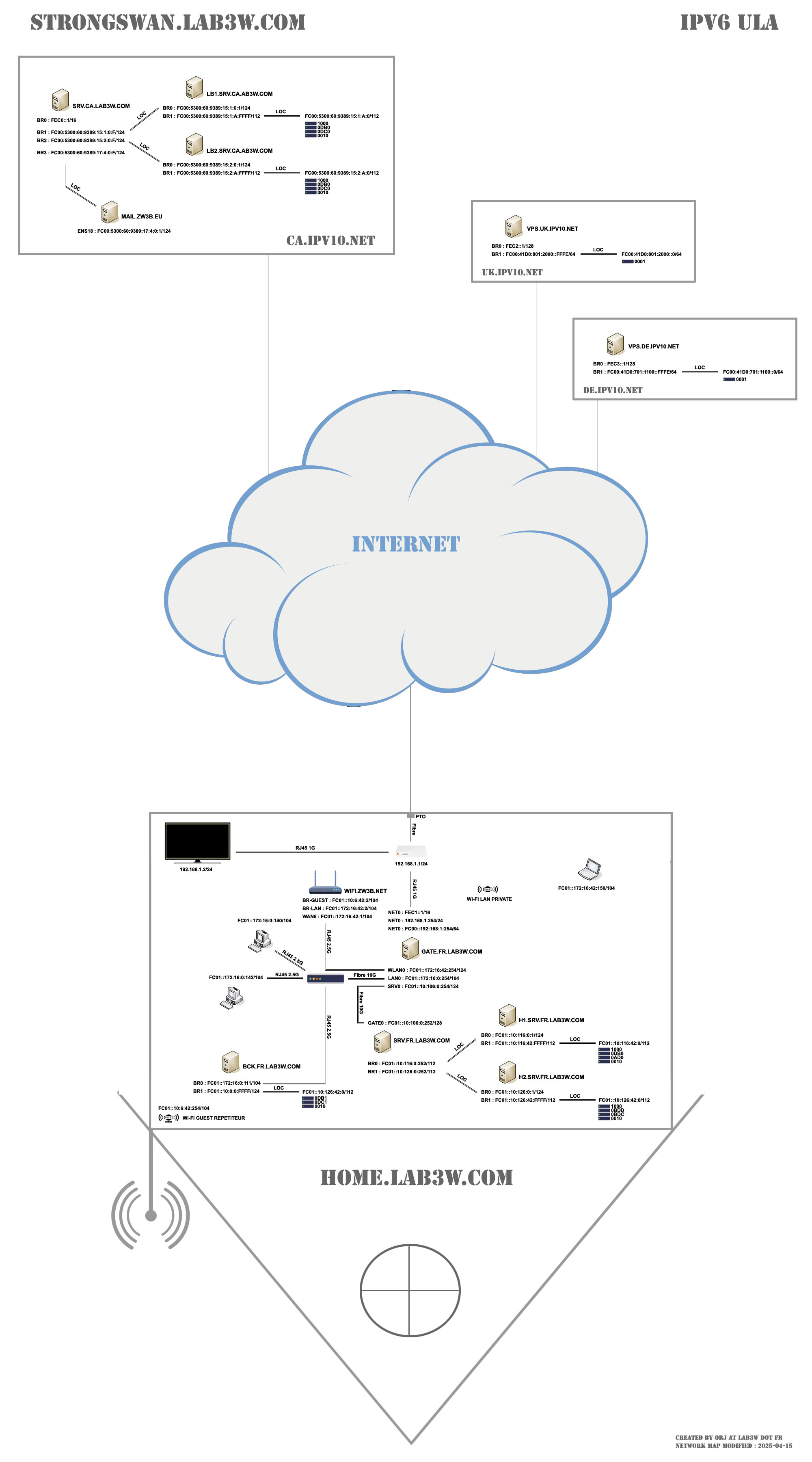
Otherwise, I’ve started experimenting with IPv6 using Incus. As I mentioned before, by manually configuring IPv6 ULA in the containers and manually setting the default route, I’m successfully connecting to the internet.

I’m trying to send packets for NDP using RaDvD and DHCPdv6. That’s where I’m at right now.

I will tell you the details when I am satisfied with my network configuration.

Hello,

How can I preroute the data from the “raw” table to the “nat” table ?

Local host recipient (your own machine) : Table “-t raw -P PREROUTING
This chain is normally used to modify packets, i.e., change the TOS bits, etc.

Local source host (your own machine) : Table “-t raw -P OUTPUT
This is where connection tracing takes place for locally generated packets. You can mark connections so they are not traced, for example.

root@hst-fr:~ # iptables -L -vn -t raw
Chain PREROUTING (policy DROP 3 packets, 156 bytes)
 pkts bytes target     prot opt in     out     source               destination

Chain OUTPUT (policy DROP 0 packets, 0 bytes)
 pkts bytes target     prot opt in     out     source               destination

Above are the packets that pass through the “raw” table ;

We will therefore need to configure a “strong firewall” with “connection tracing”, or more commonly known as a “stateful firewall”.

Connection tracing is performed so that the Netfilter architecture can know the state of a specific connection. Firewalls that implement this are usually called stateful firewalls. A stateful firewall is generally much more secure than a stateless firewall, since it enforces stricter rules.

root@hst-fr:~ # iptables -L -vn -t mangle
Chain PREROUTING (policy ACCEPT 0 packets, 0 bytes)
 pkts bytes target     prot opt in     out     source               destination

Chain INPUT (policy ACCEPT 0 packets, 0 bytes)
 pkts bytes target     prot opt in     out     source               destination

Chain FORWARD (policy ACCEPT 0 packets, 0 bytes)
 pkts bytes target     prot opt in     out     source               destination

Chain OUTPUT (policy ACCEPT 0 packets, 0 bytes)
 pkts bytes target     prot opt in     out     source               destination

Chain POSTROUTING (policy ACCEPT 0 packets, 0 bytes)
 pkts bytes target     prot opt in     out     source               destination
root@hst-fr:~ # iptables -L -vn -t nat
Chain PREROUTING (policy ACCEPT 0 packets, 0 bytes)
 pkts bytes target     prot opt in     out     source               destination

Chain INPUT (policy ACCEPT 0 packets, 0 bytes)
 pkts bytes target     prot opt in     out     source               destination

Chain OUTPUT (policy ACCEPT 0 packets, 0 bytes)
 pkts bytes target     prot opt in     out     source               destination

Chain POSTROUTING (policy ACCEPT 0 packets, 0 bytes)
 pkts bytes target     prot opt in     out     source               destination
    0     0 MASQUERADE  all  --  *      eth0    10.175.0.1           0.0.0.0/0
    0     0 MASQUERADE  all  --  *      eth0    10.175.0.2           0.0.0.0/0
    0     0 MASQUERADE  all  --  *      eth0    10.175.0.10          0.0.0.0/0

Above are the packets in my configuration for using the “nat” table to be able to browse from hidden machines on my network.

For now, it’s not working as usual—the packets are getting stuck.

I can browse the internet, but I don’t know how :wink:

# Firewall start (all closed)

# iptables -P INPUT DROP
# iptables -P FORWARD DROP
# iptables -P OUTPUT DROP

# Firewall stop (all open)

# iptables -P INPUT ACCEPT
# iptables -P FORWARD ACCEPT
# iptables -P OUTPUT ACCEPT

# Status reset

# iptables  -F
# iptables  -t raw -F
# iptables  -t mangle -F
# iptables  -t nat -F
# iptables  -Z
# iptables  -t raw -Z
# iptables  -t mangle -Z
# iptables  -t nat -Z
# iptables  -X
# iptables  -t raw -X
# iptables  -t mangle -X
# iptables  -t nat -X

# Example of blocking traffic to a specific destination from the local machine
# iptables -t raw -P PREROUTING DROP
# iptables -t raw -P OUTPUT DROP

Note : J.5. Exemple rc.flush-iptables script

:wink:

:france: !netdoc.net - Chapter 6. Traversing Tables and Chains

This chapter describes how packets traverse the various chains, and in what order. It also explains the order in which tables are traversed. You will understand the importance of this later when writing your own rules. Other points will be examined, related to kernel-dependent elements, as they are also relevant to this chapter. Among other things, the different routing decisions will be covered. This is particularly useful if you want to write iptables rules that can modify packet routing instructions/rules, i.e., why and how packets are routed; DNAT and SNAT are characteristic examples. Of course, the TOS bits must not be forgotten.

6.1. General Information

When a packet first arrives at a firewall, it encounters the hardware layer and is then picked up by the appropriate device driver within the kernel. Next, the packet goes through a series of steps in the kernel before being sent to the correct application (locally), or forwarded to another host—or whatever else.

First, let’s analyze a packet destined for the local machine. It goes through the following steps before actually being delivered to the receiving application:

Table 6.1. Local recipient host (your own machine)

Step Table String Comment
1 On cable (e.g., Internet)
2 Arrives at the interface (e.g., eth0)
3 raw PREROUTING This string is normally used to modify packets, i.e., change the bits of TOS, etc.
4 During connection code checks as described in the chapter The State Machine.
5 mangle PREROUTING String primarily used to modify packets, i.e., changing TOS, etc.
6 nat PREROUTING This string is mainly used for DNAT. Avoid filtering in this string as it is bypassed in some cases.
7 Routing decision, i.e., is the packet destined for our local host, should it be forwarded, and where?
8 mangle INPUT Here, it reaches the INPUT string in the mangle table. This string allows modification of packets after routing, but before they are actually sent to the machine’s process.
9 filter INPUT This is where incoming traffic to the local machine is filtered. Note that all incoming packets destined for your host pass through this chain, regardless of their interface or origin.
10 Local process/application (i.e. client/server program)

Notice that this time, the packet is transmitted through the INPUT chain instead of the FORWARD chain. This makes perfect sense. And it’s probably the only thing that makes sense to you in traversing the tables and chains right now, but if you keep thinking about it, you’ll find it increasingly clear.


Now, let’s analyze the packets leaving our local host and the steps they go through.

Table 6.2. Local Source Host (your own machine)

Step Table String Comment
1 Local process/application (i.e., client/server program)
2 Routing decision. Which source address should be used, which outgoing interface, and other necessary information that must be gathered.
3 raw OUTPUT This is where connection tracing takes place for locally generated packets. You can mark connections so that they are not traced, for example.
4 This is where connection tracing takes place for locally generated packets, for example, state changes, etc. See the chapter The State Machine for more information.
5 mangle OUTPUT This is where the packets are modified. It is advisable not to filter in this chain, due to some side effects.
6 nat OUTPUT This chain allows NAT to be performed on packets leaving the firewall.
7 Routing decision, how previous mangle and NAT changes may have altered the way packets will be routed.
8 filter OUTPUT This is where packets leave the local host.
9 mangle POSTROUTING The POSTROUTING string in the mangle table is primarily used when you want to modify packets before they leave the machine but after routing decisions have been made. This string is encountered both by packets that are only passing through the firewall and by packets created by the firewall itself.
10 nat POSTROUTING This is where SNAT is performed. It is advisable not to filter at this point due to side effects; some packets may slip through even if a default behavior has been defined for the DROP target.
11 Exits via a specific interface (e.g., eth0)
12 On cable (e.g., Internet)

In this example, we assume the packet is destined for another host on a different network. The packet goes through the different stages as follows:

Table 6.3. Redirected Packets

Step Table String Comment
1 On cable (e.g., Internet)
2 Arrives at the interface (e.g., eth0)
3 raw PREROUTING Here you can place a connection that will not be interpreted by the connection tracing system.
4 This is where non-locally generated connection tracing takes place; we will see this in the chapter The State Machine.
5 mangle PREROUTING This string is typically used to modify packets, i.e., change the bits of TOS, etc.
6 nat PREROUTING This chain is primarily used for DNAT. SNAT is performed further down the chain. Avoid filtering within this chain as it may be bypassed in some cases.
7 Routing decision, i.e., is the packet destined for your local host, should it be redirected, and where?
8 mangle FORWARD The packet is then sent to the FORWARD chain in the mangle table. This is useful for very specific needs, when you want to modify packets after the initial routing decision, but before the final routing decision made just before the packet is sent.
9 filter FORWARD The packet is routed to the FORWARD chain. Only forwarded packets arrive here, and this is also where all filtering is performed. Note that all redirected traffic passes through here (and not just in one direction), so you must consider this when writing your rules.
10 mangle POSTROUTING This string is used for special forms of packet modification, which are to be applied after all routing decisions have been made, but always on this machine.
11 nat POSTROUTING This chain is used primarily for SNAT. Avoid filtering here, as some packets may pass through this chain unchecked. This is also where masquerading (address masking) is performed.
12 Exits via the output interface (e.g., eth1).
13 Out again via cable (e.g., LAN).

As you can see, there are many steps involved. A packet can be stopped in any iptables chain, and even elsewhere if it’s malformed. However, it’s worth examining the fate of the packet as seen by iptables. Note that no specific chain or table is defined for different interfaces, or anything similar. The FORWARD chain is always traversed by packets that are redirected through this firewall/router.

[!IMPORTANT]
Do not use the INPUT string for filtering in the previous scenario! INPUT only makes sense for packets destined for your local host, in other words, packets that will not be routed to any other destination.

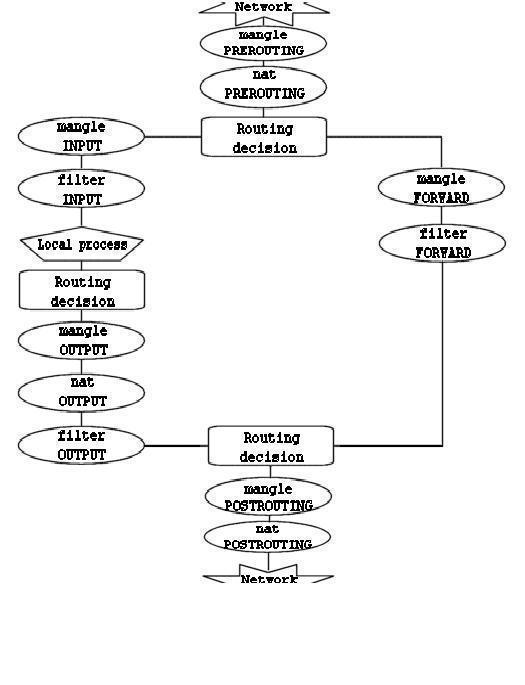
Now you have discovered how the different chains are traversed according to three distinct scenarios. We can provide a graphical representation of this :


To be clearer, this diagram requires some explanation. If a packet reaching the first routing decision is not destined for the local machine, it will be directed to the FORWARD chain. Conversely, if it is destined for an IP address that the machine is listening on, this packet will be sent to the INPUT chain, and therefore to the local machine.

It is important to note that even if packets are destined for the local machine, their destination address can be modified within the PREROUTING chain by a NAT operation. This is because, since this occurs before the first routing decision, the packet will only be examined after a potential change. Due to this characteristic, the routing can be altered before the routing decision is made. Note that all packets will transit through one of the paths shown in this diagram. If you perform DNAT on a packet to send it back to its originating network, it will still continue its journey through the remaining chains until it returns to the external network.

[!NOTE]
If you feel you need more information, you can use the script rc.test-iptables.txt. This test script should provide you with sufficient rules to experiment and understand how tables and chains are traversed.


Thanks !netdoc !ncus !-!ostinger :wink:


DataHacker.blog : iptables Process Flow: Chains, Tables, and Rules > iptables Chains and Extensions > iptables Commands


I shared all this with you because :

I installed “Generic Colouriser” the warper “grc” to have more visible colors with Debian GNU/Linux 13 (trixie).

root@hst-fr:~ # grc ip address show
1: lo: <LOOPBACK,UP,LOWER_UP> mtu 65536 qdisc noqueue state UNKNOWN group default qlen 1000
    link/loopback 00:00:00:00:00:00 brd 00:00:00:00:00:00
    inet 127.0.0.1/8 scope host lo
       valid_lft forever preferred_lft forever
    inet6 ::1/128 scope host noprefixroute
       valid_lft forever preferred_lft forever
2: eth0: <BROADCAST,MULTICAST,UP,LOWER_UP> mtu 1500 qdisc mq state UP group default qlen 1000
    link/ether a4:e8:d4:b5:94:55 brd ff:ff:ff:ff:ff:ff
    altname enp0s18
    altname enxa4e8d4b59455
    inet 147.79.115.130/24 brd 147.79.115.255 scope global eth0
       valid_lft forever preferred_lft forever
    inet6 2a02:4780:28:5295::1/48 scope global
       valid_lft forever preferred_lft forever
    inet6 fec5::1/120 scope site
       valid_lft forever preferred_lft forever
    inet6 fe80::a6e8:d4ff:feb5:9455/64 scope link proto kernel_ll
       valid_lft forever preferred_lft forever
5: incusbr0: <BROADCAST,MULTICAST,UP,LOWER_UP> mtu 1500 qdisc noqueue state UP group default qlen 1000
    link/ether 10:66:6a:56:26:85 brd ff:ff:ff:ff:ff:ff
    inet 10.175.0.254/24 brd 10.175.0.255 scope global incusbr0
       valid_lft forever preferred_lft forever
    inet6 fc00:4780:28:5295::fd/112 scope global
       valid_lft forever preferred_lft forever
    inet6 fe80::1266:6aff:fe56:2685/64 scope link proto kernel_ll
       valid_lft forever preferred_lft forever
52: vethec81ca64@if51: <BROADCAST,MULTICAST,UP,LOWER_UP> mtu 1500 qdisc noqueue master incusbr0 state UP group default qlen 1000
    link/ether fa:fb:c0:02:ab:70 brd ff:ff:ff:ff:ff:ff link-netnsid 0
60: veth1782b135@if59: <BROADCAST,MULTICAST,UP,LOWER_UP> mtu 1500 qdisc noqueue master incusbr0 state UP group default qlen 1000
    link/ether 1a:4d:f0:00:9e:8c brd ff:ff:ff:ff:ff:ff link-netnsid 1
root@hst-fr:~ # grc ip route show
default via 147.79.115.254 dev eth0 proto static
10.175.0.0/24 dev incusbr0 proto kernel scope link src 10.175.0.254
147.79.115.0/24 dev eth0 proto kernel scope link src 147.79.115.130
root@hst-fr:~ # grc ip -6 route show
2a02:4780:28::/48 dev eth0 proto kernel metric 256 pref medium
fc00:4780:28:5295::/112 dev incusbr0 proto kernel metric 256 pref medium
fe80::/64 dev eth0 proto kernel metric 256 pref medium
fe80::/64 dev incusbr0 proto kernel metric 256 pref medium
fec5::/120 dev eth0 proto kernel metric 256 pref medium
default via 2a02:4780:28::1 dev eth0 proto static metric 1024 pref medium
root@hst-fr:~ # incus exec web -- bash
root@hst-fr.web:~ # grc ip -6 route get fc00:5300:60:9389:15:2:a:10
fc00:5300:60:9389:15:2:a:10 from :: via fc00:4780:28:5295::fd dev eth0 src fc00:4780:28:5295::10 metric 1024 pref medium

root@hst-fr.web:~ # grc ping -c4 fc00:5300:60:9389:15:2:a:10
PING fc00:5300:60:9389:15:2:a:10 (fc00:5300:60:9389:15:2:a:10) 56 data bytes
From 2001:550:0:1000::9a19:cb5 icmp_seq=4 Destination unreachable: No route

--- fc00:5300:60:9389:15:2:a:10 ping statistics ---
4 packets transmitted, 0 received, +1 errors, 100% packet loss, time 3063ms
root@hst-fr.web:~ # grc traceroute6 fc00:5300:60:9389:15:2:a:10
traceroute to fc00:5300:60:9389:15:2:a:10 (fc00:5300:60:9389:15:2:a:10), 30 hops max, 80 byte packets
 1  hst-fr (fc00:4780:28:5295::fd)  0.080 ms  0.017 ms  0.015 ms
 2  2a02:4780:28::1 (2a02:4780:28::1)  0.404 ms  0.759 ms  0.734 ms
 3  2a02:4780:27:ffff::2d (2a02:4780:27:ffff::2d)  0.823 ms  0.899 ms  0.875 ms
 4  2a02:4780:27:ffff::2 (2a02:4780:27:ffff::2)  0.807 ms 2a02:4780:27:ffff::1 (2a02:4780:27:ffff::1)  0.783 ms 2a02:4780:27:ffff::2 (2a02:4780:27:ffff::2)  0.765 ms
 5  2a02:4780:27:ffff::c (2a02:4780:27:ffff::c)  0.675 ms 2a02:4780:27:ffff::b (2a02:4780:27:ffff::b)  0.566 ms  0.548 ms
 6  prs-b9-link.ip.twelve99.net (2001:2035:0:290f::1)  0.921 ms prs-b9-link.ip.twelve99.net (2001:2035:0:2921::1)  0.842 ms prs-b9-link.ip.twelve99.net (2001:2035:0:290f::1)  1.371 ms
 7  be9065.rcr81.par05.atlas.cogentco.com (2001:550:0:1000::9a19:bc9)  2.982 ms !N  2.554 ms !N *
root@hst-fr.web:~ # grc traceroute6 2001:550:0:1000::9a19:cb5
traceroute to 2001:550:0:1000::9a19:cb5 (2001:550:0:1000::9a19:cb5), 30 hops max, 80 byte packets
 1  hst-fr (fc00:4780:28:5295::fd)  0.448 ms  0.023 ms  0.014 ms
 2  2a02:4780:28::1 (2a02:4780:28::1)  0.539 ms  0.499 ms  0.461 ms
 3  2a02:4780:27:ffff::2e (2a02:4780:27:ffff::2e)  0.735 ms  0.593 ms  0.614 ms
 4  2a02:4780:27:ffff::1 (2a02:4780:27:ffff::1)  0.458 ms 2a02:4780:27:ffff::2 (2a02:4780:27:ffff::2)  0.424 ms 2a02:4780:27:ffff::1 (2a02:4780:27:ffff::1)  0.392 ms
 5  2a02:4780:27:ffff::b (2a02:4780:27:ffff::b)  0.581 ms 2a02:4780:27:ffff::c (2a02:4780:27:ffff::c)  0.654 ms  0.646 ms
 6  2001:978:2:1c::b0:1 (2001:978:2:1c::b0:1)  1.160 ms 2001:978:2:1c::b1:1 (2001:978:2:1c::b1:1)  1.268 ms 2001:978:2:1c::b0:1 (2001:978:2:1c::b0:1)  1.420 ms
 7  be9072.rcr82.par05.atlas.cogentco.com (2001:550:0:1000::9a19:cb5)  4.104 ms  4.367 ms  4.319 ms

I don’t know where this container is going, but it’s very far away.

DNSLytics : IP 2001:550:0:1000::9a19:cb5

root@hst-fr.web:~ # exit
root@hst-fr:~ # swanctl --initiate --child hst_fr-ca
[IKE] establishing CHILD_SA hst_fr-ca{302}
[...]
[IKE] CHILD_SA hst_fr-ca{302} established with SPIs c8d3ce50_i c4966bd4_o and TS fc00:4780:28:5295::/64 fec5::/120 === fc00:1f00:8100:400::/64 fc00:41d0:701:1100::/64 fc00:41d0:801:2000::/64 fc00:5300:60:9389::/64 fc01::10:0:0:0/80 fc01::172:16:0:0/104 fc01::192:168:0:0/104 fec0::/16 fec1::/16 fec2::/120 fec3::/120 fec4::/120
initiate completed successfully

root@hst-fr:~ # grc ip -6 route show table 220
fc00:1f00:8100:400::/64 dev eth0 proto static src fec5::1 metric 1024 pref medium
fc00:41d0:701:1100::/64 dev eth0 proto static src fec5::1 metric 1024 pref medium
fc00:41d0:801:2000::/64 dev eth0 proto static src fec5::1 metric 1024 pref medium
fc00:5300:60:9389::/64 dev eth0 proto static src fec5::1 metric 1024 pref medium
fc01::10:0:0:0/80 dev eth0 proto static src fec5::1 metric 1024 pref medium
fc01::172:16:0:0/104 dev eth0 proto static src fec5::1 metric 1024 pref medium
fc01::192:168:0:0/104 dev eth0 proto static src fec5::1 metric 1024 pref medium
fec0::/16 dev eth0 proto static src fec5::1 metric 1024 pref medium
fec1::/16 dev eth0 proto static src fec5::1 metric 1024 pref medium
fec2::/120 dev eth0 proto static src fec5::1 metric 1024 pref medium
fec3::/120 dev eth0 proto static src fec5::1 metric 1024 pref medium
fec4::/120 dev eth0 proto static src fec5::1 metric 1024 pref medium

root@hst-fr:~ # ping -c1 fc00:5300:60:9389:15:2:a:10
PING fc00:5300:60:9389:15:2:a:10 (fc00:5300:60:9389:15:2:a:10) 56 data bytes
64 bytes from fc00:5300:60:9389:15:2:a:10: icmp_seq=1 ttl=62 time=93.1 ms

--- fc00:5300:60:9389:15:2:a:10 ping statistics ---
1 packets transmitted, 1 received, 0% packet loss, time 0ms
rtt min/avg/max/mdev = 93.063/93.063/93.063/0.000 ms

root@hst-fr:~ # traceroute6 fc00:5300:60:9389:15:2:a:10
traceroute to fc00:5300:60:9389:15:2:a:10 (fc00:5300:60:9389:15:2:a:10), 30 hops max, 80 byte packets
 1  🦢.🇨🇦.ip❤10.ws (fec0::1)  92.212 ms  92.075 ms  91.883 ms
 2  fc00:5300:60:9389:15:2:0:1 (fc00:5300:60:9389:15:2:0:1)  92.123 ms  92.051 ms  92.623 ms
 3  fc00:5300:60:9389:15:2:a:10 (fc00:5300:60:9389:15:2:a:10)  92.451 ms  92.405 ms  92.373 ms
root@hst-fr:~ # incus exec web -- bash
root@hst-fr.web:~ # ping -c4 fc00:5300:60:9389:15:2:a:10
PING fc00:5300:60:9389:15:2:a:10 (fc00:5300:60:9389:15:2:a:10) 56 data bytes
From 2a02:4780:28:5295::1 icmp_seq=1 Destination unreachable: Address unreachable

--- fc00:5300:60:9389:15:2:a:10 ping statistics ---
4 packets transmitted, 0 received, +1 errors, 100% packet loss, time 3070ms

root@hst-fr.web:~ # grc traceroute6 fc00:5300:60:9389:15:2:a:10
traceroute to fc00:5300:60:9389:15:2:a:10 (fc00:5300:60:9389:15:2:a:10), 30 hops max, 80 byte packets
 1  hst-fr (fc00:4780:28:5295::fd)  0.094 ms  0.016 ms  0.012 ms
 2  hst.🇫🇷.◕‿◕.st (2a02:4780:28:5295::1)  3064.548 ms !H  3064.469 ms !H  3064.425 ms !H

root@hst-fr.web:~ # exit
root@hst-fr:~ # cat /etc/sysctl.conf

net.ipv6.conf.eth0.forwarding = 1
net.ipv6.conf.eth0.autoconf = 0
net.ipv6.conf.eth0.accept_redirects = 1
net.ipv6.conf.eth0.accept_ra = 0
net.ipv6.conf.eth0.proxy_ndp = 0
net.ipv6.conf.eth0.accept_source_route = 0
net.ipv6.conf.eth0.accept_dad = 0

net.ipv6.conf.incusbr0.forwarding = 1
net.ipv6.conf.incusbr0.autoconf = 0
net.ipv6.conf.incusbr0.accept_redirects = 1
net.ipv6.conf.incusbr0.accept_ra = 2
net.ipv6.conf.incusbr0.proxy_ndp = 1
net.ipv6.conf.incusbr0.accept_source_route = 0
net.ipv6.conf.incusbr0.accept_dad = 0
root@hst-fr:~ # cat /etc/sysctl.d/50-incus.conf
fs.aio-max-nr=16777216
fs.inotify.max_queued_events=1048576
fs.inotify.max_user_instances=1048576
fs.inotify.max_user_watches=1048576
kernel.keys.maxbytes=2000000
kernel.keys.maxkeys=2000
net.ipv4.fib_sync_mem=33554432
net.ipv4.neigh.default.gc_thresh3=8192
net.ipv6.neigh.default.gc_thresh3=8192
vm.max_map_count=262144

I don’t know if it’s related to “strict routing” to Incus ; to Debian Trixie ; or to the Hostinger VPS/KVM configuration.


I’m adding this for your information :

From a machine on the network (the one I wanted to contact from the Hostinger VPS/KVM container ; Incus), I can successfully receive replies to ICMPv6 requests and others.

This is definitely related to the iptables configuration in “strict firewall” mode on this machine, “hst-fr” which acts as a router for the containers.

root@lb2.ww2:~ # ip -6 address show
1: lo: <LOOPBACK,UP,LOWER_UP> mtu 65536 state UNKNOWN qlen 1000
    inet6 ::1/128 scope host
       valid_lft forever preferred_lft forever
2: eth0@if8: <BROADCAST,MULTICAST,UP,LOWER_UP> mtu 1500 state UP qlen 1000
    inet6 fc00:5300:60:9389:15:2:a:10/112 scope global
       valid_lft forever preferred_lft forever
    inet6 2607:5300:60:9389:15:2:a:10/112 scope global
       valid_lft forever preferred_lft forever
    inet6 fe80::c4e7:b1ff:fe48:d134/64 scope link
       valid_lft forever preferred_lft forever
root@lb2.ww2:~ # ping -c2 fc00:4780:28:5295::10
PING fc00:4780:28:5295::10(fc00:4780:28:5295::10) 56 data bytes
64 bytes from fc00:4780:28:5295::10: icmp_seq=1 ttl=61 time=91.4 ms
64 bytes from fc00:4780:28:5295::10: icmp_seq=2 ttl=61 time=88.2 ms

--- fc00:4780:28:5295::10 ping statistics ---
2 packets transmitted, 2 received, 0% packet loss, time 1002ms
rtt min/avg/max/mdev = 88.183/89.782/91.381/1.599 ms
root@hst-fr.web:~ # tcpdump -s0 -t -n ip6 or proto ipv6 and port ! 22 -i eth0 -vv
tcpdump: listening on eth0, link-type EN10MB (Ethernet), snapshot length 262144 bytes

IP6 (flowlabel 0xb88c2, hlim 61, next-header ICMPv6 (58) payload length: 64) fc00:5300:60:9389:15:2:a:10 > fc00:4780:28:5295::10: [icmp6 sum ok] ICMP6, echo request, id 55467, seq 1
IP6 (flowlabel 0x4e3ff, hlim 64, next-header ICMPv6 (58) payload length: 64) fc00:4780:28:5295::10 > fc00:5300:60:9389:15:2:a:10: [icmp6 sum ok] ICMP6, echo reply, id 55467, seq 1
IP6 (flowlabel 0xb88c2, hlim 61, next-header ICMPv6 (58) payload length: 64) fc00:5300:60:9389:15:2:a:10 > fc00:4780:28:5295::10: [icmp6 sum ok] ICMP6, echo request, id 55467, seq 2
IP6 (flowlabel 0x4e3ff, hlim 64, next-header ICMPv6 (58) payload length: 64) fc00:4780:28:5295::10 > fc00:5300:60:9389:15:2:a:10: [icmp6 sum ok] ICMP6, echo reply, id 55467, seq 2
root@lb2.ww2:~ # traceroute6 fc00:4780:28:5295::10
traceroute to fc00:4780:28:5295::10 (fc00:4780:28:5295::10), 30 hops max, 80 byte packets
 1  fc00:5300:60:9389:15:2:a:ffff (fc00:5300:60:9389:15:2:a:ffff)  0.689 ms  0.609 ms  0.566 ms
 2  fc00:5300:60:9389:15:2:0:f (fc00:5300:60:9389:15:2:0:f)  0.523 ms  0.486 ms  0.450 ms
 3  🌓.🇫🇷.ip❤10.ws (fec5::1)  89.384 ms  89.346 ms  89.311 ms
 4  fc00:4780:28:5295::10 (fc00:4780:28:5295::10)  89.792 ms  89.771 ms  89.275 ms
root@hst-fr.web:~ # tcpdump -s0 -t -n ip6 or proto ipv6 and port ! 22 -i eth0 -vv
tcpdump: listening on eth0, link-type EN10MB (Ethernet), snapshot length 262144 bytes

IP6 (flowlabel 0xf36bd, hlim 1, next-header UDP (17) payload length: 40) fc00:5300:60:9389:15:2:a:10.40939 > fc00:4780:28:5295::10.33443: [udp sum ok] UDP, length 32
IP6 (flowlabel 0xff6b8, hlim 64, next-header ICMPv6 (58) payload length: 88) fc00:4780:28:5295::10 > fc00:5300:60:9389:15:2:a:10: [icmp6 sum ok] ICMP6, destination unreachable, unreachable port, fc00:4780:28:5295::10 udp port 33443
IP6 (flowlabel 0x6b855, hlim 1, next-header UDP (17) payload length: 40) fc00:5300:60:9389:15:2:a:10.54549 > fc00:4780:28:5295::10.33444: [udp sum ok] UDP, length 32
IP6 (flowlabel 0xff6b8, hlim 64, next-header ICMPv6 (58) payload length: 88) fc00:4780:28:5295::10 > fc00:5300:60:9389:15:2:a:10: [icmp6 sum ok] ICMP6, destination unreachable, unreachable port, fc00:4780:28:5295::10 udp port 33444
IP6 (flowlabel 0x81f56, hlim 1, next-header UDP (17) payload length: 40) fc00:5300:60:9389:15:2:a:10.45690 > fc00:4780:28:5295::10.33445: [udp sum ok] UDP, length 32
IP6 (flowlabel 0xff6b8, hlim 64, next-header ICMPv6 (58) payload length: 88) fc00:4780:28:5295::10 > fc00:5300:60:9389:15:2:a:10: [icmp6 sum ok] ICMP6, destination unreachable, unreachable port, fc00:4780:28:5295::10 udp port 33445
IP6 (flowlabel 0x91c98, hlim 2, next-header UDP (17) payload length: 40) fc00:5300:60:9389:15:2:a:10.46160 > fc00:4780:28:5295::10.33446: [udp sum ok] UDP, length 32
IP6 (flowlabel 0xff6b8, hlim 64, next-header ICMPv6 (58) payload length: 88) fc00:4780:28:5295::10 > fc00:5300:60:9389:15:2:a:10: [icmp6 sum ok] ICMP6, destination unreachable, unreachable port, fc00:4780:28:5295::10 udp port 33446
IP6 (flowlabel 0x3462b, hlim 2, next-header UDP (17) payload length: 40) fc00:5300:60:9389:15:2:a:10.55545 > fc00:4780:28:5295::10.33447: [udp sum ok] UDP, length 32
IP6 (flowlabel 0xff6b8, hlim 64, next-header ICMPv6 (58) payload length: 88) fc00:4780:28:5295::10 > fc00:5300:60:9389:15:2:a:10: [icmp6 sum ok] ICMP6, destination unreachable, unreachable port, fc00:4780:28:5295::10 udp port 33447
IP6 (flowlabel 0xf3127, hlim 2, next-header UDP (17) payload length: 40) fc00:5300:60:9389:15:2:a:10.35112 > fc00:4780:28:5295::10.33448: [udp sum ok] UDP, length 32
IP6 (flowlabel 0xff6b8, hlim 64, next-header ICMPv6 (58) payload length: 88) fc00:4780:28:5295::10 > fc00:5300:60:9389:15:2:a:10: [icmp6 sum ok] ICMP6, destination unreachable, unreachable port, fc00:4780:28:5295::10 udp port 33448
IP6 (flowlabel 0x4ab47, hlim 3, next-header UDP (17) payload length: 40) fc00:5300:60:9389:15:2:a:10.36367 > fc00:4780:28:5295::10.33449: [udp sum ok] UDP, length 32
IP6 (flowlabel 0x468e5, hlim 3, next-header UDP (17) payload length: 40) fc00:5300:60:9389:15:2:a:10.45946 > fc00:4780:28:5295::10.33450: [udp sum ok] UDP, length 32
IP6 (flowlabel 0x0ac3f, hlim 3, next-header UDP (17) payload length: 40) fc00:5300:60:9389:15:2:a:10.56307 > fc00:4780:28:5295::10.33451: [udp sum ok] UDP, length 32
IP6 (flowlabel 0xc5827, hlim 4, next-header UDP (17) payload length: 40) fc00:5300:60:9389:15:2:a:10.49421 > fc00:4780:28:5295::10.33452: [udp sum ok] UDP, length 32
IP6 (flowlabel 0x2b739, hlim 4, next-header UDP (17) payload length: 40) fc00:5300:60:9389:15:2:a:10.49324 > fc00:4780:28:5295::10.33453: [udp sum ok] UDP, length 32
IP6 (flowlabel 0xdb49c, hlim 4, next-header UDP (17) payload length: 40) fc00:5300:60:9389:15:2:a:10.36007 > fc00:4780:28:5295::10.33454: [udp sum ok] UDP, length 32
IP6 (flowlabel 0x835eb, hlim 5, next-header UDP (17) payload length: 40) fc00:5300:60:9389:15:2:a:10.53848 > fc00:4780:28:5295::10.33455: [udp sum ok] UDP, length 32
IP6 (flowlabel 0x4f7d3, hlim 5, next-header UDP (17) payload length: 40) fc00:5300:60:9389:15:2:a:10.53402 > fc00:4780:28:5295::10.33456: [udp sum ok] UDP, length 32
IP6 (flowlabel 0xff6b8, hlim 64, next-header ICMPv6 (58) payload length: 88) fc00:4780:28:5295::10 > fc00:5300:60:9389:15:2:a:10: [icmp6 sum ok] ICMP6, destination unreachable, unreachable port, fc00:4780:28:5295::10 udp port 33456
IP6 (flowlabel 0x8958c, hlim 5, next-header UDP (17) payload length: 40) fc00:5300:60:9389:15:2:a:10.47422 > fc00:4780:28:5295::10.33457: [udp sum ok] UDP, length 32
IP6 (flowlabel 0x6f403, hlim 6, next-header UDP (17) payload length: 40) fc00:5300:60:9389:15:2:a:10.41931 > fc00:4780:28:5295::10.33458: [udp sum ok] UDP, length 32

I.E. To test the responses from my reverse IPv6 SLA :

# dig -x fec0::1 @2a01:cb1d:813:4a00:1ab3::1

; <<>> DiG 9.18.41-1~deb12u1-Debian <<>> -x fec0::1 @2a01:cb1d:813:4a00:1ab3::1
;; global options: +cmd
;; Got answer:
;; ->>HEADER<<- opcode: QUERY, status: NOERROR, id: 10061
;; flags: qr aa rd ra; QUERY: 1, ANSWER: 1, AUTHORITY: 0, ADDITIONAL: 1

;; OPT PSEUDOSECTION:
; EDNS: version: 0, flags:; udp: 1232
; COOKIE: cf3f8a6dfe712f2b0100000069281a9d59d69cab0b775b7d (good)
;; QUESTION SECTION:
;1.0.0.0.0.0.0.0.0.0.0.0.0.0.0.0.0.0.0.0.0.0.0.0.0.0.0.0.0.c.e.f.ip6.arpa. IN PTR

;; ANSWER SECTION:
1.0.0.0.0.0.0.0.0.0.0.0.0.0.0.0.0.0.0.0.0.0.0.0.0.0.0.0.0.c.e.f.ip6.arpa. 60 IN PTR 🦢.🇨🇦.ip❤10.ws.

;; Query time: 107 msec
;; SERVER: 2a01:cb1d:813:4a00:1ab3::1#53(2a01:cb1d:813:4a00:1ab3::1) (UDP)
;; WHEN: Thu Nov 27 04:32:13 EST 2025
;; MSG SIZE  rcvd: 178

My IPv6 reverse SLAddresses “fec0::/10”:

;; AUTHORITY SECTION:
c.e.f.ip6.arpa.         60      IN      SOA     srv.🇫🇷.◕‿◕.st. 👮.🇫🇷.◕‿◕.st. 2025110501 20 5 420 60

My IPv6 reverse ULAddresses “fc00::/7” :

;; AUTHORITY SECTION:
c.f.ip6.arpa.           60      IN      SOA     srv.🇫🇷.◕‿◕.st. 👮.🇫🇷.◕‿◕.st. 2025101803 20 5 420 60

From the Incus container, when trying to contact the same machine on its IPv6 GUA, everything works normally.

root@hst-fr:~ # incus exec web -- bash
root@hst-fr.web:~ # ping -c2 2607:5300:60:9389:15:2:a:10
PING 2607:5300:60:9389:15:2:a:10 (2607:5300:60:9389:15:2:a:10) 56 data bytes
64 bytes from 2607:5300:60:9389:15:2:a:10: icmp_seq=1 ttl=44 time=86.7 ms
64 bytes from 2607:5300:60:9389:15:2:a:10: icmp_seq=2 ttl=44 time=86.5 ms

--- 2607:5300:60:9389:15:2:a:10 ping statistics ---
2 packets transmitted, 2 received, 0% packet loss, time 1002ms
rtt min/avg/max/mdev = 86.483/86.570/86.658/0.087 ms
root@hst-fr.web:~ # grc traceroute6 2607:5300:60:9389:15:2:a:10
traceroute to 2607:5300:60:9389:15:2:a:10 (2607:5300:60:9389:15:2:a:10), 30 hops max, 80 byte packets
 1  hst-fr (fc00:4780:28:5295::fd)  0.091 ms  0.021 ms  0.015 ms
 2  2a02:4780:28::1 (2a02:4780:28::1)  0.497 ms  0.750 ms  0.718 ms
 3  2a02:4780:27:ffff::2d (2a02:4780:27:ffff::2d)  0.771 ms  0.936 ms 2a02:4780:27:ffff::2e (2a02:4780:27:ffff::2e)  0.794 ms
 4  2a02:4780:27:ffff::1 (2a02:4780:27:ffff::1)  0.777 ms  0.748 ms 2a02:4780:27:ffff::2 (2a02:4780:27:ffff::2)  0.710 ms
 5  2a02:4780:27:ffff::c (2a02:4780:27:ffff::c)  0.864 ms 2a02:4780:27:ffff::b (2a02:4780:27:ffff::b)  0.790 ms 2a02:4780:27:ffff::c (2a02:4780:27:ffff::c)  1.169 ms
 6  prs-b9-link.ip.twelve99.net (2001:2035:0:2921::1)  0.849 ms 2001:978:2:1c::b1:1 (2001:978:2:1c::b1:1)  2.749 ms prs-b9-link.ip.twelve99.net (2001:2035:0:2921::1)  0.726 ms
 7  prs-b16-v6.ip.twelve99.net (2001:2034:0:2e::1)  4.126 ms be9072.rcr82.par05.atlas.cogentco.com (2001:550:0:1000::9a19:cb5)  3.717 ms prs-b16-v6.ip.twelve99.net (2001:2034:0:2e::1)  4.264 ms
 8  prs-bb2-v6.ip.twelve99.net (2001:2034:1:c1::1)  1.568 ms * *
 9  be3001.rcr21.b015964-1.par01.atlas.cogentco.com (2001:550:0:1000::9a36:3cde)  2.578 ms 2001:41d0::266b (2001:41d0::266b)  2.071 ms be3749.rcr71.b036457-0.par01.atlas.cogentco.com (2001:550:0:1000::8275:b9)  2.736 ms
10  par-th2-pb1-nc5.fr.eu (2001:41d0::266a)  2.674 ms  2.134 ms *
11  2001:41d0:aaaa:100::13 (2001:41d0:aaaa:100::13)  9.294 ms 2001:41d0::266b (2001:41d0::266b)  1.829 ms 2001:41d0::27a0 (2001:41d0::27a0)  6.999 ms
12  2001:41d0:aaaa:100::9 (2001:41d0:aaaa:100::9)  8.303 ms 2001:41d0:aaaa:100::11 (2001:41d0:aaaa:100::11)  25.415 ms 2001:41d0:aaaa:100::9 (2001:41d0:aaaa:100::9)  15.968 ms
13  2001:41d0:aaaa:100::4 (2001:41d0:aaaa:100::4)  2.828 ms  2.787 ms 2001:41d0:aaaa:100::6 (2001:41d0:aaaa:100::6)  2.831 ms
14  be103.lil1-rbx8-sbb1-nc5.fr.eu (2001:41d0::25e7)  9.912 ms  10.514 ms *
15  be101.lon-drch-sbb1-nc5.uk.eu (2001:41d0::c69)  10.350 ms lon-thw-sbb1-nc5.uk.eu (2001:41d0::25f0)  9.492 ms  10.366 ms
16  nyc-ny1-sbb1-8k.nj.us (2607:5300::18b)  82.392 ms be101.lon-drch-sbb1-nc5.uk.eu (2001:41d0::c69)  9.585 ms nyc-ny1-sbb1-8k.nj.us (2607:5300::18b)  85.198 ms
17  be10.nyc-ny1-sbb1-8k.nj.us (2001:41d0::26c0)  77.068 ms *  77.413 ms
18  vl100.bhs-d1-a75.qc.ca (2607:5300::1c3)  83.953 ms be102.bhs-g1-nc5.qc.ca (2607:5300::1c6)  91.262 ms  91.400 ms
19  vl100.bhs-d1-a75.qc.ca (2607:5300::1c3)  86.843 ms  88.872 ms 2001:41d0:0:50::6:84f (2001:41d0:0:50::6:84f)  87.214 ms
20  2001:41d0:0:50::2:163 (2001:41d0:0:50::2:163)  89.117 ms vl100.bhs-d1-a75.qc.ca (2607:5300::1c3)  85.040 ms 2001:41d0:0:50::6:84b (2001:41d0:0:50::6:84b)  85.020 ms
21  2001:41d0:0:50::2:161 (2001:41d0:0:50::2:161)  91.636 ms srv.🇨🇦.◕‿◕.st (2607:5300:60:9389::1)  87.951 ms  87.907 ms
22  srv.🇨🇦.◕‿◕.st (2607:5300:60:9389::1)  86.487 ms  84.152 ms ☕.🟦.srv.🇨🇦.◕‿◕.st (2607:5300:60:9389:15:2:0:1)  90.117 ms
23  ☕.🟦.srv.🇨🇦.◕‿◕.st (2607:5300:60:9389:15:2:0:1)  84.590 ms 🌎.🇨🇦.◕‿◕.st (2607:5300:60:9389:15:2:a:10)  88.651 ms  90.155 ms

@+

Hi,

I still can’t manage, “without much effort,” to switch from the “raw” table to “nat” on the “incusbr0” interface; I don’t understand why (although it might be related to the “bootpc” protocol not being enabled on UDP port 68).

On the LXC bridge “lxcbr0”, in the “mangle” table, there is this (example) :

root@vps-de:~ # iptables -L -vn -t mangle
Chain PREROUTING (policy ACCEPT 0 packets, 0 bytes)
 pkts bytes target     prot opt in     out     source               destination

Chain INPUT (policy ACCEPT 0 packets, 0 bytes)
 pkts bytes target     prot opt in     out     source               destination

Chain FORWARD (policy ACCEPT 0 packets, 0 bytes)
 pkts bytes target     prot opt in     out     source               destination

Chain OUTPUT (policy ACCEPT 0 packets, 0 bytes)
 pkts bytes target     prot opt in     out     source               destination

Chain POSTROUTING (policy ACCEPT 0 packets, 0 bytes)
 pkts bytes target     prot opt in     out     source               destination
    0     0 CHECKSUM   udp  --  *      lxcbr0  0.0.0.0/0            0.0.0.0/0            udp dpt:68 CHECKSUM fill

In Incus :

I’m sure it’s related; and nobody tells me - You need to enable “bootpc” in “Incus” :wink:

UDP 68

Internet-Security.com UDP port 68 details

Protocol : UDP
Port : 68
Labels : bootpc

Synopsis

  • UDP port 68 is the DHCP/BOOTP client port used by devices to receive configuration from DHCP servers (which send from UDP 67).
  • Microsoft Windows (including Windows Server) uses the DHCP Client service on UDP 68 to obtain IP settings.
  • Linux systems use DHCP clients such as ISC dhclient, systemd-networkd’s DHCP client, NetworkManager, dhcpcd, or BusyBox udhcpc on UDP 68.
  • Apple macOS and iOS use the built-in DHCP client (via configd) listening on UDP 68 for address assignment.
  • Android uses its built-in DHCP client (e.g., dhcpcd in some versions) on UDP 68 when joining networks.
  • Network gear like Cisco IOS/IOS-XE and Juniper Junos devices, plus Ubiquiti UniFi access points, use UDP 68 on interfaces configured as DHCP clients.
  • Virtualization and cloud environments (VMware ESXi hosts and guest VMs, KVM/Libvirt guests, Hyper-V guests, common cloud images) acquire addresses via DHCP clients on UDP 68.
  • IP phones and printers (e.g., Poly/Yealink phones, HP printers) use UDP 68 to obtain network settings.
  • PXE network boot clients use UDP 68 to receive BOOTP/DHCP offers and boot parameters.
  • Security note: UDP 68 traffic can be abused by rogue DHCP servers and crafted replies; client-side flaws (e.g., ISC dhclient CVE-2018-1111) have enabled code execution via malicious DHCP responses.

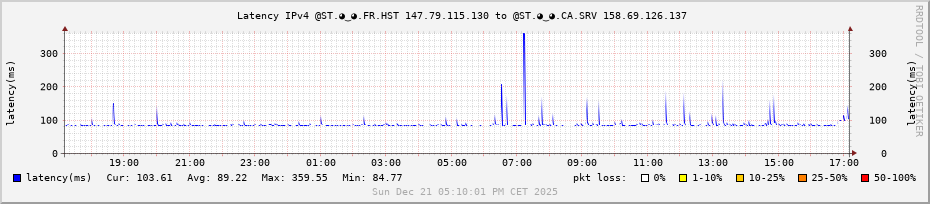
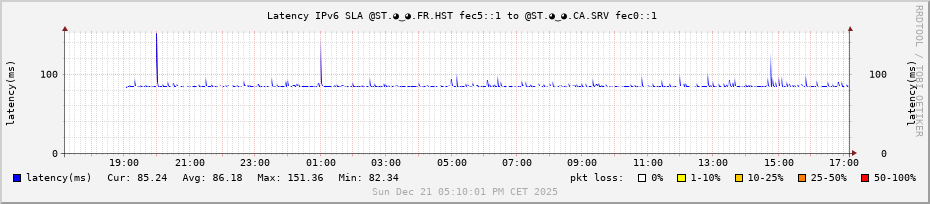
Otherwise, I created graphs Multi Router Traffic Grapher (MRTG) for all my machines; this allows me to better visualize the traffic between my websites, frontend services, and backends. I had only put the graphs on my Canadian server until yesterday.

The (same) MRTG graphs (that I added) are available from all the machine URLs:

MRTG :-: SRV.:canada:.◕‿◕.ST

MRTG :-: VPS.:germany:.IP​:heart:10.WS
MRTG :-: VPS.:united_kingdom:.IP​:heart:10.WS
MRTG :-: VPS.:australia:.IP​:heart:10.WS

MRTG :-: HST.:france:.◕‿◕.ST

MRTG :-: GATE.:france:.◕‿◕.ST
MRTG :-: SRV.:france:.◕‿◕.ST

After blocking a SYN-ACK attack (TCP SYN 44 ATTACK:TCP_SYN) the night before last.

I just re-established the SWAN connections from Australia, Germany, and England to get the SRV-FR backends working. This backend is a server located at my home in France, high up in the mountains in the Alpes-Maritimes region (Orange_FR).

However, I have disabled these frontends for ZW3B.TV.

We are starting to see an increase in traffic on the MRTG graphs for @ST.◕‿◕.:france:.GATE and @ST.◕‿◕.:france:.SRV.


On my KVM8 (32GB RAM) at Hostinger with “Incus”; HST-FR, I need to enable the network for these future MySQL and web backends for better availability and, hopefully, speed.

My Installation/configuration “KVM Hostinger” + Incus : https://hst.🇫🇷.◕‿◕.st/infos/INFOs.txt

:wink:

See you later.

Romain.

Howto’ table “raw” to “nat” ; please ?

I think the problem stems from my firewall configuration and something related to inter-site communication—host-to-host. Or rather, the routing table isn’t “valid/registered” from the container since strongSwan is on the host. I read that somewhere.

I already had a problem on the host; to get SWAN traffic to flow in and out, I had to manually add the strongSwan rule to the host’s own rules.

Before :

root@hst-fr:~ # ip -6 rule show
0:      from all lookup local
32766:  from all lookup main

Now :

root@hst-fr:~ # ip -6 rule show
0:      from all lookup local
220:    from all lookup 220
32766:  from all lookup main

Kodee (the Hostinger chatbot) guided me like this :
# Kodee : Add this rule

root@hst-fr:~ # ip -6 rule add fwmark 0x200/0x200 table 220

And, if I did that to mark the “XFRM” packets ; I’ll try.


I’m adding these two links :


I’m trying to understand – to move from the TCP layer to the application layer (I must be explaining myself poorly); the steps would be :

Let’s say; a TCP packet (proto 6) :

root@hst-fr:~ # tcpdump -ddd -i eth0 ip proto 6
6
40 0 0 12
21 0 3 2048
48 0 0 23
21 0 1 6
6 0 0 262144
6 0 0 0

an ESP package (proto 50) :

root@hst-fr:~ # tcpdump -ddd -i eth0 ip proto 50
6
40 0 0 12
21 0 3 2048
48 0 0 23
21 0 1 50
6 0 0 262144
6 0 0 0

It looks simple in the drawing :wink:


New Host Debian GNU/Linux 13 (trixie) : “hst-fr.web” → “srv-ca.h1.ww1” : KO

  • ping x 2:
root@hst-fr.web:~ # ping6 -n fc00:5300:60:9389:15:1:a:10 -c2
PING fc00:5300:60:9389:15:1:a:10 (fc00:5300:60:9389:15:1:a:10) 56 data bytes
From 2a02:4780:28:5295::1 icmp_seq=1 Destination unreachable: Address unreachable
From 2a02:4780:28:5295::1 icmp_seq=2 Destination unreachable: Address unreachable

--- fc00:5300:60:9389:15:1:a:10 ping statistics ---
2 packets transmitted, 0 received, +2 errors, 100% packet loss, time 1006ms

root@hst-fr:~ # conntrack -E -o timestamp
[1764678877.967950]         [NEW] icmpv6   58 30 src=fc00:4780:28:5295::10 dst=fc00:5300:60:9389:15:1:a:10 type=128 code=0 id=38766 [UNREPLIED] src=fc00:5300:60:9389:15:1:a:10 dst=2a02:4780:28:5295::1 type=129 code=0 id=38766
[1764678906.691929]         [NEW] icmpv6   58 30 src=fc00:4780:28:5295::10 dst=fc00:5300:60:9389:15:1:a:10 type=128 code=0 id=38767 [UNREPLIED] src=fc00:5300:60:9389:15:1:a:10 dst=2a02:4780:28:5295::1 type=129 code=0 id=38767

[1764678956.829465]     [DESTROY] icmpv6   58 src=fc00:4780:28:5295::10 dst=fc00:5300:60:9389:15:1:a:10 type=128 code=0 id=38767 [UNREPLIED] src=fc00:5300:60:9389:15:1:a:10 dst=2a02:4780:28:5295::1 type=129 code=0 id=38767
[1764678956.832566]     [DESTROY] icmpv6   58 src=fc00:4780:28:5295::10 dst=fc00:5300:60:9389:15:1:a:10 type=128 code=0 id=38766 [UNREPLIED] src=fc00:5300:60:9389:15:1:a:10 dst=2a02:4780:28:5295::1 type=129 code=0 id=38766

Old Host Debian GNU/Linux 10 (buster) : “srv-ca.h1.ww1” → “hst-fr.web” : OK

  • ping x 1 :
root@lb1.ww1:~ # ping -c2 fc00:4780:28:5295::10
PING fc00:4780:28:5295::10(fc00:4780:28:5295::10) 56 data bytes
64 bytes from fc00:4780:28:5295::10: icmp_seq=1 ttl=61 time=85.2 ms
64 bytes from fc00:4780:28:5295::10: icmp_seq=2 ttl=61 time=84.8 ms

--- fc00:4780:28:5295::10 ping statistics ---
2 packets transmitted, 2 received, 0% packet loss, time 2ms
rtt min/avg/max/mdev = 84.814/84.995/85.177/0.343 ms
root@hst-fr:~ # conntrack -E -o timestamp --dst fc00:4780:28:5295::10
[1764682010.142097]         [NEW] icmpv6   58 30 src=fc00:5300:60:9389:15:1:a:10 dst=fc00:4780:28:5295::10 type=128 code=0 id=982 [UNREPLIED] src=fc00:4780:28:5295::10 dst=fc00:5300:60:9389:15:1:a:10 type=129 code=0 id=982
[1764682010.142171]      [UPDATE] icmpv6   58 30 src=fc00:5300:60:9389:15:1:a:10 dst=fc00:4780:28:5295::10 type=128 code=0 id=982 src=fc00:4780:28:5295::10 dst=fc00:5300:60:9389:15:1:a:10 type=129 code=0 id=982
[1764682090.272322]     [DESTROY] icmpv6   58 src=fc00:5300:60:9389:15:1:a:10 dst=fc00:4780:28:5295::10 type=128 code=0 id=982 src=fc00:4780:28:5295::10 dst=fc00:5300:60:9389:15:1:a:10 type=129 code=0 id=982

Hello,

On the host; in order for SWAN traffic to be able to enter and exit, I had to manually add the strongSwan rule to the host rules; otherwise, requests to the SWAN attempt to go through the default gateway.

root@hst-fr:~ # ip -6 rule add priority 220 lookup 220 table 220

I believe we need to configure rules for multiple routes ; Dual Routes no longer in recent FW?


Otherwise ; off-topic :slight_smile:

Exemple :

root@hst-fr:~ # for addr in $(host www.ipv10.net | grep address | sed s/IPv6// | awk '{print $4}'); do echo -n $addr" has rDNS "; dig -x $addr +short @dns.google; done;
139.99.171.39 has rDNS vps.🇦🇺.ip❤10.ws.
57.128.171.43 has rDNS vps.🇬🇧.ip❤10.ws.
147.79.115.130 has rDNS hst.🇫🇷.◕‿◕.st.
158.69.126.137 has rDNS mail.zw3b.eu.
135.125.133.51 has rDNS vps.🇩🇪.ip❤10.ws.
2001:41d0:801:2000::44f9 has rDNS vps.🇬🇧.ip❤10.ws.
2607:5300:60:9389::1 has rDNS srv.🇨🇦.◕‿◕.st.
2a02:4780:28:5295::1 has rDNS hst.🇫🇷.◕‿◕.st.
2001:41d0:701:1100::6530 has rDNS vps.🇩🇪.ip❤10.ws.
2402:1f00:8100:400::1435 has rDNS vps.🇦🇺.ip❤10.ws.

but ;

root@hst-fr:~ # vim ./reversehost.bash
#!/bin/bash
##########################
# Author : o.Romain.Jaillet-ramey (orj AT lab3w.fr)
# Date : 20251203
# Desc : return reverse DNS with IDN to UNICODE
##########################

dn=$1

for addr in $(host $dn | grep address | sed s/IPv6// | awk '{print $4}');
do
        req=$(dig -x $addr +short @dns.google)

        if [[ "$req" == "" ]];
        then
                host $dn
                exit 1
        else
                echo -n "$addr has rDNS "
                echo ${req} | idn -u
        fi
done
root@hst-fr:~ # chmod u+x ./reversehost.bash
root@hst-fr:~ # alias reversehost="/root/reversehost.bash"
root@hst-fr:~ # reversehost vps.de.ipv10.net
135.125.133.51 has rDNS vps.xn--h77hc.ip❤10.ws.
2001:41d0:701:1100::6530 has rDNS vps.xn--h77hc.ip❤10.ws.

The flags “xn--j77hya”, “xn--h77hc”, “xn--e77hib”, “xn--f77hja”, “xn--e77hd

IDN Applications :wink:

root@hst-fr:~ # host dc1.lab3w.com
dc1.lab3w.com is an alias for dc1.lab3w.fr.
lab3w.com has DNAME record lab3w.fr.
dc1.lab3w.fr has IPv6 address 2607:5300:60:9389:15:1:a:dc1
root@hst-fr:~ # dig -x 2607:5300:60:9389:15:1:a:dc1 +short
📚.🇨🇦.⛔🔜.ws.
root@hst-fr:~ # reversehost dc1.lab3w.com
2607:5300:60:9389:15:1:a:dc1 has rDNS xn--zt8h.xn--e77hd.xn--m9h7198m.ws.

Hi,

I don’t really know how or why, but I restarted the computer and the inter-site routes worked normally.

By changing the GUA IPv6 address to obsolete.

# obsolete
ip -6 address change 2a02:4780:28:5295::1/48 dev eth0 preferred_lft 0
# normal
ip -6 address change 2a02:4780:28:5295::1/48 dev eth0 preferred_lft forever

I can connect to inter-site via “ssh” and “ping”.

From an “LXC” container :

root@hst-fr:~ # lxc-attach wb1
root@hst-fr.wb1:/ # ping -c2 fc00:5300:60:9389:15:1:a:10
PING fc00:5300:60:9389:15:1:a:10 (fc00:5300:60:9389:15:1:a:10) 56 data bytes
64 bytes from fc00:5300:60:9389:15:1:a:10: icmp_seq=1 ttl=61 time=84.9 ms
64 bytes from fc00:5300:60:9389:15:1:a:10: icmp_seq=2 ttl=61 time=84.6 ms

--- fc00:5300:60:9389:15:1:a:10 ping statistics ---
2 packets transmitted, 2 received, 0% packet loss, time 1001ms
rtt min/avg/max/mdev = 84.631/84.751/84.871/0.120 ms

root@hst-fr.wb1:/ # grc ip -6 route show
fc00::10:0:3:0/112 dev eth0 proto kernel metric 256 pref medium
fe80::/64 dev eth0 proto kernel metric 256 pref medium
default via fc00::10:0:3:fd dev eth0 metric 1024 pref medium
root@hst-fr.wb1:/ # exit
exit

From an “Incus” container :

root@hst-fr:~ # incus exec web -- bash
root@hst-fr.web:~ # ping -c2 fc00:5300:60:9389:15:1:a:10
PING fc00:5300:60:9389:15:1:a:10 (fc00:5300:60:9389:15:1:a:10) 56 data bytes
64 bytes from fc00:5300:60:9389:15:1:a:10: icmp_seq=1 ttl=61 time=84.7 ms
64 bytes from fc00:5300:60:9389:15:1:a:10: icmp_seq=2 ttl=61 time=84.8 ms

--- fc00:5300:60:9389:15:1:a:10 ping statistics ---
2 packets transmitted, 2 received, 0% packet loss, time 1002ms
rtt min/avg/max/mdev = 84.711/84.752/84.793/0.041 ms

root@hst-fr.web:~ # grc ip -6 route show
fc00:4780:28:5295:1ab3::/80 dev eth0 proto kernel metric 256 expires 73138sec pref medium
fc00:4780:28:5295:1ab3::/80 dev eth0 proto ra metric 1024 expires 86394sec pref medium
fc00:4780:28:5295::/64 dev eth0 proto kernel metric 256 pref medium
fe80::/64 dev eth0 proto kernel metric 256 pref medium
default via fc00:4780:28:5295::fd dev eth0 metric 1024 pref medium
default nhid 754869779 via fe80::1266:6aff:fe56:2685 dev eth0 proto ra metric 1024 expires 24sec pref medium
root@hst-fr.web:~ # exit

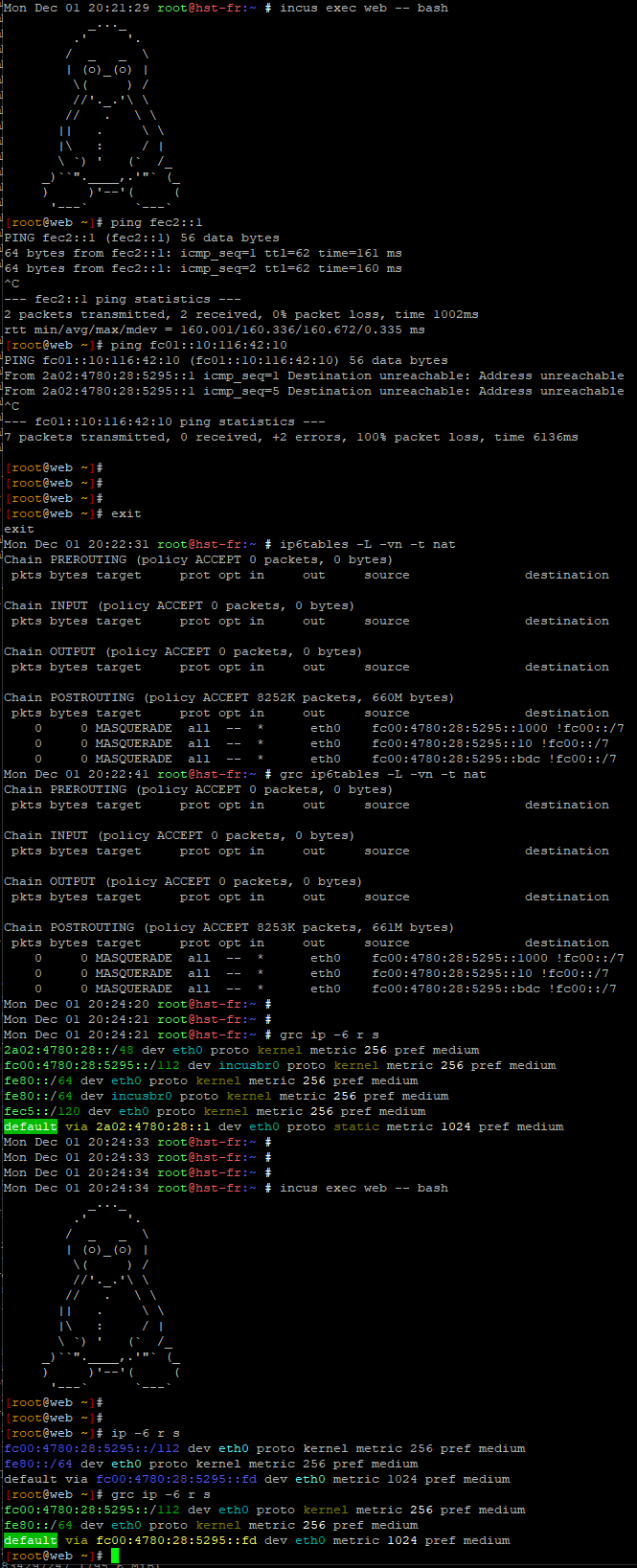
I activated RADvD for container’s “incusbr0” …

However, I can’t seem to use my “-t nat MASQUERADE” rules.

I don’t understand where the POSTROUTING rules are being processed.

CF : Chain POSTROUTING (policy ACCEPT 12049 packets, 964K bytes)
# Accept Forward between containers and the internet
# For Incus
ip6tables -A FORWARD -i incusbr0  -o eth0 -j ACCEPT
ip6tables -A FORWARD -o incusbr0  -i eth0 -j ACCEPT
# For LXC
ip6tables -A FORWARD -i lxcbr0 -o eth0 -j ACCEPT
ip6tables -A FORWARD -o lxcbr0 -i eth0 -j ACCEPT

# Accept Forward between containers types
ip6tables -A FORWARD -i incusbr0 -o lxcbr0 -j ACCEPT

# POSTROUTING by default except for destinations on the ULA network
# NAT / 1x IPv6::/128
ip6tables -t nat -A POSTROUTING -o eth0 -s fc00:4780:28:5295::10 ! -d fc00::/7 -j MASQUERADE
ip6tables -t nat -A POSTROUTING -o eth0 -s fc00::10:0:3:10 ! -d fc00::/7 -j MASQUERADE

# The SLA IPv6 addresses "fec0::/10" are in "inbound" and "outbound" and in "forward" between the secure sites and in "forwarding" with the ULA addresses "fc00::/7" connected to the sites.
# The LLU IPv6 addresses "fe80::/10" are used for "inbound" and "outbound" requests, as well as for "forwarding" between local machines with ULA addresses "fc00::/7" connected to the host. They are used for requests between the router and client machines.

We are doing address translation - between a “public” network and a “private” network ; NAT is only used for this.

It is “local” to the “stateful” machine ; and, therefore, no state declaration is necessary.

root@hst-fr:/usr/src/linux # ip6tables -L FORWARD -vn
Chain FORWARD (policy DROP 0 packets, 0 bytes)
 pkts bytes target     prot opt in     out     source               destination
[...]
    0     0 ACCEPT     all  --  incusbr0 lxcbr0  ::/0                 ::/0
    0     0 ACCEPT     all  --  incusbr0 lxcbr0  ::/0                 ::/0
  106 21304 ACCEPT     all  --  incusbr0 eth0    ::/0                 ::/0
   98 21003 ACCEPT     all  --  eth0   incusbr0  ::/0                 ::/0
    0     0 ACCEPT     all  --  lxcbr0 eth0    ::/0                 ::/0
    0     0 ACCEPT     all  --  eth0   lxcbr0  ::/0                 ::/0
[...]
    0     0 LOG        all  --  *      *       ::/0                 ::/0                 LOG flags 0 level 4 prefix "FORWARD-v6:"
    0     0 DROP       all  --  *      *       ::/0                 ::/0                 rt type:0
root@hst-fr:~ # ip6tables -L -vn -t nat
Chain PREROUTING (policy ACCEPT 0 packets, 0 bytes)
 pkts bytes target     prot opt in     out     source               destination

Chain INPUT (policy ACCEPT 0 packets, 0 bytes)
 pkts bytes target     prot opt in     out     source               destination

Chain OUTPUT (policy ACCEPT 0 packets, 0 bytes)
 pkts bytes target     prot opt in     out     source               destination

Chain POSTROUTING (policy ACCEPT 12049 packets, 964K bytes)
 pkts bytes target     prot opt in     out     source               destination
    0     0 MASQUERADE  all  --  *      eth0    fc00:4780:28:5295::10 !fc00::/7
    0     0 MASQUERADE  all  --  *      eth0    fc00::10:0:3:10     !fc00::/7

On my other servers; VPS and such - there are no packets or bytes in the ACCEPT policy of POSTROUTING !

Example of LXC Bind9 service on my VPS-DE:

root@vps-de:~ # ip6tables -L -vn -t nat
Chain PREROUTING (policy ACCEPT 0 packets, 0 bytes)
 pkts bytes target     prot opt in     out     source               destination
 3939  294K DNAT       tcp      *      *       ::/0                 2001:41d0:701:1100::6530  tcp dpt:53 to:[fc00:41d0:701:1100::1]:53
1257K  114M DNAT       udp      *      *       ::/0                 2001:41d0:701:1100::6530  udp dpt:53 to:[fc00:41d0:701:1100::1]:53

Chain INPUT (policy ACCEPT 0 packets, 0 bytes)
 pkts bytes target     prot opt in     out     source               destination

Chain OUTPUT (policy ACCEPT 0 packets, 0 bytes)
 pkts bytes target     prot opt in     out     source               destination

Chain POSTROUTING (policy ACCEPT 0 packets, 0 bytes)
 pkts bytes target     prot opt in     out     source               destination
 773K   86M MASQUERADE  all      *      vmbr0   fc00:41d0:701:1100::1 !fc00::/7

However ; I don’t really know why, but I can’t/no longer get "rsync to work.

Example :

root@hst-fr.wb1:/ # rsync --version
rsync  version 3.4.1  protocol version 32

root@srv-ca.lb1.ww1:~ # rsync --version
rsync  version 3.1.3  protocol version 31
root@hst-fr.wb1:/ # rsync --protocol=31 -av -e "ssh -6" [fc00:5300:60:9389:15:1:a:10]:/root/test/ /tmp/test/
** WARNING: connection is not using a post-quantum key exchange algorithm.
** This session may be vulnerable to "store now, decrypt later" attacks.
** The server may need to be upgraded. See https://openssh.com/pq.html

protocol version mismatch -- is your shell clean?
(see the rsync manpage for an explanation)
rsync error: protocol incompatibility (code 2) at compat.c(622) [Receiver=3.4.1]
** WARNING: connection is not using a post-quantum key exchange algorithm.
** This session may be vulnerable to "store now, decrypt later" attacks.
** The server may need to be upgraded. See https://openssh.com/pq.html
** PRETTY_NAME="Debian GNU/Linux forky/sid"

OpenSSH supports a number of cryptographic key agreement algorithms considered to be safe against attacks from quantum computers. We recommend that all SSH connections use these algorithms.

OpenSSH has offered post-quantum key agreement (KexAlgorithms) by default since release 9.0 (April 2022), initially via the “sntrup761x25519-sha512” algorithm. More recently, in OpenSSH 9.9, we have added a second post-quantum key agreement “mlkem768x25519-sha256” and it was made the new default scheme in OpenSSH 10.0 (April 2025).
Source : OpenSSH: Post-Quantum Cryptography

See you later.


I adding :

I just performed a single ping (-6) from my LXC “wb1” to internet.nl, and therefore :

root@hst-fr:/usr/src/linux # ip6tables -L FORWARD -vn
Chain FORWARD (policy DROP 0 packets, 0 bytes)
 pkts bytes target     prot opt in     out     source               destination
   34  3536 aICMPs     ipv6-icmp --  *      *       ::/0                 ::/0
    0     0 ACCEPT     all  --  lo     *       ::/0                 ::/0
    0     0 ACCEPT     all  --  *      lo      ::/0                 ::/0
    0     0 ACCEPT     all  --  incusbr0 lxcbr0  ::/0                 ::/0
    0     0 ACCEPT     all  --  incusbr0 lxcbr0  ::/0                 ::/0
  106 21304 ACCEPT     all  --  incusbr0 eth0    ::/0                 ::/0
   98 21003 ACCEPT     all  --  eth0   incusbr0  ::/0                 ::/0
# The FORWARD filter between the two cards
  141 25454 ACCEPT     all  --  lxcbr0 eth0    ::/0                 ::/0
  126 26252 ACCEPT     all  --  eth0   lxcbr0  ::/0                 ::/0
 root@hst-fr:/usr/src/linux # ip6tables -L -vn -t nat
Chain PREROUTING (policy ACCEPT 0 packets, 0 bytes)
 pkts bytes target     prot opt in     out     source               destination

Chain INPUT (policy ACCEPT 0 packets, 0 bytes)
 pkts bytes target     prot opt in     out     source               destination

Chain OUTPUT (policy ACCEPT 0 packets, 0 bytes)
 pkts bytes target     prot opt in     out     source               destination

Chain POSTROUTING (policy ACCEPT 32145 packets, 2573K bytes)
 pkts bytes target     prot opt in     out     source               destination
# The "Post Routing" route last to "out eth0" of the INCUS container...
    0     0 MASQUERADE  all  --  *      eth0    fc00:4780:28:5295::10 !fc00::/7
# The "Post Routing" route last to "out eth0" of the LXC container "fc00::10:0:3:10" to use the IPv6 GUA address of "eth0" to go to the Internet. In this case, "2a02:4780:28:5295::1"
    1   104 MASQUERADE  all  --  *      eth0    fc00::10:0:3:10     !fc00::/7

Resume for “1x ping -6 -c4 internet.nl” from LXC “wb1” IPv6 ULA “fc00::10:0:3:10” lenght “::/112”:

# The FORWARD filter between the two cards
  141 25454 ACCEPT     all  --  lxcbr0 eth0    ::/0                 ::/0
  126 26252 ACCEPT     all  --  eth0   lxcbr0  ::/0                 ::/0

# The "Post Routing" route last to "out eth0" of the LXC container "fc00::10:0:3:10" to use the IPv6 GUA address of "eth0" to go to the Internet. In this case, "2a02:4780:28:5295::1"
    1   104 MASQUERADE  all  --  *      eth0    fc00::10:0:3:10     !fc00::/7

:wink:


By the way, I currently have my IPv6 firewall (and ICMPv6 LLU) open for ULA addresses.

I will give you my IPv6/ICMPv6 firewall for this machine (which I will store in the / infos / directory) when I am satisfied.

Here are the rules :

IPv6 LLU requests ; local links are accepted.

#####
# We set the rules for IPv6 addresses
#####

function ipv6_link_local()
{
        echo "   |";
        echo "   + IPv6 - Addrs Link-Local Unicast -----------------------";

        # Allow Link-Local addresses
        # network range : fe80:0000:0000:0000:0000:0000:0000:0000-febf:ffff:ffff:ffff:ffff:ffff:ffff:ffff

        echo "   |\\";
        ip6tables -A INPUT -s fe80::/10 -j ACCEPT
        ip6tables  -A FORWARD -s fe80::/10 -d fe80::/10 -j ACCEPT
        ip6tables  -A FORWARD -d fe80::/10 -s fe80::/10 -j ACCEPT
        ip6tables  -A OUTPUT -d fe80::/10 -j ACCEPT
        echo "   | +--> "fe80::/10 : ACCEPT;
        echo "   | |";
        echo "   | "+ IPv6 - Addrs Link-Local : [OK]

}

Open multicast :

function ipv6_multicast()
{
        echo "   |";
        echo "   + IPv6 - Addrs Multicast -----------------------";

        # Allow multicast
        # network range : ff00:0000:0000:0000:0000:0000:0000:0000-ffff:ffff:ffff:ffff:ffff:ffff:ffff:ffff

        echo "   |\\";
        ip6tables -A INPUT -d ff00::/8 -j ACCEPT
        ip6tables -A FORWARD -s ff00::/8 -d ff00::/8 -j ACCEPT
        ip6tables -A FORWARD -d ff00::/8 -s ff00::/8 -j ACCEPT
        ip6tables -A OUTPUT -d ff00::/8 -j ACCEPT
        echo "   | +--> "ff00::/8 : ACCEPT;
        echo "   | |";
        echo "   |" + IPv6 - Addrs Multicast : [OK]
}

All ULA addresses accepted ; To be closed :wink:

function ipv6_ula()
{
        echo "   |";
        echo "   + IPv6 - Addrs Unique Locale Area -----------------------";

        # Allow Link-Local addresses
        # network range : fe80:0000:0000:0000:0000:0000:0000:0000-febf:ffff:ffff:ffff:ffff:ffff:ffff:ffff

        echo "   |\\";
        ip6tables -A INPUT -s fc00::/7 -j ACCEPT
        ip6tables -A FORWARD -s fc00::/7 -d fc00::/7 -j ACCEPT
        ip6tables -A FORWARD -d fc00::/7 -s fc00::/7 -j ACCEPT
        ip6tables -A OUTPUT -d fc00::/7 -j ACCEPT
        echo "   | +--> "fc00::/7 : ACCEPT;
        echo "   | |";
        echo "   |" + IPv6 - Addrs Unique Locale Area : [OK]

}
#####
# We set the rules for secure IPv6 addresses (VPN/strongSwan)
#####

function ipv6_strongswan()
{
        # Default ------------------
        echo "   |";
        echo "   + IPv6 - Addrs Site-Local Secure Area Network -------------------------";

        # Allow  Secure Area Network addresses
        # network range : fec0:0000:0000:0000:0000:0000:0000:0000-feff:ffff:ffff:ffff:ffff:ffff:ffff:ffff

        echo "   |\\";
        ip6tables -A INPUT -s fec0::/10 -j ACCEPT
        ip6tables -A FORWARD -s fec0::/10 -d fec0::/10 -j ACCEPT
        ip6tables -A FORWARD -d fec0::/10 -s fec0::/10 -j ACCEPT
        ip6tables -A OUTPUT -d fec0::/10 -j ACCEPT
        echo "   | +--> "fec0::/10 : ACCEPT;
        echo "   | |";
        echo "   | "+ IPv6 - Addrs Secure Area Network : [OK]

        # Add ------------------

        echo "   |";
        # Allow  Forwarding SLAN (fec0::/10) <> ULA (fc00::/7)
        # network range : fc00:0000:0000:0000:0000:0000:0000:0000-fdff:ffff:ffff:ffff:ffff:ffff:ffff:ffff

        echo "   + IPv6 - Forwarding Addrs SWAN 2 ULA Networks -------------------------";
        echo "   |\\";
        ip6tables -A FORWARD -s fec0::/10 -d fc00::/7 -j ACCEPT
        ip6tables -A FORWARD -d fec0::/10 -s fc00::/7 -j ACCEPT
        echo "   | +--> fec0::/10 <←> fc00::/7 : ACCEPT";
        echo "   | |";
        echo "   | "+ IPv6 - Forwarding Addrs SWAN 2 ULA Networks : [OK]
        echo "   |";

}

And; I’m adding a Chain “aICMPs” to analyze all types of ICMPv6 packets :

#####
# Stéphane Huc's script
#####

function icmpv6_huc()
{
        # Allow dedicated  ICMPv6 packettypes, do this in an extra chain because we need it everywhere
        iptables -N aICMPs
        # Destination unreachable
        iptables -A aICMPs -p icmpv6 --icmpv6-type 1 -j ACCEPT # destination-unreachable; Must Not Be Dropped
        # Packet too big
        iptables -A aICMPs -p icmpv6 --icmpv6-type 2/0 -j ACCEPT # packet too big; Must Not Be Dropped
        # Time exceeded
        iptables -A aICMPs -p icmpv6 --icmpv6-type 3/0 -j ACCEPT # time exceeded
        iptables -A aICMPs -p icmpv6 --icmpv6-type 3/1 -j ACCEPT # time exceeded
        # Parameter problem
        iptables -A aICMPs -p icmpv6 --icmpv6-type 4/0 -j ACCEPT # parameter pb: Erroneous header field encountered
        iptables -A aICMPs -p icmpv6 --icmpv6-type 4/1 -j ACCEPT # parameter pb: Unrecognized Next Header Type encountered
        iptables -A aICMPs -p icmpv6 --icmpv6-type 4/2 -j ACCEPT # parameter pb: Unrecognized IPv6 option encountered

        # Echo Request (protect against flood)
#       iptables -I aICMPs -p icmpv6 --icmpv6-type 128/0 -m hashlimit --hashlimit-name ICMP --hashlimit-above 1/second --hashlimit-burst 1 --hashlimit-mode srcip --hashlimit-srcmask 128 -j DROP
        iptables -A aICMPs -p icmpv6 --icmpv6-type 128/0 -j ACCEPT
#        iptables -A aICMPs -p icmpv6 --icmpv6-type 128/0 -m limit --limit 1/sec --limit-burst 1 -j ACCEPT # ping tool: echo request message
        # Echo Reply
#        iptables -A aICMPs -p icmpv6 --icmpv6-type 129/0 -m limit --limit 1/sec --limit-burst 1 -j ACCEPT # ping tool: echo reply message
        iptables -A aICMPs -p icmpv6 --icmpv6-type 129/0 -j ACCEPT
        echo "   "+ ICMPV6 - DEFAULT : [OK]

        # link-local multicast receive notification mssg (need link-local src address, with hop-limit: 1)
        iptables -A aICMPs -p icmpv6 --icmpv6-type 130/0 -s fe80::/64 -m conntrack --ctstate NEW -m hl --hl-eq 1 -j ACCEPT
        iptables -A aICMPs -p icmpv6 --icmpv6-type 131/0 -s fe80::/64 -m conntrack --ctstate NEW -m hl --hl-eq 1 -j ACCEPT
        iptables -A aICMPs -p icmpv6 --icmpv6-type 132/0 -s fe80::/64 -m conntrack --ctstate NEW -m hl --hl-eq 1 -j ACCEPT
        echo "   "+ ICMPV6 - LINK-LOCAL : [OK]

        # address configuration and routeur selection mssg (received with hop limit = 255)
        iptables -A aICMPs -p icmpv6 --icmpv6-type 133/0 -m hl --hl-eq 255 -j ACCEPT # Router Solicitation
        iptables -A aICMPs -p icmpv6 --icmpv6-type 134/0 -s fe80::/64 -m hl --hl-eq 255 -j ACCEPT # Router Advertisement
        iptables -A aICMPs -p icmpv6 --icmpv6-type 135/0 -m hl --hl-eq 255 -j ACCEPT # Neighbor Solicitation
        iptables -A aICMPs -p icmpv6 --icmpv6-type 136/0 -m hl --hl-eq 255 -j ACCEPT # Neighbor Advertisement

        iptables -A aICMPs -p icmpv6 --icmpv6-type 137/0 -j DROP # Redirect Message
        iptables -A aICMPs -p icmpv6 --icmpv6-type 138/0 -j DROP # Router Renumbering (Rechargement du routeur)

        iptables -A aICMPs -p icmpv6 --icmpv6-type 139/0 -j DROP # ICMP Node Information Query
        iptables -A aICMPs -p icmpv6 --icmpv6-type 140/0 -j DROP # ICMP Node Information Response

        iptables -A aICMPs -p icmpv6 --icmpv6-type 141/0 -d ff02::1 -m hl --hl-eq 255 -j ACCEPT # Inverse Neighbor Discovery Solicitation Message
        iptables -A aICMPs -p icmpv6 --icmpv6-type 142/0 -m hl --hl-eq 255 -j ACCEPT # Inverse Neighbor Discovery Advertisement Message
        echo "   "+ ICMPV6 - ADD CONF '&' ROUTEUR SELECTION : [OK]

        # link-local multicast receive notification mssg (need link-local src address, with hop-limit: 1)
        iptables -A aICMPs -p icmpv6 --icmpv6-type 143 -s fe80::/64 -m conntrack --ctstate NEW -m hl --hl-eq 1 -j ACCEPT
        # needed for mobylity
        iptables -A aICMPs -p icmpv6 --icmpv6-type 144/0 -j DROP
        iptables -A aICMPs -p icmpv6 --icmpv6-type 145/0 -j DROP
        iptables -A aICMPs -p icmpv6 --icmpv6-type 146/0 -j DROP
        iptables -A aICMPs -p icmpv6 --icmpv6-type 147 -j DROP
        # SEND certificate path notification mssg (received with hop limit = 255)
        iptables -A aICMPs -p icmpv6 --icmpv6-type 148 -m hl --hl-eq 255 -j ACCEPT # Certification Path Solicitation Message
        iptables -A aICMPs -p icmpv6 --icmpv6-type 149 -m hl --hl-eq 255 -j ACCEPT # Certification Path Advertisement Message
        # multicast routeur discovery mssg (need link-local src address and hop limit = 1)
        iptables -A aICMPs -p icmpv6 --icmpv6-type 151 -s fe80::/64 -m conntrack --ctstate NEW -m hl --hl-eq 1 -j ACCEPT
        iptables -A aICMPs -p icmpv6 --icmpv6-type 152 -s fe80::/64 -m conntrack --ctstate NEW -m hl --hl-eq 1 -j ACCEPT
        iptables -A aICMPs -p icmpv6 --icmpv6-type 153 -s fe80::/64 -m conntrack --ctstate NEW -m hl --hl-eq 1 -j ACCEPT
        echo "   "+ ICMPV6 - MULTICAST ROUTEUR DISCOVERY : [OK]
        #
        iptables -A aICMPs -p icmpv6 --icmpv6-type 200 -j DROP # private experimentation
        iptables -A aICMPs -p icmpv6 --icmpv6-type 201 -j DROP # private experimentation
        iptables -A aICMPs -p icmpv6 --icmpv6-type 255 -j DROP # expansion error messages ICMPv6
        echo "   "+ ICMPV6 - EXPERIMENTATION : [OK]

        #
        # Only the ROUTEUR is allowed to ping us (read FAQ this is a requirement)

#        iptables -A INPUT -p icmpv6 -m limit --limit 5/s --limit-burst 4 -j aICMPs
#        iptables -A OUTPUT -m state ! --state INVALID -j aICMPs
#       iptables -A FORWARD -p icmpv6 -j ACCEPT


        iptables -I INPUT -p icmpv6 -j aICMPs
        iptables -I FORWARD -p icmpv6 -j aICMPs
        iptables -I OUTPUT -p icmpv6 -j aICMPs

        echo "   "+ ICMPV6 - INLIMIT + OUTPUT : [OK]
}
####
# Stéphane Bortzmeyer's rule: DROP ICMP LIMIT 1/sec per IPv6::/128
# To be sent after the aICMPv6 string (so that it is above -I)
####

function icmpv6_limit()
{

        ip6tables -I INPUT -p icmpv6 --icmpv6-type echo-request \
                -m hashlimit --hashlimit-name ICMP \
                --hashlimit-above 1/second --hashlimit-burst 1 \
                --hashlimit-mode srcip \
                --hashlimit-srcmask 128 -j DROP

        echo "   "+ ICMPV6 - LIMIT 1/second DROP : [OK]
}
#####
#  Accept return requests sent from this machine
#####

function generique()
{
        # Allow established, related packets back in
        ip6tables -A INPUT  -m state --state ESTABLISHED,RELATED -j ACCEPT
        ip6tables -A OUTPUT -j ACCEPT

        echo "   "+ GENERIQUE : [OK]
}
function synflood()
{
        ## SYN-FLOODING PROTECTION
        ip6tables -N Syn-FLOOD
        # tcp flags:0x17/0x02
        ip6tables -A INPUT -i eth0 -p tcp --syn -j Syn-FLOOD
        ip6tables -A Syn-FLOOD -m limit --limit 1/s --limit-burst 4 -j RETURN
        ip6tables -A Syn-FLOOD -j DROP
        ## Make sure NEW tcp connections are SYN packets
        # tcp flags:!0x17/0x02 state NEW
        ip6tables  -I INPUT -i eth0 -p tcp ! --syn -m state --state NEW -j DROP
        ########

        ########
        ip6tables -A INPUT -p tcp --tcp-flags ALL ALL -j DROP
        ip6tables -A INPUT -p tcp --tcp-flags ALL NONE -j DROP
        ########

        echo "   "+ SYNFLOOD PROTECTION : [OK]
}
#####
# We accept everything from and for "lo" local
#####

function loopback()
{
        ip6tables -A INPUT  -i lo -j ACCEPT
        ip6tables -A FORWARD  -i lo -j ACCEPT
        ip6tables -A FORWARD  -o lo -j ACCEPT
        ip6tables -A OUTPUT -o lo -j ACCEPT

        echo "   "+ LOOPBACK : [OK]
}
#####
# We set the general rules (DROP||ACCEPT)
#####

function policy()
{
        ip6tables -P INPUT $1
        ip6tables -P FORWARD $1
        ip6tables -P OUTPUT $1

        echo "   "+ POLICY $1 : [OK]
}

function policy_rt()
{
        # Filter all packets that have RH0 headers:
        ip6tables -A INPUT -m rt --rt-type 0 -j $1
        ip6tables -A FORWARD -m rt --rt-type 0 -j $1
        ip6tables -A OUTPUT -m rt --rt-type 0 -j $1

        echo "   "+ POLICY RT $1 : [OK]
}

A complete example : :france: How to build an IPv6 network? Firewall ICMPv6
And :france: Configure a Linux workstation and a router with IPv4 to browse the internet

For the “pretty face” attitude.

International Volunteer Day December 5 :wink:

Good day :slight_smile:

I would look into this first as “clue” for the failing rsync.

rsync requires a somewhat “clean” SSH connection. You can check for this by doing something like

ssh -6 root@whatever 'echo ok'

This should come back without fancy output (alternative as manpages suggest ssh remotehost /bin/true > out.dat and look into out.dat ).

The quantum security message is probably irrelevant for this problem - as far as I recall it is from your client to stderr so should not confuse rsync.

( just for completeness: there seems to be a new option -o WarnWeakCrypto=no-pq-kex (or simply no) in openssh 10.1 onward - see [oss-security] Announce: OpenSSH 10.1 released [LWN.net] - never tried that )

1 Like

Hello,

Thanks, @alangeb !


I created a page using RRD (Robin Round Database) to track ping latency between the IPv4 addresses of my servers.

It’s located in the “./infos/” directory of the servers.

For example, here’s the view (web page) from my gateway in France: RRD - Graphs Latency :-: GATE.🇫🇷.◕‿◕.ST

@ST.◕‿◕.:france:

Connection on ASN 47583 Hostinger in Paris (FR), France (UTC+1).

Latency IPv4 @ST.◕‿◕.:france:.HST (147.79.115.130) to @ST.◕‿◕.:canada:.SRV (158.69.126.137)

Latency IPv6 SLA @ST.◕‿◕.:france:.HST.:first_quarter_moon: (fec5::1) to @ST.◕‿◕.:canada:.SRV.:swan: (fec0::1)

@ST.◕‿◕.:canada:

Connection on ASN 16276 OVHCloud in Montreal (CA), Canada (UTC-5).


I ping from my servers to the Canadian server : “ping -q -n -c 3 158.69.126.137” every minute.

The tutorial is here : RRDtool tutorial, graphs and examples @ Calomel.org


In addition to the MRTG graphs : MRTG :-: GATE.🇫🇷.◕‿◕.ST

Regards,
O.Romain.Jaillet-ramey (LAB3W.ORJ)


If you’re on the line, set up this script to find out where packet loss is occurring. Please connect it between your network and someone else’s to analyze the network. :wink: