Hello,
How can I preroute the data from the “raw” table to the “nat” table ?
Local host recipient (your own machine) : Table “-t raw -P PREROUTING”
This chain is normally used to modify packets, i.e., change the TOS bits, etc.
Local source host (your own machine) : Table “-t raw -P OUTPUT”
This is where connection tracing takes place for locally generated packets. You can mark connections so they are not traced, for example.
root@hst-fr:~ # iptables -L -vn -t raw
Chain PREROUTING (policy DROP 3 packets, 156 bytes)
 pkts bytes target     prot opt in     out     source               destination

Chain OUTPUT (policy DROP 0 packets, 0 bytes)
 pkts bytes target     prot opt in     out     source               destination
Above are the packets that pass through the “raw” table ;
We will therefore need to configure a “strong firewall” with “connection tracing”, or more commonly known as a “stateful firewall”.
Connection tracing is performed so that the Netfilter architecture can know the state of a specific connection. Firewalls that implement this are usually called stateful firewalls. A stateful firewall is generally much more secure than a stateless firewall, since it enforces stricter rules.
root@hst-fr:~ # iptables -L -vn -t mangle
Chain PREROUTING (policy ACCEPT 0 packets, 0 bytes)
 pkts bytes target     prot opt in     out     source               destination

Chain INPUT (policy ACCEPT 0 packets, 0 bytes)
 pkts bytes target     prot opt in     out     source               destination

Chain FORWARD (policy ACCEPT 0 packets, 0 bytes)
 pkts bytes target     prot opt in     out     source               destination

Chain OUTPUT (policy ACCEPT 0 packets, 0 bytes)
 pkts bytes target     prot opt in     out     source               destination

Chain POSTROUTING (policy ACCEPT 0 packets, 0 bytes)
 pkts bytes target     prot opt in     out     source               destination
root@hst-fr:~ # iptables -L -vn -t nat
Chain PREROUTING (policy ACCEPT 0 packets, 0 bytes)
 pkts bytes target     prot opt in     out     source               destination

Chain INPUT (policy ACCEPT 0 packets, 0 bytes)
 pkts bytes target     prot opt in     out     source               destination

Chain OUTPUT (policy ACCEPT 0 packets, 0 bytes)
 pkts bytes target     prot opt in     out     source               destination

Chain POSTROUTING (policy ACCEPT 0 packets, 0 bytes)
 pkts bytes target     prot opt in     out     source               destination
    0     0 MASQUERADE  all  --  *      eth0    10.175.0.1           0.0.0.0/0
    0     0 MASQUERADE  all  --  *      eth0    10.175.0.2           0.0.0.0/0
    0     0 MASQUERADE  all  --  *      eth0    10.175.0.10          0.0.0.0/0
Above are the packets in my configuration for using the “nat” table to be able to browse from hidden machines on my network.
For now, it’s not working as usual—the packets are getting stuck.
I can browse the internet, but I don’t know how 
# Firewall start (all closed)

# iptables -P INPUT DROP
# iptables -P FORWARD DROP
# iptables -P OUTPUT DROP

# Firewall stop (all open)

# iptables -P INPUT ACCEPT
# iptables -P FORWARD ACCEPT
# iptables -P OUTPUT ACCEPT

# Status reset

# iptables  -F
# iptables  -t raw -F
# iptables  -t mangle -F
# iptables  -t nat -F
# iptables  -Z
# iptables  -t raw -Z
# iptables  -t mangle -Z
# iptables  -t nat -Z
# iptables  -X
# iptables  -t raw -X
# iptables  -t mangle -X
# iptables  -t nat -X

# Example of blocking traffic to a specific destination from the local machine
# iptables -t raw -P PREROUTING DROP
# iptables -t raw -P OUTPUT DROP
Note : J.5. Exemple rc.flush-iptables script
 !netdoc.net - Chapter 6. Traversing Tables and Chains
This chapter describes how packets traverse the various chains, and in what order. It also explains the order in which tables are traversed. You will understand the importance of this later when writing your own rules. Other points will be examined, related to kernel-dependent elements, as they are also relevant to this chapter. Among other things, the different routing decisions will be covered. This is particularly useful if you want to write iptables rules that can modify packet routing instructions/rules, i.e., why and how packets are routed; DNAT and SNAT are characteristic examples. Of course, the TOS bits must not be forgotten.
6.1. General Information
When a packet first arrives at a firewall, it encounters the hardware layer and is then picked up by the appropriate device driver within the kernel. Next, the packet goes through a series of steps in the kernel before being sent to the correct application (locally), or forwarded to another host—or whatever else.
First, let’s analyze a packet destined for the local machine. It goes through the following steps before actually being delivered to the receiving application:
Table 6.1. Local recipient host (your own machine)
| Step | Table | String | Comment |
|---|---|---|---|
| 1 | On cable (e.g., Internet) | ||
| 2 | Arrives at the interface (e.g., eth0) | ||
| 3 | raw | PREROUTING | This string is normally used to modify packets, i.e., change the bits of TOS, etc. |
| 4 | During connection code checks as described in the chapter The State Machine. | ||
| 5 | mangle | PREROUTING | String primarily used to modify packets, i.e., changing TOS, etc. |
| 6 | nat | PREROUTING | This string is mainly used for DNAT. Avoid filtering in this string as it is bypassed in some cases. |
| 7 | Routing decision, i.e., is the packet destined for our local host, should it be forwarded, and where? | ||
| 8 | mangle | INPUT | Here, it reaches the INPUT string in the mangle table. This string allows modification of packets after routing, but before they are actually sent to the machine’s process. |
| 9 | filter | INPUT | This is where incoming traffic to the local machine is filtered. Note that all incoming packets destined for your host pass through this chain, regardless of their interface or origin. |
| 10 | Local process/application (i.e. client/server program) |
Notice that this time, the packet is transmitted through the INPUT chain instead of the FORWARD chain. This makes perfect sense. And it’s probably the only thing that makes sense to you in traversing the tables and chains right now, but if you keep thinking about it, you’ll find it increasingly clear.
Now, let’s analyze the packets leaving our local host and the steps they go through.
Table 6.2. Local Source Host (your own machine)
| Step | Table | String | Comment |
|---|---|---|---|
| 1 | Local process/application (i.e., client/server program) | ||
| 2 | Routing decision. Which source address should be used, which outgoing interface, and other necessary information that must be gathered. | ||
| 3 | raw | OUTPUT | This is where connection tracing takes place for locally generated packets. You can mark connections so that they are not traced, for example. |
| 4 | This is where connection tracing takes place for locally generated packets, for example, state changes, etc. See the chapter The State Machine for more information. | ||
| 5 | mangle | OUTPUT | This is where the packets are modified. It is advisable not to filter in this chain, due to some side effects. |
| 6 | nat | OUTPUT | This chain allows NAT to be performed on packets leaving the firewall. |
| 7 | Routing decision, how previous mangle and NAT changes may have altered the way packets will be routed. | ||
| 8 | filter | OUTPUT | This is where packets leave the local host. |
| 9 | mangle | POSTROUTING | The POSTROUTING string in the mangle table is primarily used when you want to modify packets before they leave the machine but after routing decisions have been made. This string is encountered both by packets that are only passing through the firewall and by packets created by the firewall itself. |
| 10 | nat | POSTROUTING | This is where SNAT is performed. It is advisable not to filter at this point due to side effects; some packets may slip through even if a default behavior has been defined for the DROP target. |
| 11 | Exits via a specific interface (e.g., eth0) | ||
| 12 | On cable (e.g., Internet) |
In this example, we assume the packet is destined for another host on a different network. The packet goes through the different stages as follows:
Table 6.3. Redirected Packets
| Step | Table | String | Comment |
|---|---|---|---|
| 1 | On cable (e.g., Internet) | ||
| 2 | Arrives at the interface (e.g., eth0) | ||
| 3 | raw | PREROUTING | Here you can place a connection that will not be interpreted by the connection tracing system. |
| 4 | This is where non-locally generated connection tracing takes place; we will see this in the chapter The State Machine. | ||
| 5 | mangle | PREROUTING | This string is typically used to modify packets, i.e., change the bits of TOS, etc. |
| 6 | nat | PREROUTING | This chain is primarily used for DNAT. SNAT is performed further down the chain. Avoid filtering within this chain as it may be bypassed in some cases. |
| 7 | Routing decision, i.e., is the packet destined for your local host, should it be redirected, and where? | ||
| 8 | mangle | FORWARD | The packet is then sent to the FORWARD chain in the mangle table. This is useful for very specific needs, when you want to modify packets after the initial routing decision, but before the final routing decision made just before the packet is sent. |
| 9 | filter | FORWARD | The packet is routed to the FORWARD chain. Only forwarded packets arrive here, and this is also where all filtering is performed. Note that all redirected traffic passes through here (and not just in one direction), so you must consider this when writing your rules. |
| 10 | mangle | POSTROUTING | This string is used for special forms of packet modification, which are to be applied after all routing decisions have been made, but always on this machine. |
| 11 | nat | POSTROUTING | This chain is used primarily for SNAT. Avoid filtering here, as some packets may pass through this chain unchecked. This is also where masquerading (address masking) is performed. |
| 12 | Exits via the output interface (e.g., eth1). | ||
| 13 | Out again via cable (e.g., LAN). |
As you can see, there are many steps involved. A packet can be stopped in any iptables chain, and even elsewhere if it’s malformed. However, it’s worth examining the fate of the packet as seen by iptables. Note that no specific chain or table is defined for different interfaces, or anything similar. The FORWARD chain is always traversed by packets that are redirected through this firewall/router.
[!IMPORTANT]
Do not use theINPUTstring for filtering in the previous scenario!INPUTonly makes sense for packets destined for your local host, in other words, packets that will not be routed to any other destination.
Now you have discovered how the different chains are traversed according to three distinct scenarios. We can provide a graphical representation of this :
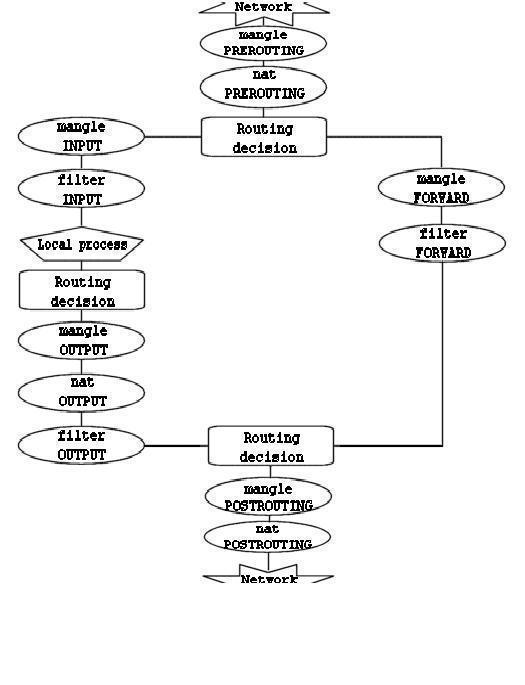
To be clearer, this diagram requires some explanation. If a packet reaching the first routing decision is not destined for the local machine, it will be directed to the
FORWARD chain. Conversely, if it is destined for an IP address that the machine is listening on, this packet will be sent to the INPUT chain, and therefore to the local machine.
It is important to note that even if packets are destined for the local machine, their destination address can be modified within the PREROUTING chain by a NAT operation. This is because, since this occurs before the first routing decision, the packet will only be examined after a potential change. Due to this characteristic, the routing can be altered before the routing decision is made. Note that all packets will transit through one of the paths shown in this diagram. If you perform DNAT on a packet to send it back to its originating network, it will still continue its journey through the remaining chains until it returns to the external network.
[!NOTE]
If you feel you need more information, you can use the script rc.test-iptables.txt. This test script should provide you with sufficient rules to experiment and understand how tables and chains are traversed.
Thanks !netdoc !ncus !-!ostinger
DataHacker.blog : iptables Process Flow: Chains, Tables, and Rules > iptables Chains and Extensions > iptables Commands
I shared all this with you because :
I installed “Generic Colouriser” the warper “grc” to have more visible colors with Debian GNU/Linux 13 (trixie).
root@hst-fr:~ # grc ip address show
1: lo: <LOOPBACK,UP,LOWER_UP> mtu 65536 qdisc noqueue state UNKNOWN group default qlen 1000
    link/loopback 00:00:00:00:00:00 brd 00:00:00:00:00:00
    inet 127.0.0.1/8 scope host lo
       valid_lft forever preferred_lft forever
    inet6 ::1/128 scope host noprefixroute
       valid_lft forever preferred_lft forever
2: eth0: <BROADCAST,MULTICAST,UP,LOWER_UP> mtu 1500 qdisc mq state UP group default qlen 1000
    link/ether a4:e8:d4:b5:94:55 brd ff:ff:ff:ff:ff:ff
    altname enp0s18
    altname enxa4e8d4b59455
    inet 147.79.115.130/24 brd 147.79.115.255 scope global eth0
       valid_lft forever preferred_lft forever
    inet6 2a02:4780:28:5295::1/48 scope global
       valid_lft forever preferred_lft forever
    inet6 fec5::1/120 scope site
       valid_lft forever preferred_lft forever
    inet6 fe80::a6e8:d4ff:feb5:9455/64 scope link proto kernel_ll
       valid_lft forever preferred_lft forever
5: incusbr0: <BROADCAST,MULTICAST,UP,LOWER_UP> mtu 1500 qdisc noqueue state UP group default qlen 1000
    link/ether 10:66:6a:56:26:85 brd ff:ff:ff:ff:ff:ff
    inet 10.175.0.254/24 brd 10.175.0.255 scope global incusbr0
       valid_lft forever preferred_lft forever
    inet6 fc00:4780:28:5295::fd/112 scope global
       valid_lft forever preferred_lft forever
    inet6 fe80::1266:6aff:fe56:2685/64 scope link proto kernel_ll
       valid_lft forever preferred_lft forever
52: vethec81ca64@if51: <BROADCAST,MULTICAST,UP,LOWER_UP> mtu 1500 qdisc noqueue master incusbr0 state UP group default qlen 1000
    link/ether fa:fb:c0:02:ab:70 brd ff:ff:ff:ff:ff:ff link-netnsid 0
60: veth1782b135@if59: <BROADCAST,MULTICAST,UP,LOWER_UP> mtu 1500 qdisc noqueue master incusbr0 state UP group default qlen 1000
    link/ether 1a:4d:f0:00:9e:8c brd ff:ff:ff:ff:ff:ff link-netnsid 1
root@hst-fr:~ # grc ip route show
default via 147.79.115.254 dev eth0 proto static
10.175.0.0/24 dev incusbr0 proto kernel scope link src 10.175.0.254
147.79.115.0/24 dev eth0 proto kernel scope link src 147.79.115.130
root@hst-fr:~ # grc ip -6 route show
2a02:4780:28::/48 dev eth0 proto kernel metric 256 pref medium
fc00:4780:28:5295::/112 dev incusbr0 proto kernel metric 256 pref medium
fe80::/64 dev eth0 proto kernel metric 256 pref medium
fe80::/64 dev incusbr0 proto kernel metric 256 pref medium
fec5::/120 dev eth0 proto kernel metric 256 pref medium
default via 2a02:4780:28::1 dev eth0 proto static metric 1024 pref medium
root@hst-fr:~ # incus exec web -- bash
root@hst-fr.web:~ # grc ip -6 route get fc00:5300:60:9389:15:2:a:10
fc00:5300:60:9389:15:2:a:10 from :: via fc00:4780:28:5295::fd dev eth0 src fc00:4780:28:5295::10 metric 1024 pref medium

root@hst-fr.web:~ # grc ping -c4 fc00:5300:60:9389:15:2:a:10
PING fc00:5300:60:9389:15:2:a:10 (fc00:5300:60:9389:15:2:a:10) 56 data bytes
From 2001:550:0:1000::9a19:cb5 icmp_seq=4 Destination unreachable: No route

--- fc00:5300:60:9389:15:2:a:10 ping statistics ---
4 packets transmitted, 0 received, +1 errors, 100% packet loss, time 3063ms
root@hst-fr.web:~ # grc traceroute6 fc00:5300:60:9389:15:2:a:10
traceroute to fc00:5300:60:9389:15:2:a:10 (fc00:5300:60:9389:15:2:a:10), 30 hops max, 80 byte packets
 1  hst-fr (fc00:4780:28:5295::fd)  0.080 ms  0.017 ms  0.015 ms
 2  2a02:4780:28::1 (2a02:4780:28::1)  0.404 ms  0.759 ms  0.734 ms
 3  2a02:4780:27:ffff::2d (2a02:4780:27:ffff::2d)  0.823 ms  0.899 ms  0.875 ms
 4  2a02:4780:27:ffff::2 (2a02:4780:27:ffff::2)  0.807 ms 2a02:4780:27:ffff::1 (2a02:4780:27:ffff::1)  0.783 ms 2a02:4780:27:ffff::2 (2a02:4780:27:ffff::2)  0.765 ms
 5  2a02:4780:27:ffff::c (2a02:4780:27:ffff::c)  0.675 ms 2a02:4780:27:ffff::b (2a02:4780:27:ffff::b)  0.566 ms  0.548 ms
 6  prs-b9-link.ip.twelve99.net (2001:2035:0:290f::1)  0.921 ms prs-b9-link.ip.twelve99.net (2001:2035:0:2921::1)  0.842 ms prs-b9-link.ip.twelve99.net (2001:2035:0:290f::1)  1.371 ms
 7  be9065.rcr81.par05.atlas.cogentco.com (2001:550:0:1000::9a19:bc9)  2.982 ms !N  2.554 ms !N *
root@hst-fr.web:~ # grc traceroute6 2001:550:0:1000::9a19:cb5
traceroute to 2001:550:0:1000::9a19:cb5 (2001:550:0:1000::9a19:cb5), 30 hops max, 80 byte packets
 1  hst-fr (fc00:4780:28:5295::fd)  0.448 ms  0.023 ms  0.014 ms
 2  2a02:4780:28::1 (2a02:4780:28::1)  0.539 ms  0.499 ms  0.461 ms
 3  2a02:4780:27:ffff::2e (2a02:4780:27:ffff::2e)  0.735 ms  0.593 ms  0.614 ms
 4  2a02:4780:27:ffff::1 (2a02:4780:27:ffff::1)  0.458 ms 2a02:4780:27:ffff::2 (2a02:4780:27:ffff::2)  0.424 ms 2a02:4780:27:ffff::1 (2a02:4780:27:ffff::1)  0.392 ms
 5  2a02:4780:27:ffff::b (2a02:4780:27:ffff::b)  0.581 ms 2a02:4780:27:ffff::c (2a02:4780:27:ffff::c)  0.654 ms  0.646 ms
 6  2001:978:2:1c::b0:1 (2001:978:2:1c::b0:1)  1.160 ms 2001:978:2:1c::b1:1 (2001:978:2:1c::b1:1)  1.268 ms 2001:978:2:1c::b0:1 (2001:978:2:1c::b0:1)  1.420 ms
 7  be9072.rcr82.par05.atlas.cogentco.com (2001:550:0:1000::9a19:cb5)  4.104 ms  4.367 ms  4.319 ms
I don’t know where this container is going, but it’s very far away.
DNSLytics : IP 2001:550:0:1000::9a19:cb5
root@hst-fr.web:~ # exit
root@hst-fr:~ # swanctl --initiate --child hst_fr-ca
[IKE] establishing CHILD_SA hst_fr-ca{302}
[...]
[IKE] CHILD_SA hst_fr-ca{302} established with SPIs c8d3ce50_i c4966bd4_o and TS fc00:4780:28:5295::/64 fec5::/120 === fc00:1f00:8100:400::/64 fc00:41d0:701:1100::/64 fc00:41d0:801:2000::/64 fc00:5300:60:9389::/64 fc01::10:0:0:0/80 fc01::172:16:0:0/104 fc01::192:168:0:0/104 fec0::/16 fec1::/16 fec2::/120 fec3::/120 fec4::/120
initiate completed successfully

root@hst-fr:~ # grc ip -6 route show table 220
fc00:1f00:8100:400::/64 dev eth0 proto static src fec5::1 metric 1024 pref medium
fc00:41d0:701:1100::/64 dev eth0 proto static src fec5::1 metric 1024 pref medium
fc00:41d0:801:2000::/64 dev eth0 proto static src fec5::1 metric 1024 pref medium
fc00:5300:60:9389::/64 dev eth0 proto static src fec5::1 metric 1024 pref medium
fc01::10:0:0:0/80 dev eth0 proto static src fec5::1 metric 1024 pref medium
fc01::172:16:0:0/104 dev eth0 proto static src fec5::1 metric 1024 pref medium
fc01::192:168:0:0/104 dev eth0 proto static src fec5::1 metric 1024 pref medium
fec0::/16 dev eth0 proto static src fec5::1 metric 1024 pref medium
fec1::/16 dev eth0 proto static src fec5::1 metric 1024 pref medium
fec2::/120 dev eth0 proto static src fec5::1 metric 1024 pref medium
fec3::/120 dev eth0 proto static src fec5::1 metric 1024 pref medium
fec4::/120 dev eth0 proto static src fec5::1 metric 1024 pref medium

root@hst-fr:~ # ping -c1 fc00:5300:60:9389:15:2:a:10
PING fc00:5300:60:9389:15:2:a:10 (fc00:5300:60:9389:15:2:a:10) 56 data bytes
64 bytes from fc00:5300:60:9389:15:2:a:10: icmp_seq=1 ttl=62 time=93.1 ms

--- fc00:5300:60:9389:15:2:a:10 ping statistics ---
1 packets transmitted, 1 received, 0% packet loss, time 0ms
rtt min/avg/max/mdev = 93.063/93.063/93.063/0.000 ms

root@hst-fr:~ # traceroute6 fc00:5300:60:9389:15:2:a:10
traceroute to fc00:5300:60:9389:15:2:a:10 (fc00:5300:60:9389:15:2:a:10), 30 hops max, 80 byte packets
 1  🦢.🇨🇦.ip❤10.ws (fec0::1)  92.212 ms  92.075 ms  91.883 ms
 2  fc00:5300:60:9389:15:2:0:1 (fc00:5300:60:9389:15:2:0:1)  92.123 ms  92.051 ms  92.623 ms
 3  fc00:5300:60:9389:15:2:a:10 (fc00:5300:60:9389:15:2:a:10)  92.451 ms  92.405 ms  92.373 ms
root@hst-fr:~ # incus exec web -- bash
root@hst-fr.web:~ # ping -c4 fc00:5300:60:9389:15:2:a:10
PING fc00:5300:60:9389:15:2:a:10 (fc00:5300:60:9389:15:2:a:10) 56 data bytes
From 2a02:4780:28:5295::1 icmp_seq=1 Destination unreachable: Address unreachable

--- fc00:5300:60:9389:15:2:a:10 ping statistics ---
4 packets transmitted, 0 received, +1 errors, 100% packet loss, time 3070ms

root@hst-fr.web:~ # grc traceroute6 fc00:5300:60:9389:15:2:a:10
traceroute to fc00:5300:60:9389:15:2:a:10 (fc00:5300:60:9389:15:2:a:10), 30 hops max, 80 byte packets
 1  hst-fr (fc00:4780:28:5295::fd)  0.094 ms  0.016 ms  0.012 ms
 2  hst.🇫🇷.◕‿◕.st (2a02:4780:28:5295::1)  3064.548 ms !H  3064.469 ms !H  3064.425 ms !H
root@hst-fr.web:~ # exit
root@hst-fr:~ # cat /etc/sysctl.conf

net.ipv6.conf.eth0.forwarding = 1
net.ipv6.conf.eth0.autoconf = 0
net.ipv6.conf.eth0.accept_redirects = 1
net.ipv6.conf.eth0.accept_ra = 0
net.ipv6.conf.eth0.proxy_ndp = 0
net.ipv6.conf.eth0.accept_source_route = 0
net.ipv6.conf.eth0.accept_dad = 0

net.ipv6.conf.incusbr0.forwarding = 1
net.ipv6.conf.incusbr0.autoconf = 0
net.ipv6.conf.incusbr0.accept_redirects = 1
net.ipv6.conf.incusbr0.accept_ra = 2
net.ipv6.conf.incusbr0.proxy_ndp = 1
net.ipv6.conf.incusbr0.accept_source_route = 0
net.ipv6.conf.incusbr0.accept_dad = 0
root@hst-fr:~ # cat /etc/sysctl.d/50-incus.conf
fs.aio-max-nr=16777216
fs.inotify.max_queued_events=1048576
fs.inotify.max_user_instances=1048576
fs.inotify.max_user_watches=1048576
kernel.keys.maxbytes=2000000
kernel.keys.maxkeys=2000
net.ipv4.fib_sync_mem=33554432
net.ipv4.neigh.default.gc_thresh3=8192
net.ipv6.neigh.default.gc_thresh3=8192
vm.max_map_count=262144
I don’t know if it’s related to “strict routing” to Incus ; to Debian Trixie ; or to the Hostinger VPS/KVM configuration.
I’m adding this for your information :
From a machine on the network (the one I wanted to contact from the Hostinger VPS/KVM container ; Incus), I can successfully receive replies to ICMPv6 requests and others.
This is definitely related to the iptables configuration in “strict firewall” mode on this machine, “hst-fr” which acts as a router for the containers.
root@lb2.ww2:~ # ip -6 address show
1: lo: <LOOPBACK,UP,LOWER_UP> mtu 65536 state UNKNOWN qlen 1000
    inet6 ::1/128 scope host
       valid_lft forever preferred_lft forever
2: eth0@if8: <BROADCAST,MULTICAST,UP,LOWER_UP> mtu 1500 state UP qlen 1000
    inet6 fc00:5300:60:9389:15:2:a:10/112 scope global
       valid_lft forever preferred_lft forever
    inet6 2607:5300:60:9389:15:2:a:10/112 scope global
       valid_lft forever preferred_lft forever
    inet6 fe80::c4e7:b1ff:fe48:d134/64 scope link
       valid_lft forever preferred_lft forever
root@lb2.ww2:~ # ping -c2 fc00:4780:28:5295::10
PING fc00:4780:28:5295::10(fc00:4780:28:5295::10) 56 data bytes
64 bytes from fc00:4780:28:5295::10: icmp_seq=1 ttl=61 time=91.4 ms
64 bytes from fc00:4780:28:5295::10: icmp_seq=2 ttl=61 time=88.2 ms

--- fc00:4780:28:5295::10 ping statistics ---
2 packets transmitted, 2 received, 0% packet loss, time 1002ms
rtt min/avg/max/mdev = 88.183/89.782/91.381/1.599 ms
root@hst-fr.web:~ # tcpdump -s0 -t -n ip6 or proto ipv6 and port ! 22 -i eth0 -vv
tcpdump: listening on eth0, link-type EN10MB (Ethernet), snapshot length 262144 bytes

IP6 (flowlabel 0xb88c2, hlim 61, next-header ICMPv6 (58) payload length: 64) fc00:5300:60:9389:15:2:a:10 > fc00:4780:28:5295::10: [icmp6 sum ok] ICMP6, echo request, id 55467, seq 1
IP6 (flowlabel 0x4e3ff, hlim 64, next-header ICMPv6 (58) payload length: 64) fc00:4780:28:5295::10 > fc00:5300:60:9389:15:2:a:10: [icmp6 sum ok] ICMP6, echo reply, id 55467, seq 1
IP6 (flowlabel 0xb88c2, hlim 61, next-header ICMPv6 (58) payload length: 64) fc00:5300:60:9389:15:2:a:10 > fc00:4780:28:5295::10: [icmp6 sum ok] ICMP6, echo request, id 55467, seq 2
IP6 (flowlabel 0x4e3ff, hlim 64, next-header ICMPv6 (58) payload length: 64) fc00:4780:28:5295::10 > fc00:5300:60:9389:15:2:a:10: [icmp6 sum ok] ICMP6, echo reply, id 55467, seq 2
root@lb2.ww2:~ # traceroute6 fc00:4780:28:5295::10
traceroute to fc00:4780:28:5295::10 (fc00:4780:28:5295::10), 30 hops max, 80 byte packets
 1  fc00:5300:60:9389:15:2:a:ffff (fc00:5300:60:9389:15:2:a:ffff)  0.689 ms  0.609 ms  0.566 ms
 2  fc00:5300:60:9389:15:2:0:f (fc00:5300:60:9389:15:2:0:f)  0.523 ms  0.486 ms  0.450 ms
 3  🌓.🇫🇷.ip❤10.ws (fec5::1)  89.384 ms  89.346 ms  89.311 ms
 4  fc00:4780:28:5295::10 (fc00:4780:28:5295::10)  89.792 ms  89.771 ms  89.275 ms
root@hst-fr.web:~ # tcpdump -s0 -t -n ip6 or proto ipv6 and port ! 22 -i eth0 -vv
tcpdump: listening on eth0, link-type EN10MB (Ethernet), snapshot length 262144 bytes

IP6 (flowlabel 0xf36bd, hlim 1, next-header UDP (17) payload length: 40) fc00:5300:60:9389:15:2:a:10.40939 > fc00:4780:28:5295::10.33443: [udp sum ok] UDP, length 32
IP6 (flowlabel 0xff6b8, hlim 64, next-header ICMPv6 (58) payload length: 88) fc00:4780:28:5295::10 > fc00:5300:60:9389:15:2:a:10: [icmp6 sum ok] ICMP6, destination unreachable, unreachable port, fc00:4780:28:5295::10 udp port 33443
IP6 (flowlabel 0x6b855, hlim 1, next-header UDP (17) payload length: 40) fc00:5300:60:9389:15:2:a:10.54549 > fc00:4780:28:5295::10.33444: [udp sum ok] UDP, length 32
IP6 (flowlabel 0xff6b8, hlim 64, next-header ICMPv6 (58) payload length: 88) fc00:4780:28:5295::10 > fc00:5300:60:9389:15:2:a:10: [icmp6 sum ok] ICMP6, destination unreachable, unreachable port, fc00:4780:28:5295::10 udp port 33444
IP6 (flowlabel 0x81f56, hlim 1, next-header UDP (17) payload length: 40) fc00:5300:60:9389:15:2:a:10.45690 > fc00:4780:28:5295::10.33445: [udp sum ok] UDP, length 32
IP6 (flowlabel 0xff6b8, hlim 64, next-header ICMPv6 (58) payload length: 88) fc00:4780:28:5295::10 > fc00:5300:60:9389:15:2:a:10: [icmp6 sum ok] ICMP6, destination unreachable, unreachable port, fc00:4780:28:5295::10 udp port 33445
IP6 (flowlabel 0x91c98, hlim 2, next-header UDP (17) payload length: 40) fc00:5300:60:9389:15:2:a:10.46160 > fc00:4780:28:5295::10.33446: [udp sum ok] UDP, length 32
IP6 (flowlabel 0xff6b8, hlim 64, next-header ICMPv6 (58) payload length: 88) fc00:4780:28:5295::10 > fc00:5300:60:9389:15:2:a:10: [icmp6 sum ok] ICMP6, destination unreachable, unreachable port, fc00:4780:28:5295::10 udp port 33446
IP6 (flowlabel 0x3462b, hlim 2, next-header UDP (17) payload length: 40) fc00:5300:60:9389:15:2:a:10.55545 > fc00:4780:28:5295::10.33447: [udp sum ok] UDP, length 32
IP6 (flowlabel 0xff6b8, hlim 64, next-header ICMPv6 (58) payload length: 88) fc00:4780:28:5295::10 > fc00:5300:60:9389:15:2:a:10: [icmp6 sum ok] ICMP6, destination unreachable, unreachable port, fc00:4780:28:5295::10 udp port 33447
IP6 (flowlabel 0xf3127, hlim 2, next-header UDP (17) payload length: 40) fc00:5300:60:9389:15:2:a:10.35112 > fc00:4780:28:5295::10.33448: [udp sum ok] UDP, length 32
IP6 (flowlabel 0xff6b8, hlim 64, next-header ICMPv6 (58) payload length: 88) fc00:4780:28:5295::10 > fc00:5300:60:9389:15:2:a:10: [icmp6 sum ok] ICMP6, destination unreachable, unreachable port, fc00:4780:28:5295::10 udp port 33448
IP6 (flowlabel 0x4ab47, hlim 3, next-header UDP (17) payload length: 40) fc00:5300:60:9389:15:2:a:10.36367 > fc00:4780:28:5295::10.33449: [udp sum ok] UDP, length 32
IP6 (flowlabel 0x468e5, hlim 3, next-header UDP (17) payload length: 40) fc00:5300:60:9389:15:2:a:10.45946 > fc00:4780:28:5295::10.33450: [udp sum ok] UDP, length 32
IP6 (flowlabel 0x0ac3f, hlim 3, next-header UDP (17) payload length: 40) fc00:5300:60:9389:15:2:a:10.56307 > fc00:4780:28:5295::10.33451: [udp sum ok] UDP, length 32
IP6 (flowlabel 0xc5827, hlim 4, next-header UDP (17) payload length: 40) fc00:5300:60:9389:15:2:a:10.49421 > fc00:4780:28:5295::10.33452: [udp sum ok] UDP, length 32
IP6 (flowlabel 0x2b739, hlim 4, next-header UDP (17) payload length: 40) fc00:5300:60:9389:15:2:a:10.49324 > fc00:4780:28:5295::10.33453: [udp sum ok] UDP, length 32
IP6 (flowlabel 0xdb49c, hlim 4, next-header UDP (17) payload length: 40) fc00:5300:60:9389:15:2:a:10.36007 > fc00:4780:28:5295::10.33454: [udp sum ok] UDP, length 32
IP6 (flowlabel 0x835eb, hlim 5, next-header UDP (17) payload length: 40) fc00:5300:60:9389:15:2:a:10.53848 > fc00:4780:28:5295::10.33455: [udp sum ok] UDP, length 32
IP6 (flowlabel 0x4f7d3, hlim 5, next-header UDP (17) payload length: 40) fc00:5300:60:9389:15:2:a:10.53402 > fc00:4780:28:5295::10.33456: [udp sum ok] UDP, length 32
IP6 (flowlabel 0xff6b8, hlim 64, next-header ICMPv6 (58) payload length: 88) fc00:4780:28:5295::10 > fc00:5300:60:9389:15:2:a:10: [icmp6 sum ok] ICMP6, destination unreachable, unreachable port, fc00:4780:28:5295::10 udp port 33456
IP6 (flowlabel 0x8958c, hlim 5, next-header UDP (17) payload length: 40) fc00:5300:60:9389:15:2:a:10.47422 > fc00:4780:28:5295::10.33457: [udp sum ok] UDP, length 32
IP6 (flowlabel 0x6f403, hlim 6, next-header UDP (17) payload length: 40) fc00:5300:60:9389:15:2:a:10.41931 > fc00:4780:28:5295::10.33458: [udp sum ok] UDP, length 32
I.E. To test the responses from my reverse IPv6 SLA :
# dig -x fec0::1 @2a01:cb1d:813:4a00:1ab3::1

; <<>> DiG 9.18.41-1~deb12u1-Debian <<>> -x fec0::1 @2a01:cb1d:813:4a00:1ab3::1
;; global options: +cmd
;; Got answer:
;; ->>HEADER<<- opcode: QUERY, status: NOERROR, id: 10061
;; flags: qr aa rd ra; QUERY: 1, ANSWER: 1, AUTHORITY: 0, ADDITIONAL: 1

;; OPT PSEUDOSECTION:
; EDNS: version: 0, flags:; udp: 1232
; COOKIE: cf3f8a6dfe712f2b0100000069281a9d59d69cab0b775b7d (good)
;; QUESTION SECTION:
;1.0.0.0.0.0.0.0.0.0.0.0.0.0.0.0.0.0.0.0.0.0.0.0.0.0.0.0.0.c.e.f.ip6.arpa. IN PTR

;; ANSWER SECTION:
1.0.0.0.0.0.0.0.0.0.0.0.0.0.0.0.0.0.0.0.0.0.0.0.0.0.0.0.0.c.e.f.ip6.arpa. 60 IN PTR 🦢.🇨🇦.ip❤10.ws.

;; Query time: 107 msec
;; SERVER: 2a01:cb1d:813:4a00:1ab3::1#53(2a01:cb1d:813:4a00:1ab3::1) (UDP)
;; WHEN: Thu Nov 27 04:32:13 EST 2025
;; MSG SIZE  rcvd: 178
My IPv6 reverse SLAddresses “fec0::/10”:
;; AUTHORITY SECTION:
c.e.f.ip6.arpa.         60      IN      SOA     srv.🇫🇷.◕‿◕.st. 👮.🇫🇷.◕‿◕.st. 2025110501 20 5 420 60
My IPv6 reverse ULAddresses “fc00::/7” :
;; AUTHORITY SECTION:
c.f.ip6.arpa.           60      IN      SOA     srv.🇫🇷.◕‿◕.st. 👮.🇫🇷.◕‿◕.st. 2025101803 20 5 420 60
From the Incus container, when trying to contact the same machine on its IPv6 GUA, everything works normally.
root@hst-fr:~ # incus exec web -- bash
root@hst-fr.web:~ # ping -c2 2607:5300:60:9389:15:2:a:10
PING 2607:5300:60:9389:15:2:a:10 (2607:5300:60:9389:15:2:a:10) 56 data bytes
64 bytes from 2607:5300:60:9389:15:2:a:10: icmp_seq=1 ttl=44 time=86.7 ms
64 bytes from 2607:5300:60:9389:15:2:a:10: icmp_seq=2 ttl=44 time=86.5 ms

--- 2607:5300:60:9389:15:2:a:10 ping statistics ---
2 packets transmitted, 2 received, 0% packet loss, time 1002ms
rtt min/avg/max/mdev = 86.483/86.570/86.658/0.087 ms
root@hst-fr.web:~ # grc traceroute6 2607:5300:60:9389:15:2:a:10
traceroute to 2607:5300:60:9389:15:2:a:10 (2607:5300:60:9389:15:2:a:10), 30 hops max, 80 byte packets
 1  hst-fr (fc00:4780:28:5295::fd)  0.091 ms  0.021 ms  0.015 ms
 2  2a02:4780:28::1 (2a02:4780:28::1)  0.497 ms  0.750 ms  0.718 ms
 3  2a02:4780:27:ffff::2d (2a02:4780:27:ffff::2d)  0.771 ms  0.936 ms 2a02:4780:27:ffff::2e (2a02:4780:27:ffff::2e)  0.794 ms
 4  2a02:4780:27:ffff::1 (2a02:4780:27:ffff::1)  0.777 ms  0.748 ms 2a02:4780:27:ffff::2 (2a02:4780:27:ffff::2)  0.710 ms
 5  2a02:4780:27:ffff::c (2a02:4780:27:ffff::c)  0.864 ms 2a02:4780:27:ffff::b (2a02:4780:27:ffff::b)  0.790 ms 2a02:4780:27:ffff::c (2a02:4780:27:ffff::c)  1.169 ms
 6  prs-b9-link.ip.twelve99.net (2001:2035:0:2921::1)  0.849 ms 2001:978:2:1c::b1:1 (2001:978:2:1c::b1:1)  2.749 ms prs-b9-link.ip.twelve99.net (2001:2035:0:2921::1)  0.726 ms
 7  prs-b16-v6.ip.twelve99.net (2001:2034:0:2e::1)  4.126 ms be9072.rcr82.par05.atlas.cogentco.com (2001:550:0:1000::9a19:cb5)  3.717 ms prs-b16-v6.ip.twelve99.net (2001:2034:0:2e::1)  4.264 ms
 8  prs-bb2-v6.ip.twelve99.net (2001:2034:1:c1::1)  1.568 ms * *
 9  be3001.rcr21.b015964-1.par01.atlas.cogentco.com (2001:550:0:1000::9a36:3cde)  2.578 ms 2001:41d0::266b (2001:41d0::266b)  2.071 ms be3749.rcr71.b036457-0.par01.atlas.cogentco.com (2001:550:0:1000::8275:b9)  2.736 ms
10  par-th2-pb1-nc5.fr.eu (2001:41d0::266a)  2.674 ms  2.134 ms *
11  2001:41d0:aaaa:100::13 (2001:41d0:aaaa:100::13)  9.294 ms 2001:41d0::266b (2001:41d0::266b)  1.829 ms 2001:41d0::27a0 (2001:41d0::27a0)  6.999 ms
12  2001:41d0:aaaa:100::9 (2001:41d0:aaaa:100::9)  8.303 ms 2001:41d0:aaaa:100::11 (2001:41d0:aaaa:100::11)  25.415 ms 2001:41d0:aaaa:100::9 (2001:41d0:aaaa:100::9)  15.968 ms
13  2001:41d0:aaaa:100::4 (2001:41d0:aaaa:100::4)  2.828 ms  2.787 ms 2001:41d0:aaaa:100::6 (2001:41d0:aaaa:100::6)  2.831 ms
14  be103.lil1-rbx8-sbb1-nc5.fr.eu (2001:41d0::25e7)  9.912 ms  10.514 ms *
15  be101.lon-drch-sbb1-nc5.uk.eu (2001:41d0::c69)  10.350 ms lon-thw-sbb1-nc5.uk.eu (2001:41d0::25f0)  9.492 ms  10.366 ms
16  nyc-ny1-sbb1-8k.nj.us (2607:5300::18b)  82.392 ms be101.lon-drch-sbb1-nc5.uk.eu (2001:41d0::c69)  9.585 ms nyc-ny1-sbb1-8k.nj.us (2607:5300::18b)  85.198 ms
17  be10.nyc-ny1-sbb1-8k.nj.us (2001:41d0::26c0)  77.068 ms *  77.413 ms
18  vl100.bhs-d1-a75.qc.ca (2607:5300::1c3)  83.953 ms be102.bhs-g1-nc5.qc.ca (2607:5300::1c6)  91.262 ms  91.400 ms
19  vl100.bhs-d1-a75.qc.ca (2607:5300::1c3)  86.843 ms  88.872 ms 2001:41d0:0:50::6:84f (2001:41d0:0:50::6:84f)  87.214 ms
20  2001:41d0:0:50::2:163 (2001:41d0:0:50::2:163)  89.117 ms vl100.bhs-d1-a75.qc.ca (2607:5300::1c3)  85.040 ms 2001:41d0:0:50::6:84b (2001:41d0:0:50::6:84b)  85.020 ms
21  2001:41d0:0:50::2:161 (2001:41d0:0:50::2:161)  91.636 ms srv.🇨🇦.◕‿◕.st (2607:5300:60:9389::1)  87.951 ms  87.907 ms
22  srv.🇨🇦.◕‿◕.st (2607:5300:60:9389::1)  86.487 ms  84.152 ms ☕.🟦.srv.🇨🇦.◕‿◕.st (2607:5300:60:9389:15:2:0:1)  90.117 ms
23  ☕.🟦.srv.🇨🇦.◕‿◕.st (2607:5300:60:9389:15:2:0:1)  84.590 ms 🌎.🇨🇦.◕‿◕.st (2607:5300:60:9389:15:2:a:10)  88.651 ms  90.155 ms
@+