Back history. I have a home lab environment that was running ProxMox and used TrueNAS as shared storage. However I found that this setup was limited with snapshots and data flexibility; therefore I moved away from Proxmox Cluster and to Ubuntu 24.04 and Incus on each host.
However this has been a slow migration as I rebuilt my container and VMs and did a full migration. I have finished that and I have to say I am SUPER pleased with the results and how Incus handles the environment. However now I am looking to add my other nodes to my incus environment as a cluster to make my containers HA. I am running into issues with the incus admin init to turn the cluster on with the new host.
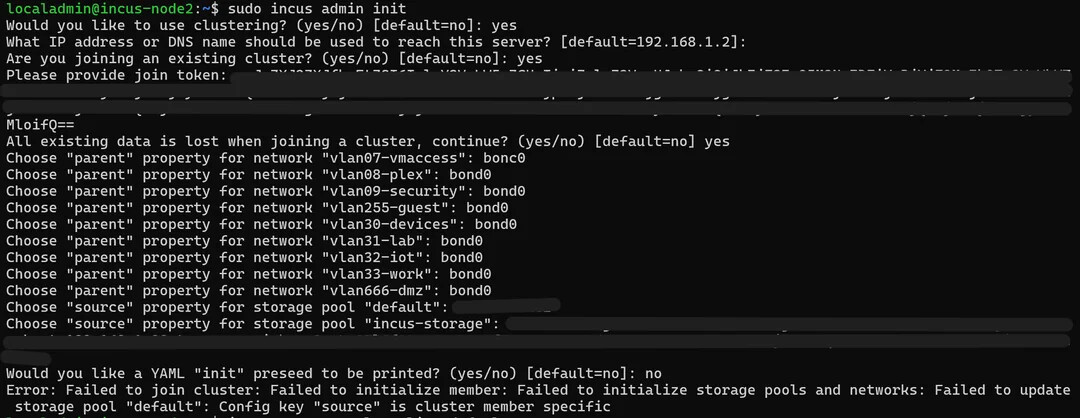
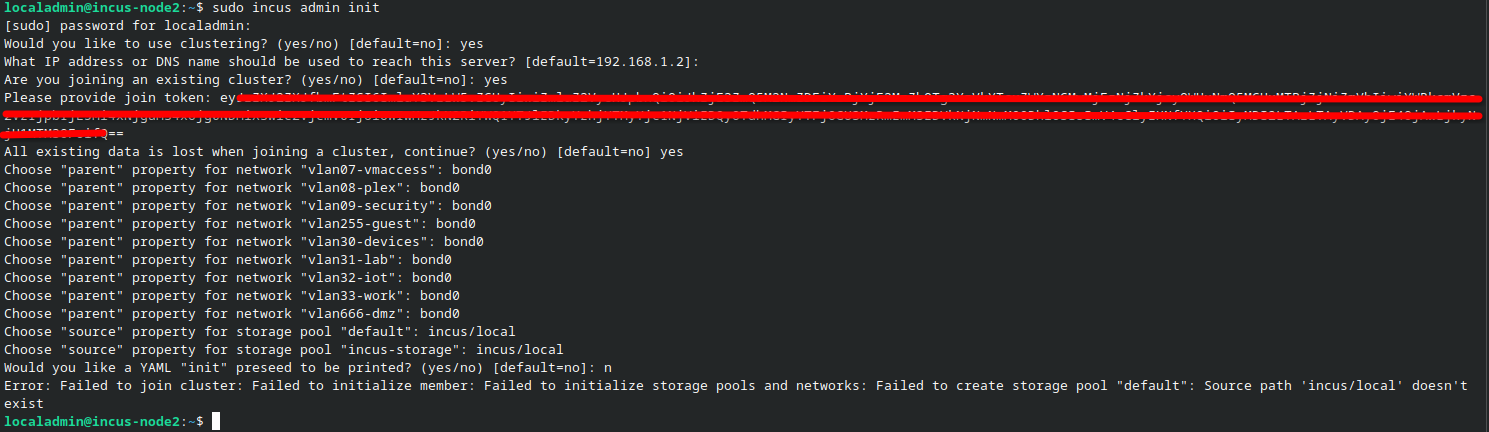
When I run the command I confirm that yes I want to wipe it’s config (nothing on this new host) and then I assign the networks as I am doing MACLAN for VLAN pass-through so I don’t have to NAT everything through the host. Trying to keep it as close to Hyper-V / VMWare network as possible. The issue arises when the wizard asks about storage. I have two Default which is just the incus host and then incus-storage which is on my TrueNAS using the TrueNAS driver from github. I do not know what to put as “source” to get it to accept and share/re-use that storage path for HA potential.
Here is a screenshot of the wizard / output from the new host. Any help or guidance would be great. I will eventually have a third node to add but I am doing this in “baby” steps as this is all 100% new to me.
Ok so if i wipe this system and start 100% fresh you think it should attach and join? The only things I will do is ensure that the incus software & truenas driver is installed but nothing else.. Is that the thought?
Thank you! I will attempt this and report back - should not take me to long - the IPMI on the supermicro servers is nice to have
Side note … Do you know if you can cluster the incus version that is built into TrueNAS direclty? I was not planning on it doing it but just curious as to what extent the TrueNAS has since it does have incus on it as well.
@stgraber - Fresh install and same result. I am 100% sure it is because I do not know what to put as the “source” of storage pool “default” and storage pool “incus-storage”
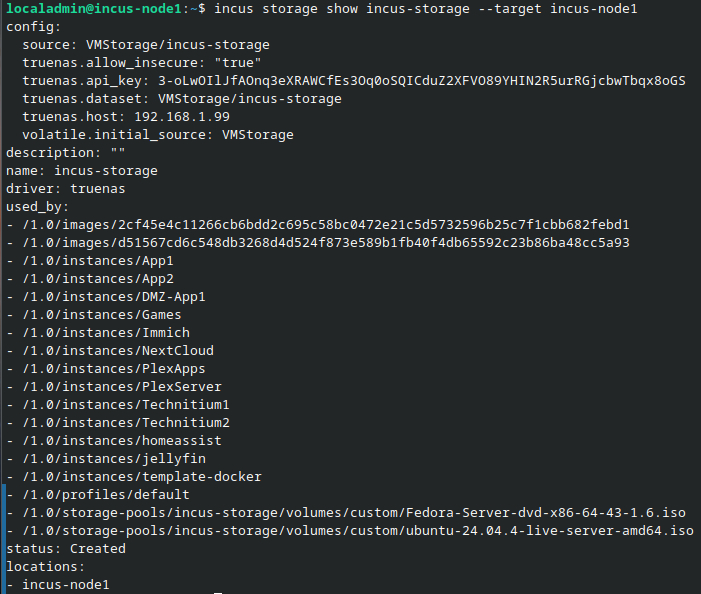
Those are on my other node that is already running my containers etc. So to recap this is 100% fresh install on what we will call node2. Node1 is already working and running what I would consider production payloads.
Okay, so looks like the TrueNAS poolneeds VMStorage/incus-storage in your environment which probably lines up with the pool and dataset name on the TrueNAS side.
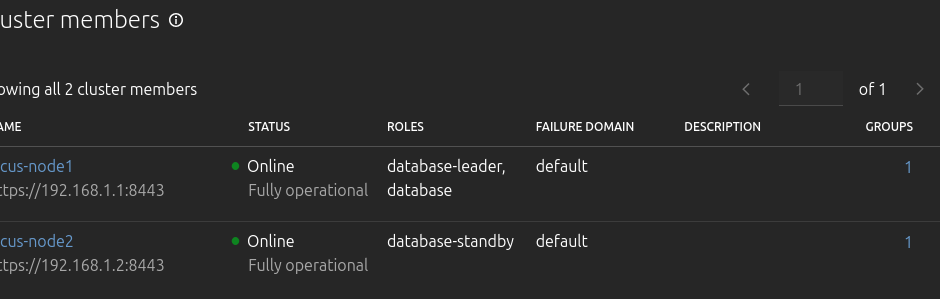
correct - I re-ran the incus admin init and set the values for both the storage pools and no errors. I am validating that this is working and that incus-node1 shows incus-node2 . and it shows SUCCESS!
That won’t work. TrueNAS ships the LTS version of Incus (6.0.4 I believe).
Clusters need to have the exact same version of Incus on all servers and given that you’re using the TrueNAS storage driver which doesn’t exist in the LTS, you’re clearly running a much newer version of Incus than what TrueNAS provides.
That is correct - I am running 6.22 and good to know about what TrueNAS ships with. None the less - I appreciate your help. I have been running Incus for 2 weeks now and have had all my workloads on the single node for that entire time without hiccups. Today I at least get to relieve some pressure from that single host and split the load. I will work on sourcing a third node so that it can be redundant. I wonder if a VM on TrueNAS would work just to be a quorum member (not running any work loads…)
also for networking / cluster purpose. Does incus support different networks for Cluster Communication or Live/Stale Migrations? I know with Proxmox and Hyper-V I had a network dedicated to the cluster communication and another network for Migrations. That way it didn’t make the general MGMT network “busy”.. Although TBH I doubt it is that busy with 10Gb bonded NICs…
Yeah, the way you’d do that typically is by setting the cluster.https_address to your cluster internal network, then core.https_address to your management network.
Though cluster.https_address must be set pre-clustering, so it may already be too late in your case
Ok well hmmm that sucks. Do you know what would happen IF I did try to do that after the setup was done? Is there a way to un-cluster and re-setup without reinstalling everything?
It’s technically possible to do it with incus admin sql local to change the config and then incus admin cluster edit to change the addresses in the database, though incus admin cluster edit requires Incus be stopped on the server in question as it directly modifies the cluster database files on disk.
So if this is performed - turn both hosts off - edit the DB like you mentioned and turn back on. I am assuming that each host has to be off and both have edits done. Would I make each of them a separate IP on that range?
for example right now I have:
vlan2 - mgmt
incus-node1 = 192.168.1.1/27
incus-node2 = 192.168.1.2/27
I would keep those IP the same for web management and assign the cluster value to the below so that it talks on vlan3..
vlan3 = cluster
incus-node1 = 192.168.1.32/27
incus-node2 = 192.168.1.33/27