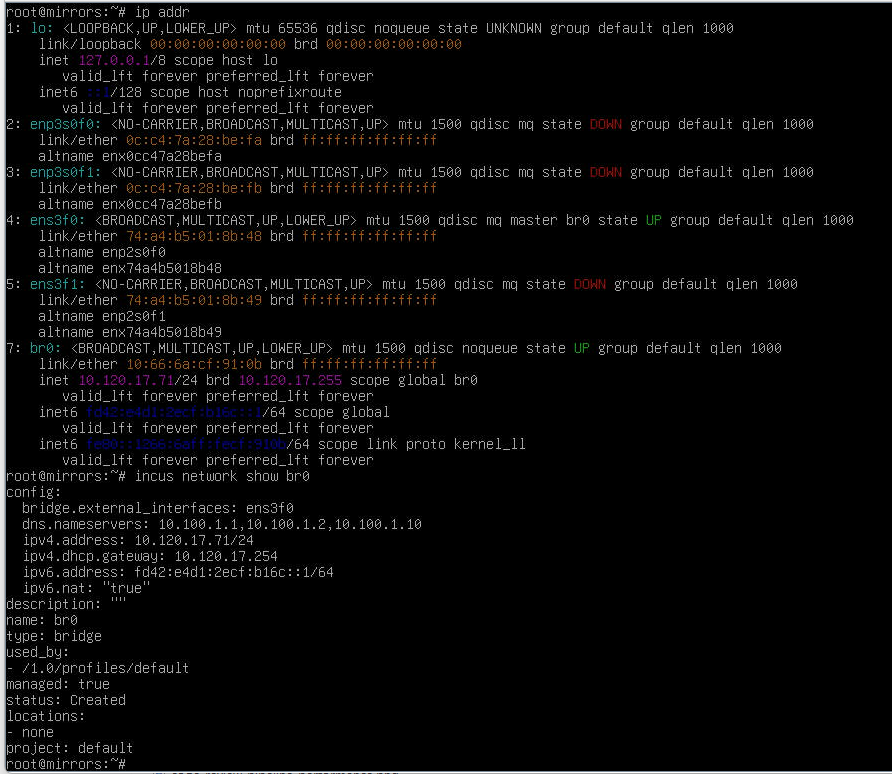
I have an Incus host with only one physical ethernet interface. But I need to deploy some server can be access by external network, so the default bridge not fit my need:
both host and the machines in incus can be access by external network
only one physical interface
Is there any simple way to solve this problem, thanks!
macvlan (simple, but vm and host can not talk to each other)
bridge with proxy pass through (but only for individual ports, each needs to be known)
incus managed / host managed bridge
…
Assuming you are on Incus (not IncusOS) probably easiest way todo this is to create a host managed bridge, then simply attach your containers/vms to it.
I.e. on Debian (based) distributions you can do similar to this:
auto lo
iface lo inet loopback

auto br0
  iface br0 inet static
  address 192.168.1.250/24
  gateway 192.168.1.1
  bridge_ports enp1s0
  bridge_stp off

iface enp1s0 inet manual
IMPORTANT: If you create a bridge on linux, do not assign an IP to the interface, only to the bridge.
then attach this interface (or create a profile):
incus config device add notpfsense eth0 nic nictype=bridged parent=br0
On IncusOS its easier - the device you see (i.e. eno1) actually is a bridge already.
Your br0 is incus managed bridge, you should be using unmanaged bridge which is not created by incus if you want your instances to be in the same lan with host.