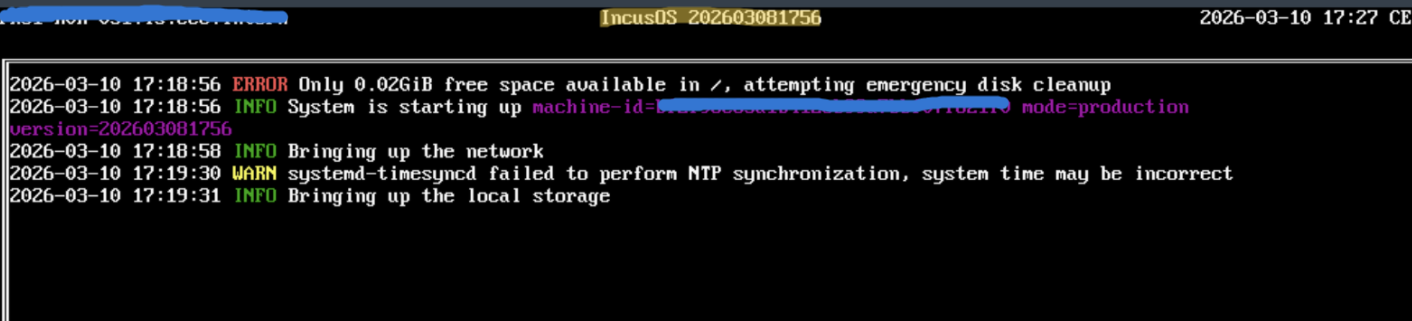
Alright. So I decided to not reinstall and troubleshoot.
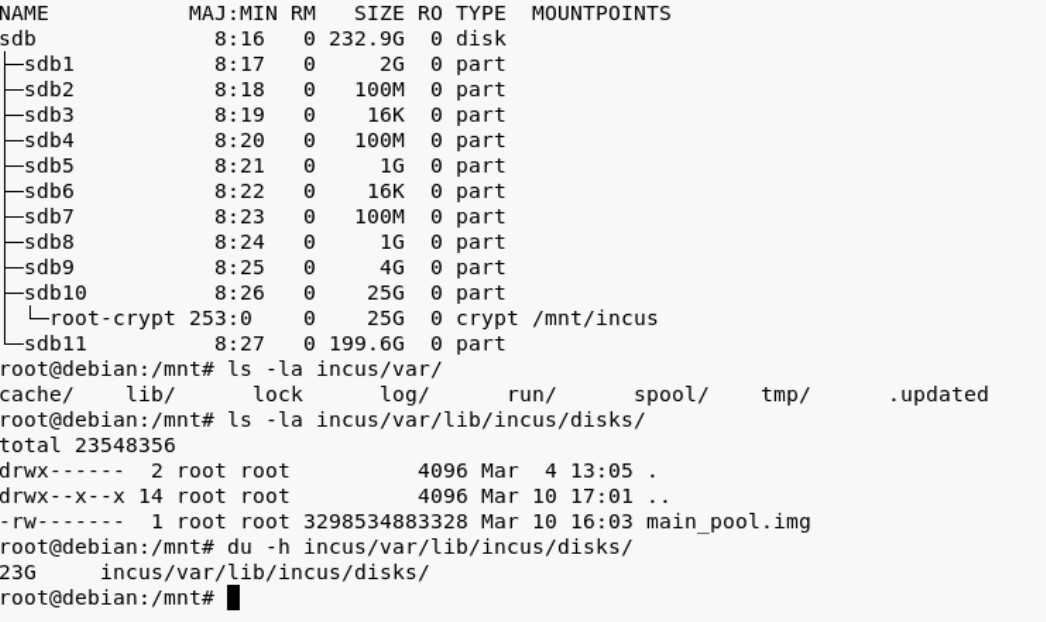
I managed to boot into a live media and unlock the cryptsetup luksOpen and mount the root partition. Interestingly the partition is only 25G and most of it seems to be used by the main_pool.img disk file (?):
I’m still looking at the logs, however I can already say with high certainty that whatever caused the space to fill up. It was before the reboot/upgrade. Here what I’ve found so far:
This when I attached the usb device to the VM. I’m unsure if the mlx4_core message are relevant. So the USB was attached at 13:39:14 and some 20 minutes later I get the error Mar 10 13:53:56 redactedhost.intern kernel: WARNING: Pool 'main_pool' has encountered an uncorrectable I/O failure and has been suspended.
Mar 10 13:39:14 redactedhost.intern kernel: usb 4-2: new SuperSpeed USB device number 4 using xhci_hcd
Mar 10 13:39:14 redactedhost.intern kernel: usb 4-2: New USB device found, idVendor=2174, idProduct=2100, bcdDevice= 1.00
Mar 10 13:39:14 redactedhost.intern kernel: usb 4-2: New USB device strings: Mfr=1, Product=2, SerialNumber=3
Mar 10 13:39:14 redactedhost.intern kernel: usb 4-2: Product: ESD310C
Mar 10 13:39:14 redactedhost.intern kernel: usb 4-2: Manufacturer: Transcend
Mar 10 13:39:14 redactedhost.intern kernel: usb 4-2: SerialNumber: F6326339I99725870024
Mar 10 13:39:14 redactedhost.intern kernel: scsi host17: uas
Mar 10 13:39:14 redactedhost.intern kernel: scsi 17:0:0:0: Direct-Access     ESD310C  TS256GESD310C    1000 PQ: 0 ANSI: 6
Mar 10 13:39:14 redactedhost.intern kernel: sd 17:0:0:0: Attached scsi generic sg5 type 0
Mar 10 13:39:14 redactedhost.intern kernel: sd 17:0:0:0: [sde] 500118192 512-byte logical blocks: (256 GB/238 GiB)
Mar 10 13:39:14 redactedhost.intern kernel: sd 17:0:0:0: [sde] Write Protect is off
Mar 10 13:39:14 redactedhost.intern kernel: sd 17:0:0:0: [sde] Mode Sense: 43 00 00 00
Mar 10 13:39:14 redactedhost.intern kernel: sd 17:0:0:0: [sde] Write cache: disabled, read cache: enabled, doesn't support DPO or FUA
Mar 10 13:39:14 redactedhost.intern kernel:  sde: sde1
Mar 10 13:39:14 redactedhost.intern kernel: sd 17:0:0:0: [sde] Attached SCSI disk
Mar 10 13:40:48 redactedhost.intern incusd[259051]: time="2026-03-10T14:40:48+01:00" level=warning msg="Failed getting exec control websocket reader, killing command" PID=0 err="websocket: close 1005 (no status)" instance=IncusManageVM interactive=true project=default
Mar 10 13:41:07 redactedhost.intern kernel: mlx4_core 0000:81:00.0: VPD access failed.  This is likely a firmware bug on this device.  Contact the card vendor for a firmware update
Mar 10 13:41:24 redactedhost.intern kernel: mlx4_core 0000:81:00.0: VPD access failed.  This is likely a firmware bug on this device.  Contact the card vendor for a firmware update
Mar 10 13:41:47 redactedhost.intern kernel: mlx4_core 0000:81:00.0: VPD access failed.  This is likely a firmware bug on this device.  Contact the card vendor for a firmware update
Mar 10 13:43:24 redactedhost.intern kernel: mlx4_core 0000:81:00.0: VPD access failed.  This is likely a firmware bug on this device.  Contact the card vendor for a firmware update
Mar 10 13:44:16 redactedhost.intern kernel: mlx4_core 0000:81:00.0: VPD access failed.  This is likely a firmware bug on this device.  Contact the card vendor for a firmware update
Mar 10 13:44:32 redactedhost.intern kernel: mlx4_core 0000:81:00.0: VPD access failed.  This is likely a firmware bug on this device.  Contact the card vendor for a firmware update
Mar 10 13:44:44 redactedhost.intern kernel: mlx4_core 0000:81:00.0: VPD access failed.  This is likely a firmware bug on this device.  Contact the card vendor for a firmware update
Mar 10 13:45:40 redactedhost.intern kernel: mlx4_core 0000:81:00.0: VPD access failed.  This is likely a firmware bug on this device.  Contact the card vendor for a firmware update
Mar 10 13:46:27 redactedhost.intern kernel: mlx4_core 0000:81:00.0: VPD access failed.  This is likely a firmware bug on this device.  Contact the card vendor for a firmware update
Mar 10 13:46:57 redactedhost.intern kernel: kauditd_printk_skb: 2 callbacks suppressed
Mar 10 13:46:57 redactedhost.intern kernel: audit: type=1400 audit(1773150417.876:1802): apparmor="DENIED" operation="open" class="file" profile="incus-IncusManageVM_</var/lib/incus>" name="/dev/bus/usb/" pid=309384 comm="qemu-system-x86" requested_mask="r" denied_mask="r" fsuid=985 ouid=0
Mar 10 13:46:57 redactedhost.intern kernel: audit: type=1300 audit(1773150417.876:1802): arch=c000003e syscall=257 success=no exit=-13 a0=ffffff9c a1=7f6a0d38237b a2=90800 a3=0 items=0 ppid=1 pid=309384 auid=4294967295 uid=985 gid=985 euid=985 suid=985 fsuid=985 egid=985 sgid=985 fsgid=985 tty=(none) ses=4294967295 comm="qemu-system-x86" exe="/opt/incus/bin/qemu-system-x86_64" subj=incus-IncusManageVM_</var/lib/incus> key=(null)
Mar 10 13:46:57 redactedhost.intern kernel: audit: type=1327 audit(1773150417.876:1802): proctitle=2F6F70742F696E6375732F62696E2F71656D752D73797374656D2D7838365F3634002D53002D6E616D6500496E6375734D616E616765564D002D757569640030633032626663652D343232382D343961342D383430352D353938323062323237303061002D6461656D6F6E697A65002D63707500686F73742C68765F70617373
Mar 10 13:46:57 redactedhost.intern kernel: audit: type=1400 audit(1773150417.877:1803): apparmor="DENIED" operation="open" class="file" profile="incus-IncusManageVM_</var/lib/incus>" name="/dev/" pid=309384 comm="qemu-system-x86" requested_mask="r" denied_mask="r" fsuid=985 ouid=0
Mar 10 13:46:57 redactedhost.intern kernel: audit: type=1300 audit(1773150417.877:1803): arch=c000003e syscall=257 success=no exit=-13 a0=ffffff9c a1=7f6a0d382388 a2=90800 a3=0 items=0 ppid=1 pid=309384 auid=4294967295 uid=985 gid=985 euid=985 suid=985 fsuid=985 egid=985 sgid=985 fsgid=985 tty=(none) ses=4294967295 comm="qemu-system-x86" exe="/opt/incus/bin/qemu-system-x86_64" subj=incus-IncusManageVM_</var/lib/incus> key=(null)
Mar 10 13:46:57 redactedhost.intern kernel: audit: type=1327 audit(1773150417.877:1803): proctitle=2F6F70742F696E6375732F62696E2F71656D752D73797374656D2D7838365F3634002D53002D6E616D6500496E6375734D616E616765564D002D757569640030633032626663652D343232382D343961342D383430352D353938323062323237303061002D6461656D6F6E697A65002D63707500686F73742C68765F70617373
Mar 10 13:47:10 redactedhost.intern kernel: mlx4_core 0000:81:00.0: VPD access failed.  This is likely a firmware bug on this device.  Contact the card vendor for a firmware update
Mar 10 13:47:26 redactedhost.intern kernel: mlx4_core 0000:81:00.0: VPD access failed.  This is likely a firmware bug on this device.  Contact the card vendor for a firmware update
Mar 10 13:50:09 redactedhost.intern kernel: mlx4_core 0000:81:00.0: VPD access failed.  This is likely a firmware bug on this device.  Contact the card vendor for a firmware update

## I/O Error and call trace
Mar 10 13:53:56 redactedhost.intern kernel: WARNING: Pool 'main_pool' has encountered an uncorrectable I/O failure and has been suspended.
Mar 10 13:57:20 redactedhost.intern kernel: INFO: task zvol_tq-1:3455 blocked for more than 122 seconds.
INFO: task zvol_tq-1:3455 blocked for more than 122 seconds.
Mar 10 13:57:20 redactedhost.intern kernel:       Tainted: P           O        6.18.14-zabbly+ #debian13
Mar 10 13:57:20 redactedhost.intern kernel: "echo 0 > /proc/sys/kernel/hung_task_timeout_secs" disables this message.
Mar 10 13:57:20 redactedhost.intern kernel: task:zvol_tq-1       state:D stack:0     pid:3455  tgid:3455  ppid:2      task_flags:0x288040 flags:0x00080000
Mar 10 13:57:20 redactedhost.intern kernel: Call Trace:
Mar 10 13:57:20 redactedhost.intern kernel:  <TASK>
Mar 10 13:57:20 redactedhost.intern kernel:  __schedule+0x468/0x1310
Mar 10 13:57:20 redactedhost.intern kernel:  schedule+0x27/0xf0
Mar 10 13:57:20 redactedhost.intern kernel:  io_schedule+0x4c/0x80
Mar 10 13:57:20 redactedhost.intern kernel:  cv_wait_common+0xb0/0x140 [spl]
Mar 10 13:57:20 redactedhost.intern kernel:  ? __pfx_autoremove_wake_function+0x10/0x10
Mar 10 13:57:20 redactedhost.intern kernel:  __cv_wait_io+0x18/0x30 [spl]
Mar 10 13:57:20 redactedhost.intern kernel:  txg_wait_synced_flags+0xd9/0x160 [zfs]
Mar 10 13:57:20 redactedhost.intern kernel:  dmu_tx_wait+0x249/0x460 [zfs]
Mar 10 13:57:20 redactedhost.intern kernel:  dmu_tx_assign+0x3ce/0x490 [zfs]
Mar 10 13:57:20 redactedhost.intern kernel:  zvol_write+0x212/0xa00 [zfs]
Mar 10 13:57:20 redactedhost.intern kernel:  zvol_write_task+0x12/0x30 [zfs]
Mar 10 13:57:20 redactedhost.intern kernel:  taskq_thread+0x34c/0x720 [spl]
Mar 10 13:57:20 redactedhost.intern kernel:  ? srso_return_thunk+0x5/0x5f
Mar 10 13:57:20 redactedhost.intern kernel:  ? __pfx_default_wake_function+0x10/0x10
Mar 10 13:57:20 redactedhost.intern kernel:  ? __pfx_zvol_write_task+0x10/0x10 [zfs]
Mar 10 13:57:20 redactedhost.intern kernel:  ? __pfx_taskq_thread+0x10/0x10 [spl]
Mar 10 13:57:20 redactedhost.intern kernel:  kthread+0x10b/0x220
Mar 10 13:57:20 redactedhost.intern kernel:  ? __pfx_kthread+0x10/0x10
Mar 10 13:57:20 redactedhost.intern kernel:  ret_from_fork+0x1ec/0x220
Mar 10 13:57:20 redactedhost.intern kernel:  ? __pfx_kthread+0x10/0x10
Mar 10 13:57:20 redactedhost.intern kernel:  ret_from_fork_asm+0x1a/0x30
Mar 10 13:57:20 redactedhost.intern kernel:  </TASK>
After that I get a lot zfs errors, because the pool is suspended and IncusOS cannot run zfs commands. That’s when I decide to restart the OS through the Web UI (not the physical server)
## start of os shutdown
Mar 10 14:57:29 redactedhost.intern incus-osd[1865]: 2026-03-10 15:57:29 INFO System is shutting down version=202603030349
Mar 10 14:57:29 redactedhost.intern incus-osd[1865]: 2026-03-10 15:57:29 INFO Stopping application name=incus version=202603081756
Mar 10 14:57:29 redactedhost.intern systemd[1]: Stopping incus-startup.service - Incus - Startup check...

## free space error during os shutdown
Mar 10 14:57:31 redactedhost.intern systemd-networkd[15997]: uplink.124: Lost carrier
Mar 10 14:57:31 redactedhost.intern incusd[259051]: time="2026-03-10T15:57:31+01:00" level=warning msg="Failed to dump database file db.bin-wal: write /var/lib/incus/database/global/db.bin-wal: no space left on device"
Mar 10 14:57:31 redactedhost.intern systemd[1]: var-lib-incus-devices-IncusManageVM-config.mount.mount: Deactivated successfully.

## shutting down continues
Mar 10 14:57:29 redactedhost.intern incus-osd[1865]: 2026-03-10 15:57:29 INFO System is shutting down version=202603030349
Mar 10 14:57:29 redactedhost.intern incus-osd[1865]: 2026-03-10 15:57:29 INFO Stopping application name=incus version=20260308175
If I remember correctly it was during those 20 minutes where I started the copy operation between the usb device and the VM IncusManageVM. I should mention that the file I was trying to copy was around 30GB (usb → VM), so bigger then the 25GB root partition.
IncusManageVM was on the main_pool, so it shouldn’t take any space on root. right?
Besides I remember that the copy operation transfered around 59MB (checking through ls -laand du) and then it froze (presumably because of the suspend).
This was the device config for the instance:
devices:
  root:
    type: disk
    path: /
    pool: main_pool
    size: 500GiB
  eth0:
    type: nic
    network: uplink.666
  usb1:
    attached: 'true'
    busnum: '4'
    devnum: '4'
    type: usb
 ) and I have not found yet how to discover what happened (through the incus client).
 .
.