IncusOS: Questions about incus copy behavior

I would like to run an IncusOS backup server on which I can back up all the VMs/containers and volumes on my server. Now that incremental updates of custom volumes are working, I’ve been looking into backing up containers and VMs. In doing so, I noticed something that I couldn’t find in the documentation. I’m not sure if this is a problem that only occurs for me.

The behavior I observed occurs with containers as well as VMs.

Case 1:

I have a container without snapshots. I copy it with

incus copy server:c1 backup:c1 

This works so far. Now I want to make another incremental backup later.

incus copy server:c1 backup:c1 --refresh

I get the following error message:

Error: Error transferring instance data: Failed migration on target: Failed creating instance on target: Failed receiving volume “c1”: Failed to run: zfs receive -x mountpoint -F -u storagePool/storage/containers/c1: exit status 1 (cannot receive new filesystem stream: zfs receive -F cannot be used to destroy an encrypted filesystem or overwrite an unencrypted one with an encrypted one)

Case 2:

Same starting point, no initial snapshot. First copy works fine. Then I create a snapshot (s2) and try again:

incus copy server:c1 backup:c1 --refresh

This fails again with mostly the same error message:

Error: Error transferring instance data: Failed migration on target: Failed creating instance on target: Failed receiving snapshot volume "c1/s2": Failed to run: zfs receive -x mountpoint -F -u storagePool/storage/containers/c1@snapshot-s2: exit status 1 (cannot receive new filesystem stream: zfs receive -F cannot be used to destroy an encrypted filesystem or overwrite an unencrypted one with an encrypted one)

Case 3:

I create a snapshot (s1) and after that I perform the initial copy to the backup server, without explicitly mentioning the snapshot.

incus copy server:c1 backup:c1 

After that I make a second snapshot (s2) and perform a refresh:

incus copy server:c1 backup:c1 --refresh

This works fine and it syncs the second snapshot (s2) incrementally to the backup server.

Case 4:

With an initial snapshot (s1), it works. If I create the first snapshot before I copy the container, I can perform a –refresh without a second snapshot.

All in all, it works. However, I would have liked to have a little more information on the whole topic. I am also happy to write documentation texts on this.

However, I am not entirely sure whether this behavior is intentional?

I would have expected that when copying for the first time without an explicit snapshot, one would be created automatically, as in case 4. Except that in that case, the second snapshot is automatically created.
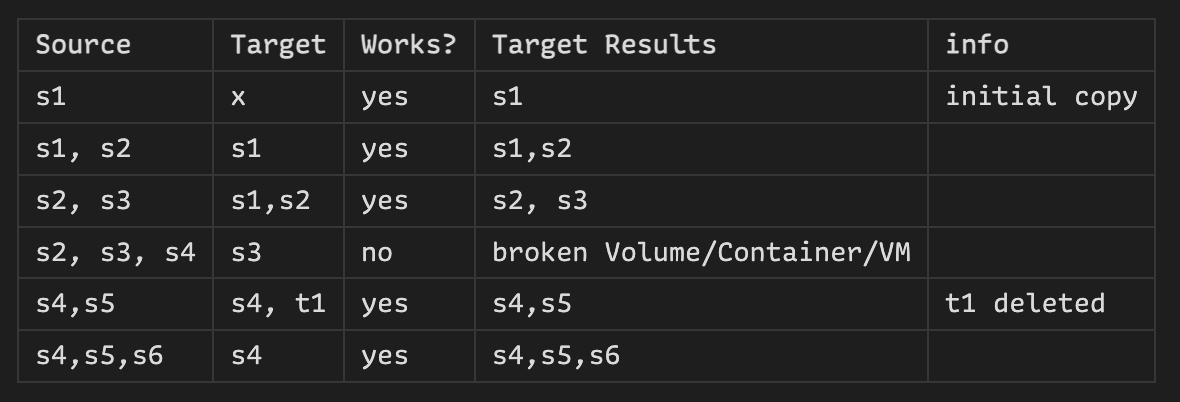
Sorry, it’s me again. I’ve attached a table to clarify the situation.

Just for context: I am currently developing a backup solution. The table applies to both Containers/VMs and Custom Storage Volumes.

As mentioned above, my goal is to use ⁠copy --refresh whenever possible to ensure the backup runs quickly.

I noticed that the refresh only works if the backup target has the same history as the source system. If one of the snapshots is missing, the process fails with an error. After that, the target has to be deleted and a full transfer must be started from scratch. I understand that a shared history is required for the –refresh to work. However, the last common snapshot should actually be sufficient for this.

Another thing I noticed is that if you add snapshots on the target side, they are automatically removed during the next ⁠--refresh. This is unfortunate, because it means you can’t retain older snapshots on the target without also keeping them on the source system.

Is there perhaps a way to extend the copy function so that extra snapshots on the target are not removed?

I have some years of experience with snapshots as it relates to writing opensource backup utilities for virtualized systems so in looking at your table (nice job there!) I might offer an educated guess at what you are seeing:

There are different kinds of snapshots. There are lightweight forward incremental snapshots and full snapshots.

Let’s say you have a container or vm and it is 10 Gigs on the drive. Let’s call the container’s state file “V1.orig”

If you take a lightweight forward snapshot to create V1.snap1 you might see something like this

file        size
V1.orig     10 GB
V1.snap1    1 MB

the V1.orig is your snapshot from the beginning of time and the V1.snap is the lightweight snapshot starting from when you took the snap. Now you run for a while and you take another snapshot. You might see something like this

file        size
V1.orig     10 GB
V1.snap1    2 MB
V1.snap2    1 MB

In the case above you have two lightweight forward snaps where V1.snap2 references V1.snap1 which references V1.orig. V1.snap1 is small because it only has the changes since V1.orig and ending by V1.snap2. V1.snap2 only has the history since V1.snap2.

That means a backup with ONLY a forward incremental snapshot is invalid without the full chain behind it so it can understand it’s existing state.

In this case valid backups would be

  • V1.orig
  • (V1.orig and V1.snap1)
  • (V1.orig and V1.snap1 and V1.snap2)

Invalid snapshot backups would be

  • only V1.snap1
  • only V1.snap2
  • only (V1,snap1 and V1.snap2)

Which is what your table seems to indicate.

Again this is a GUESS (I’m new to incus) that what you are showing with the invalid backups are snaps with a broken backup chain as we see in your table.

Also looking at row 3 with a valid backup with S2,S3 (Again this is a GUESS) I’d guess you deleted a snapshot on the original server which consolidated to S2, and then took another snapshot (to get S3). Snapshot consolidation is where you consolidate snapshots into one state which happens when (typically) you delete snapshots. If you deleted all snaps you might get a new single state which might be called something like V1.snap3. The new file will have all the changes (e.g. 10GB + 1MB + 2MB ). (Aside: there are different ways to do that and some ways can grow and others shrink the total size of the consolidated snapshot. I wrote about that years ago here: Blockpull vs blockcommit for qemu2 VM images | Afan )

1 Like

Thank you for your thoughts! It sounds like this could be the case here.
It would be helpful if this were explicitly described in the documentation (or did I just not find it?).

As it stands at the moment, it is unfortunately not possible to “set up” a backup server that also stores older snapshots. Or rather, it is only possible if these snapshots also have to be available on the source system.

You can have archival backups on standby as snapshots with the “export” command. I have a script which makes an export and then saves the backups as “container_name.0/container” , “container_name.1/container” … etc. where the date of the directory is the date of backup because on backup the directory named “container.N” is moved to “container.N+1”

Because

  • it is recommended that you backup all of /var/lib/incus
  • the default backup location for the export command is /var/lib/incus/backups

I have the exports going somewhere else besides /var/lib/incus/backups

That script is at GitHub - AJRepo/incus_tools: Tools for Incus .

Currently it requires a mounted location for the backups on NFS

Some possible future upgrades:

  • Instead of a copy of the snapshot to container_name.0/ ; doing an rsync to only copy differences between snapshots. (would require testing to see if was even a good option)
  • Instead of only supporting NFS, add the option of local removable media (e.g. a hot-swap backup drive)