I’d like to share a new project I’ve been working on: ixui, an open-source web UI for Incus. The design draws inspiration from Proxmox and VMware ESXi, aiming to let you manage your entire Incus setup without needing to touch the CLI.
Pre-alpha notice: ixui is in early, pre-alpha development. Expect missing features, rough edges, and breaking changes. Please don’t rely on it to manage production Incus servers yet.
Some of the key features:
Full instance management — create and monitor instances from start to finish
A built-in file browser for each instance
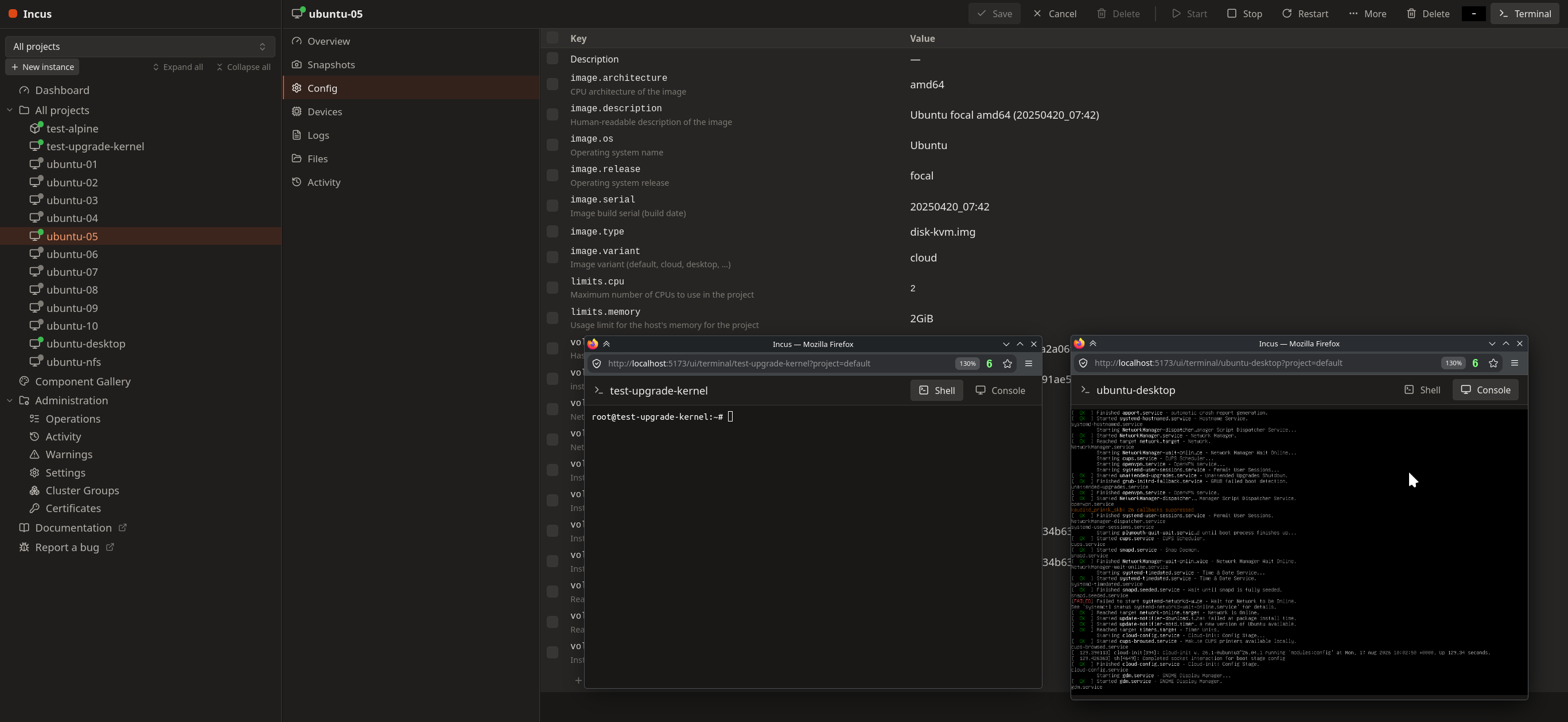
A terminal that opens directly from the UI
Comprehensive network, storage, and image management
Cluster support, with live instance status updates over WebSocket (no page refresh needed)
The project is licensed under the Apache License 2.0. It’s still in an early, pre-alpha stage, so expect rough edges, feedback and contributions are very welcome.
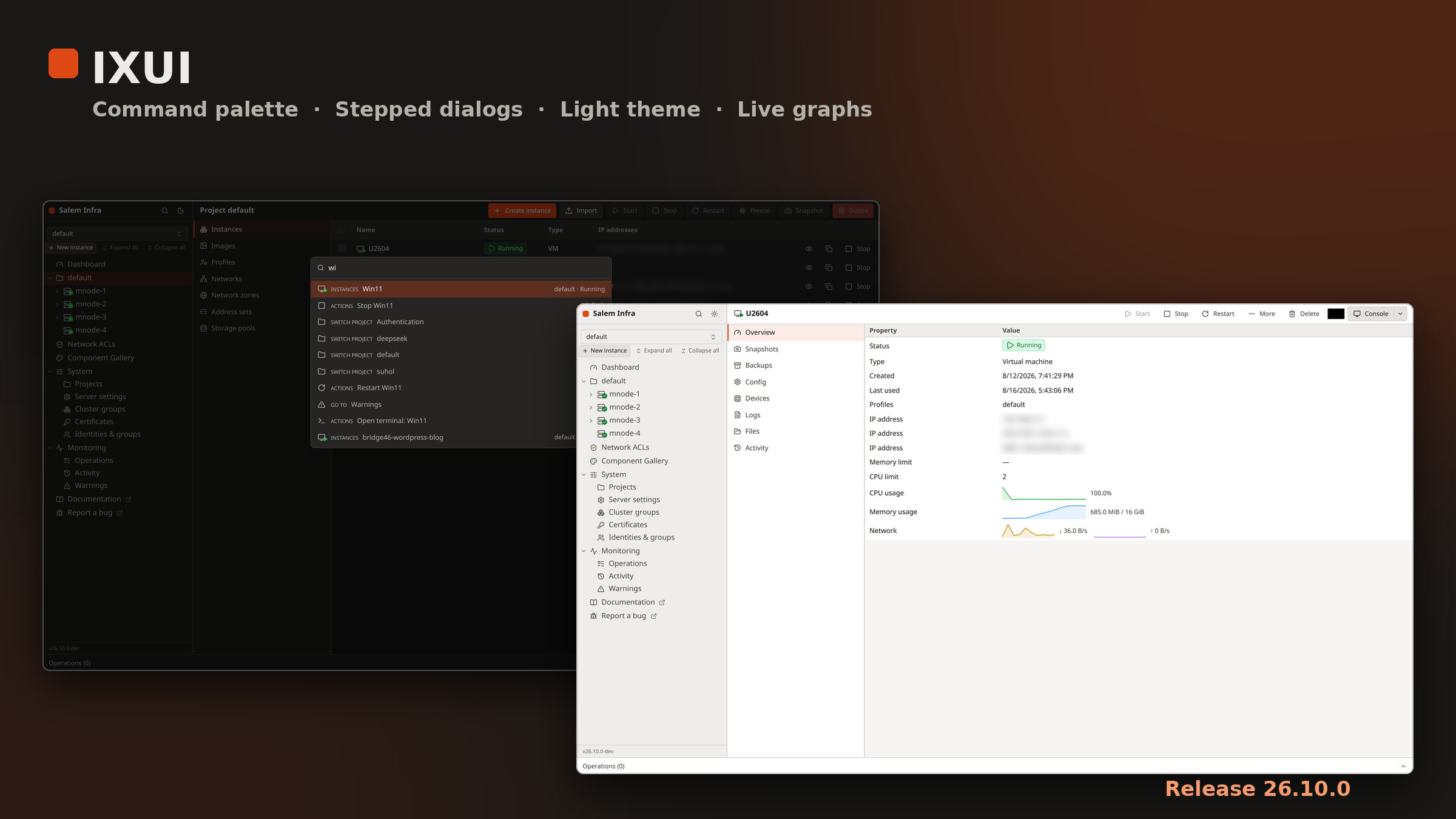
A big round of changes today. IXUI is still pre-alpha, but it covers a lot more of Incus now.
New
Command palette (Ctrl/Cmd+K): jump to any instance, page or project, or start, stop, restart or open a terminal.
Stepped dialogs for creating and editing instances, projects, networks, profiles, zones and address sets, with validation and a review page. Pulling an image now searches the catalog inside the dialog.
Light theme (plus “follow system”) and a navigation drawer for narrow screens.
Live graphs on the instance overview: CPU, memory, network throughput and disk usage.
Projects: create with limits and features, see real usage against limits, and delete safely (you type the name, and non-empty projects are refused).
More Incus coverage: network zones, address sets, load balancers and peers, instance backups (create, download, import), identities and auth groups, cluster member editing, and bulk instance actions including snapshots.
Sidebar is now grouped into System and Monitoring, with the version shown at the bottom.
Also
A “connection lost” banner when the live connection drops, and instances resync when it comes back.
Better keyboard support and accessibility checks in the tests.
Releases are automatic and use year-month versions (26.10.0). Each release has a zip of the built UI, ready to unpack: Releases · xlmnxp/ixui · GitHub
Extra note: changes before the versioning system (18 Aug – 12 Sep)
For completeness, here’s what landed between the first post and the 26.10.0 release above. There were no tagged releases back then.
Terminal
Chrome-style shell tabs: add and close tabs, drag to reorder, and double-click to rename a tab and give it a colour.
Tab names follow the instance and the running shell process, and update live from the terminal title.
Long tab lists scroll with fading edges, and the “add tab” button stays in reach.
One Console button with a Shell / VGA dropdown. One console window is reused, and you can open several shell windows.
VGA (SPICE) console
The display fits and scales inside its window, follows window resizes, and maps the mouse position correctly.
Fixed a crash when resizing before the connection w
Instance overview
Per-instance CPU and memory graphs. CPU % is computed from usage counters, so it’s accurate. With no memory limit, the memory
graph uses the node’s total memory as its maximum.
Status at a glance
A green play icon on running instances, and dimmed icons for stopped ones.
Status icons inside the badges in the instances tab
Cluster members show a status dot: a checkmark when online, a warning triangle when evacuated.
Files
Click a file to download it, and use the row buttond loading is shown inline under the table header.
Sidebar and general
The sidebar adapts to its width (icon-only buttons when narrow), and the split-pane divider is easier to see.
The “move instance” dialog no longer offers the memn.
Routes are lazy-loaded, and the live connection sends keepalives so it survives proxies that drop idle connections.
Community: thanks to René Jochum (dependency updates, PR #1) and webbrain-one (README improvements, PR #2).
Yeah, that’s correct. You’ll obviously still be able to run any of the other UI projects but we’ll now have one go to one that goes through a similar release cycle and aligns features with those landing in Incus.
Pre-alpha notice: ixui is in early, pre-alpha development. Expect missing features, rough edges, and breaking changes. Please don’t rely on it to manage production Incus servers yet.