I’ve had OIDC working well for incus. But lately for certain actions (like renaming a VM) the UI just hangs. Looking at the browser console, these requests are being rejected as the “server requires a client certificate” Is it possible to disable this? I still want mTLS for a few cli clients, but that doesn’t mean the server needs to request the certificate.
What operations are those exactly?
The server sets the TLS bit saying it accepts client certificates, if we don’t set that bit then no TLS client would send their certificate to us. But it’s just a request so it can be ignored as is normally done with the UI stuff when using OIDC.
I saw this in Orion browser (WebKit). The operation was renaming a VM. Is the code checking OIDC auth cookie before it checks the TLS cert? Perhaps the order is different for the rename operation? Because some browsers nag you to choose a client cert so my only option is to choose a dummy one and then auth with SSO.
No, the auth logic is always the same on our end.
We’re also not triggering the TLS prompt, there’s actually no way to do that in the TLS protocol. All you can do is set a bit which says “server accepts TLS authentication”, this bit is set on the TLS endpoint that Incus listens on, so all TLS connections with Incus will notice that bit being set and then may prompt the user for a certificate, use one they already have or just ignore that bit entirely if they don’t support TLS client authentication.
Hi, it’s cool that Incus UI implements TLS, but it’s a pain that there is no other classic and standard login methods to welcome new users quickly. IMHO it’s a wall for its adoption. A usual ID/password implementation would be nice as well. The copy/paste token method seems good, quicker, but it requires a certificate anyways (which is added differently in all different browsers), maybe a simpler copy/paste token alternative method could be using cookies? Anyway, all this TLS steps and different browser interfaces makes it almost impossible to write a quick and simple tutorial to allow users to finally reach the interface. So for the moment I wrote a simple shortcut script to be installed on the client side (I don’t want to have the steps of installing Incus apt repositories and its tools on the client, I want it to be compatible with standard terminal+browser setup) that only requires `screen` to be present on on the server (most distro have it by default).
Install the shortcut script on the client:
cat <<'EOF' | sudo tee /usr/local/bin/incus-web.sh > /dev/null
incusid="incus-`whoami`-`hostname`" ; incusrun=`ssh root@$1 "export incusid='$incusid' ; screen -S \$incusid -X quit ; screen -dmS \$incusid bash -c 'incus webui > /tmp/\$incusid' ; sleep 3 ; cat /tmp/\$incusid"` ; echo -e "\n#####\n\n$incusrun\n\nOuverture de la session SSH, laisser ouvert durant utilisation…\n\n#####\n" ; incusport=`echo $incusrun | sed -E 's|.*:([0-9]+).*|\1|'` ; ssh root@$1 -t -L $incusport:127.0.0.1:$incusport
EOF
sudo chmod +x /usr/local/bin/incus-web.sh
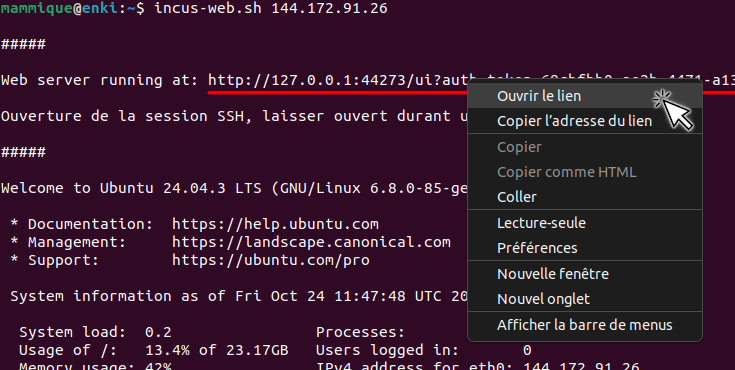
Then type incus-web.sh HOSTNAME_OR_IP on your local machine when you want to access the Incus UI interface, it’ll open an SSH connection with the server and print the local URL to copy-paste on your browser, or right-click “Open” from the terminal. Leave the SSH connection open while you use the UI.
Hope this helps,
Camille.