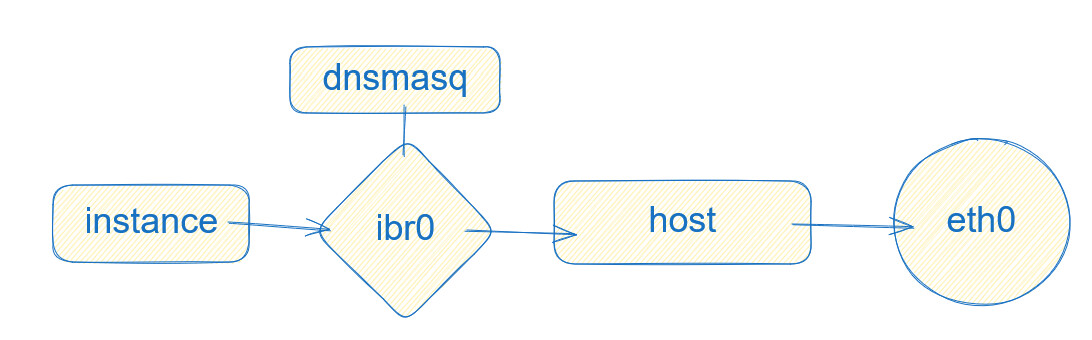
Recommended configuration for cluster setup with DHCP/DNS managed by Incus

Hi all. I’m currently testing an Incus cluster setup in some VMs. My host OS is NixOS. I want to have a cluster setup with a set of shared networks which are not NATed so that guests are accessible directly from outside, while using Incus’s DNS and DHCP feature. I got all of this working on a single node, as well as in a cluster, but in a cluster it seems a little jank, and I wanted to check if I’m missing something. There aren’t many addresses involved here but for clarity I’ll give the addresses from the subnet I’ve been testing with, 10.10.4.0/24.

My Incus config is extremely barebones:

config:
  cluster.https_address: 10.10.0.230:8443
  core.dns_address: 10.10.0.230:53
  core.https_address: 10.10.0.230:8443

First of all, I’m coming from Proxmox, and I have noticed I often try to do things in a Proxmox way before discovering the Incus way of doing things, so apologies if I’ve missed something obvious.

I have VLAN interfaces set up on the host which are unconfigured. In Incus, I have created bridge interfaces for each of these VLAN interfaces, and at first left them unconfigured. This works, instances were able to get a DHCP lease from my DHCP server on my router (10.10.4.1) and were accessible from and had access to my network. Then, I tried getting the Incus DNS integration to work. I turned off my router’s DHCP server on that network, and then re-enabled ipv4.dhcp. Suddenly, the instances wouldn’t get an address. I checked with lsof -n -i :67, and nothing was bound. After searching around and finding nothing, I tried giving the bridge interface an IP address (10.10.4.2), and immediately the DHCP server was started, the instances got addresses, and DNS records were populated and handed off to my DNS server.

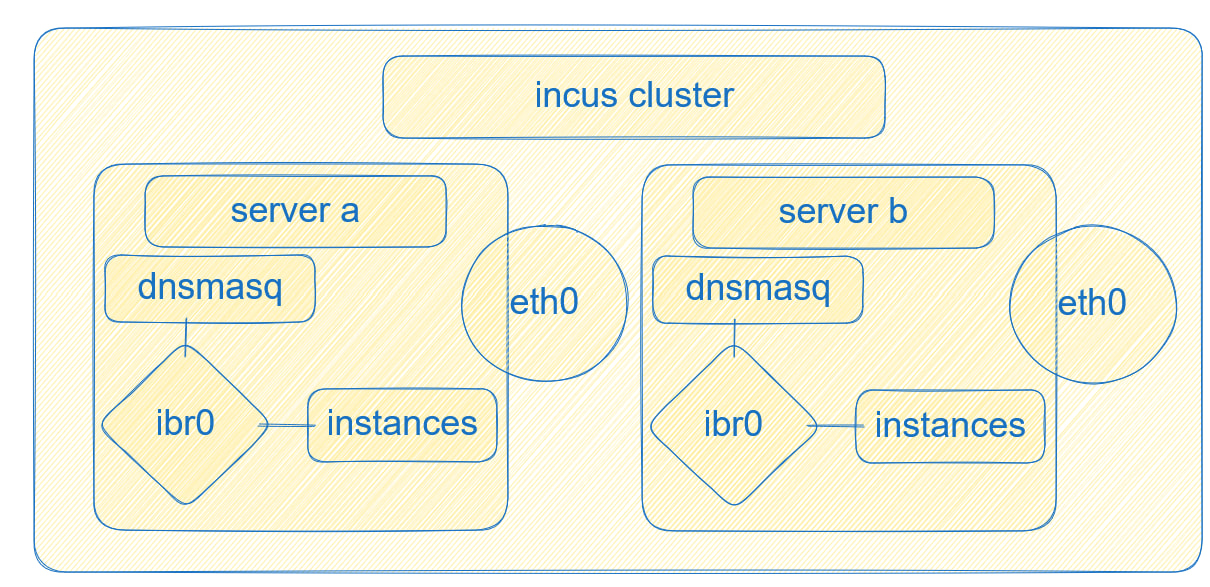
This is all well and good, except for when I want to add another node to my cluster. Now, these 2 nodes have the same IP address on their bridge interfaces, which while I can’t think of any specific problems this would cause, seems not ideal. An idea I tried was setting the address of the bridge to the broadcast address of that subnet, 10.10.4.255, which still works, but seems like a very hacky “fix”.

Network config as of now:

config:
  dns.zone.forward: dev.dfsek.com
  ipv4.address: 10.10.4.255/24
  ipv4.dhcp.gateway: 10.10.4.1
  ipv4.dhcp.ranges: 10.10.4.8-10.10.4.99
  ipv4.nat: "false"
  ipv6.address: none
  ipv6.dhcp: "false"
  ipv6.nat: "false"
  security.acls: test,test-in
description: ""
name: br104
type: bridge
used_by:
- /1.0/instances/test
- /1.0/instances/test2
- /1.0/profiles/net_dev
managed: true
status: Created
locations:
- incus-amd64
- incus2-amd64
project: default

So I suppose my question is, is there a correct way to set the interface to “broadcast only” (as that is all that’s needed for DHCP)? Is my method of just setting the address to the broadcast address correct? It works, but my searching has not led me anywhere indicating whether this is correct practice or not. If this is wrong, is there a way to allow each node to have a separate address on the bridge, or should I use a different network setup in my cluster?

1 Like

Hello and welcome,

clustering Incus instances doesn’t automatically create a “clustered” network. On default each cluster instance will have it’s own default bridge “incusbr0” configured and manages IP addresses on their own. There are multiple options to setup a clustered network.

  • One is to manage the DHCP and DNS external as you described
  • configure an OVN network
  • use vxlan between your bridges
  • use static addresses very manual approach

Each of them have their pros and cons. Depending on your requirements the first and second are the most straight forward to setup and work with. For a homelab VXLAN would be also a good option.

Incus is very flexible in how it can be configured for your needs but needs certain knowledge and configuration to support your requirements.

I’m using NixOS as my host OS for the hypervisors, so I could actually pretty easily give each hypervisor its own static address on the bridge (option 4, if I am understanding correctly), since the specific address wouldn’t matter as it is just for hosting the dnsmasq server. I couldn’t find a way to do that, though, Incus wants every node to have the same address on its corresponding bridge (which is fine as long as NAT is on, but obviously not when NAT is off). That’s why I tried setting the bridge address to the broadcast address, I’m just not sure if that’s good practice or not. I still can’t find anything searching for whether that could cause problems. For reference, here’s what I mean by that:

image

If that is fine to do, it seems like the best compromise for my situation, I did see those other options, but it seems to me like overkill to have encapsulation of the network at that level, when these hosts are all connected to the same L2 network over 40Gbps links. My understanding is that encapsulation with OVN or vxlan would drastically reduce throughput of instances if traffic was flowing between hosts, since that encapsulation is done in software.

As mentioned there are pros and cons of each option and you need to wight it out for your use case.

There are a few options how you can tune your network to overcome the overhead added by OVN or VXLAN. On a dedicated network for cluster node communication using jumbo frames is a valid option and the overhead is reduced to nearly nothing compared to the standard MTU.

The simplest approach would is to have a separate DNSMASQ sitting out side of the Incus cluster and provide IP’s and DNS. This way you don’t need to manage IP’s on your own and have full network speed.

Is what I am currently doing incorrect? Again, it works, I’m just wondering if it will come back to bite me later, since I can’t find anything suggesting this is a thing people have done before, and it seems a bit sus to me. But I can’t think of any specific reasons why it would stop working, other than it just being something unsupported and weird (is it unsupported or weird? again, no idea)

[dfsek@incus-amd64:~]$ incus network list-leases br104
+----------+-------------------+-------------+---------+--------------+
| HOSTNAME |    MAC ADDRESS    | IP ADDRESS  |  TYPE   |   LOCATION   |
+----------+-------------------+-------------+---------+--------------+
| br104.gw |                   | 10.10.4.255 | GATEWAY |              |
+----------+-------------------+-------------+---------+--------------+
| test     | 10:66:6a:bd:a9:b1 | 10.10.4.89  | DYNAMIC | incus2-amd64 |
+----------+-------------------+-------------+---------+--------------+
| test     | 10:66:6a:bd:a9:b1 | 10.10.4.89  | DYNAMIC | incus-amd64  |
+----------+-------------------+-------------+---------+--------------+
| test2    | 10:66:6a:cc:59:3a | 10.10.4.53  | DYNAMIC | incus2-amd64 |
+----------+-------------------+-------------+---------+--------------+
| test2    | 10:66:6a:cc:59:3a | 10.10.4.53  | DYNAMIC | incus-amd64  |
+----------+-------------------+-------------+---------+--------------+
| test3    | 10:66:6a:22:ff:dc | 10.10.4.39  | DYNAMIC | incus2-amd64 |
+----------+-------------------+-------------+---------+--------------+
| test3    | 10:66:6a:22:ff:dc | 10.10.4.39  | DYNAMIC | incus-amd64  |
+----------+-------------------+-------------+---------+--------------+
[dfsek@incus-amd64:~]$ dig @10.10.0.230 -p 53 axfr dev.dfsek.com

; <<>> DiG 9.20.15 <<>> @10.10.0.230 -p 53 axfr dev.dfsek.com
; (1 server found)
;; global options: +cmd
dev.dfsek.com.		3600	IN	SOA	dev.dfsek.com. 10.10.2.2. 1770873058 120 60 86400 30
dev.dfsek.com.		300	IN	NS	10.10.2.2.
br104.gw.dev.dfsek.com.	300	IN	A	10.10.4.255
test3.dev.dfsek.com.	300	IN	A	10.10.4.39
test2.dev.dfsek.com.	300	IN	A	10.10.4.53
test.dev.dfsek.com.	300	IN	A	10.10.4.89
test3.dev.dfsek.com.	300	IN	A	10.10.4.39
test2.dev.dfsek.com.	300	IN	A	10.10.4.53
test.dev.dfsek.com.	300	IN	A	10.10.4.89
dev.dfsek.com.		3600	IN	SOA	dev.dfsek.com. 10.10.2.2. 1770873058 120 60 86400 30
;; Query time: 37 msec
;; SERVER: 10.10.0.230#53(10.10.0.230) (TCP)
;; WHEN: Wed Feb 11 22:10:58 MST 2026
;; XFR size: 10 records (messages 1, bytes 455)

9: br104: <BROADCAST,MULTICAST,UP,LOWER_UP> mtu 1500 qdisc noqueue state UP group default qlen 1000
    link/ether 10:66:6a:da:1b:2b brd ff:ff:ff:ff:ff:ff
    inet 10.10.4.255/24 brd 10.10.4.255 scope global br104
       valid_lft forever preferred_lft forever

I set up a cluster using the example setup, and here the nodes also share the same (automatic) IPV4 address on the bridge. Is it just expected that nodes will have the same addresses on their respective bridge interfaces? Are you not supposed to use the DHCP/DNS functionality at all in a cluster? I’m very confused.

Well that depends how you have configured the first initial node. Assume you have used default settings it will configure a local bridge “incusbr0” on each incus cluster node which will have it’s own network settings and DNS etc.

Have a look at this How to make a server a member of more than one VxLAN (ie a member of 2 diff VNID) which should explain it a bit more in detail and how to configure Incus using VXLAN.

One option you have is to give each bridge a different ipv4.dhcp.ranges for example:

  • node1 range 10.10.4.50 - 10.10.4.99
  • node2 range 10.10.4.100 - 10.10.4.149
  • node3 range 10.10.4.150 - 10.10.4.199

As long as the ranges between the nodes are not overlapping you have unique IP addresses.

Alternative disable DHCP on each bridge and use a central DHCP server outside of Incus as mentioned above.

Again Incus provides many different solutions but requires to understand how they need to be configured. Flexibility comes with complexity and clustering Incus is a bit of an advanced setup and needs to be thought through. I would recommend using OVN as setup is simple and solves your issue would also eliminate the “incusbr0” bridge….

I’m not sure you’re actually reading my question - or the Incus documentation for that matter. I have explained that I am not using the default configuration, I’ve given my exact configuration in fact.

Also, what you’ve told me to do:

is something the documentation specifically says cannot be done:

The only configuration keys that may differ between networks on different members are bridge.external_interfaces, parent, bgp.ipv4.nexthop and bgp.ipv6.nexthop.

I also have looked into OVN and vxlan and confirmed that for my usecase, it is not what I ought to be using, for many very obvious reasons, mainly that all my nodes are residing on the same L2 network, and never will have to span different networks. The post you linked for vxlan has the user setting up a cluster across separate cloud providers. All my nodes are physical hosts right next to each other. I’m bridging VLAN interfaces, which are already on the same switch. Connecting them isn’t the problem, they are already connected and communicating just fine. Instances across nodes can connect, I can access them from outside the nodes, etc. etc. Unless I am missing something (which again, please tell me what I am missing), each node would still have the same IP address, because it’d still need a bridge, thus bringing me back to square one, but with a massively overcomplicated network setup for my usecase.

To be honest, is quite frustrating to hear you repeatedly say things like this, because it really seems that you yourself do not have this understanding you are saying that I need.

My question remains, is it possible to use the DHCP/DNS functions of Incus on bridges where NAT is disabled? Is my solution of setting the bridge address to the broadcast address a footgun? The only thought I had for how it could be is a potential race condition where 2 instances on different nodes try to get DHCP leases at the same time and the dnsmasq running on each node hands out the same lease, but I have yet to look into specifically how Incus sets up the dnsmasq instances to see whether that would be possible.

It is beginning to seem like the answer to my question is “no” and I should just use an external DHCP server.

Sorry for the confusion and you are right in a cluster you can’t define different ranges etc.

No this isn’t possible as far as I know. Incus doesn’t manage IP addresses on it’s own, it uses DNSMASQ under the hood installed on each individual node listening on the managed bridge.

The only option I’m aware about is to disable the DHCP feature for your incus network and use an external service.

Yes. There’s nothing magic about NAT: just turn it off. Then add a static route upstream to route your incus subnet via the incus host.

The problem arises if you want to use the same subnet across multiple nodes in your cluster. You can’t have multiple, non-coordinating DHCP servers on the same subnet. dnsmasq isn’t a clustered DHCP server (*).

What I think you can do is run unmanaged bridges on the other nodes, and then trunk them to the managed bridge on the first node. You wouldn’t have any redundancy, since the first node is responsible for DHCP and DNS. Also, all the DNS requests will all go across to the first node. But that may be good enough for what you want.

Otherwise, stick DHCP and DNS in its own container, but you won’t get the incus hostnames added automatically.


(*) EDIT: I don’t use clustering myself, so I’ve not tested this. Possibly, if incus understands the networks are bridged together externally, it will run a single instance of dnsmasq on a node of its choice, and only one node will be active as the gateway. The documentation is unclear here; it says you have to create the same (named) network on all cluster nodes, but not whether they are separate layer 2 domains / subnets or the same.