Hi all! I’ve migrated from Proxmox to IncusOS over the weekend. So far, I’ve been really enjoying IncusOS, the whole experience is really well thought out.
After physically reseating my TPM chip (with the system powered off, as I had to take off the chip to reorganize some cables), IncusOS now fails to check for Secure Boot key updates with the error unable to get issuer certificate.
The system boots and runs normally — TPM auto-unlock works, all containers are running — but every boot shows this verification failure.
Environment
-
Hardware: Supermicro motherboard with discrete TPM 2.0 module
-
IncusOS channel: stable
-
Secure Boot: Enabled, User Mode, IncusOS keys enrolled (confirmed present in BIOS)
What Happened
-
Powered off the system completely
-
Disconnected and reconnected the TPM chip (was installing something nearby on the motherboard)
-
Powered the system back on
-
IncusOS now shows a red error on boot:
Verification failure: unable to get issuer certificate
What’s Working
-
System boots successfully
-
TPM auto-unlock works (no recovery key needed)
-
All containers and VMs are running normally
-
Secure Boot keys are present in BIOS NVRAM (verified in UEFI settings)
-
Remote access via
incusclient works
What’s Broken
-
Secure Boot key update checks fail
-
incus admin os system update checktriggers the same error
Command Outputs
$ incus admin os system update show homelab:
WARNING: The IncusOS API and configuration is subject to change
config:
  auto_reboot: false
  channel: stable
  check_frequency: 6h
state:
  last_check: "2026-02-04T04:02:04.328074805Z"
  needs_reboot: false
  status: Failed to check for Secure Boot key updates
$ incus admin os system security show homelab:
Error: not found
$ incus list homelab:
# Works correctly, shows all running containers
Screenshots
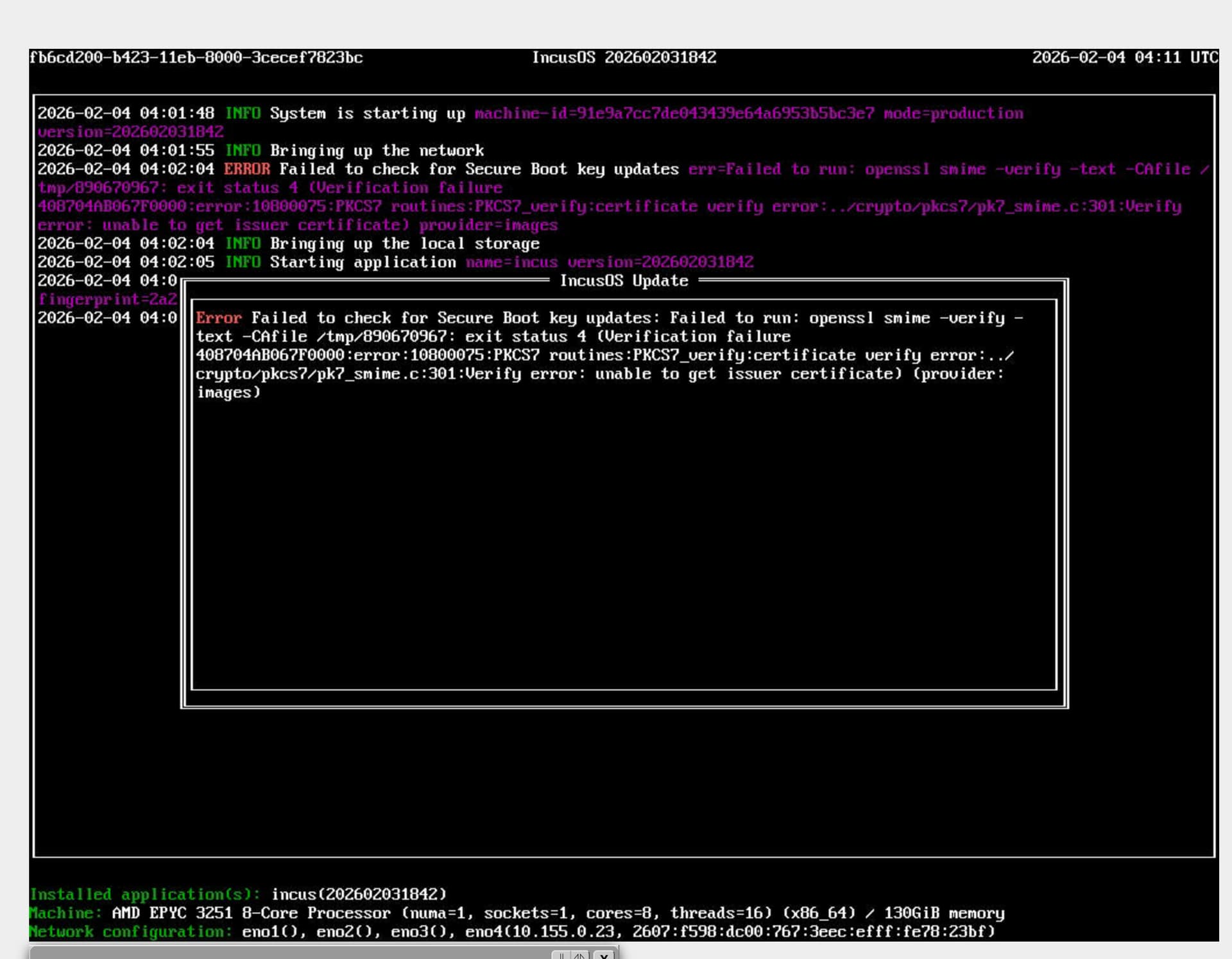
Analysis
It appears the update verification (which uses OpenSSL to validate .auth files against the IncusOS certificate chain) is failing, even though:
-
The UEFI Secure Boot keys (PK, KEK, db) are intact and the system boots fine
-
TPM disk encryption is working correctly
The unable to get issuer certificate error suggests the IncusOS Root CA or intermediate CA certificate used to verify update signatures is missing or inaccessible — possibly due to some internal state being invalidated when the TPM was physically disturbed.
What I’ve Ruled Out
-
System time: Verified correct
-
Secure Boot keys: Confirmed present in BIOS
-
TPM functionality: Auto-unlock works, no recovery key needed
-
Reset to Setup Mode / Restore Factory Keys: Advised against this as it would clear the IncusOS-enrolled keys and potentially prevent boot
Questions
-
Is there a way to reset or refresh the internal certificate store that IncusOS uses for update verification, without affecting Secure Boot or TPM encryption?
-
Is
tpm-rebindrelevant here, given that TPM auto-unlock is actually working? -
Is this a known issue when the TPM chip is physically reseated?
I’ve read Security - IncusOS documentation and System security - IncusOS documentation but couldn’t find definitive answers to these questions.
P.S. It seems like it might be a bug. I saw this comment but in response to a Gigabyte motherboard. IncusOS got stuck while trying to install - #8 by gibmat My homelab is installed in the following Supermicro unit https://www.supermicro.com/en/Aplus/system/Embedded/AS-5019D-FTN4.php
Thanks for any guidance!