delmar
February 18, 2026, 2:47am
1
Ok I have been trying to get a trivia/cloud vm to boot with a static ip address.
root@nick:~# incus init trixie-vm-cloud -c limits.cpu=4 -c limits.memory=8GiB -d root,size=20GiB --vm gru -p default -p merlot   -c cloud-init.network-config="$(cat <<EOF
version: 2
ethernets:
  enp5s0:
    addresses:
      - 192.168.129.130/17
    gateway4: 192.168.128.1
    nameservers:
      addresses:
        - 192.168.128.1
EOF

)"
Then I
root@nick:~# incus --console gru
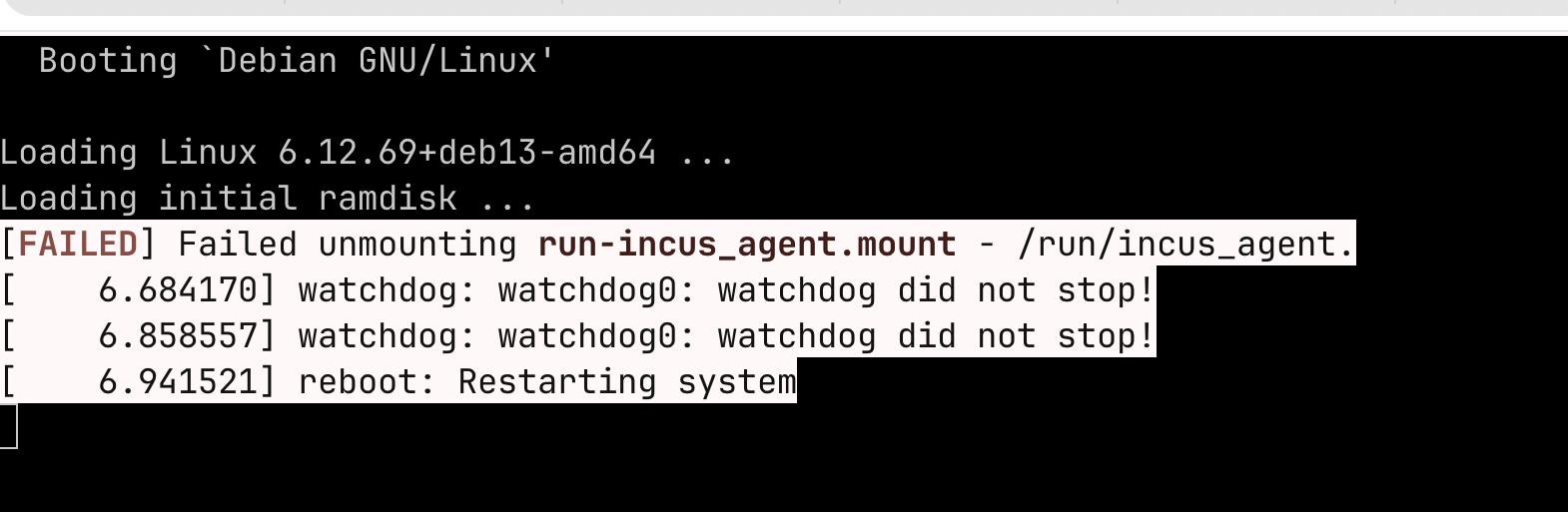
And I get a boot loop. WTFO???
delmar
February 18, 2026, 2:49am
2
I love/HATE how my browser changes trixie to trivia. #$!3&%^#@~ apple=suckdifferent
delmar
February 18, 2026, 2:51am
3
delmar
February 18, 2026, 2:52am
4
Also that is the debian/13/cloud image from images…
stgraber
February 18, 2026, 6:15am
5
Make sure Incus is fully up to date on your system, this looks like you may be one package update behind.
delmar
February 19, 2026, 12:15am
6
Thanks @stgraber That took care of the boot loop.
Now I just need to figure out how to get the static ip
delmar
February 19, 2026, 12:45am
7
And actually after deleting and recreating the vm it solved both. Thanks again @stgraber
delmar
July 19, 2026, 12:43am
8
Ok. So this is related and I will ask again differently.
candlerb
July 19, 2026, 7:24pm
9
Is this the same question you posted here ? If so, I think it would be better not to cross-post.
Starting a new thread would probably have been a better approach, given that the other thread was more than 2 years old. But I have answered in that one anyway.
delmar
July 19, 2026, 8:20pm
10
Yes. I started digging around and found your old post. And so I continued there. Thanks.