I’ve used acme based tools with lets encrypt quite a bit in the past. I just setup a new Incus server and wanted to get validated certs for my domain, incus.mydomain.com (fake domain of course).
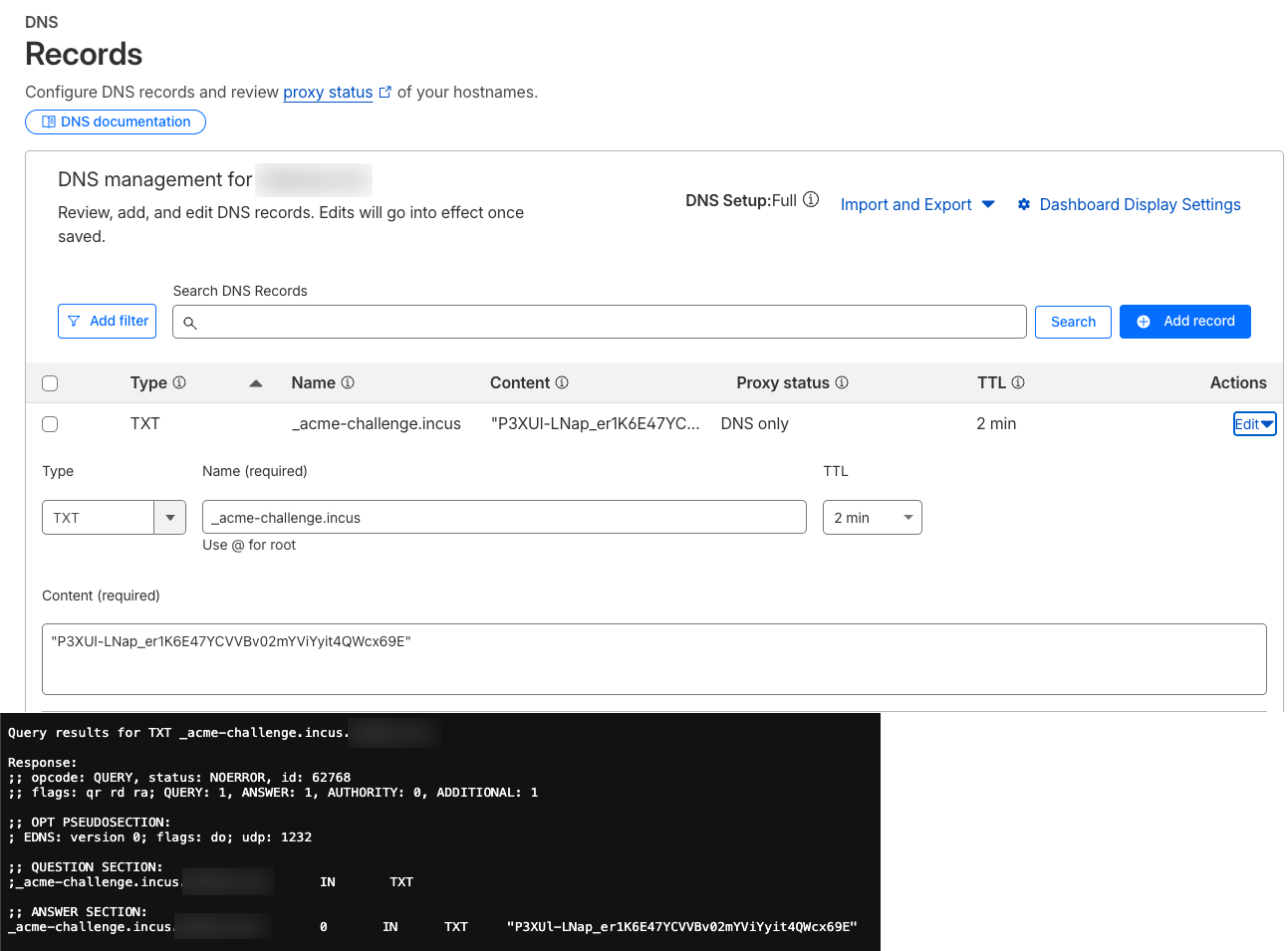
It’s not working. I edit the incus config, put in the values, I see the lego request go out and make the TXT record. I can validate that the TXT record is found with unboundtest.com, but, the validation fails. It says that the record was not found.
Here is the log output after I save the config and wait the 4 or 2 mins for the test to fail:
2025/11/14 10:51:16 Saved key to /tmp/lego695114223/accounts/acme-v02.api.letsencrypt.org/josh@mydomain.com/keys/josh@mydomain.com.key
2025/11/14 10:51:17 [INFO] acme: Registering account for josh@mydomain.com
2025/11/14 10:51:17 [INFO] [incus.mydomain.com] acme: Obtaining bundled SAN certificate
2025/11/14 10:51:17 [INFO] [incus.mydomain.com] AuthURL: https://acme-v02.api.letsencrypt.org/acme/authz/2800677086/612858237036
2025/11/14 10:51:17 [INFO] [incus.mydomain.com] acme: Could not find solver for: tls-alpn-01
2025/11/14 10:51:17 [INFO] [incus.mydomain.com] acme: Could not find solver for: http-01
2025/11/14 10:51:17 [INFO] [incus.mydomain.com] acme: use dns-01 solver
2025/11/14 10:51:17 [INFO] [incus.mydomain.com] acme: Preparing to solve DNS-01
2025/11/14 10:51:19 [INFO] cloudflare: new record for incus.mydomain.com, ID d56dd3f47738766396ef2d05669a555b
2025/11/14 10:51:19 [INFO] [incus.mydomain.com] acme: Trying to solve DNS-01
2025/11/14 10:51:19 [INFO] [incus.mydomain.com] acme: Checking DNS record propagation. [nameservers=1.1.1.1:53,8.8.8.8:53]
2025/11/14 10:51:21 [INFO] Wait for propagation [timeout: 4m0s, interval: 2s]
2025/11/14 10:51:21 [INFO] [incus.mydomain.com] acme: Waiting for DNS record propagation.

<Waiting message repeated over and over and over>

2025/11/14 10:55:22 [INFO] [incus.mydomain.com] acme: Cleaning DNS-01 challenge
2025/11/14 10:55:22 [INFO] Deactivating auth: https://acme-v02.api.letsencrypt.org/acme/authz/2800677086/612858237036
2025/11/14 10:55:22 Could not obtain certificates:
        error: one or more domains had a problem:
[incus.mydomain.com] propagation: time limit exceeded: last error: authoritative nameservers: NS pedro.ns.cloudflare.com.:53 returned NXDOMAIN for _acme-challenge.incus.mydomain.com.)
Press enter to open the editor again or ctrl+c to abort change
I’ll have to test it with one of our Cloudflare test domains here, but the error really suggests a missing record in the CloudFlare DNS from Let’s Encrypt’s view of things at least…
Yeah, I just know for a fact it is created in Cloudflare. So I don’t know how else to make it recognize the record.
BTW, I tried directly with lego command line and got the same thing.
I’m using Cloudflare, and have a couple of thoughts:
Don’t use 1.1.1.1 as the resolver, use your actual Cloudflare Nameservers for your domain. They are listed below your DNS configuration with the pattern *.ns.cloudflare.com
If you’re using a CLOUDFLARE_DNS_API_TOKEN, use a CLOUDFLARE_ZONE_API_TOKEN too. You may well have created a single API token with Zone.Zone and Zone.DNS permissions, but lego seems to prefer a separation.
Include your Cloudflare account email in the environment. It may or may not be the same as the ACME email address, but it needs to be present.
I have the exact same behaviour here. The records populate (including on the root ns) and can be queried from an adjacent device on the same network. The contents also match what is output of what the lego client is logging as expected.
The CF_API_EMAIL is not needed if using the DNS and Zone API tokens. Those values are both bearer tokens so contain the auth details already. It’s either: email + API key, dns + zone token, or just single dns token (with privs for both). Implementation here.
There is an issue here with others commenting on similar behaviour. It’s still open, but a common fix appears to be passing --dns.propagation-disable-ans to bypass the propagation check. Unfortunately there doesn’t appear to be a way to pass that via an env var so is not possible here.
Possible cause is further expanded in this issue where it appears lego may be attempting ipv6 only. Without shell access on IncusOS it’s a little hard to confirm, but would make sense for my environment (IPv4 only to outside world).
@_kb I would agree, but I got the behaviour that you and @jbhardman experienced when I first set this up for Cloudflare. I added the my account email (because that is what the lego describes for Cloudflare operation), and it worked - both with incus and IncusOS.
It’s definitely not needed by lego. I couldn’t spot anywhere Incus is expecting that email either. From the PR history though you seem like a good person to confirm that @accuser?
FWIW all up and running here with just a CF_DNS_API_TOKEN (setup as per details here).
Root cause of the issue was a router DNATing all DNS traffic (and that rule not applied to the adjacent machine, just for some extra troubleshooting fun). This meant that while the record would create and be visible on the authoritative servers, the requests used for the propagation check from the IncusOS host were being hijacked, regardless of what was placed in acme.provider.resolvers. With that oddity ahem resolved, all is good with a minimal config.