Try ovn in incus

As a non-professional selfhoster, I have seen ovn in a variety of selfhost posts. I know I don’t need such abstraction in my setup, I only have one mini pc as server, but seeing you discuss it so frequently, it just raises my curiosity. After doing a lot of research, it seems I’m just too naive, there is little I can find about ovn tutorial, let along combining with incus, I think search engines are feeding me ads and AIs are lying to me. So, I have to read manual pages and search pieces by pieces to fill my knowledge. I don’t think I can chew the hard bone without paying money. Hence here are my notes of testing ovn in incus, hope any of you can fill the void without ask me to pay, but I guess that will never happen. No cluster, can’t afford it, will never try it.

manual page:

Table of contents:

ovn inside incus container

  • 1-0-0
  • 1-1-1 overlay logical switch
  • 1-2-1 localnet (bridged logical switch)
  • 1-2-2 l2gateway
  • 1-2-3 vtep
  • 1-2-4 DHCP and external
  • 1-3-1 router (overlay logical switch)
  • 1-3-2 router (bridged logical switch)

ovn intergrade with incus

  • 2-1-1 overlay logical switch
  • 2-2-1 localnet (bridged logical switch)
  • 2-2-2 l2gateway
  • 2-2-3
  • 2-2-4 DHCP
  • 2-3-1 router (overlay logical switch)
  • 2-3-2 router (bridged logical switch)

ovn with incus as CMS

  • 3-1-1 overlay logical switch
  • 3-2-1 localnet (bridged logical switch)
  • 3-2-2 l2gateway
  • 3-3-1 router
  • 3-4-1 conclusion

ovn inside incus container

1-0-0

I prepared 4 containers for test, one for ovn server, two for ovn client, one is just a plain host. All of them are debian 13 containers, and connect to same incus managed bridge. Host is debian 13 too.
server is 10.129.251.153. client 1 is 10.129.251.100. client 2 is 10.129.251.91. client 3 is 10.129.251.134.

# server 
apt update
apt install -y ovn-central
ovn-nbctl set-connection ptcp:6641:10.129.251.153
ovn-sbctl set-connection ptcp:6642:10.129.251.153

I really don’t know why passive listen address are writen in port:ip way. At First glance, I thought ptcp means port + tcp.

# client 1
apt update
apt install -y openvswitch-switch ovn-host
# client 2
apt update
apt install -y openvswitch-switch ovn-host

and i create snapshots for all of them.

1-1-1

let’s start with overlay logical switch and the type of logical switch port which doesn’t has a name which I will call it instance port.

# server
# create a logical switch ls0. I know I should use a more meaningful name, but nothing jumps out of my mind.
ovn-nbctl ls-add ls0
# add a logical switch instance port ls0-ins1 to ls0. I should give the naming task to you, I don't think I need ovn after I finish writing this post.
ovn-nbctl lsp-add ls0 ls0-ins1
# yes, I made up this mac address and I can't made up a more mac address like one.
# set ls0-ins1 address to 00:00:00:00:00:01
ovn-nbctl lsp-set-addresses ls0-ins1 00:00:00:00:00:01
ovn-nbctl lsp-add ls0 ls0-ins2
ovn-nbctl lsp-set-addresses ls0-ins2 00:00:00:00:00:02

Yes, I can set ls0-ins1 address to “00:00:00:00:00:01 192.168.100.11”, I’m just lazy, and they can learn addresses through ARP, so do whatever you like.

# client 1
# connect to southboard database and inform self ip to sb db and use encapsulate type geneve
# only 2 types of encapsulation: geneve or vxlan
# want to know why use geneve, read: https://blog.russellbryant.net/post/2017/05/2017-05-30-ovn-geneve-vs-vxlan-does-it-matter/
ovs-vsctl set open_vswitch . external-ids:ovn-remote="tcp:10.129.251.153:6642" external-ids:ovn-encap-ip=10.129.251.100 external-ids:ovn-encap-type=geneve
## create a internal port ins1 and match id and mac as in ovn db
ovs-vsctl add-port br-int ins1  -- set Interface ins1 type=internal
ovs-vsctl set Interface ins1 external_ids:iface-id=ls0-ins1 mac='["00:00:00:00:00:01"]'
ip addr add 192.168.100.11/24 dev ins1
ip link set ins1 up

Yes, we put all instance ports in br-int to connect to overlay logical switches. Ovn will distinguish them with iface-id.

# client 2
ovs-vsctl set open_vswitch . external-ids:ovn-remote="tcp:10.129.251.153:6642" external-ids:ovn-encap-ip=10.129.251.91 external-ids:ovn-encap-type=geneve
ovs-vsctl add-port br-int ins2  -- set Interface ins2 type=internal
ovs-vsctl set Interface ins2 external_ids:iface-id=ls0-ins2 mac='["00:00:00:00:00:02"]'
ip addr add 192.168.100.12/24 dev ins2
ip link set ins2 up
ping test
# client 1
~# ping -I ins1 -c 1 192.168.100.12
PING 192.168.100.12 (192.168.100.12) from 192.168.100.11 ins1: 56(84) bytes of data.
64 bytes from 192.168.100.12: icmp_seq=1 ttl=64 time=1.22 ms

--- 192.168.100.12 ping statistics ---
1 packets transmitted, 1 received, 0% packet loss, time 0ms
rtt min/avg/max/mdev = 1.216/1.216/1.216/0.000 ms

# client 2
~# ping -I ins2 -c 1 192.168.100.11
PING 192.168.100.11 (192.168.100.11) from 192.168.100.12 ins2: 56(84) bytes of data.
64 bytes from 192.168.100.11: icmp_seq=1 ttl=64 time=1.89 ms

--- 192.168.100.11 ping statistics ---
1 packets transmitted, 1 received, 0% packet loss, time 0ms
rtt min/avg/max/mdev = 1.885/1.885/1.885/0.000 ms

You can see how convenient we can connect 2 instances together that don’t directly connect to a “physical” switch. Ins1 and ins2 can ping each other through geneve tunnel. I guess visually it will look like this:

Yes, server doesn’t connect to the geneve tunnel, it doesn’t even have a ovs bridge because lack of openvswitch-switch package.
If you use “ovn-nbctl lsp-get-type ls0-ins1” in server, you will see empty string. Since in incus, only VMs and containers use this type of port, that’s why I call it instance port.

1-1-2

Let’s see switch port which bridge 2 overlay logical switches.

# server
ovn-nbctl lsp-add ls0 ls0-to-ls1
ovn-nbctl lsp-set-type ls0-to-ls1 switch
ovn-nbctl lsp-set-options ls0-to-ls1 peer=ls1-to-ls0
ovn-nbctl ls-add ls1
ovn-nbctl lsp-add ls1 ls1-to-ls0
ovn-nbctl lsp-set-type ls1-to-ls0 switch
ovn-nbctl lsp-set-options ls1-to-ls0 peer=ls0-to-ls1
ovn-nbctl lsp-add ls1 ls1-ins3
ovn-nbctl lsp-set-addresses ls1-ins3 00:00:00:00:00:03
# client 1
ovs-vsctl add-port br-int ins3  -- set Interface ins3 type=internal
ovs-vsctl set Interface ins3 external_ids:iface-id=ls1-ins3 mac='["00:00:00:00:00:03"]'
ip addr add 192.168.100.13/24 dev ins3
ip link set ins3 up
ping test
# client 1
~# ping -I ins3 -c 1 192.168.100.12
PING 192.168.100.12 (192.168.100.12) from 192.168.100.13 ins3: 56(84) bytes of data.
64 bytes from 192.168.100.12: icmp_seq=1 ttl=64 time=2.09 ms

--- 192.168.100.12 ping statistics ---
1 packets transmitted, 1 received, 0% packet loss, time 0ms
rtt min/avg/max/mdev = 2.091/2.091/2.091/0.000 ms

# client 2
~# ping -I ins2 -c 1 192.168.100.13
PING 192.168.100.13 (192.168.100.13) from 192.168.100.12 ins2: 56(84) bytes of data.
64 bytes from 192.168.100.13: icmp_seq=1 ttl=64 time=1.28 ms

--- 192.168.100.13 ping statistics ---
1 packets transmitted, 1 received, 0% packet loss, time 0ms
rtt min/avg/max/mdev = 1.282/1.282/1.282/0.000 ms

As you can see a switch port peers with another switch port, they don’t have ip, just like connect 2 switches with an ethernet cable.

result
# server
~# ovn-sbctl show
Chassis "e54ad6e1-382d-4ed7-884e-5e724be3c936"
    hostname: oc1
    Encap geneve
        ip: "10.129.251.100"
        options: {csum="true"}
    Port_Binding ls0-ins1
    Port_Binding ls1-ins3
Chassis "7225b2eb-68a1-448b-925e-65a83a604b3d"
    hostname: oc2
    Encap geneve
        ip: "10.129.251.91"
        options: {csum="true"}
    Port_Binding ls0-ins2
~# ovn-nbctl show
switch f78a1d40-48da-4119-bbef-f58e351204d3 (ls1)
    port ls1-ins3
        addresses: ["00:00:00:00:00:03"]
    port ls1-to-ls0
        type: switch
switch b8ec47e2-35cf-441d-8a3b-a15d4e40a68f (ls0)
    port ls0-ins1
        addresses: ["00:00:00:00:00:01"]
    port ls0-ins2
        addresses: ["00:00:00:00:00:02"]
    port ls0-to-ls1
        type: switch

# client 1
~# ovs-vsctl show
e655c3c9-9f7a-42e4-a9bd-8a639a25949e
    Bridge br-int
        fail_mode: secure
        datapath_type: system
        Port ins3
            Interface ins3
                type: internal
        Port br-int
            Interface br-int
                type: internal
        Port ins1
            Interface ins1
                type: internal
        Port ovn-7225b2-0
            Interface ovn-7225b2-0
                type: geneve
                options: {csum="true", key=flow, local_ip="10.129.251.100", remote_ip="10.129.251.91"}

# client 2
~# ovs-vsctl show
bd70728b-95af-4a9f-9b62-577ffe017df5
    Bridge br-int
        fail_mode: secure
        datapath_type: system
        Port ins2
            Interface ins2
                type: internal
        Port br-int
            Interface br-int
                type: internal
        Port ovn-e54ad6-0
            Interface ovn-e54ad6-0
                type: geneve
                options: {csum="true", key=flow, local_ip="10.129.251.91", remote_ip="10.129.251.100"}

1-2-1

I restored snapshot. Let’s see localnet port, a type of port connects to “physical” network. I connected client 1 and 3’s eth1 to an ovs bridge not an incus managed bridge. i don’t know why i can’t ping thorugh incus managed bridge use the same method as ovs bridge.

# host
ovs-vsctl add-br br-test
incus config device add <instance> eth1 nic nictype=bridged parent=br-test
# server
ovn-nbctl ls-add ls0
ovn-nbctl lsp-add ls0 ls0-localnet 
## localnet port address is always unknown 
ovn-nbctl lsp-set-addresses ls0-localnet unknown 
ovn-nbctl lsp-set-type ls0-localnet localnet 
## you can set network_name to whatever like
ovn-nbctl lsp-set-options ls0-localnet network_name=localnetbind
ovn-nbctl lsp-add ls0 ls0-ins1 
ovn-nbctl lsp-set-addresses ls0-ins1 00:00:00:00:00:01
ovn-nbctl lsp-add ls0 ls0-ins2
ovn-nbctl lsp-set-addresses ls0-ins2 00:00:00:00:00:02
# client 1
ovs-vsctl set open_vswitch . external-ids:ovn-remote="tcp:10.129.251.153:6642" external-ids:ovn-encap-ip=10.129.251.100 external-ids:ovn-encap-type=geneve
## another terrible name, what name will you make up
ovs-vsctl add-br br-local
ovs-vsctl add-port br-local eth1
ip link set eth1 up 
ovs-vsctl set Open_vSwitch . external-ids:ovn-bridge-mappings=localnetbind:br-local
ovs-vsctl add-port br-int ins1  -- set Interface ins1 type=internal
ovs-vsctl set Interface ins1 external_ids:iface-id=ls0-ins1 mac='["00:00:00:00:00:01"]'
ip addr add 192.168.100.11/24 dev ins1
ip link set ins1 up
# client 2
ovs-vsctl set open_vswitch . external-ids:ovn-remote="tcp:10.129.251.153:6642" external-ids:ovn-encap-ip=10.129.251.91 external-ids:ovn-encap-type=geneve
ovs-vsctl add-port br-int ins2  -- set Interface ins2 type=internal
ovs-vsctl set Interface ins2 external_ids:iface-id=ls0-ins2 mac='["00:00:00:00:00:02"]'
ip addr add 192.168.100.12/24 dev ins2
ip link set ins2 up
# client 3
ip addr add 192.168.100.13/24 dev eth1
ip link set eth1 up
ping test
# client 1
~# ping -I ins1 -c 1 192.168.100.12
PING 192.168.100.12 (192.168.100.12) from 192.168.100.11 ins1: 56(84) bytes of data.

--- 192.168.100.12 ping statistics ---
1 packets transmitted, 0 received, 100% packet loss, time 0ms

~# ping -I ins1 -c 1 192.168.100.13
PING 192.168.100.13 (192.168.100.13) from 192.168.100.11 ins1: 56(84) bytes of data.
64 bytes from 192.168.100.13: icmp_seq=1 ttl=64 time=1.49 ms

--- 192.168.100.13 ping statistics ---
1 packets transmitted, 1 received, 0% packet loss, time 0ms
rtt min/avg/max/mdev = 1.487/1.487/1.487/0.000 ms

# client 2
~# ping -I ins2 -c 1 192.168.100.11
PING 192.168.100.11 (192.168.100.11) from 192.168.100.12 ins2: 56(84) bytes of data.

--- 192.168.100.11 ping statistics ---
1 packets transmitted, 0 received, 100% packet loss, time 0ms

~# ping -I ins2 -c 1 192.168.100.13
PING 192.168.100.13 (192.168.100.13) from 192.168.100.12 ins2: 56(84) bytes of data.

--- 192.168.100.13 ping statistics ---
1 packets transmitted, 0 received, 100% packet loss, time 0ms

# client 3
~# ping -I eth1 -c 1 192.168.100.11
PING 192.168.100.11 (192.168.100.11) from 192.168.100.13 eth1: 56(84) bytes of data.
64 bytes from 192.168.100.11: icmp_seq=1 ttl=64 time=0.851 ms

--- 192.168.100.11 ping statistics ---
1 packets transmitted, 1 received, 0% packet loss, time 0ms
rtt min/avg/max/mdev = 0.851/0.851/0.851/0.000 ms

~# ping -I eth1 -c 1 192.168.100.12
PING 192.168.100.12 (192.168.100.12) from 192.168.100.13 eth1: 56(84) bytes of data.

--- 192.168.100.12 ping statistics ---
1 packets transmitted, 0 received, 100% packet loss, time 0ms

Ins1 and client 3’s eth1 can ping each other. Ins2 can’t ping any of them, even though ins1 and ins2 are connected to ls0. Because after setting up localnet port, it’s a bridged logical switch not an overlay logical switch, traffic will not travel through tunnel. If you want to know why, please read Logical Networks-Logical Switch Port Types in:
https://www.ovn.org/support/dist-docs/ovn-architecture.7.html

result
# server
~# ovn-sbctl show
Chassis "e54ad6e1-382d-4ed7-884e-5e724be3c936"
    hostname: oc1
    Encap geneve
        ip: "10.129.251.100"
        options: {csum="true"}
    Port_Binding ls0-ins1
Chassis "7225b2eb-68a1-448b-925e-65a83a604b3d"
    hostname: oc2
    Encap geneve
        ip: "10.129.251.91"
        options: {csum="true"}
    Port_Binding ls0-ins2
~# ovn-nbctl show
switch 831ba227-5a5a-4838-abba-85174b92fe65 (ls0)
    port ls0-localnet
        type: localnet
        addresses: ["unknown"]
    port ls0-ins1
        addresses: ["00:00:00:00:00:01"]
    port ls0-ins2
        addresses: ["00:00:00:00:00:02"]

# client 1
~# ovs-vsctl show
e655c3c9-9f7a-42e4-a9bd-8a639a25949e
    Bridge br-int
        fail_mode: secure
        datapath_type: system
        Port br-int
            Interface br-int
                type: internal
        Port patch-br-int-to-ls0-localnet
            Interface patch-br-int-to-ls0-localnet
                type: patch
                options: {peer=patch-ls0-localnet-to-br-int}
        Port ins1
            Interface ins1
                type: internal
        Port ovn-7225b2-0
            Interface ovn-7225b2-0
                type: geneve
                options: {csum="true", key=flow, local_ip="10.129.251.100", remote_ip="10.129.251.91"}
    Bridge br-local
        Port br-local
            Interface br-local
                type: internal
        Port patch-ls0-localnet-to-br-int
            Interface patch-ls0-localnet-to-br-int
                type: patch
                options: {peer=patch-br-int-to-ls0-localnet}
        Port eth1
            Interface eth1

# client 2
~# ovs-vsctl show
bd70728b-95af-4a9f-9b62-577ffe017df5
    Bridge br-int
        fail_mode: secure
        datapath_type: system
        Port ins2
            Interface ins2
                type: internal
        Port ovn-e54ad6-0
            Interface ovn-e54ad6-0
                type: geneve
                options: {csum="true", key=flow, local_ip="10.129.251.91", remote_ip="10.129.251.100"}
        Port br-int
            Interface br-int
                type: internal

1-2-2

I restored snapshot. Let’s see l2gateway port, another type of port connects to “physical” network but acts as a gateway. Client 1 will be the gateway.

# server
ovn-nbctl ls-add ls0
ovn-nbctl lsp-add ls0 ls0-gw
ovn-nbctl lsp-set-type ls0-gw l2gateway
ovn-nbctl lsp-set-addresses ls0-gw unknown
# you can recognize it's client 1's chassis id. I wiil stop joking about my naming sense.
ovn-nbctl lsp-set-options ls0-gw network_name=gatewaybind  l2gateway-chassis=e54ad6e1-382d-4ed7-884e-5e724be3c936
ovn-nbctl lsp-add ls0 ls0-ins1 
ovn-nbctl lsp-set-addresses ls0-ins1 00:00:00:00:00:01
ovn-nbctl lsp-add ls0 ls0-ins2
ovn-nbctl lsp-set-addresses ls0-ins2 00:00:00:00:00:02
# client 1
ovs-vsctl set open_vswitch . external-ids:ovn-remote="tcp:10.129.251.153:6642" external-ids:ovn-encap-ip=10.129.251.100 external-ids:ovn-encap-type=geneve
ovs-vsctl add-br br-local
ovs-vsctl add-port br-local eth1
ip link set eth1 up 
ovs-vsctl set Open_vSwitch . external-ids:ovn-bridge-mappings=gatewaybind:br-local
ovs-vsctl add-port br-int ins1  -- set Interface ins1 type=internal
ovs-vsctl set Interface ins1 external_ids:iface-id=ls0-ins1 mac='["00:00:00:00:00:01"]'
ip addr add 192.168.100.11/24 dev ins1
ip link set ins1 up
# client 2
ovs-vsctl set open_vswitch . external-ids:ovn-remote="tcp:10.129.251.153:6642" external-ids:ovn-encap-ip=10.129.251.91 external-ids:ovn-encap-type=geneve
ovs-vsctl add-port br-int ins2  -- set Interface ins2 type=internal
ovs-vsctl set Interface ins2 external_ids:iface-id=ls0-ins2 mac='["00:00:00:00:00:02"]'
ip addr add 192.168.100.12/24 dev ins2
ip link set ins2 up
# client 3
ip addr add 192.168.100.13/24 dev eth1
ip link set eth1 up
ping test
# client 1
~# ping -I ins1 -c 1 192.168.100.12
PING 192.168.100.12 (192.168.100.12) from 192.168.100.11 ins1: 56(84) bytes of data.
64 bytes from 192.168.100.12: icmp_seq=1 ttl=64 time=1.61 ms

--- 192.168.100.12 ping statistics ---
1 packets transmitted, 1 received, 0% packet loss, time 0ms
rtt min/avg/max/mdev = 1.606/1.606/1.606/0.000 ms

~# ping -I ins1 -c 1 192.168.100.13
PING 192.168.100.13 (192.168.100.13) from 192.168.100.11 ins1: 56(84) bytes of data.
64 bytes from 192.168.100.13: icmp_seq=1 ttl=64 time=1.32 ms

--- 192.168.100.13 ping statistics ---
1 packets transmitted, 1 received, 0% packet loss, time 0ms
rtt min/avg/max/mdev = 1.320/1.320/1.320/0.000 ms

# client 2
~# ping -I ins2 -c 1 192.168.100.11
PING 192.168.100.11 (192.168.100.11) from 192.168.100.12 ins2: 56(84) bytes of data.
64 bytes from 192.168.100.11: icmp_seq=1 ttl=64 time=0.878 ms

--- 192.168.100.11 ping statistics ---
1 packets transmitted, 1 received, 0% packet loss, time 0ms
rtt min/avg/max/mdev = 0.878/0.878/0.878/0.000 ms

~# ping -I ins2 -c 1 192.168.100.13
PING 192.168.100.13 (192.168.100.13) from 192.168.100.12 ins2: 56(84) bytes of data.
64 bytes from 192.168.100.13: icmp_seq=1 ttl=64 time=2.59 ms

--- 192.168.100.13 ping statistics ---
1 packets transmitted, 1 received, 0% packet loss, time 0ms
rtt min/avg/max/mdev = 2.585/2.585/2.585/0.000 ms

# client 3
~# ping -I eth1 -c 1 192.168.100.11
PING 192.168.100.11 (192.168.100.11) from 192.168.100.13 eth1: 56(84) bytes of data.
64 bytes from 192.168.100.11: icmp_seq=1 ttl=64 time=0.921 ms

--- 192.168.100.11 ping statistics ---
1 packets transmitted, 1 received, 0% packet loss, time 0ms
rtt min/avg/max/mdev = 0.921/0.921/0.921/0.000 ms

~#  ping -I eth1 -c 1 192.168.100.12
PING 192.168.100.12 (192.168.100.12) from 192.168.100.13 eth1: 56(84) bytes of data.
64 bytes from 192.168.100.12: icmp_seq=1 ttl=64 time=1.61 ms

--- 192.168.100.12 ping statistics ---
1 packets transmitted, 1 received, 0% packet loss, time 0ms
rtt min/avg/max/mdev = 1.607/1.607/1.607/0.000 ms

Compare to localnet, in server, port type changed to l2gateway and bind to a chassis, in client 1, only changed network name which doesn’t need to change, apart from this, nothing need to change. Ins1 and ins2 and client 3’s eth1 can ping each other. Because l2gateway is a gateway, so ins2 can travel through geneve tunnel to ls0-gw(client 1’s eth1) to ping the other side of gateway.

result
# server
~# ovn-sbctl show
Chassis "e54ad6e1-382d-4ed7-884e-5e724be3c936"
    hostname: oc1
    Encap geneve
        ip: "10.129.251.100"
        options: {csum="true"}
    Port_Binding ls0-gw
    Port_Binding ls0-ins1
Chassis "7225b2eb-68a1-448b-925e-65a83a604b3d"
    hostname: oc2
    Encap geneve
        ip: "10.129.251.91"
        options: {csum="true"}
    Port_Binding ls0-ins2
~# ovn-nbctl show
switch 66953763-aa77-437d-8f0a-6435d2a1500d (ls0)
    port ls0-ins1
        addresses: ["00:00:00:00:00:01"]
    port ls0-gw
        type: l2gateway
        addresses: ["unknown"]
    port ls0-ins2
        addresses: ["00:00:00:00:00:02"]

# client 1
~# ovs-vsctl show
e655c3c9-9f7a-42e4-a9bd-8a639a25949e
    Bridge br-local
        Port br-local
            Interface br-local
                type: internal
        Port patch-ls0-gw-to-br-int
            Interface patch-ls0-gw-to-br-int
                type: patch
                options: {peer=patch-br-int-to-ls0-gw}
        Port eth1
            Interface eth1
    Bridge br-int
        fail_mode: secure
        datapath_type: system
        Port br-int
            Interface br-int
                type: internal
        Port patch-br-int-to-ls0-gw
            Interface patch-br-int-to-ls0-gw
                type: patch
                options: {peer=patch-ls0-gw-to-br-int}
        Port ins1
            Interface ins1
                type: internal
        Port ovn-7225b2-0
            Interface ovn-7225b2-0
                type: geneve
                options: {csum="true", key=flow, local_ip="10.129.251.100", remote_ip="10.129.251.91"}

# client 2
~# ovs-vsctl show
bd70728b-95af-4a9f-9b62-577ffe017df5
    Bridge br-int
        fail_mode: secure
        datapath_type: system
        Port ins2
            Interface ins2
                type: internal
        Port br-int
            Interface br-int
                type: internal
        Port ovn-e54ad6-0
            Interface ovn-e54ad6-0
                type: geneve
                options: {csum="true", key=flow, local_ip="10.129.251.91", remote_ip="10.129.251.100"}

1-2-3

I restored snapshot again. let’s see vtep port another type of gateway. First of all, you should know i don’t have a Network Virtualization Controller, so i need to use vtep-ctl to simulate one. And i don’t know how to config ovsdb-server, so i have to use systemd to manipulate it.

# client 3
apt install -y openvswitch-switch openvswitch-vtep ovn-controller-vtep
ovsdb-tool create /etc/openvswitch/ovs.db /usr/share/openvswitch/vswitch.ovsschema
ovsdb-tool create /etc/openvswitch/vtep.db /usr/share/openvswitch/vtep.ovsschema

cat > /etc/systemd/system/start-vtep-ovsdb.service << EOF
[Unit]
Description=Start OVSDB with VTEP databases
After=ovsdb-server.service
Wants=network.target

[Service]
Type=oneshot
ExecStart=/bin/systemctl stop ovsdb-server
ExecStart=/usr/sbin/ovsdb-server --pidfile=/var/run/ovsdb-server.pid --detach --monitor -vconsole:off   --log-file=/var/log/openvswitch/ovsdb-server-vtep.log --remote=punix:/var/run/openvswitch/db.sock  --remote=db:hardware_vtep,Global,managers /etc/openvswitch/ovs.db /etc/openvswitch/vtep.db
RemainAfterExit=yes

[Install]
WantedBy=multi-user.target
EOF

cat > /etc/systemd/system/start-vswitchd.service << EOF
[Unit]
Description=Start ovs-vswitchd
After=start-vtep-ovsdb.service

[Service]
Type=oneshot
ExecStart=/usr/sbin/ovs-vswitchd -vconsole:off --log-file --detach --pidfile unix:/var/run/openvswitch/db.sock
RemainAfterExit=yes

[Install]
WantedBy=multi-user.target
EOF

cat > /etc/systemd/system/start-ovn-controller.service << EOF
[Unit]
Description=Start ovn-controller-vtep
After=start-vswitchd.service

[Service]
Type=oneshot
ExecStart=/bin/systemctl stop ovn-controller-vtep
ExecStart=/usr/bin/mkdir -p /var/run/ovn/
ExecStart=/usr/bin/ovn-controller-vtep  --no-chdir --pidfile --detach --ovnsb-db="tcp:10.129.251.153:6642" --vtep-db=unix:/var/run/openvswitch/db.sock
RemainAfterExit=yes

[Install]
WantedBy=multi-user.target
EOF

# of cause I know I can use "systemctl --now enable" to active services now and no need to restart
systemctl daemon-reload
systemctl enable start-vtep-ovsdb.service
systemctl enable start-vswitchd.service
systemctl enable start-ovn-controller.service

now restart client 3.

ovs-vsctl add-br br-vx
ovs-vsctl add-port br-vx tep0 -- set interface tep0 type=internal
ovs-vsctl set Interface tep0 external_ids:iface-id=ls0-vtep0
ip link set tep0 up
ovs-vsctl add-port br-vx ins3 -- set interface ins3 type=internal
ip addr add 192.168.100.3/24 dev ins3
ip link set ins3 up
vtep-ctl add-ps br-vx
vtep-ctl set Physical_Switch br-vx tunnel_ips=10.129.251.134
/usr/share/openvswitch/scripts/ovs-vtep --log-file --pidfile --detach br-vx
vtep-ctl add-ls ls-vx
vtep-ctl bind-ls br-vx tep0 0 ls-vx
vtep-ctl bind-ls br-vx ins3 0 ls-vx
# server
ovn-nbctl ls-add ls0
ovn-nbctl lsp-add ls0 ls0-ins1
ovn-nbctl lsp-set-addresses ls0-ins1 00:00:00:00:00:01
ovn-nbctl lsp-add ls0 ls0-ins2
ovn-nbctl lsp-set-addresses ls0-ins2 00:00:00:00:00:02
ovn-nbctl lsp-add ls0 ls0-vtep0
ovn-nbctl lsp-set-type ls0-vtep0 vtep
ovn-nbctl lsp-set-addresses ls0-vtep0 unknown
ovn-nbctl lsp-set-options ls0-vtep0 vtep-logical-switch=ls-vx  vtep-physical-switch=br-vx
# client 1
ovs-vsctl set open_vswitch . external-ids:ovn-remote="tcp:10.129.251.153:6642" external-ids:ovn-encap-ip=10.129.251.100 external-ids:ovn-encap-type=geneve,vxlan
ovs-vsctl add-port br-int ins1  -- set Interface ins1 type=internal
ovs-vsctl set Interface ins1 external_ids:iface-id=ls0-ins1 mac='["00:00:00:00:00:01"]'
ip addr add 192.168.100.11/24 dev ins1
ip link set ins1 up
# client 2
ovs-vsctl set open_vswitch . external-ids:ovn-remote="tcp:10.129.251.153:6642" external-ids:ovn-encap-ip=10.129.251.91 external-ids:ovn-encap-type=geneve
ovs-vsctl add-port br-int ins2  -- set Interface ins2 type=internal
ovs-vsctl set Interface ins2 external_ids:iface-id=ls0-ins2 mac='["00:00:00:00:00:02"]'
ip addr add 192.168.100.12/24 dev ins2
ip link set ins2 up
ping test
# client 1
~# ping -I ins1 -c 1 192.168.100.12
PING 192.168.100.12 (192.168.100.12) from 192.168.100.11 ins1: 56(84) bytes of data.
64 bytes from 192.168.100.12: icmp_seq=1 ttl=64 time=1.64 ms

--- 192.168.100.12 ping statistics ---
1 packets transmitted, 1 received, 0% packet loss, time 0ms
rtt min/avg/max/mdev = 1.641/1.641/1.641/0.000 ms

~# ping -I ins1 -c 1 192.168.100.3
PING 192.168.100.3 (192.168.100.3) from 192.168.100.11 ins1: 56(84) bytes of data.
64 bytes from 192.168.100.3: icmp_seq=1 ttl=64 time=1.72 ms

--- 192.168.100.3 ping statistics ---
1 packets transmitted, 1 received, 0% packet loss, time 0ms
rtt min/avg/max/mdev = 1.715/1.715/1.715/0.000 ms

# client 2
~# ping -I ins2 -c 1 192.168.100.11
PING 192.168.100.11 (192.168.100.11) from 192.168.100.12 ins2: 56(84) bytes of data.
64 bytes from 192.168.100.11: icmp_seq=1 ttl=64 time=1.24 ms

--- 192.168.100.11 ping statistics ---
1 packets transmitted, 1 received, 0% packet loss, time 0ms
rtt min/avg/max/mdev = 1.238/1.238/1.238/0.000 ms

~# ping -I ins2 -c 1 192.168.100.3
PING 192.168.100.3 (192.168.100.3) from 192.168.100.12 ins2: 56(84) bytes of data.

--- 192.168.100.3 ping statistics ---
1 packets transmitted, 0 received, 100% packet loss, time 0ms

# client 3
~# ping -I ins3 -c 1 192.168.100.11
PING 192.168.100.11 (192.168.100.11) from 192.168.100.3 ins3: 56(84) bytes of data.
64 bytes from 192.168.100.11: icmp_seq=1 ttl=64 time=1.70 ms

--- 192.168.100.11 ping statistics ---
1 packets transmitted, 1 received, 0% packet loss, time 0ms
rtt min/avg/max/mdev = 1.701/1.701/1.701/0.000 ms

~# ping -I ins3 -c 1 192.168.100.12
PING 192.168.100.12 (192.168.100.12) from 192.168.100.3 ins3: 56(84) bytes of data.

--- 192.168.100.12 ping statistics ---
1 packets transmitted, 0 received, 100% packet loss, time 0ms

As you can see, client 3 is the vtep gateway, and vtep go through vxlan tunnel. I set client 2 not use vxlan tunnel to prove vtep port only go through vxlan tunnel. Read carefully, ins3 is in br-vx not br-int, and doesn’t have iface-id, so it’s not directly connecting to an overlay logical switch.

result
# server
~# ovn-sbctl show
Chassis "e54ad6e1-382d-4ed7-884e-5e724be3c936"
    hostname: oc1
    Encap geneve
        ip: "10.129.251.100"
        options: {csum="true"}
    Encap vxlan
        ip: "10.129.251.100"
        options: {csum="true"}
    Port_Binding ls0-ins1
Chassis "7225b2eb-68a1-448b-925e-65a83a604b3d"
    hostname: oc2
    Encap geneve
        ip: "10.129.251.91"
        options: {csum="true"}
    Port_Binding ls0-ins2
Chassis br-vx
    Encap vxlan
        ip: "10.129.251.134"
        options: {csum="false"}
    Port_Binding ls0-vtep0

~# ovn-nbctl show
switch 747c3959-d3cb-4c9a-a925-6d71027ff592 (ls0)
    port ls0-vtep0
        type: vtep
        addresses: ["unknown"]
    port ls0-ins1
        addresses: ["00:00:00:00:00:01"]
    port ls0-ins2
        addresses: ["00:00:00:00:00:02"]

# client 1
~# ovs-vsctl show
e655c3c9-9f7a-42e4-a9bd-8a639a25949e
    Bridge br-int
        fail_mode: secure
        datapath_type: system
        Port ovn-br-vx-0
            Interface ovn-br-vx-0
                type: vxlan
                options: {csum="false", key=flow, local_ip="10.129.251.100", remote_ip="10.129.251.134"}
        Port br-int
            Interface br-int
                type: internal
        Port ovn-7225b2-0
            Interface ovn-7225b2-0
                type: geneve
                options: {csum="true", key=flow, local_ip="10.129.251.100", remote_ip="10.129.251.91"}
        Port ins1
            Interface ins1
                type: internal

# client 2
~# ovs-vsctl show
bd70728b-95af-4a9f-9b62-577ffe017df5
    Bridge br-int
        fail_mode: secure
        datapath_type: system
        Port ovn-e54ad6-0
            Interface ovn-e54ad6-0
                type: geneve
                options: {csum="true", key=flow, local_ip="10.129.251.91", remote_ip="10.129.251.100"}
        Port ins2
            Interface ins2
                type: internal
        Port br-int
            Interface br-int
                type: internal

# client 3
~# ovs-vsctl show
db910864-4fcd-458b-bdcf-c6cd2830b0df
    Bridge br-vx_vtep_ls1
        Port "0000-ins3-l"
            Interface "0000-ins3-l"
                type: patch
                options: {peer="0000-ins3-p"}
        Port "0000-tep0-l"
            Interface "0000-tep0-l"
                type: patch
                options: {peer="0000-tep0-p"}
        Port br-vx_vtep_ls1
            Interface br-vx_vtep_ls1
                type: internal
        Port vx1
            Interface vx1
                type: vxlan
                options: {key="1", remote_ip="10.129.251.100"}
    Bridge br-vx
        Port tep0
            Interface tep0
                type: internal
        Port br-vx
            Interface br-vx
                type: internal
        Port "0000-ins3-p"
            Interface "0000-ins3-p"
                type: patch
                options: {peer="0000-ins3-l"}
        Port ins3
            Interface ins3
                type: internal
        Port "0000-tep0-p"
            Interface "0000-tep0-p"
                type: patch
                options: {peer="0000-tep0-l"}
    Bridge vtep_bfd
        Port vtep_bfd
            Interface vtep_bfd
                type: internal
        Port bfd10.129.251.100
            Interface bfd10.129.251.100
                type: vxlan
                options: {remote_ip="10.129.251.100"}

1-2-4

I restored snapshot again. Let’s see DHCP and external port. Config DHCP is easy, the mass is belong to external port, because external port needs to be in a localnet bridge. You can use “ovn-nbctl list dhcp_options” to see CIDR_UUID. External port need to bind to a ha-chassis, in this case client 1.

# server
ovn-nbctl ls-add ls0
ovn-nbctl set logical_switch ls0 other_config:subnet=10.0.0.0/24
CIDR_UUID=$(ovn-nbctl create dhcp_options cidr=10.0.0.0/24   options='"lease_time"="3600" "router"="10.0.0.1" "server_id"="10.0.0.1" "server_mac"="01:00:00:00:00:01"')
ovn-nbctl lsp-add ls0 ls0-ins2
ovn-nbctl lsp-set-addresses ls0-ins2 "00:00:00:00:00:02 dynamic"
ovn-nbctl lsp-set-dhcpv4-options ls0-ins2 $CIDR_UUID
# below is for external port ls0-ins1 
ovn-nbctl lsp-add ls0 ls0-localnet 
ovn-nbctl lsp-set-addresses ls0-localnet unknown 
ovn-nbctl lsp-set-type ls0-localnet localnet 
ovn-nbctl lsp-set-options ls0-localnet network_name=localnetbind
ovn-nbctl lsp-add ls0 ls0-ins1 
ovn-nbctl lsp-set-addresses ls0-ins1 "00:00:00:00:00:01 dynamic"
ovn-nbctl lsp-set-dhcpv4-options ls0-ins1 $CIDR_UUID
ovn-nbctl lsp-set-type ls0-ins1 external
ovn-nbctl ha-chassis-group-add group0
ovn-nbctl ha-chassis-group-add-chassis group0 e54ad6e1-382d-4ed7-884e-5e724be3c936 10
group_uuid=`ovn-nbctl --bare --columns _uuid find ha_chassis_group name="group0"`
ovn-nbctl set Logical_Switch_Port ls0-ins1 ha-chassis-group=$group_uuid
# client 1
ovs-vsctl set open_vswitch . external-ids:ovn-remote="tcp:10.129.251.153:6642" external-ids:ovn-encap-ip=10.129.251.100 external-ids:ovn-encap-type=geneve
ovs-vsctl add-br br-local
ovs-vsctl add-port br-local eth1
ip link set eth1 up 
ovs-vsctl set Open_vSwitch . external-ids:ovn-bridge-mappings=localnetbind:br-local
ovs-vsctl add-port br-local ins1  -- set Interface ins1 type=internal
ovs-vsctl set Interface ins1 external_ids:iface-id=ls0-ins1 mac='["00:00:00:00:00:01"]'
ip link set ins1 up
dhclient -i ins1
ip a show dev ins1
10.0.0.3
# client 2
ovs-vsctl set open_vswitch . external-ids:ovn-remote="tcp:10.129.251.153:6642" external-ids:ovn-encap-ip=10.129.251.91 external-ids:ovn-encap-type=geneve
ovs-vsctl add-port br-int ins2  -- set Interface ins2 type=internal mac='["00:00:00:00:00:02"]' external_ids:iface-id=ls0-ins2
ip link set ins2 up
dhclient -i ins2
ip a show dev ins2
10.0.0.2
# client 3
ip addr add 10.0.0.103/24 dev eth1
ip link set eth1 up
ping test
# client 1
~# ping -I ins1 -c 1 10.0.0.2
PING 10.0.0.2 (10.0.0.2) from 10.0.0.3 ins1: 56(84) bytes of data.

--- 10.0.0.2 ping statistics ---
1 packets transmitted, 0 received, 100% packet loss, time 0ms

~# ping -I ins1 -c 1 10.0.0.103
PING 10.0.0.103 (10.0.0.103) from 10.0.0.3 ins1: 56(84) bytes of data.
64 bytes from 10.0.0.103: icmp_seq=1 ttl=64 time=1.08 ms

--- 10.0.0.103 ping statistics ---
1 packets transmitted, 1 received, 0% packet loss, time 0ms
rtt min/avg/max/mdev = 1.076/1.076/1.076/0.000 ms

# client 2
~# ping -I ins2 -c 1 10.0.0.3
PING 10.0.0.3 (10.0.0.3) from 10.0.0.2 ins2: 56(84) bytes of data.

--- 10.0.0.3 ping statistics ---
1 packets transmitted, 0 received, 100% packet loss, time 0ms

~# ping -I ins2 -c 1 10.0.0.103
PING 10.0.0.103 (10.0.0.103) from 10.0.0.2 ins2: 56(84) bytes of data.

--- 10.0.0.103 ping statistics ---
1 packets transmitted, 0 received, 100% packet loss, time 0ms

# client 3
~# ping -I eth1 -c 1 10.0.0.3
PING 10.0.0.3 (10.0.0.3) from 10.0.0.103 eth1: 56(84) bytes of data.
64 bytes from 10.0.0.3: icmp_seq=1 ttl=64 time=0.740 ms

--- 10.0.0.3 ping statistics ---
1 packets transmitted, 1 received, 0% packet loss, time 0ms
rtt min/avg/max/mdev = 0.740/0.740/0.740/0.000 ms

~# ping -I eth1 -c 1 10.0.0.2
PING 10.0.0.2 (10.0.0.2) from 10.0.0.103 eth1: 56(84) bytes of data.

--- 10.0.0.2 ping statistics ---
1 packets transmitted, 0 received, 100% packet loss, time 0ms

As you can see it’s a localnet bridge, only ports get ip from DHCP.
I will not explain external port, please read Logical_Switch_Port TABLE-Details-external in:
https://www.ovn.org/support/dist-docs/ovn-nb.5.html

I forgot to log “ovn-sbctl show” and “ovn-nbctl show” and “ovs-vsctl show”. But it’s no important, my commands worked, you can try it yourself, remember to try “ovn-nbctl list dhcp_options”.

Logical switch port still has 4 types left: localport and virtual and remote and router. I’m not going to test localport and virtual and remote, good luck researching them.

1-3-1

I restored snapshot. Here is an example of a logical router connect to 2 overlay logcal switches.

# server 
ovn-nbctl lr-add lr0
ovn-nbctl lrp-add lr0 lr0-to-ls1 00:00:00:00:00:03 192.168.100.1/24
ovn-nbctl ls-add ls1
ovn-nbctl lsp-add ls1 ls1-to-lr0
## Logical switch port type router is here
ovn-nbctl lsp-set-type ls1-to-lr0 router
ovn-nbctl lsp-set-addresses ls1-to-lr0 00:00:00:00:00:03
ovn-nbctl lsp-set-options ls1-to-lr0 router-port=lr0-to-ls1
ovn-nbctl lrp-add lr0 lr0-to-ls2 00:00:00:00:00:04 192.168.200.1/24
ovn-nbctl ls-add ls2
ovn-nbctl lsp-add ls2 ls2-to-lr0
ovn-nbctl lsp-set-type ls2-to-lr0 router
ovn-nbctl lsp-set-addresses ls2-to-lr0  00:00:00:00:00:04
ovn-nbctl lsp-set-options ls2-to-lr0 router-port=lr0-to-ls2
ovn-nbctl lsp-add ls1 ls1-ins1 
ovn-nbctl lsp-set-addresses ls1-ins1 "00:00:00:00:00:01 192.168.100.11"
ovn-nbctl lsp-add ls2 ls2-ins2
ovn-nbctl lsp-set-addresses ls2-ins2 "00:00:00:00:00:02 192.168.200.22"
# client 1
ovs-vsctl set open_vswitch . external-ids:ovn-remote="tcp:10.129.251.153:6642" external-ids:ovn-encap-ip=10.129.251.100 external-ids:ovn-encap-type=geneve
ovs-vsctl add-port br-int ins1  -- set Interface ins1 type=internal
ovs-vsctl set Interface ins1 external_ids:iface-id=ls1-ins1 mac='["00:00:00:00:00:01"]'
ip addr add 192.168.100.11/24 dev ins1
ip link set ins1 up
## normally, port will get ip and router from DHCP, but I manually assign ip to port, so I need to manually config router for port. You didn't see me do this before, because layer 2 conmunication doesn't need router. We are at layer 3 now.
ip route add default via 192.168.100.1 dev ins1
# client 2
ovs-vsctl set open_vswitch . external-ids:ovn-remote="tcp:10.129.251.153:6642" external-ids:ovn-encap-ip=10.129.251.91 external-ids:ovn-encap-type=geneve
ovs-vsctl add-port br-int ins2  -- set Interface ins2 type=internal
ovs-vsctl set Interface ins2 external_ids:iface-id=ls2-ins2 mac='["00:00:00:00:00:02"]'
ip addr add 192.168.200.22/24 dev ins2
ip link set ins2 up
ip route add default via 192.168.200.1 dev ins2
ping test
# client 1
~# ping -I ins1 -c 1 192.168.200.22
PING 192.168.200.22 (192.168.200.22) from 192.168.100.11 ins1: 56(84) bytes of data.
64 bytes from 192.168.200.22: icmp_seq=1 ttl=63 time=2.03 ms

--- 192.168.200.22 ping statistics ---
1 packets transmitted, 1 received, 0% packet loss, time 0ms
rtt min/avg/max/mdev = 2.025/2.025/2.025/0.000 ms

# client 2
~# ping -I ins2 -c 1 192.168.100.11
PING 192.168.100.11 (192.168.100.11) from 192.168.200.22 ins2: 56(84) bytes of data.
64 bytes from 192.168.100.11: icmp_seq=1 ttl=63 time=1.31 ms

--- 192.168.100.11 ping statistics ---
1 packets transmitted, 1 received, 0% packet loss, time 0ms
rtt min/avg/max/mdev = 1.305/1.305/1.305/0.000 ms

Ins1 and ins2 can ping each other. Ovn already knows the routing table, so no need to config static route.

result
# server
~# ovn-sbctl show
Chassis "7225b2eb-68a1-448b-925e-65a83a604b3d"
    hostname: oc2
    Encap geneve
        ip: "10.129.251.91"
        options: {csum="true"}
    Port_Binding ls2-ins2
Chassis "e54ad6e1-382d-4ed7-884e-5e724be3c936"
    hostname: oc1
    Encap geneve
        ip: "10.129.251.100"
        options: {csum="true"}
    Port_Binding ls1-ins1

~# ovn-nbctl show
switch 50e8359d-63b8-4132-9a3b-a2e26594c3aa (ls1)
    port ls1-ins1
        addresses: ["00:00:00:00:00:01 192.168.100.11"]
    port ls1-to-lr0
        type: router
        addresses: ["00:00:00:00:00:03"]
        router-port: lr0-to-ls1
switch 95f90c86-1102-4bc0-bfe8-8f788bad074e (ls2)
    port ls2-ins2
        addresses: ["00:00:00:00:00:02 192.168.200.22"]
    port ls2-to-lr0
        type: router
        addresses: ["00:00:00:00:00:04"]
        router-port: lr0-to-ls2
router a14ea6b8-d97b-4048-8c87-15a1651a84a6 (lr0)
    port lr0-to-ls1
        mac: "00:00:00:00:00:03"
        ipv6-lla: "fe80::200:ff:fe00:3"
        networks: ["192.168.100.1/24"]
    port lr0-to-ls2
        mac: "00:00:00:00:00:04"
        ipv6-lla: "fe80::200:ff:fe00:4"
        networks: ["192.168.200.1/24"]

# client 1
~# ovs-vsctl show
e655c3c9-9f7a-42e4-a9bd-8a639a25949e
    Bridge br-int
        fail_mode: secure
        datapath_type: system
        Port br-int
            Interface br-int
                type: internal
        Port ovn-7225b2-0
            Interface ovn-7225b2-0
                type: geneve
                options: {csum="true", key=flow, local_ip="10.129.251.100", remote_ip="10.129.251.91"}
        Port ins1
            Interface ins1
                type: internal

~# ip r
default via 192.168.100.1 dev ins1 
default via 10.129.251.1 dev eth0 proto dhcp src 10.129.251.100 metric 1024 
10.129.251.0/24 dev eth0 proto kernel scope link src 10.129.251.100 metric 1024 
10.129.251.1 dev eth0 proto dhcp scope link src 10.129.251.100 metric 1024 
192.168.100.0/24 dev ins1 proto kernel scope link src 192.168.100.11

# client 2
~# ovs-vsctl show
bd70728b-95af-4a9f-9b62-577ffe017df5
    Bridge br-int
        fail_mode: secure
        datapath_type: system
        Port ovn-e54ad6-0
            Interface ovn-e54ad6-0
                type: geneve
                options: {csum="true", key=flow, local_ip="10.129.251.91", remote_ip="10.129.251.100"}
        Port br-int
            Interface br-int
                type: internal
        Port ins2
            Interface ins2
                type: internal

~# ip r
default via 192.168.200.1 dev ins2 
default via 10.129.251.1 dev eth0 proto dhcp src 10.129.251.91 metric 1024 
10.129.251.0/24 dev eth0 proto kernel scope link src 10.129.251.91 metric 1024 
10.129.251.1 dev eth0 proto dhcp scope link src 10.129.251.91 metric 1024 
192.168.200.0/24 dev ins2 proto kernel scope link src 192.168.200.22

1-3-2

As you know in 1-2-1, I created a ovs bridge which doesn’t connect to any “physic” port, hence it’s just a “logical” switch. Well, I just plugged it to my router, now, it’s a “physical” switch. It’s time for routing between an overlay logical switch and a bridged logical switch and doing nat. I restored snapshot.

# server 
ovn-nbctl lr-add lr0
# I pick a free ip from my lan: 192.168.0.36, you should use your own
ovn-nbctl lrp-add lr0 lr0-to-ls1 00:00:00:00:00:03 192.168.0.36/24
ovn-nbctl ls-add ls1
ovn-nbctl lsp-add ls1 ls1-to-lr0
ovn-nbctl lsp-set-type ls1-to-lr0 router
ovn-nbctl lsp-set-addresses ls1-to-lr0 00:00:00:00:00:03
ovn-nbctl lsp-set-options ls1-to-lr0 router-port=lr0-to-ls1
ovn-nbctl lsp-add ls1 ls1-localnet 
ovn-nbctl lsp-set-addresses ls1-localnet unknown 
ovn-nbctl lsp-set-type ls1-localnet localnet 
ovn-nbctl lsp-set-options ls1-localnet network_name=localnetbind
ovn-nbctl lrp-add lr0 lr0-to-ls2 00:00:00:00:00:04 192.168.200.1/24
ovn-nbctl ls-add ls2
ovn-nbctl lsp-add ls2 ls2-to-lr0
ovn-nbctl lsp-set-type ls2-to-lr0 router
ovn-nbctl lsp-set-addresses ls2-to-lr0  00:00:00:00:00:04
ovn-nbctl lsp-set-options ls2-to-lr0 router-port=lr0-to-ls2
ovn-nbctl lsp-add ls2 ls2-ins2
ovn-nbctl lsp-set-addresses ls2-ins2 "00:00:00:00:00:02 192.168.200.22"
# bind lr0 to client 1 then it's a gateway router
ovn-nbctl set Logical_Router lr0 options:chassis=e54ad6e1-382d-4ed7-884e-5e724be3c936
# 192.168.0.1 is my router ip, you should use your own. it's the static route to internet
ovn-nbctl lr-route-add lr0 "0.0.0.0/0" 192.168.0.1
# there are 3 type of nat: dnat, dnat_and_snat, snat. I prefer snat. Incus prefers dnat_and_snat. Dnat will eat up your ipv4 address pool very fast.
# as you can see this is 2 commands writen as 1. I copyed it, I don't know how to break it apart.
ovn-nbctl -- --id=@nat create nat type="snat" logical_ip=192.168.200.0/24 external_ip=192.168.0.36 -- add logical_router lr0 nat @nat
# client 1
ovs-vsctl set open_vswitch . external-ids:ovn-remote="tcp:10.129.251.153:6642" external-ids:ovn-encap-ip=10.129.251.100 external-ids:ovn-encap-type=geneve
ovs-vsctl add-br br-local
ovs-vsctl add-port br-local eth1
ip link set eth1 up 
ovs-vsctl set Open_vSwitch . external-ids:ovn-bridge-mappings=localnetbind:br-local
# client 2
ovs-vsctl set open_vswitch . external-ids:ovn-remote="tcp:10.129.251.153:6642" external-ids:ovn-encap-ip=10.129.251.91 external-ids:ovn-encap-type=geneve
ovs-vsctl add-port br-int ins2  -- set Interface ins2 type=internal
ovs-vsctl set Interface ins2 external_ids:iface-id=ls2-ins2 mac='["00:00:00:00:00:02"]'
ip addr add 192.168.200.22/24 dev ins2
ip link set ins2 up
ip route add default via 192.168.200.1 dev ins2
ping test
# client 2
~# ping -I ins2 -c 1 192.168.0.1
PING 192.168.0.1 (192.168.0.1) from 192.168.200.22 ins2: 56(84) bytes of data.
64 bytes from 192.168.0.1: icmp_seq=1 ttl=63 time=6.60 ms

--- 192.168.0.1 ping statistics ---
1 packets transmitted, 1 received, 0% packet loss, time 0ms
rtt min/avg/max/mdev = 6.597/6.597/6.597/0.000 ms

~# ping -I ins2 -c 1 1.1.1.1
PING 1.1.1.1 (1.1.1.1) from 192.168.200.22 ins2: 56(84) bytes of data.
64 bytes from 1.1.1.1: icmp_seq=1 ttl=52 time=62.3 ms

--- 1.1.1.1 ping statistics ---
1 packets transmitted, 1 received, 0% packet loss, time 0ms
rtt min/avg/max/mdev = 62.315/62.315/62.315/0.000 ms

now, ins2 can ping any valid ip in 192.168.0.0/24, And ins2 can ping 1.1.1.1, it can access internet.

result
# server
~# ovn-sbctl show
Chassis "7225b2eb-68a1-448b-925e-65a83a604b3d"
    hostname: oc2
    Encap geneve
        ip: "10.129.251.91"
        options: {csum="true"}
    Port_Binding ls2-ins2
Chassis "e54ad6e1-382d-4ed7-884e-5e724be3c936"
    hostname: oc1
    Encap geneve
        ip: "10.129.251.100"
        options: {csum="true"}
    Port_Binding lr0-to-ls2
    Port_Binding lr0-to-ls1
    Port_Binding ls1-to-lr0
    Port_Binding ls2-to-lr0

~# ovn-nbctl show
switch b51d1fcc-c39f-41b6-8e21-2f6b588da580 (ls1)
    port ls1-localnet
        type: localnet
        addresses: ["unknown"]
    port ls1-to-lr0
        type: router
        addresses: ["00:00:00:00:00:03"]
        router-port: lr0-to-ls1
switch 04637bc9-3ec6-4fad-9ba6-1808f5c9563e (ls2)
    port ls2-to-lr0
        type: router
        addresses: ["00:00:00:00:00:04"]
        router-port: lr0-to-ls2
    port ls2-ins2
        addresses: ["00:00:00:00:00:02 192.168.200.22"]
router ad1bbafd-c458-4053-963e-663095a26dd3 (lr0)
    port lr0-to-ls2
        mac: "00:00:00:00:00:04"
        ipv6-lla: "fe80::200:ff:fe00:4"
        networks: ["192.168.200.1/24"]
    port lr0-to-ls1
        mac: "00:00:00:00:00:03"
        ipv6-lla: "fe80::200:ff:fe00:3"
        networks: ["192.168.0.36/24"]
    nat 2f783c50-ed63-4866-aa17-77fe419469ea
        external ip: "192.168.0.36"
        logical ip: "192.168.200.0/24"
        type: "snat"

# client 1
~# ovs-vsctl show
e655c3c9-9f7a-42e4-a9bd-8a639a25949e
    Bridge br-local
        Port patch-ls1-localnet-to-br-int
            Interface patch-ls1-localnet-to-br-int
                type: patch
                options: {peer=patch-br-int-to-ls1-localnet}
        Port br-local
            Interface br-local
                type: internal
        Port eth1
            Interface eth1
    Bridge br-int
        fail_mode: secure
        datapath_type: system
        Port br-int
            Interface br-int
                type: internal
        Port ovn-7225b2-0
            Interface ovn-7225b2-0
                type: geneve
                options: {csum="true", key=flow, local_ip="10.129.251.100", remote_ip="10.129.251.91"}
        Port patch-br-int-to-ls1-localnet
            Interface patch-br-int-to-ls1-localnet
                type: patch
                options: {peer=patch-ls1-localnet-to-br-int}

~# ip r
default via 10.129.251.1 dev eth0 proto dhcp src 10.129.251.100 metric 1024 
10.129.251.0/24 dev eth0 proto kernel scope link src 10.129.251.100 metric 1024 
10.129.251.1 dev eth0 proto dhcp scope link src 10.129.251.100 metric 1024

# client 2
~# ovs-vsctl show
bd70728b-95af-4a9f-9b62-577ffe017df5
    Bridge br-int
        fail_mode: secure
        datapath_type: system
        Port ovn-e54ad6-0
            Interface ovn-e54ad6-0
                type: geneve
                options: {csum="true", key=flow, local_ip="10.129.251.91", remote_ip="10.129.251.100"}
        Port ins2
            Interface ins2
                type: internal
        Port br-int
            Interface br-int
                type: internal

~# ip r
default via 192.168.200.1 dev ins2 
default via 10.129.251.1 dev eth0 proto dhcp src 10.129.251.91 metric 1024 
10.129.251.0/24 dev eth0 proto kernel scope link src 10.129.251.91 metric 1024 
10.129.251.1 dev eth0 proto dhcp scope link src 10.129.251.91 metric 1024 
192.168.200.0/24 dev ins2 proto kernel scope link src 192.168.200.22

Congratulations, you finished my very basic ovn basic tutorial. I will write ovn intergrade with incus next which is not place instance port in client but in client’s container.

In most ovn tutorials I found, they use “ip netns”(a type of namespace) to connect to instance port. But why haven’t I done it? Because I can’t. I’m using unprivileged container(another type of namespace), so I have no space to create a new namespace. As you can’t create unprivileged container in incus runs in an unprivileged container. Privileged container in incus runs in an unprivileged container just share the same place with incus, so no new namespace. I’m just talking nonsense, I don’t know how namespace work, I’m not a developer, I just know what doesn’t work. But why do I have to use unprivileged container, it’s because I like. You can use VM or privileged container or whatever you want.
But after I reported a “bug” in github, I fond how to replicate “ip netns” with privileged container in incus runs in an unprivileged container. Yeah, I know I don’t have professional knowledge and doing something normal people won’t do in their entire life and run into problem and don’t know how to solve and report a “bug” is annoying. But what can I do except not to report a bug, I really don’t know the answer, and I’m just really curious. Yes, I’m talking too much, let’s do experiments that won’t be written in official document start with 1-1-1 again.

2-1-1

1-1-1 + container = 2-1-1

# server
ovn-nbctl ls-add ls0
ovn-nbctl lsp-add ls0 ls0-ins1
ovn-nbctl lsp-set-addresses ls0-ins1 00:00:00:00:00:01
ovn-nbctl lsp-add ls0 ls0-ins2
ovn-nbctl lsp-set-addresses ls0-ins2 00:00:00:00:00:02
# client 1
ovs-vsctl set open_vswitch . external-ids:ovn-remote="tcp:10.129.251.153:6642" external-ids:ovn-encap-ip=10.129.251.100 external-ids:ovn-encap-type=geneve
apt install incus-base -y
# do whatever you want, but answer yes with "Would you like to have your containers share their parent's allocation", same as below
incus admin init
# create a container without nic with whatever way you like, whatever distro you like, whatever name you like
incus launch images:debian/13 t1
# if no host_name, it will be a random name. if no hwaddr, it will be a random mac address
incus config device add t1 eth0 nic nictype=bridged parent=br-int host_name=veth_ls0-ins1 hwaddr=00:00:00:00:00:01
ovs-vsctl set Interface veth_ls0-ins1 external_ids:iface-id=ls0-ins1
incus exec t1 -- ip addr add 192.168.100.11/24 dev eth0
incus exec t1 -- ip link set eth0 up
# client 2
ovs-vsctl set open_vswitch . external-ids:ovn-remote="tcp:10.129.251.153:6642" external-ids:ovn-encap-ip=10.129.251.91 external-ids:ovn-encap-type=geneve
apt install incus-base -y
incus admin init
incus launch images:debian/13 t2
incus config device add t2 eth0 nic nictype=bridged parent=br-int host_name=veth_ls0-ins2 hwaddr=00:00:00:00:00:02
ovs-vsctl set Interface veth_ls0-ins2 external_ids:iface-id=ls0-ins2
incus exec t2 -- ip addr add 192.168.100.12/24 dev eth0
incus exec t2 -- ip link set eth0 up
ping test
# client 1
~# incus exec t1 -- ping -I eth0 -c 1 192.168.100.12
PING 192.168.100.12 (192.168.100.12) from 192.168.100.11 eth0: 56(84) bytes of data.
64 bytes from 192.168.100.12: icmp_seq=1 ttl=64 time=1.66 ms

--- 192.168.100.12 ping statistics ---
1 packets transmitted, 1 received, 0% packet loss, time 0ms
rtt min/avg/max/mdev = 1.660/1.660/1.660/0.000 ms

# client 2
~# incus exec t2 -- ping -I eth0 -c 1 192.168.100.11
PING 192.168.100.11 (192.168.100.11) from 192.168.100.12 eth0: 56(84) bytes of data.
64 bytes from 192.168.100.11: icmp_seq=1 ttl=64 time=0.900 ms

--- 192.168.100.11 ping statistics ---
1 packets transmitted, 1 received, 0% packet loss, time 0ms
rtt min/avg/max/mdev = 0.900/0.900/0.900/0.000 ms

Cool, let’s finish 1-1-2 too.

2-1-2

1-1-2 + 2-1-1 = 2-1-2

# server
ovn-nbctl lsp-add ls0 ls0-to-ls1
ovn-nbctl lsp-set-type ls0-to-ls1 switch
ovn-nbctl lsp-set-options ls0-to-ls1 peer=ls1-to-ls0
ovn-nbctl ls-add ls1
ovn-nbctl lsp-add ls1 ls1-to-ls0
ovn-nbctl lsp-set-type ls1-to-ls0 switch
ovn-nbctl lsp-set-options ls1-to-ls0 peer=ls0-to-ls1
ovn-nbctl lsp-add ls1 ls1-ins3
ovn-nbctl lsp-set-addresses ls1-ins3 00:00:00:00:00:03
# client 1
incus launch images:debian/13 t3
incus config device add t3 eth0 nic nictype=bridged parent=br-int host_name=veth_ls1-ins3 hwaddr=00:00:00:00:00:03
ovs-vsctl set Interface veth_ls1-ins3 external_ids:iface-id=ls1-ins3
incus exec t3 -- ip addr add 192.168.100.13/24 dev eth0
incus exec t3 -- ip link set eth0 up
ping test
~# incus exec t1 -- ping -I eth0 -c 1 192.168.100.13
PING 192.168.100.13 (192.168.100.13) from 192.168.100.11 eth0: 56(84) bytes of data.
64 bytes from 192.168.100.13: icmp_seq=1 ttl=64 time=1.14 ms

--- 192.168.100.13 ping statistics ---
1 packets transmitted, 1 received, 0% packet loss, time 0ms
rtt min/avg/max/mdev = 1.144/1.144/1.144/0.000 ms

~# incus exec t3 -- ping -I eth0 -c 1 192.168.100.11
PING 192.168.100.11 (192.168.100.11) from 192.168.100.13 eth0: 56(84) bytes of data.
64 bytes from 192.168.100.11: icmp_seq=1 ttl=64 time=0.635 ms

--- 192.168.100.11 ping statistics ---
1 packets transmitted, 1 received, 0% packet loss, time 0ms
rtt min/avg/max/mdev = 0.635/0.635/0.635/0.000 ms

~# incus exec t3 -- ping -I eth0 -c 1 192.168.100.12
PING 192.168.100.12 (192.168.100.12) from 192.168.100.13 eth0: 56(84) bytes of data.
64 bytes from 192.168.100.12: icmp_seq=1 ttl=64 time=1.78 ms

--- 192.168.100.12 ping statistics ---
1 packets transmitted, 1 received, 0% packet loss, time 0ms
rtt min/avg/max/mdev = 1.778/1.778/1.778/0.000 ms

# client 2
~# incus exec t2 -- ping -I eth0 -c 1 192.168.100.13
PING 192.168.100.13 (192.168.100.13) from 192.168.100.12 eth0: 56(84) bytes of data.
64 bytes from 192.168.100.13: icmp_seq=1 ttl=64 time=1.12 ms

--- 192.168.100.13 ping statistics ---
1 packets transmitted, 1 received, 0% packet loss, time 0ms
rtt min/avg/max/mdev = 1.119/1.119/1.119/0.000 ms
result
# server
~# ovn-sbctl show
Chassis "e54ad6e1-382d-4ed7-884e-5e724be3c936"
    hostname: oc1
    Encap geneve
        ip: "10.129.251.100"
        options: {csum="true"}
    Port_Binding ls1-ins3
    Port_Binding ls0-ins1
Chassis "7225b2eb-68a1-448b-925e-65a83a604b3d"
    hostname: oc2
    Encap geneve
        ip: "10.129.251.91"
        options: {csum="true"}
    Port_Binding ls0-ins2

~# ovn-nbctl show
switch ca1abdd4-7ec1-4183-a749-3376b6ff92ad (ls0)
    port ls0-to-ls1
        type: switch
    port ls0-ins2
        addresses: ["00:00:00:00:00:02"]
    port ls0-ins1
        addresses: ["00:00:00:00:00:01"]
switch 8b405249-de5c-4751-8af5-61e7e8472c50 (ls1)
    port ls1-to-ls0
        type: switch
    port ls1-ins3
        addresses: ["00:00:00:00:00:03"]

# client 1
~# ovs-vsctl show
e655c3c9-9f7a-42e4-a9bd-8a639a25949e
    Bridge br-int
        fail_mode: secure
        datapath_type: system
        Port br-int
            Interface br-int
                type: internal
        Port veth_ls1-ins3
            Interface veth_ls1-ins3
        Port ovn-7225b2-0
            Interface ovn-7225b2-0
                type: geneve
                options: {csum="true", key=flow, local_ip="10.129.251.100", remote_ip="10.129.251.91"}
        Port veth_ls0-ins1
            Interface veth_ls0-ins1

~# ip addr show dev veth_ls0-ins1
7: veth_ls0-ins1@if6: <BROADCAST,MULTICAST,UP,LOWER_UP> mtu 1500 qdisc noqueue master ovs-system state UP group default qlen 1000
    link/ether 6a:0b:30:2b:6e:50 brd ff:ff:ff:ff:ff:ff link-netnsid 1

~# ip addr show dev veth_ls1-ins3
10: veth_ls1-ins3@if9: <BROADCAST,MULTICAST,UP,LOWER_UP> mtu 1500 qdisc noqueue master ovs-system state UP group default qlen 1000
    link/ether 26:57:59:9a:3f:07 brd ff:ff:ff:ff:ff:ff link-netnsid 2

# client 2
~# ovs-vsctl show
bd70728b-95af-4a9f-9b62-577ffe017df5
    Bridge br-int
        fail_mode: secure
        datapath_type: system
        Port br-int
            Interface br-int
                type: internal
        Port ovn-e54ad6-0
            Interface ovn-e54ad6-0
                type: geneve
                options: {csum="true", key=flow, local_ip="10.129.251.91", remote_ip="10.129.251.100"}
        Port veth_ls0-ins2
            Interface veth_ls0-ins2

~# ip addr show dev veth_ls0-ins2
7: veth_ls0-ins2@if6: <BROADCAST,MULTICAST,UP,LOWER_UP> mtu 1500 qdisc noqueue master ovs-system state UP group default qlen 1000
    link/ether ea:d8:7e:82:69:bc brd ff:ff:ff:ff:ff:ff link-netnsid 1

2-2-1

1-2-1 + 2-1-1 = 2-2-1

Just a reminder, client 1 is still attached to br-test. And you know client 2 is not attaching to br-test, so no localnet, so no connection, so no need to use it. And I deleted client 3. As always, I restored snapshot, and I will skip install and config incus and create instance part.

# server
ovn-nbctl ls-add ls0
ovn-nbctl lsp-add ls0 ls0-localnet 
ovn-nbctl lsp-set-addresses ls0-localnet unknown 
ovn-nbctl lsp-set-type ls0-localnet localnet 
ovn-nbctl lsp-set-options ls0-localnet network_name=localnetbind
ovn-nbctl lsp-add ls0 ls0-ins1 
ovn-nbctl lsp-set-addresses ls0-ins1 00:00:00:00:00:01
# client 1
ovs-vsctl set open_vswitch . external-ids:ovn-remote="tcp:10.129.251.153:6642" external-ids:ovn-encap-ip=10.129.251.100 external-ids:ovn-encap-type=geneve
ovs-vsctl add-br br-local
ovs-vsctl add-port br-local eth1
ip link set eth1 up 
ovs-vsctl set Open_vSwitch . external-ids:ovn-bridge-mappings=localnetbind:br-local
incus config device add t1 eth0 nic nictype=bridged parent=br-int host_name=veth_ls0-ins1 hwaddr=00:00:00:00:00:01
ovs-vsctl set Interface veth_ls0-ins1 external_ids:iface-id=ls0-ins1
incus exec t1 -- ip link set eth0 up
incus exec t1 -- dhclient eth0
# ping test
~# incus exec t1 -- ping -I eth0 -c 1 192.168.0.1
PING 192.168.0.1 (192.168.0.1) from 192.168.0.53 eth0: 56(84) bytes of data.
64 bytes from 192.168.0.1: icmp_seq=1 ttl=64 time=0.852 ms

--- 192.168.0.1 ping statistics ---
1 packets transmitted, 1 received, 0% packet loss, time 0ms
rtt min/avg/max/mdev = 0.852/0.852/0.852/0.000 ms
result
# server
~# ovn-sbctl show
Chassis "e54ad6e1-382d-4ed7-884e-5e724be3c936"
    hostname: oc1
    Encap geneve
        ip: "10.129.251.100"
        options: {csum="true"}
    Port_Binding ls0-ins1

~# ovn-nbctl show
switch 7c75cd52-699c-4eee-8bf7-0517414d38b0 (ls0)
    port ls0-ins1
        addresses: ["00:00:00:00:00:01"]
    port ls0-localnet
        type: localnet
        addresses: ["unknown"]

# client 1
~# ovs-vsctl show
e655c3c9-9f7a-42e4-a9bd-8a639a25949e
    Bridge br-local
        Port br-local
            Interface br-local
                type: internal
        Port eth1
            Interface eth1
        Port patch-ls0-localnet-to-br-int
            Interface patch-ls0-localnet-to-br-int
                type: patch
                options: {peer=patch-br-int-to-ls0-localnet}
    Bridge br-int
        fail_mode: secure
        datapath_type: system
        Port patch-br-int-to-ls0-localnet
            Interface patch-br-int-to-ls0-localnet
                type: patch
                options: {peer=patch-ls0-localnet-to-br-int}
        Port br-int
            Interface br-int
                type: internal
        Port veth_ls0-ins1
            Interface veth_ls0-ins1

~# ip addr show dev veth_ls0-ins1
6: veth_ls0-ins1@if5: <BROADCAST,MULTICAST,UP,LOWER_UP> mtu 1500 qdisc noqueue master ovs-system state UP group default qlen 1000
    link/ether 6a:0b:30:2b:6e:50 brd ff:ff:ff:ff:ff:ff link-netnsid 1

2-2-2

1-2-2 + 2-1-1 = 2-2-2

Another reminder, client 2 is not attached to br-test. I restored snapshot, you can think the snapshot has incus installed and configed and an instance created.

# server
ovn-nbctl ls-add ls0
ovn-nbctl lsp-add ls0 ls0-gw
ovn-nbctl lsp-set-type ls0-gw l2gateway
ovn-nbctl lsp-set-addresses ls0-gw unknown
ovn-nbctl lsp-set-options ls0-gw network_name=gatewaybind  l2gateway-chassis=e54ad6e1-382d-4ed7-884e-5e724be3c936
ovn-nbctl lsp-add ls0 ls0-ins1 
ovn-nbctl lsp-set-addresses ls0-ins1 00:00:00:00:00:01
ovn-nbctl lsp-add ls0 ls0-ins2
ovn-nbctl lsp-set-addresses ls0-ins2 00:00:00:00:00:02
# client 1
ovs-vsctl set open_vswitch . external-ids:ovn-remote="tcp:10.129.251.153:6642" external-ids:ovn-encap-ip=10.129.251.100 external-ids:ovn-encap-type=geneve
ovs-vsctl add-br br-local
ovs-vsctl add-port br-local eth1
ip link set eth1 up 
ovs-vsctl set Open_vSwitch . external-ids:ovn-bridge-mappings=gatewaybind:br-local
incus config device add t1 eth0 nic nictype=bridged parent=br-int host_name=veth_ls0-ins1 hwaddr=00:00:00:00:00:01
ovs-vsctl set Interface veth_ls0-ins1 external_ids:iface-id=ls0-ins1
incus exec t1 -- ip link set eth0 up
incus exec t1 -- dhclient eth0
# client 2
ovs-vsctl set open_vswitch . external-ids:ovn-remote="tcp:10.129.251.153:6642" external-ids:ovn-encap-ip=10.129.251.91 external-ids:ovn-encap-type=geneve
incus config device add t2 eth0 nic nictype=bridged parent=br-int host_name=veth_ls0-ins2 hwaddr=00:00:00:00:00:02
ovs-vsctl set Interface veth_ls0-ins2 external_ids:iface-id=ls0-ins2
incus exec t2 -- ip link set eth0 up
incus exec t2 -- dhclient eth0
ping test
# client 1
~# incus exec t1 -- ping -I eth0 -c 1 192.168.0.1
PING 192.168.0.1 (192.168.0.1) from 192.168.0.53 eth0: 56(84) bytes of data.
64 bytes from 192.168.0.1: icmp_seq=1 ttl=64 time=0.782 ms

--- 192.168.0.1 ping statistics ---
1 packets transmitted, 1 received, 0% packet loss, time 0ms
rtt min/avg/max/mdev = 0.782/0.782/0.782/0.000 ms

# client 2
~# incus exec t2 -- ping -I eth0 -c 1 192.168.0.1
PING 192.168.0.1 (192.168.0.1) from 192.168.0.54 eth0: 56(84) bytes of data.
64 bytes from 192.168.0.1: icmp_seq=1 ttl=64 time=1.39 ms

--- 192.168.0.1 ping statistics ---
1 packets transmitted, 1 received, 0% packet loss, time 0ms
rtt min/avg/max/mdev = 1.385/1.385/1.385/0.000 ms
result
# server
~# ovn-sbctl show
Chassis "e54ad6e1-382d-4ed7-884e-5e724be3c936"
    hostname: oc1
    Encap geneve
        ip: "10.129.251.100"
        options: {csum="true"}
    Port_Binding ls0-ins1
    Port_Binding ls0-gw
Chassis "7225b2eb-68a1-448b-925e-65a83a604b3d"
    hostname: oc2
    Encap geneve
        ip: "10.129.251.91"
        options: {csum="true"}
    Port_Binding ls0-ins2

~# ovn-nbctl show
switch 15c7331d-5982-41e3-ac63-acfe44ab91e5 (ls0)
    port ls0-gw
        type: l2gateway
        addresses: ["unknown"]
    port ls0-ins1
        addresses: ["00:00:00:00:00:01"]
    port ls0-ins2
        addresses: ["00:00:00:00:00:02"]

# client 1
~# ovs-vsctl show
e655c3c9-9f7a-42e4-a9bd-8a639a25949e
    Bridge br-local
        Port eth1
            Interface eth1
        Port patch-ls0-gw-to-br-int
            Interface patch-ls0-gw-to-br-int
                type: patch
                options: {peer=patch-br-int-to-ls0-gw}
        Port br-local
            Interface br-local
                type: internal
    Bridge br-int
        fail_mode: secure
        datapath_type: system
        Port ovn-7225b2-0
            Interface ovn-7225b2-0
                type: geneve
                options: {csum="true", key=flow, local_ip="10.129.251.100", remote_ip="10.129.251.91"}
        Port br-int
            Interface br-int
                type: internal
        Port veth_ls0-ins1
            Interface veth_ls0-ins1
        Port patch-br-int-to-ls0-gw
            Interface patch-br-int-to-ls0-gw
                type: patch
                options: {peer=patch-ls0-gw-to-br-int}

~# ip addr show dev veth_ls0-ins1
6: veth_ls0-ins1@if5: <BROADCAST,MULTICAST,UP,LOWER_UP> mtu 1500 qdisc noqueue master ovs-system state UP group default qlen 1000
    link/ether 6a:0b:30:2b:6e:50 brd ff:ff:ff:ff:ff:ff link-netnsid 1

# client 2
~# ovs-vsctl show
bd70728b-95af-4a9f-9b62-577ffe017df5
    Bridge br-int
        fail_mode: secure
        datapath_type: system
        Port veth_ls0-ins2
            Interface veth_ls0-ins2
        Port br-int
            Interface br-int
                type: internal
        Port ovn-e54ad6-0
            Interface ovn-e54ad6-0
                type: geneve
                options: {csum="true", key=flow, local_ip="10.129.251.91", remote_ip="10.129.251.100"}

~# ip addr show dev veth_ls0-ins2
7: veth_ls0-ins2@if6: <BROADCAST,MULTICAST,UP,LOWER_UP> mtu 1500 qdisc noqueue master ovs-system state UP group default qlen 1000
    link/ether ea:d8:7e:82:69:bc brd ff:ff:ff:ff:ff:ff link-netnsid 1

2-2-3

There is no 2-2-3, this is a placeholder. If you read 1-2-3, you know vtep port in not in ovn-host but in openvswitch-vtep. But if you know how to let incus works with vtep port, leave a comment.

2-2-4

1-2-4 + 2-1-1 = 2-2-4

I restored snapshot. It’s exactly like 1-2-4 except no external port.

#server
ovn-nbctl ls-add ls0
ovn-nbctl set logical_switch ls0 other_config:subnet=10.0.0.0/24
CIDR_UUID=$(ovn-nbctl create dhcp_options cidr=10.0.0.0/24 options='"lease_time"="3600" "router"="10.0.0.1" "server_id"="10.0.0.1" "server_mac"="01:00:00:00:00:01"')
ovn-nbctl lsp-add ls0 ls0-ins1
ovn-nbctl lsp-set-addresses ls0-ins1 "00:00:00:00:00:01 dynamic"
ovn-nbctl lsp-set-dhcpv4-options ls0-ins1 $CIDR_UUID
ovn-nbctl lsp-add ls0 ls0-ins2
ovn-nbctl lsp-set-addresses ls0-ins2 "00:00:00:00:00:02 dynamic"
ovn-nbctl lsp-set-dhcpv4-options ls0-ins2 $CIDR_UUID
# client 1
ovs-vsctl set open_vswitch . external-ids:ovn-remote="tcp:10.129.251.153:6642" external-ids:ovn-encap-ip=10.129.251.100 external-ids:ovn-encap-type=geneve
incus config device add t1 eth0 nic nictype=bridged parent=br-int host_name=veth_ls0-ins1 hwaddr=00:00:00:00:00:01
ovs-vsctl set Interface veth_ls0-ins1 external_ids:iface-id=ls0-ins1
# if using alpine linux: ifup eth0
incus exec t1 -- ip link set eth0 up
incus exec t1 -- dhclient eth0
incus exec t1 -- ip a show dev eth0
10.0.0.2
# client 2
ovs-vsctl set open_vswitch . external-ids:ovn-remote="tcp:10.129.251.153:6642" external-ids:ovn-encap-ip=10.129.251.91 external-ids:ovn-encap-type=geneve
incus config device add t2 eth0 nic nictype=bridged parent=br-int host_name=veth_ls0-ins2 hwaddr=00:00:00:00:00:02
ovs-vsctl set Interface veth_ls0-ins2 external_ids:iface-id=ls0-ins2
incus exec t2 -- ip link set eth0 up
incus exec t2 -- dhclient eth0
incus exec t2 -- ip a show dev eth0
10.0.0.3
ping test
# client 1
~# incus exec t1 -- ping -I eth0 -c 1 10.0.0.3
PING 10.0.0.3 (10.0.0.3): 56 data bytes
64 bytes from 10.0.0.3: seq=0 ttl=64 time=1.598 ms

--- 10.0.0.3 ping statistics ---
1 packets transmitted, 1 packets received, 0% packet loss
round-trip min/avg/max = 1.598/1.598/1.598 ms

# client 2
~# incus exec t2 -- ping -I eth0 -c 1 10.0.0.2
PING 10.0.0.2 (10.0.0.2): 56 data bytes
64 bytes from 10.0.0.2: seq=0 ttl=64 time=1.135 ms

--- 10.0.0.2 ping statistics ---
1 packets transmitted, 1 packets received, 0% packet loss
round-trip min/avg/max = 1.135/1.135/1.135 ms
result
# server
~# ovn-sbctl show
Chassis "e54ad6e1-382d-4ed7-884e-5e724be3c936"
    hostname: oc1
    Encap geneve
        ip: "10.129.251.100"
        options: {csum="true"}
    Port_Binding ls0-ins1
Chassis "7225b2eb-68a1-448b-925e-65a83a604b3d"
    hostname: oc2
    Encap geneve
        ip: "10.129.251.91"
        options: {csum="true"}
    Port_Binding ls0-ins2

~# ovn-nbctl show
switch 5e8dce2f-cfb9-48ab-ae34-bbfbc0415221 (ls0)
    port ls0-ins2
        addresses: ["00:00:00:00:00:02 dynamic"]
    port ls0-ins1
        addresses: ["00:00:00:00:00:01 dynamic"]

~# ovn-nbctl list dhcp_options
_uuid               : 699c0b30-2d63-4201-b354-f6f5af61c95e
cidr                : "10.0.0.0/24"
external_ids        : {}
options             : {lease_time="3600", router="10.0.0.1", server_id="10.0.0.1", server_mac="01:00:00:00:00:01"}

# client 1
~# ovs-vsctl show
e655c3c9-9f7a-42e4-a9bd-8a639a25949e
    Bridge br-int
        fail_mode: secure
        datapath_type: system
        Port br-int
            Interface br-int
                type: internal
        Port veth_ls0-ins1
            Interface veth_ls0-ins1
        Port ovn-7225b2-0
            Interface ovn-7225b2-0
                type: geneve
                options: {csum="true", key=flow, local_ip="10.129.251.100", remote_ip="10.129.251.91"}

# client 2
~# ovs-vsctl show
bd70728b-95af-4a9f-9b62-577ffe017df5
    Bridge br-int
        fail_mode: secure
        datapath_type: system
        Port br-int
            Interface br-int
                type: internal
        Port ovn-e54ad6-0
            Interface ovn-e54ad6-0
                type: geneve
                options: {csum="true", key=flow, local_ip="10.129.251.91", remote_ip="10.129.251.100"}
        Port veth_ls0-ins2
            Interface veth_ls0-ins2

2-3-1

1-3-1 + 2-1-1 = 2-3-1

I restored snapshot. Unlike 1-3-1, I can only add one routing rule to a client. Now routing rules are added to instance, so no confilt. We will make a logical router connects to 4 overlay logcal switches.

# server 
ovn-nbctl lr-add lr0

ovn-nbctl lrp-add lr0 lr0-to-ls1 00:00:00:00:10:01 192.168.10.1/24
ovn-nbctl ls-add ls1
ovn-nbctl lsp-add ls1 ls1-to-lr0
ovn-nbctl lsp-set-type ls1-to-lr0 router
ovn-nbctl lsp-set-addresses ls1-to-lr0 00:00:00:00:10:01
ovn-nbctl lsp-set-options ls1-to-lr0 router-port=lr0-to-ls1
ovn-nbctl lsp-add ls1 ls1-ins1 
ovn-nbctl lsp-set-addresses ls1-ins1 "00:00:00:00:00:01 192.168.10.11"

ovn-nbctl lrp-add lr0 lr0-to-ls2 00:00:00:00:20:01 192.168.20.1/24
ovn-nbctl ls-add ls2
ovn-nbctl lsp-add ls2 ls2-to-lr0
ovn-nbctl lsp-set-type ls2-to-lr0 router
ovn-nbctl lsp-set-addresses ls2-to-lr0  00:00:00:00:20:01
ovn-nbctl lsp-set-options ls2-to-lr0 router-port=lr0-to-ls2
ovn-nbctl lsp-add ls2 ls2-ins2
ovn-nbctl lsp-set-addresses ls2-ins2 "00:00:00:00:00:02 192.168.20.22"

ovn-nbctl lrp-add lr0 lr0-to-ls3 00:00:00:00:30:01 192.168.30.1/24
ovn-nbctl ls-add ls3
ovn-nbctl lsp-add ls3 ls3-to-lr0
ovn-nbctl lsp-set-type ls3-to-lr0 router
ovn-nbctl lsp-set-addresses ls3-to-lr0  00:00:00:00:30:01
ovn-nbctl lsp-set-options ls3-to-lr0 router-port=lr0-to-ls3
ovn-nbctl lsp-add ls3 ls3-ins3
ovn-nbctl lsp-set-addresses ls3-ins3 "00:00:00:00:00:03 192.168.30.33"

ovn-nbctl lrp-add lr0 lr0-to-ls4 00:00:00:00:40:01 192.168.40.1/24
ovn-nbctl ls-add ls4
ovn-nbctl lsp-add ls4 ls4-to-lr0
ovn-nbctl lsp-set-type ls4-to-lr0 router
ovn-nbctl lsp-set-addresses ls4-to-lr0  00:00:00:00:40:01
ovn-nbctl lsp-set-options ls4-to-lr0 router-port=lr0-to-ls4
ovn-nbctl lsp-add ls4 ls4-ins4
ovn-nbctl lsp-set-addresses ls4-ins4 "00:00:00:00:00:04 192.168.40.44"
# client 1
ovs-vsctl set open_vswitch . external-ids:ovn-remote="tcp:10.129.251.153:6642" external-ids:ovn-encap-ip=10.129.251.100 external-ids:ovn-encap-type=geneve

incus config device add t1 eth0 nic nictype=bridged parent=br-int host_name=veth_ls1-ins1 hwaddr=00:00:00:00:00:01
ovs-vsctl set Interface veth_ls1-ins1 external_ids:iface-id=ls1-ins1
incus exec t1 -- ip addr add 192.168.10.11/24 dev eth0
incus exec t1 -- ip link set eth0 up
incus exec t1 -- ip route add default via 192.168.10.1 dev eth0

incus config device add t2 eth0 nic nictype=bridged parent=br-int host_name=veth_ls2-ins2 hwaddr=00:00:00:00:00:02
ovs-vsctl set Interface veth_ls2-ins2 external_ids:iface-id=ls2-ins2
incus exec t2 -- ip addr add 192.168.20.22/24 dev eth0
incus exec t2 -- ip link set eth0 up
incus exec t2 -- ip route add default via 192.168.20.1 dev eth0
# client 2
ovs-vsctl set open_vswitch . external-ids:ovn-remote="tcp:10.129.251.153:6642" external-ids:ovn-encap-ip=10.129.251.91 external-ids:ovn-encap-type=geneve

incus config device add t3 eth0 nic nictype=bridged parent=br-int host_name=veth_ls3-ins3 hwaddr=00:00:00:00:00:03
ovs-vsctl set Interface veth_ls3-ins3 external_ids:iface-id=ls3-ins3
incus exec t3 -- ip addr add 192.168.30.33/24 dev eth0
incus exec t3 -- ip link set eth0 up
incus exec t3 -- ip route add default via 192.168.30.1 dev eth0

incus config device add t4 eth0 nic nictype=bridged parent=br-int host_name=veth_ls4-ins4 hwaddr=00:00:00:00:00:04
ovs-vsctl set Interface veth_ls4-ins4 external_ids:iface-id=ls4-ins4
incus exec t4 -- ip addr add 192.168.40.44/24 dev eth0
incus exec t4 -- ip link set eth0 up
incus exec t4 -- ip route add default via 192.168.40.1 dev eth0
ping test
# client 1
~# incus exec t1 -- ping -I eth0 -c 1 192.168.20.22
PING 192.168.20.22 (192.168.20.22): 56 data bytes
64 bytes from 192.168.20.22: seq=0 ttl=63 time=1.472 ms

--- 192.168.20.22 ping statistics ---
1 packets transmitted, 1 packets received, 0% packet loss
round-trip min/avg/max = 1.472/1.472/1.472 ms

~# incus exec t1 -- ping -I eth0 -c 1 192.168.30.33
PING 192.168.30.33 (192.168.30.33): 56 data bytes
64 bytes from 192.168.30.33: seq=0 ttl=63 time=1.680 ms

--- 192.168.30.33 ping statistics ---
1 packets transmitted, 1 packets received, 0% packet loss
round-trip min/avg/max = 1.680/1.680/1.680 ms

~# incus exec t1 -- ping -I eth0 -c 1 192.168.40.44
PING 192.168.40.44 (192.168.40.44): 56 data bytes
64 bytes from 192.168.40.44: seq=0 ttl=63 time=1.429 ms

--- 192.168.40.44 ping statistics ---
1 packets transmitted, 1 packets received, 0% packet loss
round-trip min/avg/max = 1.429/1.429/1.429 ms

~# incus exec t2 -- ping -I eth0 -c 1 192.168.10.11
PING 192.168.10.11 (192.168.10.11): 56 data bytes
64 bytes from 192.168.10.11: seq=0 ttl=63 time=0.771 ms

--- 192.168.10.11 ping statistics ---
1 packets transmitted, 1 packets received, 0% packet loss
round-trip min/avg/max = 0.771/0.771/0.771 ms

~# incus exec t2 -- ping -I eth0 -c 1 192.168.30.33
PING 192.168.30.33 (192.168.30.33): 56 data bytes
64 bytes from 192.168.30.33: seq=0 ttl=63 time=1.394 ms

--- 192.168.30.33 ping statistics ---
1 packets transmitted, 1 packets received, 0% packet loss
round-trip min/avg/max = 1.394/1.394/1.394 ms

~# incus exec t2 -- ping -I eth0 -c 1 192.168.40.44
PING 192.168.40.44 (192.168.40.44): 56 data bytes
64 bytes from 192.168.40.44: seq=0 ttl=63 time=1.367 ms

--- 192.168.40.44 ping statistics ---
1 packets transmitted, 1 packets received, 0% packet loss
round-trip min/avg/max = 1.367/1.367/1.367 ms

# client 2
~# incus exec t3 -- ping -I eth0 -c 1 192.168.10.11
PING 192.168.10.11 (192.168.10.11): 56 data bytes
64 bytes from 192.168.10.11: seq=0 ttl=63 time=1.410 ms

--- 192.168.10.11 ping statistics ---
1 packets transmitted, 1 packets received, 0% packet loss
round-trip min/avg/max = 1.410/1.410/1.410 ms

~# incus exec t3 -- ping -I eth0 -c 1 192.168.20.22
PING 192.168.20.22 (192.168.20.22): 56 data bytes
64 bytes from 192.168.20.22: seq=0 ttl=63 time=1.283 ms

--- 192.168.20.22 ping statistics ---
1 packets transmitted, 1 packets received, 0% packet loss
round-trip min/avg/max = 1.283/1.283/1.283 ms

~# incus exec t3 -- ping -I eth0 -c 1 192.168.40.44
PING 192.168.40.44 (192.168.40.44): 56 data bytes
64 bytes from 192.168.40.44: seq=0 ttl=63 time=0.776 ms

--- 192.168.40.44 ping statistics ---
1 packets transmitted, 1 packets received, 0% packet loss
round-trip min/avg/max = 0.776/0.776/0.776 ms

~# incus exec t4 -- ping -I eth0 -c 1 192.168.10.11
PING 192.168.10.11 (192.168.10.11): 56 data bytes
64 bytes from 192.168.10.11: seq=0 ttl=63 time=1.347 ms

--- 192.168.10.11 ping statistics ---
1 packets transmitted, 1 packets received, 0% packet loss
round-trip min/avg/max = 1.347/1.347/1.347 ms

~# incus exec t4 -- ping -I eth0 -c 1 192.168.20.22
PING 192.168.20.22 (192.168.20.22): 56 data bytes
64 bytes from 192.168.20.22: seq=0 ttl=63 time=1.298 ms

--- 192.168.20.22 ping statistics ---
1 packets transmitted, 1 packets received, 0% packet loss
round-trip min/avg/max = 1.298/1.298/1.298 ms

~# incus exec t4 -- ping -I eth0 -c 1 192.168.30.33
PING 192.168.30.33 (192.168.30.33): 56 data bytes
64 bytes from 192.168.30.33: seq=0 ttl=63 time=0.800 ms

--- 192.168.30.33 ping statistics ---
1 packets transmitted, 1 packets received, 0% packet loss
round-trip min/avg/max = 0.800/0.800/0.800 ms
result
# server
~# ovn-sbctl show
Chassis "e54ad6e1-382d-4ed7-884e-5e724be3c936"
    hostname: oc1
    Encap geneve
        ip: "10.129.251.100"
        options: {csum="true"}
    Port_Binding ls2-ins2
    Port_Binding ls1-ins1
Chassis "7225b2eb-68a1-448b-925e-65a83a604b3d"
    hostname: oc2
    Encap geneve
        ip: "10.129.251.91"
        options: {csum="true"}
    Port_Binding ls4-ins4
    Port_Binding ls3-ins3

~# ovn-nbctl show
switch 2fe7a99c-241b-42a6-be23-3fc13b5fb1d5 (ls4)
    port ls4-to-lr0
        type: router
        addresses: ["00:00:00:00:40:01"]
        router-port: lr0-to-ls4
    port ls4-ins4
        addresses: ["00:00:00:00:00:04 192.168.40.44"]
switch 71e9e125-d201-48fd-ba0a-b3c81b9732ef (ls1)
    port ls1-to-lr0
        type: router
        addresses: ["00:00:00:00:10:01"]
        router-port: lr0-to-ls1
    port ls1-ins1
        addresses: ["00:00:00:00:00:01 192.168.10.11"]
switch c2be28ed-8e4e-4396-b56f-35eaa2d74687 (ls3)
    port ls3-ins3
        addresses: ["00:00:00:00:00:03 192.168.30.33"]
    port ls3-to-lr0
        type: router
        addresses: ["00:00:00:00:30:01"]
        router-port: lr0-to-ls3
switch 4460980b-7e17-48a9-92c2-226df48b2315 (ls2)
    port ls2-to-lr0
        type: router
        addresses: ["00:00:00:00:20:01"]
        router-port: lr0-to-ls2
    port ls2-ins2
        addresses: ["00:00:00:00:00:02 192.168.20.22"]
router 3e097703-9a07-4b42-b96a-dd7812615efe (lr0)
    port lr0-to-ls4
        mac: "00:00:00:00:40:01"
        ipv6-lla: "fe80::200:ff:fe00:4001"
        networks: ["192.168.40.1/24"]
    port lr0-to-ls3
        mac: "00:00:00:00:30:01"
        ipv6-lla: "fe80::200:ff:fe00:3001"
        networks: ["192.168.30.1/24"]
    port lr0-to-ls1
        mac: "00:00:00:00:10:01"
        ipv6-lla: "fe80::200:ff:fe00:1001"
        networks: ["192.168.10.1/24"]
    port lr0-to-ls2
        mac: "00:00:00:00:20:01"
        ipv6-lla: "fe80::200:ff:fe00:2001"
        networks: ["192.168.20.1/24"]

# client 1
~# ovs-vsctl show
e655c3c9-9f7a-42e4-a9bd-8a639a25949e
    Bridge br-int
        fail_mode: secure
        datapath_type: system
        Port veth_ls2-ins2
            Interface veth_ls2-ins2
        Port ovn-7225b2-0
            Interface ovn-7225b2-0
                type: geneve
                options: {csum="true", key=flow, local_ip="10.129.251.100", remote_ip="10.129.251.91"}
        Port br-int
            Interface br-int
                type: internal
        Port veth_ls1-ins1
            Interface veth_ls1-ins1

# client 2
~# ovs-vsctl show
bd70728b-95af-4a9f-9b62-577ffe017df5
    Bridge br-int
        fail_mode: secure
        datapath_type: system
        Port ovn-e54ad6-0
            Interface ovn-e54ad6-0
                type: geneve
                options: {csum="true", key=flow, local_ip="10.129.251.91", remote_ip="10.129.251.100"}
        Port veth_ls3-ins3
            Interface veth_ls3-ins3
        Port br-int
            Interface br-int
                type: internal
        Port veth_ls4-ins4
            Interface veth_ls4-ins4

2-3-2

1-3-2 + 2-1-1 = 2-3-2

Just continue to add ls5 as bridged logical switch.

# server 
ovn-nbctl lrp-add lr0 lr0-to-ls5 00:00:00:00:05:36 192.168.0.36/24
ovn-nbctl ls-add ls5
ovn-nbctl lsp-add ls5 ls5-to-lr0
ovn-nbctl lsp-set-type ls5-to-lr0 router
ovn-nbctl lsp-set-addresses ls5-to-lr0 00:00:00:00:05:36
ovn-nbctl lsp-set-options ls5-to-lr0 router-port=lr0-to-ls5
ovn-nbctl lsp-add ls5 ls5-localnet 
ovn-nbctl lsp-set-addresses ls5-localnet unknown 
ovn-nbctl lsp-set-type ls5-localnet localnet 
ovn-nbctl lsp-set-options ls5-localnet network_name=localnetbind
ovn-nbctl set Logical_Router lr0 options:chassis=e54ad6e1-382d-4ed7-884e-5e724be3c936
ovn-nbctl lr-route-add lr0 "0.0.0.0/0" 192.168.0.1
ovn-nbctl -- --id=@nat create nat type="snat" logical_ip=192.168.10.0/24 external_ip=192.168.0.36 -- add logical_router lr0 nat @nat
ovn-nbctl -- --id=@nat create nat type="snat" logical_ip=192.168.20.0/24 external_ip=192.168.0.36 -- add logical_router lr0 nat @nat
ovn-nbctl -- --id=@nat create nat type="snat" logical_ip=192.168.30.0/24 external_ip=192.168.0.36 -- add logical_router lr0 nat @nat
ovn-nbctl -- --id=@nat create nat type="snat" logical_ip=192.168.40.0/24 external_ip=192.168.0.36 -- add logical_router lr0 nat @nat
# client 1
ovs-vsctl add-br br-local
ovs-vsctl add-port br-local eth1
ip link set eth1 up 
ovs-vsctl set Open_vSwitch . external-ids:ovn-bridge-mappings=localnetbind:br-local
ping test
# client 1
~# incus exec t1 -- ping -I eth0 -c 1  192.168.0.1
PING 192.168.0.1 (192.168.0.1): 56 data bytes
64 bytes from 192.168.0.1: seq=0 ttl=63 time=5.737 ms

--- 192.168.0.1 ping statistics ---
1 packets transmitted, 1 packets received, 0% packet loss
round-trip min/avg/max = 5.737/5.737/5.737 ms

~# incus exec t1 -- ping -I eth0 -c 1  1.1.1.1
PING 1.1.1.1 (1.1.1.1): 56 data bytes
64 bytes from 1.1.1.1: seq=0 ttl=52 time=66.974 ms

--- 1.1.1.1 ping statistics ---
1 packets transmitted, 1 packets received, 0% packet loss
round-trip min/avg/max = 66.974/66.974/66.974 ms

~# incus exec t2 -- ping -I eth0 -c 1  192.168.0.1
PING 192.168.0.1 (192.168.0.1): 56 data bytes
64 bytes from 192.168.0.1: seq=0 ttl=63 time=1.664 ms

--- 192.168.0.1 ping statistics ---
1 packets transmitted, 1 packets received, 0% packet loss
round-trip min/avg/max = 1.664/1.664/1.664 ms

~# incus exec t2 -- ping -I eth0 -c 1  1.1.1.1
PING 1.1.1.1 (1.1.1.1): 56 data bytes
64 bytes from 1.1.1.1: seq=0 ttl=52 time=68.259 ms

--- 1.1.1.1 ping statistics ---
1 packets transmitted, 1 packets received, 0% packet loss
round-trip min/avg/max = 68.259/68.259/68.259 ms

# client 2
~# incus exec t3 -- ping -I eth0 -c 1  192.168.0.1
PING 192.168.0.1 (192.168.0.1): 56 data bytes
64 bytes from 192.168.0.1: seq=0 ttl=63 time=2.561 ms

--- 192.168.0.1 ping statistics ---
1 packets transmitted, 1 packets received, 0% packet loss
round-trip min/avg/max = 2.561/2.561/2.561 ms

~# incus exec t3 -- ping -I eth0 -c 1  1.1.1.1
PING 1.1.1.1 (1.1.1.1): 56 data bytes
64 bytes from 1.1.1.1: seq=0 ttl=52 time=67.799 ms

--- 1.1.1.1 ping statistics ---
1 packets transmitted, 1 packets received, 0% packet loss
round-trip min/avg/max = 67.799/67.799/67.799 ms

~# incus exec t4 -- ping -I eth0 -c 1  192.168.0.1
PING 192.168.0.1 (192.168.0.1): 56 data bytes
64 bytes from 192.168.0.1: seq=0 ttl=63 time=2.649 ms

--- 192.168.0.1 ping statistics ---
1 packets transmitted, 1 packets received, 0% packet loss
round-trip min/avg/max = 2.649/2.649/2.649 ms

~# incus exec t4 -- ping -I eth0 -c 1  1.1.1.1
PING 1.1.1.1 (1.1.1.1): 56 data bytes
64 bytes from 1.1.1.1: seq=0 ttl=52 time=67.993 ms

--- 1.1.1.1 ping statistics ---
1 packets transmitted, 1 packets received, 0% packet loss
round-trip min/avg/max = 67.993/67.993/67.993 ms
result
# server
~# ovn-sbctl show
Chassis "e54ad6e1-382d-4ed7-884e-5e724be3c936"
    hostname: oc1
    Encap geneve
        ip: "10.129.251.100"
        options: {csum="true"}
    Port_Binding lr0-to-ls2
    Port_Binding ls2-ins2
    Port_Binding lr0-to-ls3
    Port_Binding ls3-to-lr0
    Port_Binding lr0-to-ls1
    Port_Binding lr0-to-ls4
    Port_Binding ls1-to-lr0
    Port_Binding ls1-ins1
    Port_Binding ls4-to-lr0
    Port_Binding lr0-to-ls5
    Port_Binding ls5-to-lr0
    Port_Binding ls2-to-lr0
Chassis "7225b2eb-68a1-448b-925e-65a83a604b3d"
    hostname: oc2
    Encap geneve
        ip: "10.129.251.91"
        options: {csum="true"}
    Port_Binding ls4-ins4
    Port_Binding ls3-ins3

~# ovn-nbctl show
switch 2fe7a99c-241b-42a6-be23-3fc13b5fb1d5 (ls4)
    port ls4-to-lr0
        type: router
        addresses: ["00:00:00:00:40:01"]
        router-port: lr0-to-ls4
    port ls4-ins4
        addresses: ["00:00:00:00:00:04 192.168.40.44"]
switch 0ee203a1-2e0b-4e46-a580-427a889d682a (ls5)
    port ls5-localnet
        type: localnet
        addresses: ["unknown"]
    port ls5-to-lr0
        type: router
        addresses: ["00:00:00:00:05:36"]
        router-port: lr0-to-ls5
switch 71e9e125-d201-48fd-ba0a-b3c81b9732ef (ls1)
    port ls1-to-lr0
        type: router
        addresses: ["00:00:00:00:10:01"]
        router-port: lr0-to-ls1
    port ls1-ins1
        addresses: ["00:00:00:00:00:01 192.168.10.11"]
switch c2be28ed-8e4e-4396-b56f-35eaa2d74687 (ls3)
    port ls3-ins3
        addresses: ["00:00:00:00:00:03 192.168.30.33"]
    port ls3-to-lr0
        type: router
        addresses: ["00:00:00:00:30:01"]
        router-port: lr0-to-ls3
switch 4460980b-7e17-48a9-92c2-226df48b2315 (ls2)
    port ls2-to-lr0
        type: router
        addresses: ["00:00:00:00:20:01"]
        router-port: lr0-to-ls2
    port ls2-ins2
        addresses: ["00:00:00:00:00:02 192.168.20.22"]
router 3e097703-9a07-4b42-b96a-dd7812615efe (lr0)
    port lr0-to-ls4
        mac: "00:00:00:00:40:01"
        ipv6-lla: "fe80::200:ff:fe00:4001"
        networks: ["192.168.40.1/24"]
    port lr0-to-ls3
        mac: "00:00:00:00:30:01"
        ipv6-lla: "fe80::200:ff:fe00:3001"
        networks: ["192.168.30.1/24"]
    port lr0-to-ls5
        mac: "00:00:00:00:05:36"
        ipv6-lla: "fe80::200:ff:fe00:536"
        networks: ["192.168.0.36/24"]
    port lr0-to-ls1
        mac: "00:00:00:00:10:01"
        ipv6-lla: "fe80::200:ff:fe00:1001"
        networks: ["192.168.10.1/24"]
    port lr0-to-ls2
        mac: "00:00:00:00:20:01"
        ipv6-lla: "fe80::200:ff:fe00:2001"
        networks: ["192.168.20.1/24"]
    nat 00c3c717-c7e3-43be-a598-2611d555a99a
        external ip: "192.168.0.36"
        logical ip: "192.168.30.0/24"
        type: "snat"
    nat 39d68fd7-2d52-46c0-a515-b93880245b75
        external ip: "192.168.0.36"
        logical ip: "192.168.20.0/24"
        type: "snat"
    nat 7d097a14-68b4-4233-972b-59fc7d203e68
        external ip: "192.168.0.36"
        logical ip: "192.168.40.0/24"
        type: "snat"
    nat 891c5ad1-944a-43d6-8f94-e8779bdcf8fc
        external ip: "192.168.0.36"
        logical ip: "192.168.10.0/24"
        type: "snat"


# client 1
~# ovs-vsctl show
e655c3c9-9f7a-42e4-a9bd-8a639a25949e
    Bridge br-local
        Port patch-ls5-localnet-to-br-int
            Interface patch-ls5-localnet-to-br-int
                type: patch
                options: {peer=patch-br-int-to-ls5-localnet}
        Port eth1
            Interface eth1
        Port br-local
            Interface br-local
                type: internal
    Bridge br-int
        fail_mode: secure
        datapath_type: system
        Port veth_ls2-ins2
            Interface veth_ls2-ins2
        Port ovn-7225b2-0
            Interface ovn-7225b2-0
                type: geneve
                options: {csum="true", key=flow, local_ip="10.129.251.100", remote_ip="10.129.251.91"}
        Port br-int
            Interface br-int
                type: internal
        Port veth_ls1-ins1
            Interface veth_ls1-ins1
        Port patch-br-int-to-ls5-localnet
            Interface patch-br-int-to-ls5-localnet
                type: patch
                options: {peer=patch-ls5-localnet-to-br-int}

# client 2
~# ovs-vsctl show
bd70728b-95af-4a9f-9b62-577ffe017df5
    Bridge br-int
        fail_mode: secure
        datapath_type: system
        Port ovn-e54ad6-0
            Interface ovn-e54ad6-0
                type: geneve
                options: {csum="true", key=flow, local_ip="10.129.251.91", remote_ip="10.129.251.100"}
        Port veth_ls3-ins3
            Interface veth_ls3-ins3
        Port br-int
            Interface br-int
                type: internal
        Port veth_ls4-ins4
            Interface veth_ls4-ins4

Congratulations, you finished my ovn intergrade with incus tutorial. Next, incus will be the Cloud Management System.

3-1-1

Let’s say I have an instance connects to an incus created overlay logical switch on incus server A, and I have another instance in incus server B. I want those two instances talk to each other over layer 2, how can I do it, let’s do some experiments. I restored snapshot.

# client 1
ovs-vsctl set open_vswitch . external-ids:ovn-remote="tcp:10.129.251.153:6642" external-ids:ovn-encap-ip=10.129.251.100 external-ids:ovn-encap-type=geneve
incus config set network.ovn.northbound_connection=tcp:10.129.251.153:6641
incus network create c1-o1 --type=ovn network=none ipv6.address=none 
# client 2
ovs-vsctl set open_vswitch . external-ids:ovn-remote="tcp:10.129.251.153:6642" external-ids:ovn-encap-ip=10.129.251.91 external-ids:ovn-encap-type=geneve
incus config set network.ovn.northbound_connection=tcp:10.129.251.153:6641
incus network create c2-o2 --type=ovn network=none ipv6.address=none ipv4.address=none
# server
~# ovn-nbctl show
switch 1eb27260-eee1-4b60-962a-c87e492c674a (incus-net1-ls-int)
    port incus-net1-ls-int-lsp-router
        type: router
        router-port: incus-net1-lr-lrp-int
switch 57f3698d-8e4f-458c-9e0b-2ff947623cfe (incus-net2-ls-int)
router b6af5906-70a3-4039-9443-326b4bbab2fb (incus-net1-lr)
    port incus-net1-lr-lrp-int
        mac: "10:66:6a:fc:ff:3d"
        ipv6-lla: "fe80::1266:6aff:fefc:ff3d"
        networks: ["10.178.97.1/24"]

As you can see, c1-o1 is incus-ne1-ls-int, c2-o2 is incus-net2-ls-int. We can ignore incus-net1-lr, because we are not going to study layer 3 now. Just add switch port to them.

# server
ovn-nbctl lsp-add incus-net1-ls-int net1-to-net2
ovn-nbctl lsp-set-type net1-to-net2 switch
ovn-nbctl lsp-set-options net1-to-net2 peer=net2-to-net1
ovn-nbctl lsp-add incus-net2-ls-int net2-to-net1
ovn-nbctl lsp-set-type net2-to-net1 switch
ovn-nbctl lsp-set-options net2-to-net1 peer=net1-to-net2
# client 1
incus config device add t1 eth0 nic network=c1-o1
~# incus list 
+------+---------+--------------------+------+-----------+-----------+
| NAME |  STATE  |        IPV4        | IPV6 |   TYPE    | SNAPSHOTS |
+------+---------+--------------------+------+-----------+-----------+
| t1   | RUNNING | 10.178.97.2 (eth0) |      | CONTAINER | 0         |
+------+---------+--------------------+------+-----------+-----------+
# client 2
incus config device add t2 eth0 nic network=c2-o2
~# incus list 
+------+---------+------+------+-----------+-----------+
| NAME |  STATE  | IPV4 | IPV6 |   TYPE    | SNAPSHOTS |
+------+---------+------+------+-----------+-----------+
| t2   | RUNNING |      |      | CONTAINER | 0         |
+------+---------+------+------+-----------+-----------+

I thought t2 can get ip from c1-o1, but no. Let’s go back to server to see what incus has done.

# server
~# ovn-nbctl list logical_switch
_uuid               : 1eb27260-eee1-4b60-962a-c87e492c674a
acls                : [072524d1-36b9-4104-981c-edb1f36d9884, 14752cf9-bf27-4e49-ac79-c0ac1751f92e, 18060406-25df-4494-8d64-2ae4be32b45e, 1a79d938-29c4-492a-b369-156c1c8ef73a, 37db15f5-afb6-42b3-9b92-c59d090dc798, 3e0adc49-f6ca-4d64-8102-ead46aee5257, 670e7475-c891-4aa7-86b3-ebda1621e986, 70d40433-d784-4812-a136-4619512ffb9e, 83ff941a-ea10-4d29-84a3-b6d6e6dbc251, 84a2895a-e149-43bb-baf3-be16e7b8de12, d2cf42c3-9db6-4f5a-8d45-d17d1a6c929b]
copp                : []
dns_records         : [f1632fdc-1842-4d95-9644-9cfb03e33809]
external_ids        : {}
forwarding_groups   : []
load_balancer       : []
load_balancer_group : []
name                : incus-net1-ls-int
other_config        : {exclude_ips="10.178.97.1 10.178.97.254", subnet="10.178.97.0/24"}
ports               : [36251c53-f4bc-47b6-a157-2815961b9803, 737a6789-53fb-4f9d-a4e7-6b55bfcc4a19, e44350cc-434e-4dd3-a8bf-a19b846b4b7d]
qos_rules           : []

_uuid               : 57f3698d-8e4f-458c-9e0b-2ff947623cfe
acls                : [133f6d0e-28e5-4b57-9829-2241b7b711d1, 13bb3d11-70fc-4f05-9d20-64e5c0644224, 321d1470-075d-403b-a6ad-1da352088b55, 46251162-8ba5-4ef0-b191-d93bd3df0e7c, 52f6ce80-e1af-41e4-a24d-380192fa7179, 68b21578-b229-4441-ac8f-cdc856c659a1, 7a24e8bf-e5ac-408c-9923-cceb77010b3d, 8017dab3-d5d2-425f-be9c-39b6f940e370, e5f67986-400c-4ef3-a5bf-8438cd30b50a]
copp                : []
dns_records         : [e6224d2a-18fc-49e4-b1d8-e0ff226bfe2e]
external_ids        : {}
forwarding_groups   : []
load_balancer       : []
load_balancer_group : []
name                : incus-net2-ls-int
other_config        : {}
ports               : [c601350c-eb72-4d34-a917-8047b2bf4975, ec737046-a887-4b7e-9c36-8652e9607a61]
qos_rules           : []

You can see incus-net2-ls-int’s other_config is empty.

~# ovn-nbctl list logical_switch_port 
_uuid               : c601350c-eb72-4d34-a917-8047b2bf4975
addresses           : ["10:66:6a:b6:83:f8 dynamic"]
dhcpv4_options      : []
dhcpv6_options      : []
dynamic_addresses   : []
enabled             : []
external_ids        : {incus_location=none, incus_switch=incus-net2-ls-int}
ha_chassis_group    : []
mirror_rules        : []
name                : incus-net2-instance-bfd04ae2-d2c1-4ce8-8369-5d15c0a7b89e-eth0
options             : {requested-chassis="7225b2eb-68a1-448b-925e-65a83a604b3d"}
parent_name         : []
peer                : []
port_security       : []
tag                 : []
tag_request         : []
type                : ""
up                  : true

_uuid               : e44350cc-434e-4dd3-a8bf-a19b846b4b7d
addresses           : ["10:66:6a:7a:54:3d dynamic"]
dhcpv4_options      : 8debac9f-7159-4578-b969-68d04654b89b
dhcpv6_options      : []
dynamic_addresses   : "10:66:6a:7a:54:3d 10.178.97.2"
enabled             : []
external_ids        : {incus_location=none, incus_switch=incus-net1-ls-int}
ha_chassis_group    : []
mirror_rules        : []
name                : incus-net1-instance-d7a01b82-65d3-4bc5-b24c-8c57f6a02a04-eth0
options             : {requested-chassis="e54ad6e1-382d-4ed7-884e-5e724be3c936"}
parent_name         : []
peer                : []
port_security       : []
tag                 : []
tag_request         : []
type                : ""
up                  : true

_uuid               : 737a6789-53fb-4f9d-a4e7-6b55bfcc4a19
addresses           : []
dhcpv4_options      : []
dhcpv6_options      : []
dynamic_addresses   : []
enabled             : []
external_ids        : {}
ha_chassis_group    : []
mirror_rules        : []
name                : net1-to-net2
options             : {peer=net2-to-net1}
parent_name         : []
peer                : []
port_security       : []
tag                 : []
tag_request         : []
type                : switch
up                  : true

_uuid               : ec737046-a887-4b7e-9c36-8652e9607a61
addresses           : []
dhcpv4_options      : []
dhcpv6_options      : []
dynamic_addresses   : []
enabled             : []
external_ids        : {}
ha_chassis_group    : []
mirror_rules        : []
name                : net2-to-net1
options             : {peer=net1-to-net2}
parent_name         : []
peer                : []
port_security       : []
tag                 : []
tag_request         : []
type                : switch
up                  : true

_uuid               : 36251c53-f4bc-47b6-a157-2815961b9803
addresses           : [router]
dhcpv4_options      : []
dhcpv6_options      : []
dynamic_addresses   : []
enabled             : []
external_ids        : {incus_switch=incus-net1-ls-int}
ha_chassis_group    : []
mirror_rules        : []
name                : incus-net1-ls-int-lsp-router
options             : {nat-addresses=router, router-port=incus-net1-lr-lrp-int}
parent_name         : []
peer                : []
port_security       : []
tag                 : []
tag_request         : []
type                : router
up                  : true

You can see incus-net2-instance-bfd04ae2-d2c1-4ce8-8369-5d15c0a7b89e-eth0 AKA t2’s eth0 doesn’t has dhcpv4_options and dynamic_addresses. That’s why t2 doesn’t get an ip.

~# ovn-nbctl list dhcp_options
_uuid               : 8debac9f-7159-4578-b969-68d04654b89b
cidr                : "10.178.97.0/24"
external_ids        : {incus_switch=incus-net1-ls-int}
options             : {dns_server="{10.178.97.1}", domain_name="\"incus\"", domain_search_list="\"incus\"", lease_time="3600", mtu="1442", router="10.178.97.1", server_id="10.178.97.1", server_mac="10:66:6a:fc:ff:3d"}

Does it mean 8debac9f-7159-4578-b969-68d04654b89b is tired to incus-net1-ls-int? Let’s find out.

~# ovn-nbctl set logical_switch 57f3698d-8e4f-458c-9e0b-2ff947623cfe other_config:subnet="10.178.97.0/24"
~# ovn-nbctl lsp-set-dhcpv4-options incus-net2-instance-bfd04ae2-d2c1-4ce8-8369-5d15c0a7b89e-eth0 8debac9f-7159-4578-b969-68d04654b89b
~# ovn-nbctl list logical_switch_port incus-net2-instance-bfd04ae2-d2c1-4ce8-8369-5d15c0a7b89e-eth0
_uuid               : c601350c-eb72-4d34-a917-8047b2bf4975
addresses           : ["10:66:6a:b6:83:f8 dynamic"]
dhcpv4_options      : 8debac9f-7159-4578-b969-68d04654b89b
dhcpv6_options      : []
dynamic_addresses   : "10:66:6a:b6:83:f8 10.178.97.2"
enabled             : []
external_ids        : {incus_location=none, incus_switch=incus-net2-ls-int}
ha_chassis_group    : []
mirror_rules        : []
name                : incus-net2-instance-bfd04ae2-d2c1-4ce8-8369-5d15c0a7b89e-eth0
options             : {requested-chassis="7225b2eb-68a1-448b-925e-65a83a604b3d"}
parent_name         : []
peer                : []
port_security       : []
tag                 : []
tag_request         : []
type                : ""
up                  : true

Oh, no, both port got the same address. Let do a quick fix.

~# ovn-nbctl set logical_switch 57f3698d-8e4f-458c-9e0b-2ff947623cfe other_config:exclude_ips="10.178.97.1..10.178.97.128 10.178.97.254"
~# ovn-nbctl list logical_switch_port incus-net2-instance-bfd04ae2-d2c1-4ce8-8369-5d15c0a7b89e-eth0
_uuid               : c601350c-eb72-4d34-a917-8047b2bf4975
addresses           : ["10:66:6a:b6:83:f8 dynamic"]
dhcpv4_options      : 8debac9f-7159-4578-b969-68d04654b89b
dhcpv6_options      : []
dynamic_addresses   : "10:66:6a:b6:83:f8 10.178.97.129"
enabled             : []
external_ids        : {incus_location=none, incus_switch=incus-net2-ls-int}
ha_chassis_group    : []
mirror_rules        : []
name                : incus-net2-instance-bfd04ae2-d2c1-4ce8-8369-5d15c0a7b89e-eth0
options             : {requested-chassis="7225b2eb-68a1-448b-925e-65a83a604b3d"}
parent_name         : []
peer                : []
port_security       : []
tag                 : []
tag_request         : []
type                : ""
up                  : true
# client 2
~# incus list 
+------+---------+--------------------+------+-----------+-----------+
| NAME |  STATE  |        IPV4        | IPV6 |   TYPE    | SNAPSHOTS |
+------+---------+--------------------+------+-----------+-----------+
| t2   | RUNNING | 10.178.97.2 (eth0) |      | CONTAINER | 0         |
+------+---------+--------------------+------+-----------+-----------+
~# incus exec t2 -- dhclient eth0
~# incus list 
+------+---------+----------------------+------+-----------+-----------+
| NAME |  STATE  |         IPV4         | IPV6 |   TYPE    | SNAPSHOTS |
+------+---------+----------------------+------+-----------+-----------+
| t2   | RUNNING | 10.178.97.2 (eth0)   |      | CONTAINER | 0         |
|      |         | 10.178.97.129 (eth0) |      |           |           |
+------+---------+----------------------+------+-----------+-----------+

Well, I need to maually remove 10.178.97.2.

~# incus exec t2 -- ip addr del 10.178.97.2/24 dev eth0
~# incus list 
+------+---------+----------------------+------+-----------+-----------+
| NAME |  STATE  |         IPV4         | IPV6 |   TYPE    | SNAPSHOTS |
+------+---------+----------------------+------+-----------+-----------+
| t2   | RUNNING | 10.178.97.129 (eth0) |      | CONTAINER | 0         |
+------+---------+----------------------+------+-----------+-----------+
ping test
# client 2
~# incus exec t2 -- ping -c 1 10.178.97.2
PING 10.178.97.2 (10.178.97.2) 56(84) bytes of data.
64 bytes from 10.178.97.2: icmp_seq=1 ttl=64 time=1.81 ms

--- 10.178.97.2 ping statistics ---
1 packets transmitted, 1 received, 0% packet loss, time 0ms
rtt min/avg/max/mdev = 1.813/1.813/1.813/0.000 ms

# client 1
~# incus exec t1 -- ping -c 1 10.178.97.129
PING 10.178.97.129 (10.178.97.129) 56(84) bytes of data.
64 bytes from 10.178.97.129: icmp_seq=1 ttl=64 time=1.34 ms

--- 10.178.97.129 ping statistics ---
1 packets transmitted, 1 received, 0% packet loss, time 0ms
rtt min/avg/max/mdev = 1.339/1.339/1.339/0.000 ms

So 2 incus created ovn networks can share the same cidr, we just need to deal with exclude_ips. Let’s try attach client 2’s t3 to c2-o2.

# client 2
~# incus config device add t3 eth0 nic network=c2-o2
Error: Failed to start device "eth0": Failed setting up OVN port: object not found
~# incus network attach c2-o2 t3 eth0
Error: Failed to start device "eth0": Failed setting up OVN port: object not found

Can’t do it, don’t know which object it refered. Gonna to destory this 2 switch, and do it again.

# client 1
incus config device remove t1 eth0
incus network delete c1-o1
incus network create c1-o1 --type=ovn ipv6.address=none network=none ipv4.address=10.28.100.1/24 ipv4.dhcp.ranges=10.28.100.10-10.28.100.128
incus config device add t1 eth0 nic network=c1-o1

~# incus list 
+------+---------+---------------------+------+-----------+-----------+
| NAME |  STATE  |        IPV4         | IPV6 |   TYPE    | SNAPSHOTS |
+------+---------+---------------------+------+-----------+-----------+
| t1   | RUNNING | 10.28.100.10 (eth0) |      | CONTAINER | 0         |
+------+---------+---------------------+------+-----------+-----------+
# client 2
incus config device remove t2 eth0
incus network delete c2-o2
incus network create c2-ovn --type=ovn network=none ipv6.address=none ipv4.address=10.28.100.2/24 ipv4.dhcp.ranges=10.28.100.129-10.28.100.250
incus config device add t2 eth0 nic network=c2-ovn
incus config device add t3 eth0 nic network=c2-ovn

~# incus list 
+------+---------+----------------------+------+-----------+-----------+
| NAME |  STATE  |         IPV4         | IPV6 |   TYPE    | SNAPSHOTS |
+------+---------+----------------------+------+-----------+-----------+
| t2   | RUNNING | 10.28.100.129 (eth0) |      | CONTAINER | 0         |
+------+---------+----------------------+------+-----------+-----------+
| t3   | RUNNING | 10.28.100.130 (eth0) |      | CONTAINER | 0         |
+------+---------+----------------------+------+-----------+-----------+
# server
~# ovn-nbctl show
switch 6fb8f7b7-1b55-4767-ac37-fbf34e634d78 (incus-net3-ls-int)
    port incus-net3-ls-int-lsp-router
        type: router
        router-port: incus-net3-lr-lrp-int
    port incus-net3-instance-bfd04ae2-d2c1-4ce8-8369-5d15c0a7b89e-eth0
        addresses: ["10:66:6a:b0:fe:71 dynamic"]
    port incus-net3-instance-bf490c4e-1c53-4b66-a925-a8fc53e9a5ec-eth0
        addresses: ["10:66:6a:d2:e5:7b dynamic"]
switch 18fc1c6b-c696-4ba4-9bd2-a1201efe0fcf (incus-net2-ls-int)
    port incus-net2-ls-int-lsp-router
        type: router
        router-port: incus-net2-lr-lrp-int
    port incus-net2-instance-d7a01b82-65d3-4bc5-b24c-8c57f6a02a04-eth0
        addresses: ["10:66:6a:dd:e1:d8 dynamic"]
router 93fd77d5-0f8a-4a1a-b7a0-2358b02ce49a (incus-net3-lr)
    port incus-net3-lr-lrp-int
        mac: "10:66:6a:f6:25:99"
        ipv6-lla: "fe80::1266:6aff:fef6:2599"
        networks: ["10.28.100.2/24"]
    nat b9c537a6-df97-4739-9b56-8f4f29d017de
        external ip: "10.28.100.129"
        logical ip: "10.28.100.129"
        type: "dnat_and_snat"
    nat c24ce39d-00c5-4ec2-a845-39c2b890a34e
        external ip: "10.28.100.130"
        logical ip: "10.28.100.130"
        type: "dnat_and_snat"
router 60916eda-812b-4171-a5b7-9fc8b848fbd7 (incus-net2-lr)
    port incus-net2-lr-lrp-int
        mac: "10:66:6a:62:a0:9c"
        ipv6-lla: "fe80::1266:6aff:fe62:a09c"
        networks: ["10.28.100.1/24"]
    nat 92c1d670-6873-4f7e-91d7-dee2a915f852
        external ip: "10.28.100.10"
        logical ip: "10.28.100.10"
        type: "dnat_and_snat"

ovn-nbctl lsp-add incus-net3-ls-int net3-to-net2
ovn-nbctl lsp-set-type net3-to-net2 switch
ovn-nbctl lsp-set-options net3-to-net2 peer=net2-to-net3
ovn-nbctl lsp-add incus-net2-ls-int net2-to-net3
ovn-nbctl lsp-set-type net2-to-net3 switch
ovn-nbctl lsp-set-options net2-to-net3 peer=net3-to-net2
ping test
# client 1
~# incus exec t1 -- ping -c 1 10.28.100.129
PING 10.28.100.129 (10.28.100.129) 56(84) bytes of data.
64 bytes from 10.28.100.129: icmp_seq=1 ttl=64 time=1.89 ms

--- 10.28.100.129 ping statistics ---
1 packets transmitted, 1 received, 0% packet loss, time 0ms
rtt min/avg/max/mdev = 1.890/1.890/1.890/0.000 ms

# client 2
~# incus exec t2 -- ping -c 1 10.28.100.10
PING 10.28.100.10 (10.28.100.10) 56(84) bytes of data.
64 bytes from 10.28.100.10: icmp_seq=1 ttl=64 time=1.25 ms

--- 10.28.100.10 ping statistics ---
1 packets transmitted, 1 received, 0% packet loss, time 0ms
rtt min/avg/max/mdev = 1.245/1.245/1.245/0.000 ms

It works, don’t know why I can’t add t3 to c2-o2 before.

dns test
# client 1
~# incus exec t1 -- resolvectl query t2.incus
t2.incus: resolve call failed: Lookup failed due to system error: Connection refused

~# incus exec t1 -- resolvectl query t3.incus
t3.incus: resolve call failed: Lookup failed due to system error: Connection refused

# client 2
~# incus exec t2 -- resolvectl query t1.incus
t1.incus: resolve call failed: Lookup failed due to system error: Connection refused

~# incus exec t2 -- resolvectl query t3.incus
t3.incus: 10.28.100.130                        -- link: eth0

-- Information acquired via protocol DNS in 4.3ms.
-- Data is authenticated: no; Data was acquired via local or encrypted transport: no
-- Data from: network

# client 2
~# incus exec t3 -- resolvectl query t1.incus
t1.incus: resolve call failed: Lookup failed due to system error: Connection refused

~# incus exec t3 -- resolvectl query t2.incus
t2.incus: 10.28.100.129                        -- link: eth0

-- Information acquired via protocol DNS in 5.1ms.
-- Data is authenticated: no; Data was acquired via local or encrypted transport: no
-- Data from: network

Yep, 2 DHCP, 2 DNS.

result
# server
~# ovn-sbctl show
Chassis "e54ad6e1-382d-4ed7-884e-5e724be3c936"
    hostname: oc1
    Encap geneve
        ip: "10.129.251.100"
        options: {csum="true"}
    Port_Binding incus-net2-instance-d7a01b82-65d3-4bc5-b24c-8c57f6a02a04-eth0
Chassis "7225b2eb-68a1-448b-925e-65a83a604b3d"
    hostname: oc2
    Encap geneve
        ip: "10.129.251.91"
        options: {csum="true"}
    Port_Binding incus-net3-instance-bf490c4e-1c53-4b66-a925-a8fc53e9a5ec-eth0
    Port_Binding incus-net3-instance-bfd04ae2-d2c1-4ce8-8369-5d15c0a7b89e-eth0

~# ovn-nbctl show
switch 6fb8f7b7-1b55-4767-ac37-fbf34e634d78 (incus-net3-ls-int)
    port incus-net3-ls-int-lsp-router
        type: router
        router-port: incus-net3-lr-lrp-int
    port incus-net3-instance-bfd04ae2-d2c1-4ce8-8369-5d15c0a7b89e-eth0
        addresses: ["10:66:6a:b0:fe:71 dynamic"]
    port net3-to-net2
        type: switch
    port incus-net3-instance-bf490c4e-1c53-4b66-a925-a8fc53e9a5ec-eth0
        addresses: ["10:66:6a:d2:e5:7b dynamic"]
switch 18fc1c6b-c696-4ba4-9bd2-a1201efe0fcf (incus-net2-ls-int)
    port net2-to-net3
        type: switch
    port incus-net2-ls-int-lsp-router
        type: router
        router-port: incus-net2-lr-lrp-int
    port incus-net2-instance-d7a01b82-65d3-4bc5-b24c-8c57f6a02a04-eth0
        addresses: ["10:66:6a:dd:e1:d8 dynamic"]
router 93fd77d5-0f8a-4a1a-b7a0-2358b02ce49a (incus-net3-lr)
    port incus-net3-lr-lrp-int
        mac: "10:66:6a:f6:25:99"
        ipv6-lla: "fe80::1266:6aff:fef6:2599"
        networks: ["10.28.100.2/24"]
    nat b9c537a6-df97-4739-9b56-8f4f29d017de
        external ip: "10.28.100.129"
        logical ip: "10.28.100.129"
        type: "dnat_and_snat"
    nat c24ce39d-00c5-4ec2-a845-39c2b890a34e
        external ip: "10.28.100.130"
        logical ip: "10.28.100.130"
        type: "dnat_and_snat"
router 60916eda-812b-4171-a5b7-9fc8b848fbd7 (incus-net2-lr)
    port incus-net2-lr-lrp-int
        mac: "10:66:6a:62:a0:9c"
        ipv6-lla: "fe80::1266:6aff:fe62:a09c"
        networks: ["10.28.100.1/24"]
    nat 92c1d670-6873-4f7e-91d7-dee2a915f852
        external ip: "10.28.100.10"
        logical ip: "10.28.100.10"
        type: "dnat_and_snat"

~# ovn-nbctl list logical_switch
_uuid               : 6fb8f7b7-1b55-4767-ac37-fbf34e634d78
acls                : [069d6d10-b00e-426b-aa53-0555a278caae, 0d835da4-5611-4488-91eb-14e0657c45f3, 570a0b19-ff30-425f-b57d-b0f269a3bcc2, 71ec270a-8ef5-43e3-b3b7-e7e0737c0f51, 76953d79-fd69-4dbc-872c-69a8ee86d062, 817baa62-2ee5-4379-b6d7-fb4a67dcb46e, 9d3080cf-e442-46d1-9100-9875b38c4493, a598886d-bc92-4d83-a743-f53f2416a7c9, b6fa7e76-3696-4968-a938-37d4ae7e8ce2, bec5bc91-e706-4776-bd14-52c8eec92cb3, d702c845-b4cf-44bc-95a5-c5d41b761b11]
copp                : []
dns_records         : [0dabc3f0-bc25-432e-a2fd-c5432cc6a39c, 790c15fa-7d05-4416-b4c8-e8f6f2d3333d]
external_ids        : {}
forwarding_groups   : []
load_balancer       : []
load_balancer_group : []
name                : incus-net3-ls-int
other_config        : {exclude_ips="10.28.100.2..10.28.100.128 10.28.100.251..10.28.100.254", subnet="10.28.100.0/24"}
ports               : [7f7b6d72-880f-4e7b-9d25-ccf0a36cc350, 8ba37b9c-64e5-44ce-be45-4965cf6c9961, 8c9d1b1d-0636-42f0-b2e1-679aef795300, b5a61ae4-577c-443a-b3b1-48c0fa4386ce]
qos_rules           : []

_uuid               : 18fc1c6b-c696-4ba4-9bd2-a1201efe0fcf
acls                : [09acf375-7b42-4d2e-902c-53d6e1f30326, 0b8b9ff4-eb50-483f-89fc-0c491ab0b939, 126f28bd-9cf5-4d5b-9d9c-19f7a4787e6d, 135642e6-e8ae-4cbf-a0ab-07acd92f0fe5, 15758a0e-fb12-4e4c-a5a3-93b84c0b23e9, 3e6d67e2-a332-4d86-9e19-1545e62814b5, 4d431661-6efe-44bd-9555-d47c5aa1e1a0, 9b68f496-53e8-455b-a64b-fcf7dd65a926, a7ef9acf-94c0-4af9-9f19-31c1c6a7749c, b70c4f98-6981-451d-b665-e6e8adca5b3c, be7cdbf9-56fd-4b9c-9ada-508f65cbba16]
copp                : []
dns_records         : [b49132c6-28d7-4d15-8a85-c8984c4d994b]
external_ids        : {}
forwarding_groups   : []
load_balancer       : []
load_balancer_group : []
name                : incus-net2-ls-int
other_config        : {exclude_ips="10.28.100.1..10.28.100.9 10.28.100.129..10.28.100.254", subnet="10.28.100.0/24"}
ports               : [64ed9598-0382-4402-b1ae-b2362483bc06, 9957e3f3-915f-4b7f-86d0-1c3138133c32, be83854c-8ba8-4bee-94ca-8d1e7bcb6a35]
qos_rules           : []

~# ovn-nbctl list logical_switch_port 
_uuid               : b5a61ae4-577c-443a-b3b1-48c0fa4386ce
addresses           : ["10:66:6a:d2:e5:7b dynamic"]
dhcpv4_options      : a9e91328-b475-4a31-b2bc-89d14ef228be
dhcpv6_options      : []
dynamic_addresses   : "10:66:6a:d2:e5:7b 10.28.100.130"
enabled             : []
external_ids        : {incus_location=none, incus_switch=incus-net3-ls-int}
ha_chassis_group    : []
mirror_rules        : []
name                : incus-net3-instance-bf490c4e-1c53-4b66-a925-a8fc53e9a5ec-eth0
options             : {requested-chassis="7225b2eb-68a1-448b-925e-65a83a604b3d"}
parent_name         : []
peer                : []
port_security       : []
tag                 : []
tag_request         : []
type                : ""
up                  : true

_uuid               : 64ed9598-0382-4402-b1ae-b2362483bc06
addresses           : []
dhcpv4_options      : []
dhcpv6_options      : []
dynamic_addresses   : []
enabled             : []
external_ids        : {}
ha_chassis_group    : []
mirror_rules        : []
name                : net2-to-net3
options             : {peer=net3-to-net2}
parent_name         : []
peer                : []
port_security       : []
tag                 : []
tag_request         : []
type                : switch
up                  : true

_uuid               : 8ba37b9c-64e5-44ce-be45-4965cf6c9961
addresses           : ["10:66:6a:b0:fe:71 dynamic"]
dhcpv4_options      : a9e91328-b475-4a31-b2bc-89d14ef228be
dhcpv6_options      : []
dynamic_addresses   : "10:66:6a:b0:fe:71 10.28.100.129"
enabled             : []
external_ids        : {incus_location=none, incus_switch=incus-net3-ls-int}
ha_chassis_group    : []
mirror_rules        : []
name                : incus-net3-instance-bfd04ae2-d2c1-4ce8-8369-5d15c0a7b89e-eth0
options             : {requested-chassis="7225b2eb-68a1-448b-925e-65a83a604b3d"}
parent_name         : []
peer                : []
port_security       : []
tag                 : []
tag_request         : []
type                : ""
up                  : true

_uuid               : be83854c-8ba8-4bee-94ca-8d1e7bcb6a35
addresses           : ["10:66:6a:dd:e1:d8 dynamic"]
dhcpv4_options      : 45625b96-b898-4829-99ac-cf301a75c466
dhcpv6_options      : []
dynamic_addresses   : "10:66:6a:dd:e1:d8 10.28.100.10"
enabled             : []
external_ids        : {incus_location=none, incus_switch=incus-net2-ls-int}
ha_chassis_group    : []
mirror_rules        : []
name                : incus-net2-instance-d7a01b82-65d3-4bc5-b24c-8c57f6a02a04-eth0
options             : {requested-chassis="e54ad6e1-382d-4ed7-884e-5e724be3c936"}
parent_name         : []
peer                : []
port_security       : []
tag                 : []
tag_request         : []
type                : ""
up                  : true

_uuid               : 8c9d1b1d-0636-42f0-b2e1-679aef795300
addresses           : []
dhcpv4_options      : []
dhcpv6_options      : []
dynamic_addresses   : []
enabled             : []
external_ids        : {}
ha_chassis_group    : []
mirror_rules        : []
name                : net3-to-net2
options             : {peer=net2-to-net3}
parent_name         : []
peer                : []
port_security       : []
tag                 : []
tag_request         : []
type                : switch
up                  : true

_uuid               : 7f7b6d72-880f-4e7b-9d25-ccf0a36cc350
addresses           : [router]
dhcpv4_options      : []
dhcpv6_options      : []
dynamic_addresses   : []
enabled             : []
external_ids        : {incus_switch=incus-net3-ls-int}
ha_chassis_group    : []
mirror_rules        : []
name                : incus-net3-ls-int-lsp-router
options             : {nat-addresses=router, router-port=incus-net3-lr-lrp-int}
parent_name         : []
peer                : []
port_security       : []
tag                 : []
tag_request         : []
type                : router
up                  : true

_uuid               : 9957e3f3-915f-4b7f-86d0-1c3138133c32
addresses           : [router]
dhcpv4_options      : []
dhcpv6_options      : []
dynamic_addresses   : []
enabled             : []
external_ids        : {incus_switch=incus-net2-ls-int}
ha_chassis_group    : []
mirror_rules        : []
name                : incus-net2-ls-int-lsp-router
options             : {nat-addresses=router, router-port=incus-net2-lr-lrp-int}
parent_name         : []
peer                : []
port_security       : []
tag                 : []
tag_request         : []
type                : router
up                  : true

~# ovn-nbctl list dhcp_options
_uuid               : a9e91328-b475-4a31-b2bc-89d14ef228be
cidr                : "10.28.100.0/24"
external_ids        : {incus_switch=incus-net3-ls-int}
options             : {dns_server="{10.28.100.2}", domain_name="\"incus\"", domain_search_list="\"incus\"", lease_time="3600", mtu="1442", router="10.28.100.2", server_id="10.28.100.2", server_mac="10:66:6a:f6:25:99"}

_uuid               : 45625b96-b898-4829-99ac-cf301a75c466
cidr                : "10.28.100.0/24"
external_ids        : {incus_switch=incus-net2-ls-int}
options             : {dns_server="{10.28.100.1}", domain_name="\"incus\"", domain_search_list="\"incus\"", lease_time="3600", mtu="1442", router="10.28.100.1", server_id="10.28.100.1", server_mac="10:66:6a:62:a0:9c"}

# client 1
~# ovs-vsctl show
e655c3c9-9f7a-42e4-a9bd-8a639a25949e
    Bridge br-int
        fail_mode: secure
        datapath_type: system
        Port br-int
            Interface br-int
                type: internal
        Port ovn-7225b2-0
            Interface ovn-7225b2-0
                type: geneve
                options: {csum="true", key=flow, local_ip="10.129.251.100", remote_ip="10.129.251.91"}
        Port veth25ce572a
            Interface veth25ce572a

~# incus network show c1-o1 
config:
  bridge.mtu: "1442"
  ipv4.address: 10.28.100.1/24
  ipv4.dhcp.ranges: 10.28.100.10-10.28.100.128
  ipv6.address: none
  network: none
description: ""
name: c1-o1
type: ovn
used_by:
- /1.0/instances/t1
managed: true
status: Created
locations:
- none
project: default

# client 2
~# ovs-vsctl show
bd70728b-95af-4a9f-9b62-577ffe017df5
    Bridge br-int
        fail_mode: secure
        datapath_type: system
        Port veth91df8cc0
            Interface veth91df8cc0
        Port ovn-e54ad6-0
            Interface ovn-e54ad6-0
                type: geneve
                options: {csum="true", key=flow, local_ip="10.129.251.91", remote_ip="10.129.251.100"}
        Port br-int
            Interface br-int
                type: internal
        Port veth96066154
            Interface veth96066154

~# incus network show c2-ovn 
config:
  bridge.mtu: "1442"
  ipv4.address: 10.28.100.2/24
  ipv4.dhcp.ranges: 10.28.100.129-10.28.100.250
  ipv6.address: none
  network: none
description: ""
name: c2-ovn
type: ovn
used_by:
- /1.0/instances/t2
- /1.0/instances/t3
managed: true
status: Created
locations:
- none
project: default
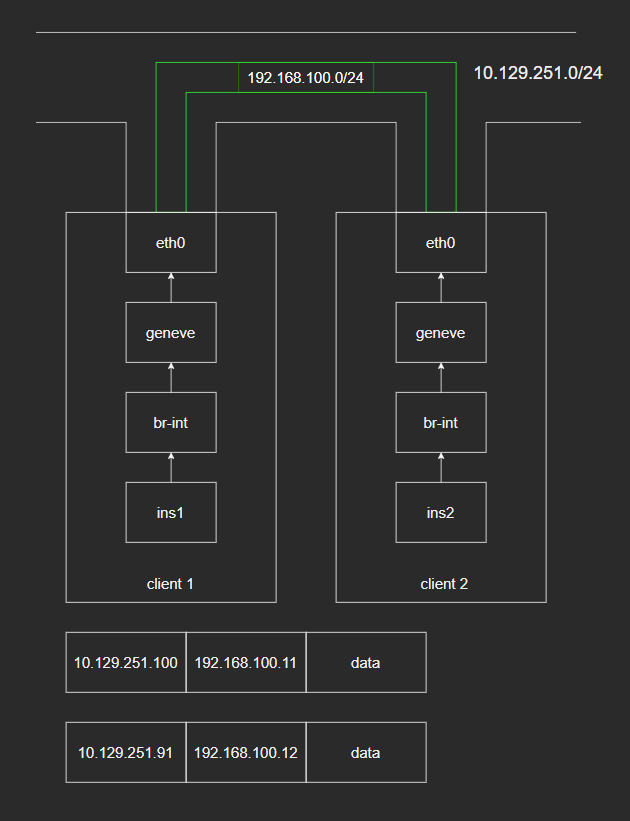
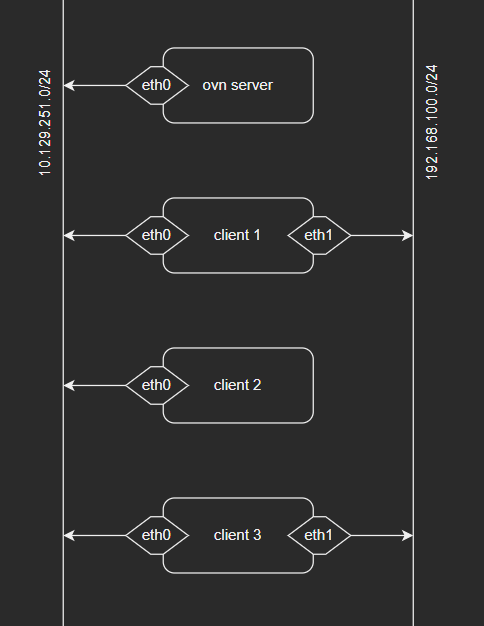
3-2-1

Incus can create localnet port for us. Then, why do I write this session? Well, incus only creates localnet port for switch that is in the exit side of router, the go to internet side, just like what I have done in 1-3-2. It has no meaning but I’m going to make incus created overlay logical switch to be bridged logical switch. I restored snapshot.

# client 1
ovs-vsctl set open_vswitch . external-ids:ovn-remote="tcp:10.129.251.153:6642" external-ids:ovn-encap-ip=10.129.251.100 external-ids:ovn-encap-type=geneve
incus config set network.ovn.northbound_connection=tcp:10.129.251.153:6641
incus network create c1-o1 --type=ovn ipv6.address=none ipv4.address=none network=none 
# server
~# ovn-nbctl show
switch f596dec1-d828-4c1b-84d1-cb412e5a3589 (incus-net2-ls-int)

Look how simple it is.

ovn-nbctl lsp-add incus-net2-ls-int c1-localnet 
ovn-nbctl lsp-set-addresses c1-localnet unknown 
ovn-nbctl lsp-set-type c1-localnet localnet 
ovn-nbctl lsp-set-options c1-localnet network_name=localnetbind
# client 1
ovs-vsctl add-br br-local
ovs-vsctl add-port br-local eth1
ip link set eth1 up 
ovs-vsctl set Open_vSwitch . external-ids:ovn-bridge-mappings=localnetbind:br-local
incus config device add t1 eth0 nic network=c1-o1

~# incus list 
+------+---------+------+------+-----------+-----------+
| NAME |  STATE  | IPV4 | IPV6 |   TYPE    | SNAPSHOTS |
+------+---------+------+------+-----------+-----------+
| t1   | RUNNING |      |      | CONTAINER | 0         |
+------+---------+------+------+-----------+-----------+

How would it possiable, t1 can’t get ip from DHCP.

~# incus exec t1 -- ip a show dev eth0
7: eth0@if8: <BROADCAST,MULTICAST,UP,LOWER_UP> mtu 1442 qdisc noqueue state UP group default qlen 1000
    link/ether 10:66:6a:5b:65:8b brd ff:ff:ff:ff:ff:ff link-netnsid 0
    inet6 fe80::1266:6aff:fe5b:658b/64 scope link proto kernel_ll 
       valid_lft forever preferred_lft forever

~# ovs-vsctl show
e655c3c9-9f7a-42e4-a9bd-8a639a25949e
    Bridge br-int
        fail_mode: secure
        datapath_type: system
        Port br-int
            Interface br-int
                type: internal
        Port vethdc783a50
            Interface vethdc783a50
        Port patch-br-int-to-c1-localnet
            Interface patch-br-int-to-c1-localnet
                type: patch
                options: {peer=patch-c1-localnet-to-br-int}
    Bridge br-local
        Port br-local
            Interface br-local
                type: internal
        Port patch-c1-localnet-to-br-int
            Interface patch-c1-localnet-to-br-int
                type: patch
                options: {peer=patch-br-int-to-c1-localnet}
        Port eth1
            Interface eth1

~# ovs-vsctl list port vethdc783a50
_uuid               : 7da509df-22e9-4c37-b872-e85e8abfc185
bond_active_slave   : []
bond_downdelay      : 0
bond_fake_iface     : false
bond_mode           : []
bond_updelay        : 0
cvlans              : []
external_ids        : {}
fake_bridge         : false
interfaces          : [81e55015-6105-4167-be47-1c2ebe5d8209]
lacp                : []
mac                 : []
name                : vethdc783a50
other_config        : {}
protected           : false
qos                 : []
rstp_statistics     : {}
rstp_status         : {}
statistics          : {}
status              : {}
tag                 : []
trunks              : []
vlan_mode           : []

vethdc783a50’s external_ids is empty. But the port is up in ovn.

# server
~# ovn-sbctl show
Chassis "e54ad6e1-382d-4ed7-884e-5e724be3c936"
    hostname: oc1
    Encap geneve
        ip: "10.129.251.100"
        options: {csum="true"}
    Port_Binding incus-net2-instance-1e8474f7-54b4-4758-b752-29664ba4b92a-eth0

~# ovn-nbctl show
switch f596dec1-d828-4c1b-84d1-cb412e5a3589 (incus-net2-ls-int)
    port c1-localnet
        type: localnet
        addresses: ["unknown"]
    port incus-net2-instance-1e8474f7-54b4-4758-b752-29664ba4b92a-eth0
        addresses: ["10:66:6a:5b:65:8b dynamic"]

~# ovn-nbctl list logical_switch
_uuid               : f596dec1-d828-4c1b-84d1-cb412e5a3589
acls                : [0f4573c4-1bfb-4f69-ad12-4a2da0c0e095, 12b37829-a2ec-441c-92fd-51ae0fc6aa1d, 273bd189-72d9-456a-9367-8bb93a3e5acc, 4764e6ff-8784-4c0f-8f09-f805a2a3a7b8, b66578b4-4715-4d4d-b158-0b7e068478d6, bbf14e80-6f69-4b47-a965-7dcd47ecf036, cdda590e-cef9-4f3d-ba8e-59aacd325b1d, d40518e6-acaf-450a-b136-9bcd46fbb40a, e9687abb-923d-4ad5-bc01-6e26da2ca194]
copp                : []
dns_records         : [0efd8aae-4423-4798-81c1-a1e3bafe7a03]
external_ids        : {}
forwarding_groups   : []
load_balancer       : []
load_balancer_group : []
name                : incus-net2-ls-int
other_config        : {}
ports               : [9eada2a1-930a-46ad-acca-99690e1b92e8, a9957af6-22f6-43d5-9b1d-91df914fd86a]
qos_rules           : []

~# ovn-nbctl list logical_switch_port 
_uuid               : 9eada2a1-930a-46ad-acca-99690e1b92e8
addresses           : [unknown]
dhcpv4_options      : []
dhcpv6_options      : []
dynamic_addresses   : []
enabled             : []
external_ids        : {}
ha_chassis_group    : []
mirror_rules        : []
name                : c1-localnet
options             : {network_name=localnetbind}
parent_name         : []
peer                : []
port_security       : []
tag                 : []
tag_request         : []
type                : localnet
up                  : false

_uuid               : a9957af6-22f6-43d5-9b1d-91df914fd86a
addresses           : ["10:66:6a:5b:65:8b dynamic"]
dhcpv4_options      : []
dhcpv6_options      : []
dynamic_addresses   : []
enabled             : []
external_ids        : {incus_location=none, incus_switch=incus-net2-ls-int}
ha_chassis_group    : []
mirror_rules        : []
name                : incus-net2-instance-1e8474f7-54b4-4758-b752-29664ba4b92a-eth0
options             : {requested-chassis="e54ad6e1-382d-4ed7-884e-5e724be3c936"}
parent_name         : []
peer                : []
port_security       : []
tag                 : []
tag_request         : []
type                : ""
up                  : true

Ok, my brain can’t process what has happened. Is it the dynamic in addresses but dynamic_addresses is empty the problem?

ovn-nbctl lsp-set-addresses incus-net2-instance-1e8474f7-54b4-4758-b752-29664ba4b92a-eth0 10:66:6a:5b:65:8b
# client 1
~# incus exec t1 -- dhclient eth0
~# incus list 
+------+---------+----------------------+------+-----------+-----------+
| NAME |  STATE  |         IPV4         | IPV6 |   TYPE    | SNAPSHOTS |
+------+---------+----------------------+------+-----------+-----------+
| t1   | RUNNING | 192.168.0.201 (eth0) |      | CONTAINER | 0         |
+------+---------+----------------------+------+-----------+-----------+

Indeed.

# ping test
~# incus exec t1 -- ping -c 1 1.1.1.1
PING 1.1.1.1 (1.1.1.1) 56(84) bytes of data.
64 bytes from 1.1.1.1: icmp_seq=1 ttl=53 time=103 ms

--- 1.1.1.1 ping statistics ---
1 packets transmitted, 1 received, 0% packet loss, time 0ms
rtt min/avg/max/mdev = 103.249/103.249/103.249/0.000 ms

Let’s prepare for 3-2-2.

# client 1
incus config device remove t1 eth0
incus network delete c1-o1

3-2-2

I haven’t found incus using l2gateway before. Anyway, I’m going to attach l2gateway port to incus created overlay logical switch.

# client 1
incus network create c1-o2 --type=ovn ipv6.address=none ipv4.address=none network=none 
ovs-vsctl set Open_vSwitch . external-ids:ovn-bridge-mappings=gatewaybind:br-local
# server
~# ovn-nbctl show
switch fde0b0d4-5b48-427f-912f-f205d87ab98f (incus-net3-ls-int)

ovn-nbctl lsp-add incus-net3-ls-int c1-gw
ovn-nbctl lsp-set-type c1-gw l2gateway
ovn-nbctl lsp-set-addresses c1-gw unknown
ovn-nbctl lsp-set-options c1-gw network_name=gatewaybind  l2gateway-chassis=e54ad6e1-382d-4ed7-884e-5e724be3c936
# client 1
incus config device add t1 eth0 nic network=c1-o2
~# incus list 
+------+---------+------+------+-----------+-----------+
| NAME |  STATE  | IPV4 | IPV6 |   TYPE    | SNAPSHOTS |
+------+---------+------+------+-----------+-----------+
| t1   | RUNNING |      |      | CONTAINER | 0         |
+------+---------+------+------+-----------+-----------+

Happened again.

# server
~# ovn-nbctl list logical_switch_port
_uuid               : d097a551-8252-4956-8491-f80d955c4fb0
addresses           : [unknown]
dhcpv4_options      : []
dhcpv6_options      : []
dynamic_addresses   : []
enabled             : []
external_ids        : {}
ha_chassis_group    : []
mirror_rules        : []
name                : c1-gw
options             : {l2gateway-chassis="e54ad6e1-382d-4ed7-884e-5e724be3c936", network_name=gatewaybind}
parent_name         : []
peer                : []
port_security       : []
tag                 : []
tag_request         : []
type                : l2gateway
up                  : true

_uuid               : d8830c67-7117-4565-b41f-979a82a7b0e2
addresses           : ["10:66:6a:ed:3f:61 dynamic"]
dhcpv4_options      : []
dhcpv6_options      : []
dynamic_addresses   : []
enabled             : []
external_ids        : {incus_location=none, incus_switch=incus-net3-ls-int}
ha_chassis_group    : []
mirror_rules        : []
name                : incus-net3-instance-1e8474f7-54b4-4758-b752-29664ba4b92a-eth0
options             : {requested-chassis="e54ad6e1-382d-4ed7-884e-5e724be3c936"}
parent_name         : []
peer                : []
port_security       : []
tag                 : []
tag_request         : []
type                : ""
up                  : true

ovn-nbctl lsp-set-addresses d8830c67-7117-4565-b41f-979a82a7b0e2 10:66:6a:ed:3f:61
# client 1
~# incus exec t1 -- dhclient eth0
~# incus list 
+------+---------+----------------------+------+-----------+-----------+
| NAME |  STATE  |         IPV4         | IPV6 |   TYPE    | SNAPSHOTS |
+------+---------+----------------------+------+-----------+-----------+
| t1   | RUNNING | 192.168.0.231 (eth0) |      | CONTAINER | 0         |
+------+---------+----------------------+------+-----------+-----------+

Ok, let’s join client 2.

# client 2
ovs-vsctl set open_vswitch . external-ids:ovn-remote="tcp:10.129.251.153:6642" external-ids:ovn-encap-ip=10.129.251.91 external-ids:ovn-encap-type=geneve
incus config set network.ovn.northbound_connection=tcp:10.129.251.153:6641
incus network create c2-o3 --type=ovn network=none ipv6.address=none ipv4.address=none
incus config device add t2 eth0 nic network=c2-o3
~# incus list 
+------+---------+------+------+-----------+-----------+
| NAME |  STATE  | IPV4 | IPV6 |   TYPE    | SNAPSHOTS |
+------+---------+------+------+-----------+-----------+
| t2   | RUNNING |      |      | CONTAINER | 0         |
+------+---------+------+------+-----------+-----------+
# server
~# ovn-nbctl list logical_switch_port
_uuid               : d097a551-8252-4956-8491-f80d955c4fb0
addresses           : [unknown]
dhcpv4_options      : []
dhcpv6_options      : []
dynamic_addresses   : []
enabled             : []
external_ids        : {}
ha_chassis_group    : []
mirror_rules        : []
name                : c1-gw
options             : {l2gateway-chassis="e54ad6e1-382d-4ed7-884e-5e724be3c936", network_name=gatewaybind}
parent_name         : []
peer                : []
port_security       : []
tag                 : []
tag_request         : []
type                : l2gateway
up                  : true

_uuid               : 8b4a08d3-3c87-4feb-9d43-61e7afc95712
addresses           : ["10:66:6a:7e:53:a9 dynamic"]
dhcpv4_options      : []
dhcpv6_options      : []
dynamic_addresses   : []
enabled             : []
external_ids        : {incus_location=none, incus_switch=incus-net1-ls-int}
ha_chassis_group    : []
mirror_rules        : []
name                : incus-net1-instance-b009c960-4137-46f9-a3ee-17a880da639a-eth0
options             : {requested-chassis="7225b2eb-68a1-448b-925e-65a83a604b3d"}
parent_name         : []
peer                : []
port_security       : []
tag                 : []
tag_request         : []
type                : ""
up                  : true

_uuid               : d8830c67-7117-4565-b41f-979a82a7b0e2
addresses           : ["10:66:6a:ed:3f:61"]
dhcpv4_options      : []
dhcpv6_options      : []
dynamic_addresses   : []
enabled             : []
external_ids        : {incus_location=none, incus_switch=incus-net3-ls-int}
ha_chassis_group    : []
mirror_rules        : []
name                : incus-net3-instance-1e8474f7-54b4-4758-b752-29664ba4b92a-eth0
options             : {requested-chassis="e54ad6e1-382d-4ed7-884e-5e724be3c936"}
parent_name         : []
peer                : []
port_security       : []
tag                 : []
tag_request         : []
type                : ""
up                  : true

ovn-nbctl lsp-set-addresses 8b4a08d3-3c87-4feb-9d43-61e7afc95712 10:66:6a:7e:53:a9

~# ovn-nbctl show
switch e54c507c-e94d-4f1f-bd64-f4acd88d2db6 (incus-net1-ls-int)
    port incus-net1-instance-b009c960-4137-46f9-a3ee-17a880da639a-eth0
        addresses: ["10:66:6a:7e:53:a9 dynamic"]
switch fde0b0d4-5b48-427f-912f-f205d87ab98f (incus-net3-ls-int)
    port c1-gw
        type: l2gateway
        addresses: ["unknown"]
    port incus-net3-instance-1e8474f7-54b4-4758-b752-29664ba4b92a-eth0
        addresses: ["10:66:6a:ed:3f:61"]

ovn-nbctl lsp-add incus-net1-ls-int net1-to-net3
ovn-nbctl lsp-set-type net1-to-net3 switch
ovn-nbctl lsp-set-options net1-to-net3 peer=net3-to-net1
ovn-nbctl lsp-add incus-net3-ls-int net3-to-net1
ovn-nbctl lsp-set-type net3-to-net1 switch
ovn-nbctl lsp-set-options net3-to-net1 peer=net1-to-net3
# client 2
~# incus exec t2 -- dhclient eth0
~# incus list 
+------+---------+----------------------+------+-----------+-----------+
| NAME |  STATE  |         IPV4         | IPV6 |   TYPE    | SNAPSHOTS |
+------+---------+----------------------+------+-----------+-----------+
| t2   | RUNNING | 192.168.0.124 (eth0) |      | CONTAINER | 0         |
+------+---------+----------------------+------+-----------+-----------+
ping test
# client 1
~# incus exec t1 -- ping -c 1 192.168.0.124
PING 192.168.0.124 (192.168.0.124) 56(84) bytes of data.
64 bytes from 192.168.0.124: icmp_seq=1 ttl=64 time=1.19 ms

--- 192.168.0.124 ping statistics ---
1 packets transmitted, 1 received, 0% packet loss, time 0ms
rtt min/avg/max/mdev = 1.187/1.187/1.187/0.000 ms

~# incus exec t1 -- ping -c 1 1.1.1.1
PING 1.1.1.1 (1.1.1.1) 56(84) bytes of data.
64 bytes from 1.1.1.1: icmp_seq=1 ttl=53 time=67.0 ms

--- 1.1.1.1 ping statistics ---
1 packets transmitted, 1 received, 0% packet loss, time 0ms
rtt min/avg/max/mdev = 66.963/66.963/66.963/0.000 ms

# client 2
~# incus exec t2 -- ping -c 1 192.168.0.231
PING 192.168.0.231 (192.168.0.231) 56(84) bytes of data.
64 bytes from 192.168.0.231: icmp_seq=1 ttl=64 time=1.91 ms

--- 192.168.0.231 ping statistics ---
1 packets transmitted, 1 received, 0% packet loss, time 0ms
rtt min/avg/max/mdev = 1.914/1.914/1.914/0.000 ms

~# incus exec t2 -- ping -c 1 1.1.1.1
PING 1.1.1.1 (1.1.1.1) 56(84) bytes of data.
64 bytes from 1.1.1.1: icmp_seq=1 ttl=53 time=66.8 ms

--- 1.1.1.1 ping statistics ---
1 packets transmitted, 1 received, 0% packet loss, time 0ms
rtt min/avg/max/mdev = 66.790/66.790/66.790/0.000 ms

As you have seen, it doesn’t matter where the l2gateway port stays, you can create an overlay logical switch just to hold a l2gateway port. That’s all for 3-2.

result
# server
~# ovn-sbctl show
Chassis "e54ad6e1-382d-4ed7-884e-5e724be3c936"
    hostname: oc1
    Encap geneve
        ip: "10.129.251.100"
        options: {csum="true"}
    Port_Binding c1-gw
    Port_Binding incus-net3-instance-1e8474f7-54b4-4758-b752-29664ba4b92a-eth0
Chassis "7225b2eb-68a1-448b-925e-65a83a604b3d"
    hostname: oc2
    Encap geneve
        ip: "10.129.251.91"
        options: {csum="true"}
    Port_Binding incus-net1-instance-b009c960-4137-46f9-a3ee-17a880da639a-eth0

~# ovn-nbctl show
switch e54c507c-e94d-4f1f-bd64-f4acd88d2db6 (incus-net1-ls-int)
    port net1-to-net3
        type: switch
    port incus-net1-instance-b009c960-4137-46f9-a3ee-17a880da639a-eth0
        addresses: ["10:66:6a:7e:53:a9"]
switch fde0b0d4-5b48-427f-912f-f205d87ab98f (incus-net3-ls-int)
    port net3-to-net1
        type: switch
    port c1-gw
        type: l2gateway
        addresses: ["unknown"]
    port incus-net3-instance-1e8474f7-54b4-4758-b752-29664ba4b92a-eth0
        addresses: ["10:66:6a:ed:3f:61"]

# client 1
~# ovs-vsctl show
e655c3c9-9f7a-42e4-a9bd-8a639a25949e
    Bridge br-int
        fail_mode: secure
        datapath_type: system
        Port br-int
            Interface br-int
                type: internal
        Port veth4e03361d
            Interface veth4e03361d
        Port patch-br-int-to-c1-gw
            Interface patch-br-int-to-c1-gw
                type: patch
                options: {peer=patch-c1-gw-to-br-int}
        Port ovn-7225b2-0
            Interface ovn-7225b2-0
                type: geneve
                options: {csum="true", key=flow, local_ip="10.129.251.100", remote_ip="10.129.251.91"}
    Bridge br-local
        Port br-local
            Interface br-local
                type: internal
        Port patch-c1-gw-to-br-int
            Interface patch-c1-gw-to-br-int
                type: patch
                options: {peer=patch-br-int-to-c1-gw}
        Port eth1
            Interface eth1

# client 2
~# ovs-vsctl show
bd70728b-95af-4a9f-9b62-577ffe017df5
    Bridge br-int
        fail_mode: secure
        datapath_type: system
        Port ovn-e54ad6-0
            Interface ovn-e54ad6-0
                type: geneve
                options: {csum="true", key=flow, local_ip="10.129.251.91", remote_ip="10.129.251.100"}
        Port br-int
            Interface br-int
                type: internal
        Port veth56c7f314
            Interface veth56c7f314

3-3-1

I restored snapshot. Let’s bridge incus created logical routers.

# client 1
ovs-vsctl set open_vswitch . external-ids:ovn-remote="tcp:10.129.251.153:6642" external-ids:ovn-encap-ip=10.129.251.100 external-ids:ovn-encap-type=geneve
incus config set network.ovn.northbound_connection=tcp:10.129.251.153:6641
incus network create c1-o1 --type=ovn network=none  ipv6.address=none
# client 2
ovs-vsctl set open_vswitch . external-ids:ovn-remote="tcp:10.129.251.153:6642" external-ids:ovn-encap-ip=10.129.251.91 external-ids:ovn-encap-type=geneve
incus config set network.ovn.northbound_connection=tcp:10.129.251.153:6641
incus network create c2-o2 --type=ovn network=none ipv6.address=none
# server
~# ovn-nbctl show
switch 3189a510-d56c-4047-aa1f-f8c92901cf93 (incus-net2-ls-int)
    port incus-net2-ls-int-lsp-router
        type: router
        router-port: incus-net2-lr-lrp-int
switch c9631155-ae88-48ff-94b4-86520508736e (incus-net4-ls-int)
    port incus-net4-ls-int-lsp-router
        type: router
        router-port: incus-net4-lr-lrp-int
router af7f5a98-5a17-4bc6-92ee-bd71e03d1faa (incus-net4-lr)
    port incus-net4-lr-lrp-int
        mac: "10:66:6a:f1:d4:0f"
        ipv6-lla: "fe80::1266:6aff:fef1:d40f"
        networks: ["10.110.152.1/24"]
router 21ce30b3-9de5-462a-980d-50023c8049ed (incus-net2-lr)
    port incus-net2-lr-lrp-int
        mac: "10:66:6a:86:9c:02"
        ipv6-lla: "fe80::1266:6aff:fe86:9c02"
        networks: ["10.207.189.1/24"]

ovn-nbctl ls-add bridge
ovn-nbctl lrp-add incus-net2-lr net2-bridge 02:00:00:00:00:01 10.30.0.2/24
ovn-nbctl lsp-add bridge bridge-net2
ovn-nbctl lsp-set-type bridge-net2 router
ovn-nbctl lsp-set-addresses bridge-net2 02:00:00:00:00:01
ovn-nbctl lsp-set-options bridge-net2 router-port=net2-bridge
ovn-nbctl lrp-add incus-net4-lr net4-bridge 04:00:00:00:00:01 10.30.0.4/24
ovn-nbctl lsp-add bridge bridge-net4
ovn-nbctl lsp-set-type bridge-net4 router
ovn-nbctl lsp-set-addresses bridge-net4 04:00:00:00:00:01
ovn-nbctl lsp-set-options bridge-net4 router-port=net4-bridge
ovn-nbctl lr-route-add incus-net2-lr "10.110.152.0/24" 10.30.0.4
ovn-nbctl lr-route-add incus-net4-lr "10.207.189.0/24" 10.30.0.2
# client 1
incus config device add t1 eth0 nic network=c1-o1
~# incus list 
+------+---------+---------------------+------+-----------+-----------+
| NAME |  STATE  |        IPV4         | IPV6 |   TYPE    | SNAPSHOTS |
+------+---------+---------------------+------+-----------+-----------+
| t1   | RUNNING | 10.110.152.2 (eth0) |      | CONTAINER | 0         |
+------+---------+---------------------+------+-----------+-----------+
# client 2
incus config device add t2 eth0 nic network=c2-o2
~# incus list 
+------+---------+---------------------+------+-----------+-----------+
| NAME |  STATE  |        IPV4         | IPV6 |   TYPE    | SNAPSHOTS |
+------+---------+---------------------+------+-----------+-----------+
| t2   | RUNNING | 10.207.189.2 (eth0) |      | CONTAINER | 0         |
+------+---------+---------------------+------+-----------+-----------+
ping test
# client 1
~# incus exec t1 -- ping -c 1 10.207.189.2
PING 10.207.189.2 (10.207.189.2) 56(84) bytes of data.
64 bytes from 10.207.189.2: icmp_seq=1 ttl=62 time=9.92 ms

--- 10.207.189.2 ping statistics ---
1 packets transmitted, 1 received, 0% packet loss, time 0ms
rtt min/avg/max/mdev = 9.922/9.922/9.922/0.000 ms

# client 2
~# incus exec t2 -- ping -c 1 10.110.152.2
PING 10.110.152.2 (10.110.152.2) 56(84) bytes of data.
64 bytes from 10.110.152.2: icmp_seq=1 ttl=62 time=1.69 ms

--- 10.110.152.2 ping statistics ---
1 packets transmitted, 1 received, 0% packet loss, time 0ms
rtt min/avg/max/mdev = 1.690/1.690/1.690/0.000 ms

Very easy. And thanks to CMS, that’s all for 3-3.

result
# server
~# ovn-sbctl show
Chassis "e54ad6e1-382d-4ed7-884e-5e724be3c936"
    hostname: oc1
    Encap geneve
        ip: "10.129.251.100"
        options: {csum="true"}
    Port_Binding incus-net4-instance-1e8474f7-54b4-4758-b752-29664ba4b92a-eth0
Chassis "7225b2eb-68a1-448b-925e-65a83a604b3d"
    hostname: oc2
    Encap geneve
        ip: "10.129.251.91"
        options: {csum="true"}
    Port_Binding incus-net2-instance-b009c960-4137-46f9-a3ee-17a880da639a-eth0

~# ovn-nbctl show
switch 3189a510-d56c-4047-aa1f-f8c92901cf93 (incus-net2-ls-int)
    port incus-net2-instance-b009c960-4137-46f9-a3ee-17a880da639a-eth0
        addresses: ["10:66:6a:68:ed:fd dynamic"]
    port incus-net2-ls-int-lsp-router
        type: router
        router-port: incus-net2-lr-lrp-int
switch c9631155-ae88-48ff-94b4-86520508736e (incus-net4-ls-int)
    port incus-net4-instance-1e8474f7-54b4-4758-b752-29664ba4b92a-eth0
        addresses: ["10:66:6a:40:e8:77 dynamic"]
    port incus-net4-ls-int-lsp-router
        type: router
        router-port: incus-net4-lr-lrp-int
switch 14127ce6-2d9f-415a-9af0-be41918854ab (bridge)
    port bridge-net4
        type: router
        addresses: ["04:00:00:00:00:01"]
        router-port: net4-bridge
    port bridge-net2
        type: router
        addresses: ["02:00:00:00:00:01"]
        router-port: net2-bridge
router af7f5a98-5a17-4bc6-92ee-bd71e03d1faa (incus-net4-lr)
    port net4-bridge
        mac: "04:00:00:00:00:01"
        ipv6-lla: "fe80::600:ff:fe00:1"
        networks: ["10.30.0.4/24"]
    port incus-net4-lr-lrp-int
        mac: "10:66:6a:f1:d4:0f"
        ipv6-lla: "fe80::1266:6aff:fef1:d40f"
        networks: ["10.110.152.1/24"]
router 21ce30b3-9de5-462a-980d-50023c8049ed (incus-net2-lr)
    port incus-net2-lr-lrp-int
        mac: "10:66:6a:86:9c:02"
        ipv6-lla: "fe80::1266:6aff:fe86:9c02"
        networks: ["10.207.189.1/24"]
    port net2-bridge
        mac: "02:00:00:00:00:01"
        ipv6-lla: "fe80::ff:fe00:1"
        networks: ["10.30.0.2/24"]

~# ovn-nbctl lr-route-list incus-net2-lr
IPv4 Routes
Route Table <main>:
          10.110.152.0/24                 10.30.0.4 dst-ip

~# ovn-nbctl lr-route-list incus-net4-lr
IPv4 Routes
Route Table <main>:
          10.207.189.0/24                 10.30.0.2 dst-ip

# client 1
~# ovs-vsctl show
e655c3c9-9f7a-42e4-a9bd-8a639a25949e
    Bridge br-int
        fail_mode: secure
        datapath_type: system
        Port br-int
            Interface br-int
                type: internal
        Port veth87fe7619
            Interface veth87fe7619
        Port ovn-7225b2-0
            Interface ovn-7225b2-0
                type: geneve
                options: {csum="true", key=flow, local_ip="10.129.251.100", remote_ip="10.129.251.91"}

~# incus network show c1-o1 
config:
  bridge.mtu: "1442"
  ipv4.address: 10.110.152.1/24
  ipv4.nat: "true"
  ipv6.address: none
  network: none
description: ""
name: c1-o1
type: ovn
used_by:
- /1.0/instances/t1
managed: true
status: Created
locations:
- none
project: default
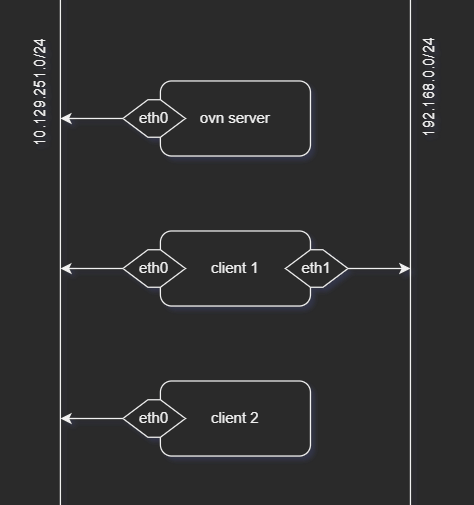
# client 2
~# ovs-vsctl show
bd70728b-95af-4a9f-9b62-577ffe017df5
    Bridge br-int
        fail_mode: secure
        datapath_type: system
        Port ovn-e54ad6-0
            Interface ovn-e54ad6-0
                type: geneve
                options: {csum="true", key=flow, local_ip="10.129.251.91", remote_ip="10.129.251.100"}
        Port veth43f0c23e
            Interface veth43f0c23e
        Port br-int
            Interface br-int
                type: internal

~# incus network show c2-o2 
config:
  bridge.mtu: "1442"
  ipv4.address: 10.207.189.1/24
  ipv4.nat: "true"
  ipv6.address: none
  network: none
description: ""
name: c2-o2
type: ovn
used_by:
- /1.0/instances/t2
managed: true
status: Created
locations:
- none
project: default

3-4-1

Let’s finish this post with one weird example, isolated ovn network for features.networks=true project. I restored snapshot.

# client 1
ovs-vsctl set open_vswitch . external-ids:ovn-remote="tcp:10.129.251.153:6642" external-ids:ovn-encap-ip=10.129.251.100 external-ids:ovn-encap-type=geneve
incus config set network.ovn.northbound_connection=tcp:10.129.251.153:6641
incus project create p1 --config features.networks=true --config features.networks.zones=true

Normally, you created a network in default project then add it to the limited project, something like:

incus network create incusbr1 ipv4.address=10.129.251.1/24 ipv4.dhcp=true ipv4.dhcp.ranges=10.129.251.10-10.129.251.90 ipv4.nat=true ipv4.ovn.ranges=10.129.251.100-10.129.251.200 ipv6.address=none
incus project set p1 restricted.networks.access=incusbr1

But I’m not going to do it.

~# incus project switch p1
~# incus network list
+------+------+---------+------+------+-------------+---------+-------+
| NAME | TYPE | MANAGED | IPV4 | IPV6 | DESCRIPTION | USED BY | STATE |
+------+------+---------+------+------+-------------+---------+-------+
~# incus network create n1
Error: No allowed uplink networks in project
~# incus network create n1 --type=ovn network=none ipv6.address=none 
Network n1 created
~# ovs-vsctl add-br br-local
~# ovs-vsctl add-port br-local eth1
~# ip link set eth1 up 
~# incus network create n2 --type=ovn network=br-local ipv6.address=none
Error: Option "network" value "br-local" is not one of the allowed uplink networks in project

As you can see, I can’t create a normal incus managed network in limited project, but I can create a rather useless incus managed ovn network.

info
~# incus project show p1
config:
  features.images: "true"
  features.networks: "true"
  features.networks.zones: "true"
  features.profiles: "true"
  features.storage.buckets: "true"
  features.storage.volumes: "true"
description: ""
name: p1
used_by:
- /1.0/networks/n1?project=p1
- /1.0/profiles/default?project=p1

~# incus profile show default 
config:
  security.privileged: "true"
description: Default Incus profile for project p1
devices:
  root:
    path: /
    pool: dirpool
    type: disk
name: default
used_by: []
project: p1

~# incus network show n1 
config:
  bridge.mtu: "1442"
  ipv4.address: 10.44.114.1/24
  ipv4.nat: "true"
  ipv6.address: none
  network: none
description: ""
name: n1
type: ovn
used_by: []
managed: true
status: Created
locations:
- none
project: p1

Thankfully, n1 is an ovn network, I can route it to internet.

# server 
~# ovn-nbctl show
switch 328cfc45-d559-46b5-941b-62e26e2ce3cc (incus-net2-ls-int)
    port incus-net2-ls-int-lsp-router
        type: router
        router-port: incus-net2-lr-lrp-int
router 541c2660-2a4e-4039-b638-eafb3764e234 (incus-net2-lr)
    port incus-net2-lr-lrp-int
        mac: "10:66:6a:49:5e:86"
        ipv6-lla: "fe80::1266:6aff:fe49:5e86"
        networks: ["10.44.114.1/24"]

As you can see incus-net2-ls-int is n1. I’m going to do it like 2-3-2 + 3-3-1.

ovn-nbctl ls-add bridge
ovn-nbctl lrp-add incus-net2-lr net2-bridge 02:00:00:00:00:01 10.30.0.2/24
ovn-nbctl lsp-add bridge bridge-net2
ovn-nbctl lsp-set-type bridge-net2 router
ovn-nbctl lsp-set-addresses bridge-net2 02:00:00:00:00:01
ovn-nbctl lsp-set-options bridge-net2 router-port=net2-bridge

ovn-nbctl lr-add lr0

ovn-nbctl lrp-add lr0 lr0-bridge 06:00:00:00:00:01 10.30.0.6/24
ovn-nbctl lsp-add bridge bridge-lr0
ovn-nbctl lsp-set-type bridge-lr0 router
ovn-nbctl lsp-set-addresses bridge-lr0 06:00:00:00:00:01
ovn-nbctl lsp-set-options bridge-lr0 router-port=lr0-bridge

ovn-nbctl lrp-add lr0 lr0-to-ls5 00:00:00:00:05:36 192.168.0.36/24
ovn-nbctl ls-add ls5
ovn-nbctl lsp-add ls5 ls5-to-lr0
ovn-nbctl lsp-set-type ls5-to-lr0 router
ovn-nbctl lsp-set-addresses ls5-to-lr0 00:00:00:00:05:36
ovn-nbctl lsp-set-options ls5-to-lr0 router-port=lr0-to-ls5

ovn-nbctl lsp-add ls5 ls5-localnet 
ovn-nbctl lsp-set-addresses ls5-localnet unknown 
ovn-nbctl lsp-set-type ls5-localnet localnet 
ovn-nbctl lsp-set-options ls5-localnet network_name=localnetbind

ovn-nbctl lr-route-add incus-net2-lr "0.0.0.0/0" 10.30.0.6
ovn-nbctl lr-route-add lr0 "10.44.114.0/24" 10.30.0.2
ovn-nbctl lr-route-add lr0 "0.0.0.0/0" 192.168.0.1

ovn-nbctl -- --id=@nat create nat type="snat" logical_ip=10.44.114.0/24 external_ip=192.168.0.36 -- add logical_router lr0 nat @nat

ovn-nbctl set Logical_Router lr0 options:chassis=e54ad6e1-382d-4ed7-884e-5e724be3c936
# client 1
~# ovs-vsctl set Open_vSwitch . external-ids:ovn-bridge-mappings=localnetbind:br-local
~# incus launch images:debian/13 i1 --network n1 --project p1
~# incus list                               
+------+---------+--------------------+------+-----------+-----------+
| NAME |  STATE  |        IPV4        | IPV6 |   TYPE    | SNAPSHOTS |
+------+---------+--------------------+------+-----------+-----------+
| i1   | RUNNING | 10.44.114.2 (eth0) |      | CONTAINER | 0         |
+------+---------+--------------------+------+-----------+-----------+
ping test
~# incus exec i1 -- ping -c 1 10.44.114.1
PING 10.44.114.1 (10.44.114.1) 56(84) bytes of data.
64 bytes from 10.44.114.1: icmp_seq=1 ttl=254 time=0.824 ms

--- 10.44.114.1 ping statistics ---
1 packets transmitted, 1 received, 0% packet loss, time 0ms
rtt min/avg/max/mdev = 0.824/0.824/0.824/0.000 ms

~# incus exec i1 -- ping -c 1 10.30.0.6
PING 10.30.0.6 (10.30.0.6) 56(84) bytes of data.
64 bytes from 10.30.0.6: icmp_seq=1 ttl=253 time=4.31 ms

--- 10.30.0.6 ping statistics ---
1 packets transmitted, 1 received, 0% packet loss, time 0ms
rtt min/avg/max/mdev = 4.306/4.306/4.306/0.000 ms

~# incus exec i1 -- ping -c 1 10.30.0.2
PING 10.30.0.2 (10.30.0.2) 56(84) bytes of data.

--- 10.30.0.2 ping statistics ---
1 packets transmitted, 0 received, 100% packet loss, time 0ms

~# incus exec i1 -- ping -c 1 192.168.0.36
PING 192.168.0.36 (192.168.0.36) 56(84) bytes of data.
64 bytes from 192.168.0.36: icmp_seq=1 ttl=253 time=0.835 ms

--- 192.168.0.36 ping statistics ---
1 packets transmitted, 1 received, 0% packet loss, time 0ms
rtt min/avg/max/mdev = 0.835/0.835/0.835/0.000 ms

~# incus exec i1 -- ping -c 1 192.168.0.1
PING 192.168.0.1 (192.168.0.1) 56(84) bytes of data.
64 bytes from 192.168.0.1: icmp_seq=1 ttl=62 time=7.05 ms

--- 192.168.0.1 ping statistics ---
1 packets transmitted, 1 received, 0% packet loss, time 0ms
rtt min/avg/max/mdev = 7.052/7.052/7.052/0.000 ms

~# incus exec i1 -- ping -c 1 192.168.0.10
PING 192.168.0.10 (192.168.0.10) 56(84) bytes of data.
64 bytes from 192.168.0.10: icmp_seq=1 ttl=62 time=5.80 ms

--- 192.168.0.10 ping statistics ---
1 packets transmitted, 1 received, 0% packet loss, time 0ms
rtt min/avg/max/mdev = 5.797/5.797/5.797/0.000 ms

~# incus exec i1 -- ping -c 1 1.1.1.1
PING 1.1.1.1 (1.1.1.1) 56(84) bytes of data.
64 bytes from 1.1.1.1: icmp_seq=1 ttl=51 time=61.1 ms

--- 1.1.1.1 ping statistics ---
1 packets transmitted, 1 received, 0% packet loss, time 0ms
rtt min/avg/max/mdev = 61.134/61.134/61.134/0.000 ms

I want ls5 can only to 192.168.0.1 and 192.168.0.36. And I don’t know how to write ACL, so I asked AI, and below commands works:

ovn-nbctl acl-add ls5 from-lport 1002 'ip4 && (ip4.dst == 192.168.0.1 || ip4.dst == 192.168.0.36)' allow
ovn-nbctl acl-add ls5 to-lport 1002 'ip4 && (ip4.src == 192.168.0.1 || ip4.src == 192.168.0.36)' allow
ovn-nbctl acl-add ls5 from-lport 1001 'ip4' drop
ovn-nbctl acl-add ls5 to-lport 1001 'ip4' drop
result
# server
~# ovn-sbctl show
Chassis "e54ad6e1-382d-4ed7-884e-5e724be3c936"
    hostname: oc1
    Encap geneve
        ip: "10.129.251.100"
        options: {csum="true"}
    Port_Binding lr0-to-ls5
    Port_Binding ls5-to-lr0
    Port_Binding lr0-bridge
    Port_Binding bridge-lr0
    Port_Binding incus-net2-instance-0d472587-f5ab-4814-a236-618a3a74b5ae-eth0

~# ovn-nbctl show
switch 328cfc45-d559-46b5-941b-62e26e2ce3cc (incus-net2-ls-int)
    port incus-net2-ls-int-lsp-router
        type: router
        router-port: incus-net2-lr-lrp-int
    port incus-net2-instance-0d472587-f5ab-4814-a236-618a3a74b5ae-eth0
        addresses: ["10:66:6a:e2:bf:d9 dynamic"]
switch e71aa0e1-4816-463f-b21b-42b75f581e45 (bridge)
    port bridge-lr0
        type: router
        addresses: ["06:00:00:00:00:01"]
        router-port: lr0-bridge
    port bridge-net2
        type: router
        addresses: ["02:00:00:00:00:01"]
        router-port: net2-bridge
switch aa75f581-f0fd-4811-a918-b189d3d2d15c (ls5)
    port ls5-to-lr0
        type: router
        addresses: ["00:00:00:00:05:36"]
        router-port: lr0-to-ls5
    port ls5-localnet
        type: localnet
        addresses: ["unknown"]
router 7999c5d0-78bb-4899-bb72-7b0d6b1aef08 (lr0)
    port lr0-bridge
        mac: "06:00:00:00:00:01"
        ipv6-lla: "fe80::400:ff:fe00:1"
        networks: ["10.30.0.6/24"]
    port lr0-to-ls5
        mac: "00:00:00:00:05:36"
        ipv6-lla: "fe80::200:ff:fe00:536"
        networks: ["192.168.0.36/24"]
    nat e6f38eed-0b46-4d64-9120-01fe78f43cc0
        external ip: "192.168.0.36"
        logical ip: "10.44.114.0/24"
        type: "snat"
router 541c2660-2a4e-4039-b638-eafb3764e234 (incus-net2-lr)
    port net2-bridge
        mac: "02:00:00:00:00:01"
        ipv6-lla: "fe80::ff:fe00:1"
        networks: ["10.30.0.2/24"]
    port incus-net2-lr-lrp-int
        mac: "10:66:6a:49:5e:86"
        ipv6-lla: "fe80::1266:6aff:fe49:5e86"
        networks: ["10.44.114.1/24"]

~# ovn-nbctl list logical_router
_uuid               : 7999c5d0-78bb-4899-bb72-7b0d6b1aef08
copp                : []
enabled             : []
external_ids        : {}
load_balancer       : []
load_balancer_group : []
name                : lr0
nat                 : [e6f38eed-0b46-4d64-9120-01fe78f43cc0]
options             : {chassis="e54ad6e1-382d-4ed7-884e-5e724be3c936"}
policies            : []
ports               : [27bb5441-741b-42f6-8907-32d928a68deb, c670a36b-2417-45fa-933b-4edba4bfd65b]
static_routes       : [0be84100-5507-43d7-9ba7-5697a09c5a60, 461297d8-b771-40cf-b209-d96e3463d4ee]

_uuid               : 541c2660-2a4e-4039-b638-eafb3764e234
copp                : []
enabled             : []
external_ids        : {}
load_balancer       : []
load_balancer_group : []
name                : incus-net2-lr
nat                 : []
options             : {always_learn_from_arp_request="false", dynamic_neigh_routers="true"}
policies            : [43236e43-3a6c-43e9-a491-eab78ea7a24a, b2c167a0-595b-4c57-8996-0f4ba9617593, d3b5f2b2-d1c5-4547-b4df-d64fe1ce6da7]
ports               : [02a448d0-49a0-4c28-bb27-913319c9272c, da69f67f-ff6c-43f1-9b63-88214ba7b1df]
static_routes       : [b9a486aa-eb68-4734-b086-e5e591c6ff5a]

~# ovn-nbctl list logical_switch
_uuid               : 328cfc45-d559-46b5-941b-62e26e2ce3cc
acls                : [4b2eebfd-2569-4de1-a080-2e8b06c3d490, 62220b0f-3f9d-4e5a-8278-47aee4e1cc53, 70ca16e0-8dd0-4c5b-b06a-cee3c223d7d9, 7db7c729-e6fd-4f0e-b8e3-01259d1926e4, b0838abe-96a1-4563-948c-75c48384123a, b1af6d28-69a4-4bbf-bef9-13e02973ad94, b46ea373-982a-4d55-b9a7-c301f2bd388f, c7ee2fe4-cc95-4724-82f8-b127564459d7, e497490e-5247-4a37-ba52-d9652b714212, f62a3306-7b7b-4956-b432-fff5f4edb800, f7b426c5-435d-42a5-bcb2-6f3b688cc70e]
copp                : []
dns_records         : [593c79f9-9fc3-48c8-bf40-8116346eab7f]
external_ids        : {}
forwarding_groups   : []
load_balancer       : []
load_balancer_group : []
name                : incus-net2-ls-int
other_config        : {exclude_ips="10.44.114.1 10.44.114.254", subnet="10.44.114.0/24"}
ports               : [9c578c55-4de3-4bcf-b422-c7203c828096, fde02c20-f4c7-445c-a410-89d18c494e91]
qos_rules           : []

_uuid               : e71aa0e1-4816-463f-b21b-42b75f581e45
acls                : []
copp                : []
dns_records         : []
external_ids        : {}
forwarding_groups   : []
load_balancer       : []
load_balancer_group : []
name                : bridge
other_config        : {}
ports               : [38bad53f-7eda-4c18-b9c5-d14c4a64f2cf, 4907dc71-ea16-4f71-baa0-560555265118]
qos_rules           : []

_uuid               : aa75f581-f0fd-4811-a918-b189d3d2d15c
acls                : [159a7d15-befa-449c-b86a-d5bf8ffbee09, 4fa10284-30ca-4e48-b640-2d4e14020802, a7c2bfba-fd74-470f-b8be-41735bc001fe, be15f07e-1f36-45c3-8ffd-706e98052ae8]
copp                : []
dns_records         : []
external_ids        : {}
forwarding_groups   : []
load_balancer       : []
load_balancer_group : []
name                : ls5
other_config        : {}
ports               : [66a8ce87-8051-4662-bb17-9c7055ed17a8, cdc22c53-a1c8-4c43-99a6-4a922df72d4a]
qos_rules           : []

~# ovn-nbctl list logical_switch_port
_uuid               : fde02c20-f4c7-445c-a410-89d18c494e91
addresses           : ["10:66:6a:e2:bf:d9 dynamic"]
dhcpv4_options      : f50613e7-aca5-48fd-b98f-a03cef867f7b
dhcpv6_options      : []
dynamic_addresses   : "10:66:6a:e2:bf:d9 10.44.114.2"
enabled             : []
external_ids        : {incus_location=none, incus_switch=incus-net2-ls-int}
ha_chassis_group    : []
mirror_rules        : []
name                : incus-net2-instance-0d472587-f5ab-4814-a236-618a3a74b5ae-eth0
options             : {requested-chassis="e54ad6e1-382d-4ed7-884e-5e724be3c936"}
parent_name         : []
peer                : []
port_security       : []
tag                 : []
tag_request         : []
type                : ""
up                  : true

_uuid               : 4907dc71-ea16-4f71-baa0-560555265118
addresses           : ["02:00:00:00:00:01"]
dhcpv4_options      : []
dhcpv6_options      : []
dynamic_addresses   : []
enabled             : []
external_ids        : {}
ha_chassis_group    : []
mirror_rules        : []
name                : bridge-net2
options             : {router-port=net2-bridge}
parent_name         : []
peer                : []
port_security       : []
tag                 : []
tag_request         : []
type                : router
up                  : true

_uuid               : 9c578c55-4de3-4bcf-b422-c7203c828096
addresses           : [router]
dhcpv4_options      : []
dhcpv6_options      : []
dynamic_addresses   : []
enabled             : []
external_ids        : {incus_switch=incus-net2-ls-int}
ha_chassis_group    : []
mirror_rules        : []
name                : incus-net2-ls-int-lsp-router
options             : {nat-addresses=router, router-port=incus-net2-lr-lrp-int}
parent_name         : []
peer                : []
port_security       : []
tag                 : []
tag_request         : []
type                : router
up                  : true

_uuid               : 38bad53f-7eda-4c18-b9c5-d14c4a64f2cf
addresses           : ["06:00:00:00:00:01"]
dhcpv4_options      : []
dhcpv6_options      : []
dynamic_addresses   : []
enabled             : []
external_ids        : {}
ha_chassis_group    : []
mirror_rules        : []
name                : bridge-lr0
options             : {router-port=lr0-bridge}
parent_name         : []
peer                : []
port_security       : []
tag                 : []
tag_request         : []
type                : router
up                  : true

_uuid               : 66a8ce87-8051-4662-bb17-9c7055ed17a8
addresses           : ["00:00:00:00:05:36"]
dhcpv4_options      : []
dhcpv6_options      : []
dynamic_addresses   : []
enabled             : []
external_ids        : {}
ha_chassis_group    : []
mirror_rules        : []
name                : ls5-to-lr0
options             : {router-port=lr0-to-ls5}
parent_name         : []
peer                : []
port_security       : []
tag                 : []
tag_request         : []
type                : router
up                  : true

_uuid               : cdc22c53-a1c8-4c43-99a6-4a922df72d4a
addresses           : [unknown]
dhcpv4_options      : []
dhcpv6_options      : []
dynamic_addresses   : []
enabled             : []
external_ids        : {}
ha_chassis_group    : []
mirror_rules        : []
name                : ls5-localnet
options             : {network_name=localnetbind}
parent_name         : []
peer                : []
port_security       : []
tag                 : []
tag_request         : []
type                : localnet
up                  : false

~# ovn-nbctl acl-list ls5
from-lport  1002 (ip4 && (ip4.dst == 192.168.0.1 || ip4.dst == 192.168.0.36)) allow
from-lport  1001 (ip4) drop
  to-lport  1002 (ip4 && (ip4.src == 192.168.0.1 || ip4.src == 192.168.0.36)) allow
  to-lport  1001 (ip4) drop

# client 1
~# ovs-vsctl show
e655c3c9-9f7a-42e4-a9bd-8a639a25949e
    Bridge br-local
        Port patch-ls5-localnet-to-br-int
            Interface patch-ls5-localnet-to-br-int
                type: patch
                options: {peer=patch-br-int-to-ls5-localnet}
        Port eth1
            Interface eth1
        Port br-local
            Interface br-local
                type: internal
    Bridge br-int
        fail_mode: secure
        datapath_type: system
        Port patch-br-int-to-ls5-localnet
            Interface patch-br-int-to-ls5-localnet
                type: patch
                options: {peer=patch-ls5-localnet-to-br-int}
        Port br-int
            Interface br-int
                type: internal
        Port vethed723ba3
            Interface vethed723ba3

That’s all, thanks for reading.