Unable to get DHCP on VLANs

Hi, I’ve been trying to set up IncusOS to move my homelab into VMs/containers from Ubuntu this weekend.

I have a number of VLANs and subnets (all 192.168.x.0/24) to keep things isolated, the relevant ones here are:

  • VLAN 1010, subnet 192.168.11.0/24 - server access routable from my LAN.
  • VLAN 1020, subnet 192.168.20.0/24 - servers with IPs DNAT redirected in from WAN (untagged/primary on the port this system is connected to)
  • VLAN 1120, subnet 192.168.120.0/24 - isolated IP cameras

incus admin os system network show looks like the following currently which all works, I can access IncusOS on 192.168.11.30:

config:
  interfaces:
  - addresses:
    - 192.168.20.30/24
    - slaac
    hwaddr: xx:xx:xx:xx:xx:2d
    name: enp3s0
    required_for_online: "no"
    roles:
    - instances
    routes:
    - to: 0.0.0.0/0
      via: 192.168.20.1
    vlan_tags:
    - 1010
    - 1011
    - 1110
    - 1120
  time:
    timezone: UTC
  vlans:
  - addresses:
    - 192.168.11.30/24
    id: 1010
    name: vlan.lansrvs
    parent: enp3s0
    roles:
    - instances
    - management
    routes:
    - to: 0.0.0.0/0
      via: 192.168.11.1
  - id: 1120
    name: vlan.isocctv
    parent: enp3s0
    roles:
    - instances

incus network list looks like this:

$ incus network list
+--------------+--------+---------+---------------+---------------------------+----------------------------+---------+---------+
|     NAME     |  TYPE  | MANAGED |     IPV4      |           IPV6            |        DESCRIPTION         | USED BY |  STATE  |
+--------------+--------+---------+---------------+---------------------------+----------------------------+---------+---------+
| enp3s0       | bridge | NO      |               |                           |                            | 1       |         |
+--------------+--------+---------+---------------+---------------------------+----------------------------+---------+---------+
| incusbr0     | bridge | YES     | 10.100.0.1/16 | fd42:6cd0:eb92:4cbe::1/64 | Local network bridge (NAT) | 5       | CREATED |
+--------------+--------+---------+---------------+---------------------------+----------------------------+---------+---------+
| vlan.isocctv | vlan   | NO      |               |                           |                            | 1       |         |
+--------------+--------+---------+---------------+---------------------------+----------------------------+---------+---------+
| vlan.lansrvs | vlan   | NO      |               |                           |                            | 1       |         |
+--------------+--------+---------+---------------+---------------------------+----------------------------+---------+---------+

I have figured out that I can get instances onto my host network through enp3s0 by bridging with the following:

  eth1:
    nictype: bridged
    parent: enp3s0
    type: nic

And they get an address in 1020 through DHCP just fine.

I can also add them onto my 1010 VLAN with a static IP by using the routed type, e.g.:

  eth1:
    ipv4.address: 192.168.10.31
    nictype: routed
    parent: vlan.lansrvs
    type: nic

And that works fine, I can access the instance via this address.

The problem I have is that I can’t add instances to VLANs (e.g. 1120) to get an address with DHCP. I thought the following should work:

  eth1:
    nictype: bridged
    parent: vlan.isocctv
    type: nic

But this stops the instance from starting with the following error:

Failed to start device "eth1": Failed to connect to OVS: Failed to connect to OVS: Failed to connect to OVS: failed to connect to unix:/run/openvswitch/db.sock: failed to open connection: dial unix /run/openvswitch/db.sock: connect: no such file or directory

I have instead tried bridging directly from the nic like so which was a suggestion from one of the other threads:

  eth1:
    nictype: bridged
    parent: enp3s0
    type: nic
    vlan: '1120'

And while this lets the instance start it still doesn’t negotiate an IP, even if I delete the iso-cctv vlan from the network with the cli admin interface.

I’m sure I did have this working at one point so I think I must be doing something stupid here and just haven’t managed to get back to what I had configured previously. Any help appreciated :wink:

Partially solved… If I delete the vlans in incus admin os system network edit (apart from vlan.lansrvs) I can then follow the procedure from this post to make a physical managed network and then just attach it to my instance with network: <example_vlan>.

If I do this with say a Debian container then run dhclient it does successfully grab an IP.

It looks like though I’m running into the issue here where I want the OCI container (in this case Frigate) to use DHCP on a second interface so that it can actually make a connection out to my cameras. I don’t really want to assign a static IP here as I have a DHCP server in charge of the entire subnet (and there are other containers I want to set up across multiple subnets like this). Is there any workaround, for example somehow having Incus negotiate the IP and then use it to attach to the container as a routed type nic?

It may sound counter-intuitive, but what you actually want are physical network interfaces here. We actually cover the VLAN case in our howtos: Applying VLAN tagging to physical networks - IncusOS documentation

Yeah, physical seems to work in VMs that have their own DHCP client running, but not containers.

I think because I’ve given an IP and the management role to vlan.lansrvs, I don’t seem to be able to use a managed interface which has it as a parent? What seems to work is configuring a VM with type: macvlan, and a container with type: routed, both using vlan.lansrvs directly, but that’s probably fine as this particular subnet is all static IPs anyway.

So after making a vlan.isocctv.phys for VLAN 1120 as in the tutorial, I have the following:

[michael@cheddar ~]$ incus admin os system network show
WARNING: The IncusOS API and configuration is subject to change

config:
  interfaces:
  - addresses:
    - 192.168.20.30/24
    - slaac
    hwaddr: xx:xx:xx:xx:xx:2d
    name: enp3s0
    required_for_online: "no"
    roles:
    - instances
    routes:
    - to: 0.0.0.0/0
      via: 192.168.20.1
    vlan_tags:
    - 1010
    - 1011
    - 1110
    - 1120
  time:
    timezone: UTC
  vlans:
  - addresses:
    - 192.168.11.30/24
    id: 1010
    name: vlan.lansrvs
    parent: enp3s0
    roles:
    - instances
    - management
    routes:
    - to: 0.0.0.0/0
      via: 192.168.11.1
state:
  interfaces:
    enp3s0:
      addresses:
      - 192.168.20.30
      - 2a10:xxxx:xxxx:2::20e
      - fda7:8815:be34:2::20e
      - fda7:8815:be34:2:e251:d8ff:fe1f:12d
      - 2a10:xxxx:xxxx:2:e251:d8ff:fe1f:12d
      hwaddr: e0:51:d8:1f:01:2d
      mtu: 1500
      roles:
      - instances
      routes:
      - to: default
        via: 192.168.20.1
      speed: "2500"
      state: routable
      stats:
        rx_bytes: 7.582977e+07
        rx_errors: 0
        tx_bytes: 1.87480586e+08
        tx_errors: 0
      type: interface
    vlan.lansrvs:
      addresses:
      - 192.168.11.30
      hwaddr: e0:51:d8:1f:01:2d
      mtu: 1500
      roles:
      - instances
      - management
      - cluster
      routes:
      - to: default
        via: 192.168.11.1
      speed: "2500"
      state: routable
      stats:
        rx_bytes: 3.5405082e+07
        rx_errors: 0
        tx_bytes: 656860
        tx_errors: 0
      type: vlan

[michael@cheddar ~]$ incus network list
+-------------------+----------+---------+---------------+---------------------------+----------------------------+---------+---------+
|       NAME        |   TYPE   | MANAGED |     IPV4      |           IPV6            |        DESCRIPTION         | USED BY |  STATE  |
+-------------------+----------+---------+---------------+---------------------------+----------------------------+---------+---------+
| enp3s0            | bridge   | NO      |               |                           |                            | 4       |         |
+-------------------+----------+---------+---------------+---------------------------+----------------------------+---------+---------+
| incusbr0          | bridge   | YES     | 10.100.0.1/16 | fd42:6cd0:eb92:4cbe::1/64 | Local network bridge (NAT) | 5       | CREATED |
+-------------------+----------+---------+---------------+---------------------------+----------------------------+---------+---------+
| vlan.isocctv.phys | physical | YES     |               |                           |                            | 2       | CREATED |
+-------------------+----------+---------+---------------+---------------------------+----------------------------+---------+---------+
| vlan.lansrvs      | vlan     | NO      |               |                           |                            | 1       |         |
+-------------------+----------+---------+---------------+---------------------------+----------------------------+---------+---------+
| vlan.lansrvs.phys | physical | YES     |               |                           |                            | 1       | CREATED |
+-------------------+----------+---------+---------------+---------------------------+----------------------------+---------+---------+

And this doesn’t configure an address for my container:

[michael@cheddar ~]$ incus config device show Frigate --project Home
<disks>
eth1:
  network: vlan.isocctv.phys
  type: nic
eth2:
  ipv4.address: 192.168.10.31
  nictype: routed
  parent: vlan.lansrvs
  type: nic

[michael@cheddar ~]$ incus info Frigate --project Home
Name: Frigate
Description: Frigate NVR (GHCR.io container)
Status: RUNNING
Type: container (application)
Architecture: x86_64
PID: 2820
Created: 2025/12/21 12:14 GMT
Last Used: 2025/12/22 21:27 GMT
Started: 2025/12/22 21:27 GMT

Resources:
  Processes: 276
  Disk usage:
    disk-device-2: 360.00KiB
    root: 23.32MiB
    disk-device-1: 316.00KiB
  CPU usage:
    CPU usage (in seconds): 21
  Memory usage:
    Memory (current): 514.77MiB
  Network usage:
    eth0:
      Type: broadcast
      State: UP
      Host interface: veth02c34794
      MAC address: 10:66:6a:5e:fc:28
      MTU: 1500
      Bytes received: 14.25kB
      Bytes sent: 29.12kB
      Packets received: 84
      Packets sent: 386
      IP addresses:
        inet:  10.100.255.34/16 (global)
        inet6: fd42:6cd0:eb92:4cbe:1266:6aff:fe5e:fc28/64 (global)
        inet6: fe80::1266:6aff:fe5e:fc28/64 (link)
    eth1:
      Type: broadcast
      State: UP
      Host interface: vetha2609921
      MAC address: 10:66:6a:7d:cd:04
      MTU: 1500
      Bytes received: 70.20kB
      Bytes sent: 2.07kB
      Packets received: 346
      Packets sent: 18
      IP addresses:
        inet6: fe80::1266:6aff:fe7d:cd04/64 (link)
    eth2:
      Type: broadcast
      State: UP
      Host interface: veth1d44a595
      MAC address: 10:66:6a:24:70:16
      MTU: 1500
      Bytes received: 788B
      Bytes sent: 3.14kB
      Packets received: 8
      Packets sent: 22
      IP addresses:
        inet:  192.168.10.31/32 (global)
        inet6: fe80::1266:6aff:fe24:7016/64 (link)
    lo:
      Type: loopback
      State: UP
      MTU: 65536
      Bytes received: 86.14kB
      Bytes sent: 86.14kB
      Packets received: 576
      Packets sent: 576
      IP addresses:
        inet:  127.0.0.1/8 (local)
        inet6: ::1/128 (local)

Judging by PR 2401 this should Just Work™? As I say before it seems to work fine in a VM with its own networking stack.

Can you try a system container just to see what’s going on?

incus launch images:debian/13 d13 --network vlan.isocctv.phys

That works, at least with it as the only network:

[michael@cheddar ~]$ incus list
+------+---------+------------------------+------+-----------+-----------+
| NAME |  STATE  |          IPV4          | IPV6 |   TYPE    | SNAPSHOTS |
+------+---------+------------------------+------+-----------+-----------+
| d13  | RUNNING | 192.168.120.231 (eth0) |      | CONTAINER | 0         |
+------+---------+------------------------+------+-----------+-----------+
[michael@cheddar ~]$ incus info d13 
Name: d13
Description: 
Status: RUNNING
Type: container
Architecture: x86_64
PID: 6090
Created: 2025/12/22 21:59 GMT
Last Used: 2025/12/22 21:59 GMT
Started: 2025/12/22 21:59 GMT

Resources:
  Processes: 8
  Disk usage:
    root: 2.59MiB
  CPU usage:
    CPU usage (in seconds): 1
  Memory usage:
    Memory (current): 41.63MiB
  Network usage:
    eth0:
      Type: broadcast
      State: UP
      Host interface: veth67ccc355
      MAC address: 10:66:6a:5b:af:a3
      MTU: 1500
      Bytes received: 684B
      Bytes sent: 1.98kB
      Packets received: 2
      Packets sent: 19
      IP addresses:
        inet:  192.168.120.231/24 (global)
        inet6: fe80::1266:6aff:fe5b:afa3/64 (link)
    lo:
      Type: loopback
      State: UP
      MTU: 65536
      Bytes received: 0B
      Bytes sent: 0B
      Packets received: 0
      Packets sent: 0
      IP addresses:
        inet:  127.0.0.1/8 (local)
        inet6: ::1/128 (local)

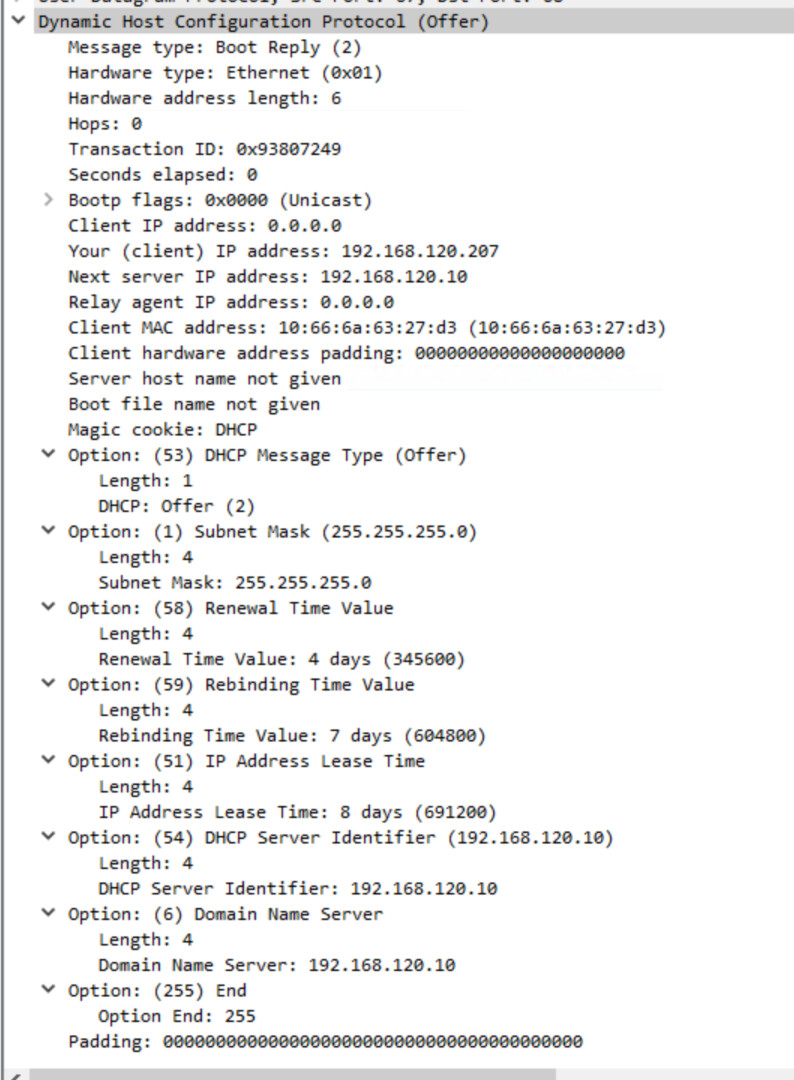
It seems that the pattern I’m seeing is containers can get leases from my router fine (OpenWRT, so dnsmasq) but it fails from the DHCP server running on Windows Server.

I can see in Wireshark that an address is negotiated on container start with a full DISCOVER/Offer/Request/ACK flow taking place, and Windows’ DHCP server records a lease, but it just never gets applied to the container (unless it’s the first interface?)…

Can you get the content of the DHCP response?
I wonder if you’re somehow getting something unusual in there like a bunch of individual routes or something like that?

Something else you could do is:

incus launch images:debian/13 debug -c security.privileged=true
incus config device add logs disk source=/var/log/incus/ path=/mnt/logs
incus exec debug bash
  cd /mnt/logs
  cd NAME-OF-INSTANCE
  ls -lh

With a bit of luck there will be a file from our DHCP client in there that you can look at.
We should expand the list of log files we make available over the API so that this doesn’t need this kind of work around :slight_smile:

Ah! I was wondering if it was possible to get to some of these logs before, I tried with the files API and couldn’t find them. In forknet-dhcp.log:

time="2025-12-23T15:46:01Z" level=info msg="running dhcp on interface"
time="2025-12-23T15:46:01Z" level=error msg="Giving up on DHCPv4, lease didn't contain required fields"
time="2025-12-23T15:46:01Z" level=error msg="DHCP client failed" error="Giving up on DHCPv4, lease didn't contain required fields"
time="2025-12-23T15:46:38Z" level=error msg="Giving up on DHCPv6, error during DHCPv6 Solicit" error="no matching response packet received"
time="2025-12-23T15:46:38Z" level=error msg="DHCP client failed" error="no matching response packet received"

Makes sense now - I never bothered to configure the server with any routes at all because there’s nothing further for anything to route to:

What do you know, if I add an option 3 router, it starts working! So this might all be my fault for configuring the DHCP server out of spec…

(for posterity, the second line you sent should be incus config device add debug logs disk source=/var/log/incus/ path=/mnt/logs :wink:)

yay, mystery solved!

1 Like

Just to finish off this thread, and for my own future reference as much as anything, :grin: I have also ended up defining the VLANs in the host network config and using macvlans on the instances. I’m not sure whether it’s intentional, but when trying to add more than one of the physical VLAN NICs to a VM, it will fail to start - it looks like Incus tries to set up two identical TAPs with the same ID.

Ah, definitely not intentional. Can you file a bug about that?

Ah ok. Sure, will do.

See Adding two `physical` NICs to a VM causes it to fail to start · Issue #2787 · lxc/incus · GitHub