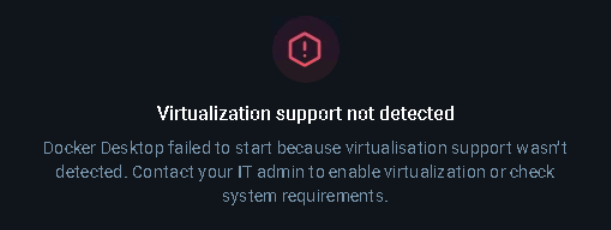
Just setup a Windows 10 Pro VM for a friend and he wants to run docker desktop on the vm. Im a bit confused because its not a container and it should be able to run the docker environment in it.
Now i havent played with windows vm’s in incus much , but everything was setup correctly according to the simos blog post that shows how to create an incus windows vm using distro builder. The windows guest tools drivers from redhat were also installed… and yet i get the following errors when he runs docker desktop.. did i miss something ?
Obviously Docker should not be able to run natively on Windows because Docker requires the Linux kernel. Under the hood, Docker on Windows will launch a Linux VM. Therefore, you get a situation of nested virtualization (outer VM: Incus with Windows instance, inner VM: Docker on Windows).
The same goes with WSL2. WSL2 is implemented through a Linux VM running in Windows.
I run nested virtualization in other containers… are you referring to enabling nested virtualization in the server itself?
I don’t remember where i saw that some time ago, but i kinda engender seeing it. Do you know where i could double check? I mean they are xeon and epyc cpu’s so im 100% sure they are virtualization capable
Sorry, I’ve been quite busy lately. I’m not sure what you mean by nested virtualization in containers. To support running virtual machines from within virtual machines, your server needs to have nested virtualization enabled, yes.
As written in @simos’ link, you can check that with cat /sys/module/kvm_intel/parameters/nested (or kvm_amd).
Docker Desktop then runs its own Linux VM (C) inside the Windows VM (B)
It would then start Linux Docker containers running inside the inner VM (C)
Therefore, you need to be able to run VMs inside VMs - nested virtualization.
Your physical hardware supports virtualization extensions (VT-x or AMD-V), otherwise it would be unable to run kvm. But you have to make these extensions available inside the outer VM too, for it to be able to create an inner VM. Links have been posted already that show you how to do that.
Nested virtualization is pretty slow, but it generally works. It would be more efficient if you gave the user their own Linux VM(*) alongside the Windows one. But then Docker Desktop would need to be configured to use a remote docker host, instead of the integrated VM.
(*) Or if you trust them, it could even be an unprivileged Linux container with container nesting enabled.
Running kvm inside a container is not “nested virtualization”. Processes running in containers are just processes running on the host, with some additional constraints. Therefore, kvm running in a container is just kvm on the host.
Yes, you need to enable nested virtualization on the server itself. It’s a parameter of the kvm kernel module.
So then being able to run docker in my containers isn’t actually nested virtualization? … i vaguely remember seeing something at some point about enabling virtualization somewhere online… do you know what modules need to be loaded in order to allow this to happen?
Correct - no virtualization at all (i.e. no virtual machines are being started).
You do need to enable container nesting, but that’s about cgroups, not VMs. You should be able to run docker inside an incus container with:
incus config set foo security.nesting=true \
  security.syscalls.intercept.mknod=true \
  security.syscalls.intercept.setxattr=true
You can demonstrate easily that there’s no virtualization. Run a process like sleep 1234 inside your docker container inside an incus container, and ps on the host will show this process is running directly on the host.
The kvm_intel or kvm_amd modules are required for virtualization. These are usually loaded automatically; the fact that you can run your Windows VM confirms that it has.
But for them to support nested virtualization you may need to set a parameter on this module. The details have already been posted earlier in this thread.
On the machine I have beside me (Ubuntu 22.04) it’s already enabled:
root@nuc3:~# cat /sys/module/kvm_intel/parameters/nested
Y
For your AMD Epyc, try cat /sys/module/kvm_amd/parameters/nested (I don’t have one to test with)
@candlerb@bensmrs so ive run the linux vm and running kvm-ok works fine from cpu-checker. I am still hitting this issue with windows VM’s . Any idea what else it could be? I even tried windows 11 with the same issue. Has anyone been able to run docker or virtualbox inside a windows VM ?
A Windows-specific forum may be the best place to ask what specifically Windows looks for from its environment to run VMs. It must be something more than what Linux requires.
I did a query on perplexity.ai. The output suggests that inside the Windows VM you run systeminfo in an elevated Command Prompt, and check everything says “Yes” under “Hyper‑V Requirements”. This includes:
VM Monitor Mode Extensions
Virtualization Enabled In Firmware
Second Level Address Translation
Data Execution Prevention Available
Apart from VT-x/AMD-V, the others are:
64‑bit processor with Second Level Address Translation (SLAT)
Intel: VT‑x + EPT (Extended Page Tables)
AMD: AMD‑V + RVI (Rapid Virtualization Indexing)
This is not just “VT‑x/AMD‑V”; the CPU must also support SLAT.
VM Monitor Mode Extension (sometimes called “VMX” or “VT‑c” on Intel; AMD has an equivalent)
This is listed explicitly in Hyper‑V requirements alongside VT‑x/AMD‑V.
Hardware‑enforced Data Execution Prevention (DEP)
Intel: XD (Execute Disable) bit
AMD: NX (No‑eXecute) bit
This must be supported and enabled in BIOS/UEFI.
If you find that any says “No” then we can work on what incantation you need to give you incus to enable it.