Incus-compose 1.3 has been released

Twelve days after 1.2. backup and port-forward are new ground; the rest is
usability - the commands that were still missing, and the ones that did not do
what they said.

What 1.3 brings

backup, by @ishaan-jindal. It copies a project’s named volumes into a
separate <project>-backup project with per-run restore points, where
down --volumes and down --project cannot reach them. create, list,
verify, restore and delete --keep-last N; the pool comes from
x-incus-compose.backup.pool.

port-forward port-forward SERVICE TARGET_PORT [LISTEN_PORT] runs a local
TCP listener and forwards into the instance, reaching a port that was never
published. It needs Incus 7.3 or 7.0.2 LTS.

Usability

run. incus-compose run SERVICE [COMMAND] starts a one-off instance and
exits with the command’s own status. Nothing else treats it as a service: up
never reconciles it, ps lists it under its service, down removes it without
--rm, and ic-healthd never restarts one. pull and up prefetch the one
image a one-off needs, so an air-gapped site can run later; --init points
that at a mirror. A cluster mixing CPU architectures is not yet supported.

Seven more docker compose commands: pause, unpause, kill, cp,
top, events and port. A pause also marks the instance stopped for
ic-healthd, which would otherwise restart it out of the pause. kill -s takes
only SIGKILL, in docker’s three spellings: the Incus state API carries no
signal. top reports per instance where docker reports per process. Plus
healthd status, which prints the shared daemon’s health status key.

command: replaces the image’s CMD, the way the compose spec says,
instead of appending to the image’s entrypoint. Telling an image’s entrypoint
and command apart meant reading them from the registry, so incus-compose now
carries an OCI registry client of its own - the same one that reads the VOLUME
declarations below. A compose file carrying a workaround for the old behaviour
can go back to its plain form.

Volumes are filled from the image. Every path an image declares as a
VOLUME gets a storage volume of the service’s own, instead of the tmpfs that
lost its contents on restart, and a named volume starts from what the image
ships at its target: conf:/etc/nginx/conf.d is no longer empty on the first
run. x-incus-compose.auto-volumes: false and volume: {nocopy: true} turn
each off.

Profiles, by @alien43. x-incus-compose.profiles sets a service’s full
Incus profile list on create, with the same semantics as
incus launch --profile: a list that omits default leaves the instance
without it. Nothing in a compose file could express profile membership before.

Mixed-architecture clusters. The image cache is keyed by architecture, so a
cluster mixing architectures no longer serves one member’s image to all of them,
and platform: is honoured for pulled images in the spelling docker uses
(linux/arm/v7). ic-healthd is published for ppc64le, s390x and riscv64
besides amd64 and arm64.

Three changes to know about

stop waits now. stop, and restart with it, shuts a service down
gracefully and kills it once --timeout is up. Both killed outright before, so
--timeout did nothing at all. kill is the old behaviour under its own name.

--pull always only re-fetches an image the registry moved, rather than
dropping every registry image and downloading it again per run. up recreates
the services whose image it replaced, and a registry the client cannot reach
leaves the stored image alone instead of failing.

Cached images from before 1.3 carry no architecture. They are re-fetched
once and then left in the cache until you delete them by hand.

Also in this release: user: may name its user and group
(user: "netbox:root"), resolved against the image’s own /etc/passwd and
/etc/group; an external network can name <project>:<network> to attach to a
managed network owned by another compose project; a config or secret whose
target sits inside a volume is written into that volume instead of under the
mount that hid it; and up no longer hangs until the start timeout on a service
that was already reported healthy. The CHANGELOG has the rest.

Updating

incus-compose self-update
incus-compose up --detach   # once per compose project

The shared ic-healthd replaces itself with the newer one on the first up.
Containers keep running: no --recreate, no downtime. Skip a project and
nothing breaks, it stays as it is.

Not self-update from 1.0.0 or 1.1.0, which always downloads the macOS
build whatever your platform is and so cannot replace itself. Reinstall once
with the one-liner below and self-update works from there on.

First install

curl -sSfL https://raw.githubusercontent.com/lxc/incus-compose/main/install.sh | sh -s -- -b ~/.local/bin

Arch users: incus-compose-bin and incus-compose-git, maintained by @neitsab and @jochumdev.

Debian users: zabbly/incus ships incus-compose via its incus-extra package.

Mac users: brew install tallica/tap/incus-compose see: lazyincus – a lazydocker-style terminal UI for Incus .

Docs: CLI reference · docs.incus-compose.org
Full changelog: CHANGELOG.md

What’s next: OVN network support (#15) and network ACLs (#98), both still in design, and the DNS work.

Thanks to

  • @ishaan-jindal for backup
  • @alien43 for x-incus-compose.profiles, the
    --pull always recreate, a gateway-check fix, and for proposing several more
    of the changes in this release
  • @stgraber for the consulting and the upstream fixes

And to everyone testing, reporting bugs, spreading the word, and just using
incus-compose.

Real-world compose files remain the most useful bug reports.

René

Repo: GitHub - lxc/incus-compose: A drop-in replacement for docker compose that runs your compose.yaml on Incus · GitHub
Releases: Releases · lxc/incus-compose · GitHub
Changelog: incus-compose/CHANGELOG.md at main · lxc/incus-compose · GitHub
Previous threads: v1.0 · v1.1 · v1.2
cp, top and events are missing incus proxy commands, they will follow in a patch release.

Released v1.3.1, contains cp, top and events. All proxy commands to incus.

For anyone needing an pull-trough cache as I do with my CI setup, I updated: OCI Registry Cache · incus-compose docs

It’s now using: GitHub - aceeric/ociregistry: Golang pull-only, pull-through, caching OCI distribution server · GitHub

Released v1.3.2

  • it now uses HEALTHCHECK from the image, but only for fresh downloaded images.
  • healthd got a bugfix it’s now running checks with the same user, group and CWD as the actual command is.

It’s always save to remove the “incus-compose-cache” project:

incus project rm incus-compose-cache

Development of the next bigger release (v1.4.0/v2.0.0) will happen in a “develop” branch while “main” (v1.3.x) will get patches.

Released v1.3.3

This contains 3 bugfixes by alien43 and one from @sandroden, thanks both!

Please read the Changelog for details.


I’m thinking since a while about an update check on up, just as info log line and only if incus-compose self-update is available, the problem with it is that each up would connect to github, the good is that you don’t need to follow this forum for updates.

What do you think?

In general, I don’t like software that auto-updates, especially if I can’t turn it off. Updates are supposed to make things better, but often break things. If I can correlate breakage with an update that I just did myself, then I have a clear cause-and-effect relationship. If things just break one day for no apparent reason, then it’s much harder to diagnose.

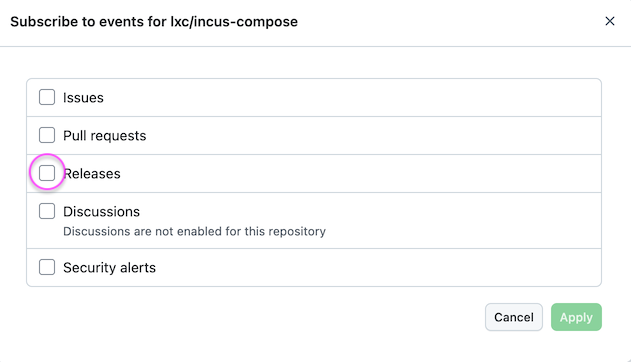
Anyone who wants to keep up with incus-compose can just subscribe to releases on github: click on Watch > Custom >

Having said that, if you really want an auto-update mechanism, then:

  1. Make it optional
  2. Check no more than once every 24 hours (otherwise it slows down normal workload and puts unnecessary load on github)

Released v1.3.4

5 bugfixes (1 Temporary) + one feature.

Bugfixes

  • Healthd now uses /secrets instead /run/secrets for 7.0.1 LTS users (temporary)
  • build now cleans up it’s tar in /tmp after build
  • Single service up --recreate <service> now brings services back up.
  • Healthd down now completes all stages even when one fails.
  • working_dir does what it should (by sandroden)

Feature

  • networks.{name}.ipam.config from the compose spec is now a thing.

Thanks

alien43, haudini69, sandroden and megascope for reports/fixes.


OVN support in v1.4.0 will require incus 7.5 or 7.0.2 LTS and will be released after these, until then v1.3 will be maintained with bugfixes.

It will contain ic-dns a DNS server that responds different per querier (EDNS0 / client_ip) as well as OVN support that depended on ic-dnsand depends on recent 7.5 bugfixes.

DNS with ic-dns will be like with docker, more here: incus-compose/docs/root/dns.md at develop · lxc/incus-compose · GitHub

Sorry I never responded to that, having users “watch” the project sounds far better than and update check, thank you!

Btw. I’ll be at the LinuxDay Vorarlberg (LUGV) and hold a presentation about Incus and incus-compose, the presentation will be in German and will be recorded.

Apologies for piggybacking on the release thread. I can create a new one if desired, but incus-compose threads seem to be where people pop in with issues instead, at least I think?

Has anyone tried a recent incus-compose with clustered IncusOS? I just installed the latest incus-compose (1.3.4) (it’s been a long while since I tried it) and I had to learn myself about x-incus-compose: seed to work with the remote cluster but then I got this error later in the setup/first-compose (luckily had trace on) when it tried to create the network.

It almost looks like it isn’t creating the network in a cluster-aware way, perhaps, given the missing --target argument?

$ incus-compose up --trace
17:12 DBG Connected url=https://10.0.0.23:8443
17:12 DBG Got project name=incus-compose-cache incus_name=incus-compose-cache
17:12 DBG Got project name=test incus_name=test
...
17:12 DBG Running action=ensure kind=network name=default incus_name=test-default
17:12 WRN Result with error action=ensure kind=network name=default incus_name=test-default created=false error="creating network \"default\": Network not pending on any node (use --target <node> first)"
17:12 ERR Ensuring resources project=test incus_project=test error="unknown: network(test-default): creating network \"default\": Network not pending on any node (use --target <node> first)"
ensure   image              docker.io/nginx:alpine (26.3MB)        [done]
ensure   image              docker.io/node:20-alpine (48.4MB)      [done]
ensure   network            default                                [error: creating network "default": Network not pending on any node (use --target <node> first)]

I can see that the projects created have NETWORKS=NO which, if I understand correctly, means they inherit to default network from the default project? So I’m not sure if incus-compose needs to be creating a network?

$ incus project list
       NAME        │IMAGES│PROFILES│STORAGE VOLUMES│STORAGE BUCKETS│NETWORKS│NETWORK ZONES│           DESCRIPTION            │USED BY
default (current)  │YES   │YES     │YES            │YES            │YES     │YES          │Default Incus project             │12     
incus-compose      │YES   │YES     │YES            │YES            │NO      │NO           │incus-compose: incus-compose      │2      
incus-compose-cache│YES   │YES     │YES            │YES            │NO      │NO           │incus-compose: incus-compose-cache│5      
test               │YES   │YES     │YES            │YES            │NO      │NO           │incus-compose: test               │3      
$ incus network list --columns entm46dus --all-projects
PROJECT│  NAME  │ TYPE │MANAGED│     IPV4      │          IPV6           │       DESCRIPTION        │USED BY│ STATE 
default│incusbr0│bridge│YES    │10.229.160.1/24│fd42:6e48:43c5:d04b::1/64│Local network bridge (NAT)│5      │CREATED

Hey @virtuous-sloth,

Free to open a Issue on Github, a forum post with “incus-compose” as tag or here.

First thanks for trying and reporting! I have not yet tested incus-compose with clustering, we have a user on Github that uses it with OVN though.

As a workaround you could try to setup the network(s) first then reference them as external:

services:
   web:
     image: x

networks:
   default:
     name: mine0
     external: true

With feature.networks: true on a project you get “per project” networks. That is OVN only and OVN is a 1.4 + incus 7.5 thing.


About seeding, seeding is a one-time thing for now. Might not be what you require.

Thank you for that workaround, René, that did get me past this. I look forward to exploring incus-compose.

I opened this Github issue and transcribed the information and back-linked.

On the seed issue, it was necessary as I ran into a bind-mount error that seemed to indicate it was trying to do something that only makes sense for a local incus server? I’m still wrapping my head around all the moving parts but I found some post or doc that mentioned the need to seed for remote servers.

Thanks again for your help and also for the hard work creating such a useful and well-thought-out (IMHO) addition to the linuxcontainers family.

Regards…
Bruce

That means a lot to me, thx.

A bind mount means you mount something from the host into the container, the host in this case is one of your cluster hosts. Thats why we have to “seed” a volume, I’m sure we can seed on each “up” as well as provide an option to overwrite the behaviour as in mount from the server.

Yeah, I think I was gathering the gist of it, if not the exact details, based on that.

This is what I meant by wrapping my head around it. I personally need to have a solid understanding the moving parts and their lifecycles/events, otherwise I get confused. I’m not a developer but do have decades of UNIX/storage experience but I’m painfully aware of the limits of what I know precisely and hate making assumptions given all the possibilities of how a technology might solve various operational concerns.

For example, while I know that containers and various aspects of them, like IP addresses and location are to be considered ephemeral, I would want there must be some way of preserving/persisting application data and perhaps configuration, hopefully including a bookend to the initialization through seeding with some sort of download of the volume contents before volume destruction when decommissioning a composition.

With local containers this is not an issue (with local relative directories configured as volumes) but with remote ones, operationally you’d want a mirror analog to the seeding process when decommissioning.

(Edit: reading your terminology… Terminology · incus-compose docs :+1:)

Do you mean incus-compose down --project or incus-compose down --volumes ?

I do think that would be where it would go. But I do realize that such a feature is not generally provided in any docker environment (it just is not needed for local). I have to admit that my expectations as a lifelong system admin/analyst often diverges from what developers deem is necessary. :wink:

My presentations from yesterday

Those 2 I did - incus before as I asked “who knows incus” first.

incus.pdf (90.2 KB)
features.pdf (237.9 KB)

This one is about development internals I didn’t present it as there was no more time.

development.pdf (201.2 KB)